
HuTools DKS01
HuTools DKS01 Keyless Entry Door Lock User Manual
Model: DKS01
Product Overview
The HuTools DKS01 Electronic Keypad Deadbolt Lock offers a modern and secure keyless entry solution for your home. This deadbolt features a backlit keypad, auto-locking capabilities, and supports up to 20 customizable user codes, including one-time codes for visitors. Designed for ease of use and durability, it provides enhanced security and convenience for various door types.

Image: Front view of the HuTools DKS01 Keyless Entry Door Lock in Matte Black.
Key Features:
- Keyless entry with illuminated keypad.
- Supports up to 20 user codes (4-10 digits) and one-time codes.
- Auto-lock function with customizable delay (10-99 seconds).
- One-touch locking for immediate security.
- Backlit keypad for visibility in low light.
- Low battery indicator and two backup mechanical keys.
- Virtual password support to deter prying eyes.
- Away mode for enhanced security.
- Wrong entry limits to disable keypad after multiple incorrect attempts.
- Quiet lock/unlock mode.
- Durable construction, weather-resistant (-4°F to 129°F).
- Compatible with standard American doors (right or left handed).
Setup and Installation
The HuTools DKS01 lock is designed for simple DIY installation, requiring only a screwdriver. No costly locksmith is needed. Ensure your door meets the specified dimensions for proper fit.
Package Contents:
- 1 HuTools Electronic Keypad & Interior Assembly
- 2 Backup Keys
- 1 Latch & Strike Plate
- Mounting Hardware
- Installation Guide (detailed manual included in package)
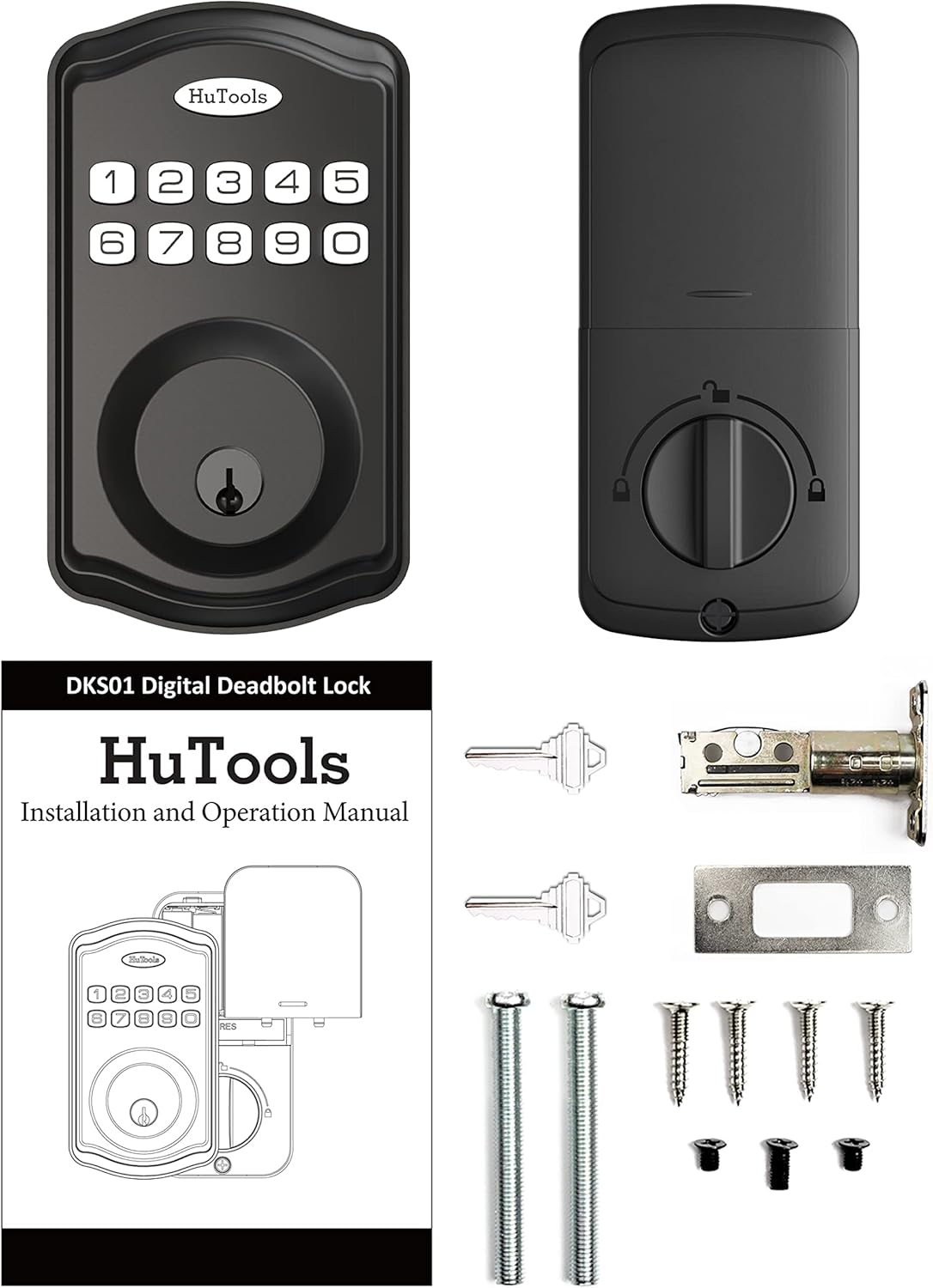
Image: All components included in the HuTools DKS01 package, including the keypad, interior assembly, keys, latch, strike plate, and mounting hardware.
Door Compatibility:
- Door Thickness: 1-3/8 inches to 2 inches (35mm to 50mm)
- Adjustable Backset: 2-3/8 inches (60mm) or 2-3/4 inches (70mm)
- Door Hole: 2-1/8 inches (54mm)
- Works with both right and left-handed doors.

Image: Diagram illustrating standard door application dimensions and lock measurements for the HuTools DKS01.

Image: The HuTools DKS01 lock installed on a wooden door, demonstrating its full reversibility for both right and left-handed door configurations.
The lock is battery-powered by 4 AA batteries (not included) and requires no hard wiring, app, or hub for operation.
Operating Instructions
Creating and Managing User Codes:
The lock allows for up to 20 unique user codes, each 4 to 10 digits long. A one-time user code can also be generated for temporary access, ideal for visitors or service personnel.

Image: The HuTools DKS01 lock installed on a door, highlighting the ability to create unique access codes for multiple users.
Locking and Unlocking:
- To Unlock: Enter a valid user code on the keypad.
- To Lock (One-Touch): Press and hold any single button on the keypad for 2 seconds.
- Auto-Lock: Enable the auto-lock feature to automatically lock the door after a set delay (customizable from 10 to 99 seconds).

Image: The HuTools DKS01 lock on a door, with an arrow indicating the auto-lock function for enhanced safety.
Advanced Security Features:
- Virtual Password: Enter random digits before or after your actual access code to prevent others from guessing your code by observing your finger movements.
- Away Mode: This battery-saving mode disables all access codes and functions until the master code is entered on the keypad, ideal for extended absences.
- Silent Mode: Mute audio indicators during locking and unlocking to prevent disturbances, especially useful at night.

Image: Icons representing key security features of the HuTools DKS01 lock, including one-touch locking, backup keys, one-time code, silent mode, secure mode, and easy installation.
Maintenance
Battery Management:
- The lock operates on 4 AA batteries (not included).
- Expected battery life is over 300 days with regular use.
- A flashing red light indicates low battery, prompting replacement.
- Always replace all four batteries simultaneously with new alkaline batteries.
Backup Keys:
Two backup mechanical keys are included to ensure access to your home even if the batteries are completely depleted or in case of electronic malfunction. Store these keys in a secure location outside your home.
Cleaning:
Clean the lock's exterior with a soft, damp cloth. Avoid abrasive cleaners or solvents that could damage the finish or electronic components.
Troubleshooting
Keypad Disabled:
The keypad will be disabled after 10 incorrect access attempts to ensure security. Wait for the lockout period to expire or use a mechanical key to regain access. Refer to the detailed manual for specific reset procedures if needed.
Lock Not Responding:
- Check battery level. Replace all 4 AA batteries if low.
- Ensure the interior assembly is properly seated and connected.
- Use the mechanical backup key to operate the lock.
Difficulty with Code Entry:
- Ensure you are pressing the keys firmly and accurately.
- Verify the user code is correct and has not been changed.
- If using virtual password, ensure the correct sequence of actual code within the random digits.
Specifications
| Feature | Detail |
|---|---|
| Brand | HuTools |
| Model Name | DKS01 BLK |
| Part Number | DKS01 |
| Lock Type | Keypad Deadbolt |
| Material | Aluminum |
| Color | Matte Black |
| Dimensions (L x W x H) | 3.03 x 1.57 x 1.57 inches |
| Item Weight | 1.41 pounds |
| Power Source | 4 AA Alkaline Batteries (not included) |
| User Codes | Up to 20 (4-10 digits) |
| Operating Temperature | -4°F to 129°F (-20°C to 54°C) |
| Door Thickness Compatibility | 1-3/8 inches to 2 inches |
| Backset Compatibility | Adjustable 2-3/8 inches or 2-3/4 inches |
| Door Hole Diameter | 2-1/8 inches |
Warranty and Support
Warranty Information:
HuTools locks are backed by a limited lifetime mechanical and finish warranty. This warranty covers defects in materials and workmanship under normal use.
Technical Support:
HuTools provides free lifetime technical support for this product. For assistance with installation, programming, or troubleshooting, please refer to the detailed manual included with your product or contact HuTools customer service.
You can also visit the official HuTools store for more information and resources: HuTools Store on Amazon.
For a comprehensive guide, you may also refer to the official User Manual (PDF) available online: User Manual PDF.
Related documentsDKS01


Ask a question about this manual
Ask about setup, troubleshooting, compatibility, parts, safety, or missing instructions. Manuals+ will review the question and use this page’s manual context to help answer it.