1. Introduction
The Bestqool BQ40 is a portable red light therapy device designed for home use. It incorporates dual-chip LEDs emitting both 660nm (red light) and 850nm (near-infrared light) wavelengths. This device is intended to support muscle recovery, skin rejuvenation, and overall wellness through targeted light therapy.
The BQ40 is lightweight and features a foldable stand and touch controls, making it convenient for various applications and travel. It operates with a power consumption of 50W and delivers an irradiance of up to 70 mW/cm² at 3 inches, ensuring effective sessions.

Figure 1: Bestqool BQ40 Red Light Therapy Device
2. Safety Information
Please read all safety instructions before using the device to ensure proper and safe operation.
- Eye Protection: Always wear the provided protective goggles when using the device, especially when treating the face or when the device is facing your eyes. Direct exposure to the bright LEDs can be harmful to vision.
- EMF Levels: The device is designed to have 0 EMF at 6 inches, making it safe for skin-contact use. Maintain a distance of at least 6 inches during use.
- Heat: The device produces low heat during operation. Ensure adequate ventilation and avoid covering the device to prevent overheating.
- Medical Conditions: Consult a healthcare professional before use if you have any underlying medical conditions, are pregnant, or are taking photosensitizing medications.
- Skin Sensitivity: Discontinue use if you experience any discomfort, redness, or irritation.
- Children and Pets: Keep the device out of reach of children and pets.
- Water Exposure: Do not use the device near water or in wet environments.
3. Product Overview and Components
3.1 Package Contents
Upon unpacking, verify that all items are present:
- Bestqool BQ40 Red Light Therapy Device
- User Manual
- Protective Goggles
- Power Cord

Figure 2: Package Contents
3.2 Device Features
- Dual-Chip LEDs: Combines 660nm (red light) and 850nm (near-infrared light) for comprehensive therapy.
- Touch Control Panel: Intuitive interface for power, mode selection (Red, NIR, or both), and timer settings.
- Digital Timer: Allows setting session durations with automatic shut-off.
- Foldable Stand: Provides adjustable angles for versatile positioning during use.
- Portable Design: Compact and lightweight for easy transport and storage.

Figure 3: Device Features and Dimensions
4. Setup
- Unpack: Carefully remove the Bestqool BQ40 device and all accessories from the packaging.
- Position: Place the device on a stable, flat surface. Extend the foldable stand to achieve the desired angle for your therapy session.
- Connect Power: Insert the power cord into the device's power input port and then plug the adapter into a standard electrical outlet.
- Prepare for Use: Ensure you have the protective goggles readily available before powering on the device.
5. Operating Instructions
5.1 Powering On/Off
- Press the Power button on the touch control panel to turn the device on. The default setting typically activates both red and near-infrared lights.
- Press the Power button again to turn the device off.
5.2 Selecting Light Modes
The BQ40 offers three light modes:
- Red Light (660nm): Press the RED button to activate only the red light. This wavelength is generally used for surface skin benefits.
- Near-Infrared Light (850nm): Press the NIR button to activate only the near-infrared light. This wavelength penetrates deeper into tissues for muscle and joint support.
- Both Red and NIR: Press both the RED and NIR buttons to activate both wavelengths simultaneously for combined benefits.
5.3 Setting the Timer
Use the timer function to set your desired session duration. The device will automatically shut off once the timer expires.
- Press the Timer button (often labeled with a clock icon or 'L') to cycle through available time settings.
- Typical session durations range from 10 to 30 minutes, depending on the application.
5.4 Recommended Usage
For optimal results, follow these general guidelines:
- Frequency: Use 5 or more times per week.
- Duration: 20-30 minutes per session.
- Distance: Position the device approximately 6 inches (15 cm) away from the skin.
- Skin Exposure: For maximum light absorption, ensure the target area is bare skin. Clothing can significantly reduce light penetration.

Figure 4: Importance of Bare Skin for Optimal Light Absorption
5.5 Application Areas
The BQ40 can be used on various parts of the body:
- Face: For skin health and rejuvenation.
- Shoulder: To relieve muscle tension.
- Arm: To soothe daily fatigue.
- Leg: To alleviate joint pain and stiffness.

Figure 5: Recommended Application Areas

Figure 6: Suggested Treatment Durations for Specific Areas
6. Maintenance
- Cleaning: Ensure the device is unplugged before cleaning. Use a soft, dry cloth to wipe the surface of the device. Do not use abrasive cleaners or immerse the device in water.
- Storage: Store the device in a cool, dry place away from direct sunlight and moisture. When not in use, the foldable stand allows for compact storage.
- Inspection: Periodically inspect the power cord for any signs of damage. If damage is found, discontinue use and contact customer support.
7. Troubleshooting
- Device Not Turning On:
- Ensure the power cord is securely plugged into both the device and a working electrical outlet.
- Verify that the power button on the touch control panel has been pressed.
- Lights Not Activating:
- After powering on, ensure you press the specific RED or NIR buttons (or both) to activate the desired light mode. The device does not automatically turn on all lights upon power-up.
- Device Overheating:
- Ensure the fan on the backside of the unit is not obstructed.
- Do not cover the device during operation.
- Inconsistent Results:
- Confirm you are using the device on bare skin and maintaining the recommended distance of 6 inches.
- Ensure consistent use (5+ times a week, 20-30 minutes per session) for at least 4 weeks to observe noticeable improvements.
8. Specifications
| Feature | Specification |
|---|---|
| Model Number | BQ40 |
| Wavelengths | 660nm (Red Light), 850nm (Near-Infrared Light) |
| Power Consumption | 50W |
| Irradiance | Up to 70 mW/cm² at 3 inches |
| EMF Output | 0 EMF at 6 inches |
| Product Dimensions | 5.6 x 1.3 x 11.3 inches |
| Weight | 2.4 Pounds (1.1 kg) |
| Manufacturer | Bestqool |
9. Warranty and Support
9.1 Warranty Information
The Bestqool BQ40 device is backed by a 30-day trial period. For information regarding extended warranty options, please visit the official Bestqool website.
9.2 Customer Support
For any questions, technical assistance, or support, please contact Bestqool customer service:
- WhatsApp (Text/Pics): +1 3195123212
- Refer to the official Bestqool website for additional contact methods and resources.
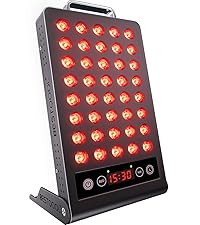
Figure 7: Bestqool Customer Support via WhatsApp