
Introduction
Thank you for choosing the WOSTOKE 9-inch IPS Touchscreen Car Stereo. This manual provides detailed instructions for the installation, operation, and maintenance of your new car multimedia system. Please read this manual thoroughly before installation and use to ensure proper functionality and to maximize your user experience. Keep this manual for future reference.
Product Overview
The WOSTOKE Car Stereo is an advanced in-dash navigation and multimedia system designed to enhance your driving experience. It features a 9-inch IPS touchscreen display, an Octa-Core processor, and supports both Apple CarPlay and Android Auto for seamless smartphone integration. Key functionalities include GPS navigation, Bluetooth connectivity, FM/AM radio, Wi-Fi, and steering wheel control compatibility.
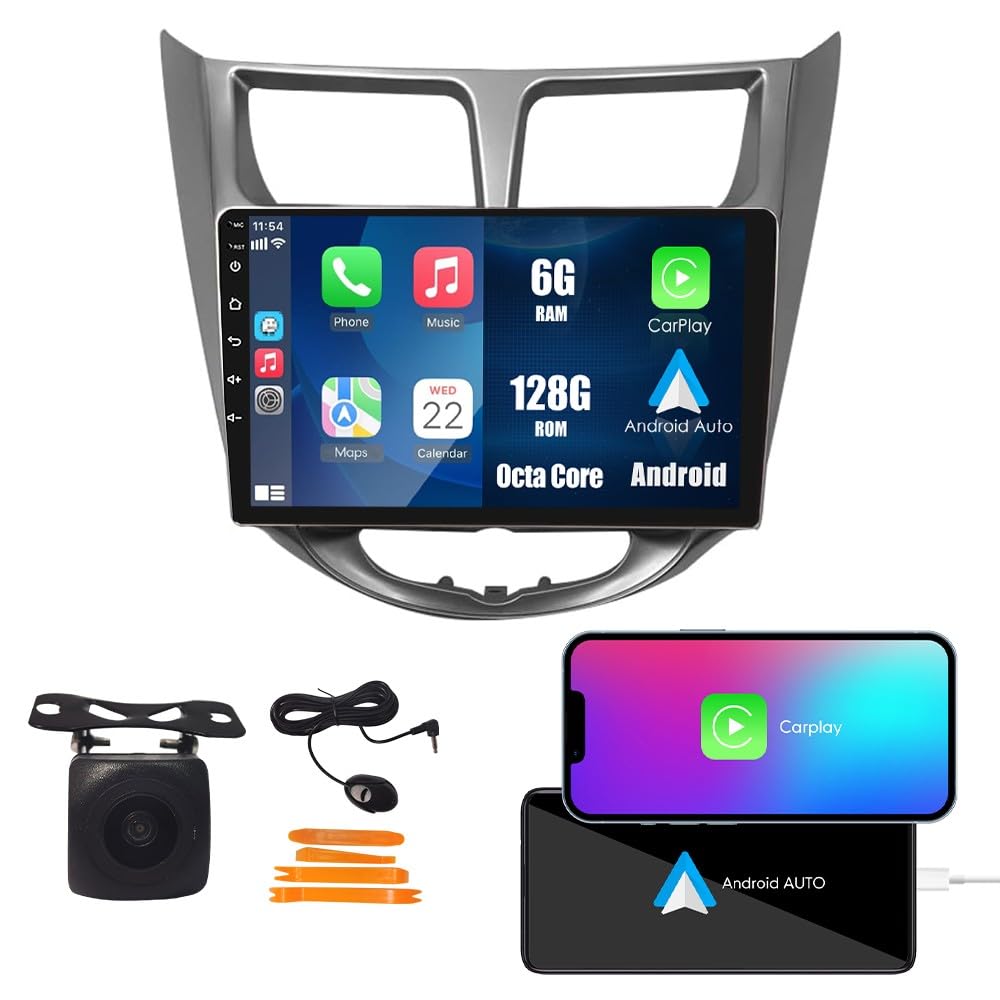
Image: Front view of the WOSTOKE 9-inch IPS Touchscreen Car Stereo.
What's in the Box
Carefully unpack the box and ensure all items are present. If any items are missing or damaged, please contact customer support.
- 1x Car Android Head Unit with Mask
- 1x GPS Antenna
- 1x Power Cable
- 2x USB Port Cables
- 1x RCA Expand Cable
- 1x RCA Connector for Reverse Camera
- 1x Install Kit (mounting brackets, screws)
- 1x External Microphone
- 1x AHD 720P Reverse Camera

Image: All components included in the product package.
Installation Guide
Professional installation is recommended. Ensure the vehicle's battery is disconnected before starting installation. Refer to your vehicle's service manual for specific dashboard removal instructions.
- Remove Factory Head Unit: Carefully remove the existing car stereo and trim panels from your vehicle's dashboard.
- Connect Wiring Harness: Connect the provided power cable and other necessary wiring harnesses to the vehicle's existing wiring. Ensure all connections are secure.
- Connect Peripherals: Connect the GPS antenna, USB cables, external microphone, and reverse camera (if applicable) to the corresponding ports on the new head unit. Route cables neatly to avoid interference.
- Mount Head Unit: Secure the new head unit into the dashboard opening using the provided install kit.
- Test Functionality: Before reassembling the dashboard, reconnect the vehicle's battery and power on the head unit to test all functions (radio, navigation, Bluetooth, camera, etc.).
- Reassemble Dashboard: Once all functions are verified, reassemble the dashboard trim panels.

Image: Comparison of the car dashboard before and after installing the WOSTOKE Car Stereo.
Operating Instructions
CarPlay & Android Auto
This unit supports both Apple CarPlay and Android Auto, allowing you to integrate your smartphone for navigation, music, calls, and more. Connect your compatible iPhone or Android device via USB to activate the respective interface.

Image: Display showing the CarPlay and Android Auto interfaces, demonstrating smartphone integration.
GPS Navigation
The system includes built-in GPS for navigation. You can use pre-installed maps or download additional navigation applications via Wi-Fi. The GPS functions in real-time without requiring a network connection once maps are downloaded.

Image: The car stereo display showing various GPS navigation applications.
Bluetooth Functionality
Pair your smartphone via Bluetooth for hands-free calling and wireless audio streaming. Access your phone's contacts and call history directly from the head unit.

Image: The Bluetooth interface on the car stereo, showing options for calls and music playback.
FM/AM Radio
Tune into your favorite FM and AM radio stations. The system supports RDS (Radio Data System) for displaying station information where available. You can save preferred stations for quick access.

Image: The FM/AM radio interface displaying frequency and RDS information.
Steering Wheel Control (SWC)
The unit supports steering wheel controls, allowing you to manage audio, calls, and other functions without taking your hands off the wheel. Configuration may be required in the system settings.

Image: Diagram illustrating how steering wheel controls interact with the car stereo functions.
Wi-Fi Connectivity
Connect the head unit to a Wi-Fi network to browse the internet, download applications, and access online services. This feature enables real-time traffic updates for navigation and streaming media.

Image: The car stereo screen displaying various applications accessible via Wi-Fi.
Car Reverse Camera
The system supports a car reverse camera input. When the vehicle is in reverse gear, the display automatically switches to the rear view, providing visual assistance for parking and maneuvering.

Image: The car stereo display showing the rear view from the reverse camera with parking guidelines.
Maintenance
To ensure the longevity and optimal performance of your WOSTOKE Car Stereo, follow these maintenance guidelines:
- Cleaning: Use a soft, dry cloth to clean the screen and exterior. For stubborn smudges, slightly dampen the cloth with water or a screen-safe cleaner. Avoid abrasive materials or harsh chemicals.
- Software Updates: Periodically check for software updates to ensure you have the latest features and performance improvements. Updates can usually be found on the manufacturer's website or through the device's settings.
- Temperature: Avoid exposing the unit to extreme temperatures, both hot and cold, for extended periods.
- Power: Ensure the vehicle's electrical system is stable. Avoid frequent power fluctuations.
Troubleshooting
If you encounter issues with your car stereo, refer to the following common problems and solutions. If the problem persists, contact customer support.
| Problem | Possible Cause | Solution |
|---|---|---|
| Unit does not power on | Incorrect wiring, blown fuse, vehicle battery issue | Check power connections, inspect vehicle fuses, ensure battery is charged. |
| No sound | Speaker wiring issues, volume too low, mute activated | Verify speaker connections, increase volume, check if mute is active. |
| GPS signal lost or inaccurate | GPS antenna obstruction, poor satellite reception | Ensure GPS antenna has a clear view of the sky, move to an open area. |
| CarPlay/Android Auto not connecting | Faulty USB cable, phone software issue, incorrect settings | Try a different USB cable, restart your phone, check unit settings for CarPlay/Android Auto. |
| Touchscreen unresponsive | System freeze, temporary software glitch | Perform a soft reset (refer to device settings or a small reset button if available). |
Specifications
Below are the technical specifications for the WOSTOKE Car Stereo Model WS-D1416:
- Brand: WOSTOKE
- Model Number: WS-D1416
- Screen Size: 9 Inches
- Display Type: IPS Touchscreen (Capacitive)
- Operating System: Android
- Processor: Octa Core
- Memory Storage Capacity: 128 GB
- Connectivity Technology: USB, Bluetooth, Wi-Fi
- Special Features: CarPlay, Android Auto, GPS Navigation, FM/AM Radio, Steering Wheel Control, Reverse Camera Support
- Compatible Vehicle Type: Car (Hyundai Verna Accent Solaris 2010-2016)
- Audio Output Mode: Stereo
- Mounting Type: Dashboard Mount
- Supported Satellite Navigation System: GPS

Image: Visual representation of the Octa-Core processor, highlighting its advanced capabilities.
Warranty and Support
Your WOSTOKE Car Stereo comes with a one-year warranty covering manufacturing defects. This warranty does not cover damage caused by improper installation, misuse, accidents, or unauthorized modifications.
For technical support, warranty claims, or any questions regarding your product, please contact the seller directly. Your inquiries are always welcome, and our support team is ready to assist you.
Please retain your proof of purchase for warranty purposes.