Introduction
This manual provides comprehensive instructions for installing and operating the BRIKSMAX LED Lighting Kit designed specifically for the Lego Technic Lamborghini Sián FKP 37 (Lego model 42115). This kit enhances your model with custom lighting effects, bringing it to life. Please note that the Lego model itself is not included with this lighting kit.
Package Contents
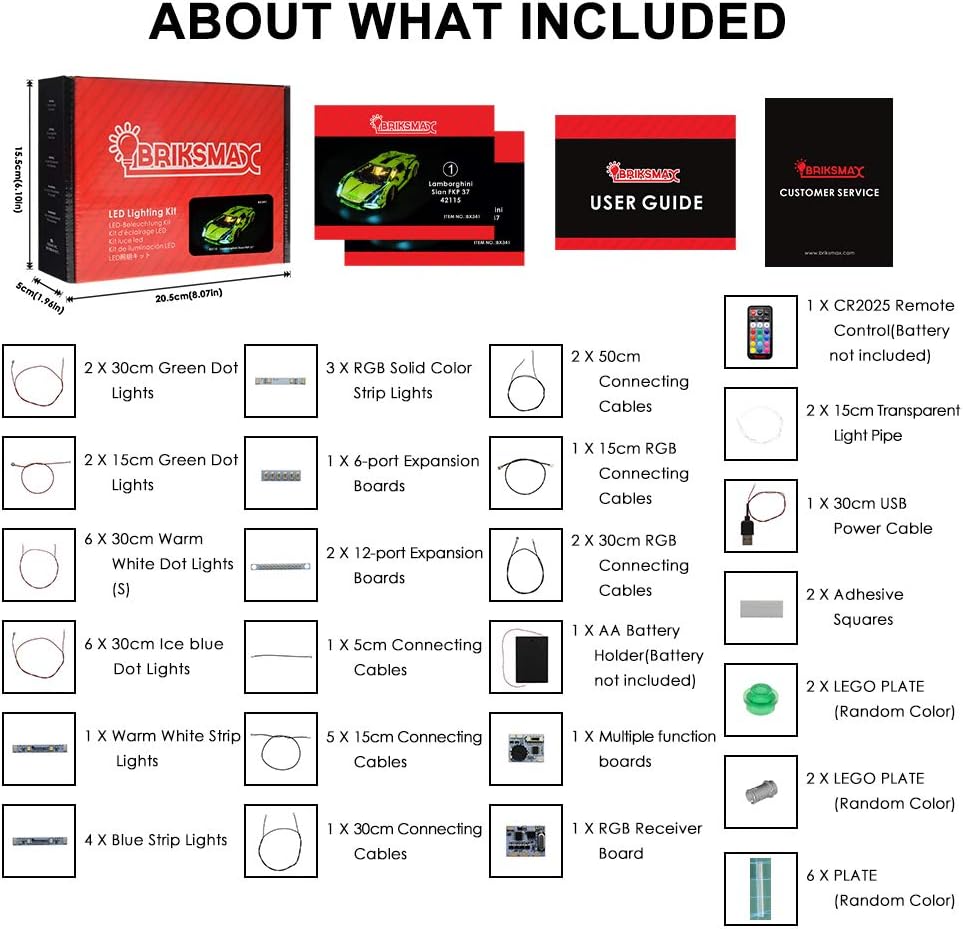
The BRIKSMAX LED Lighting Kit includes the following components:
- Various dot lights (green, warm white, ice blue, blue)
- RGB solid color strip lights
- Expansion boards (4-port and 12-port)
- Connecting cables of various lengths (5cm, 15cm, 30cm, 50cm)
- USB power cable
- CR2025 remote control (battery not included)
- Adhesive squares
- AA battery holder (batteries not included)
- Multiple function boards and RGB receiver board
- Assorted Lego plates (random colors)
- Detailed instruction manual
Setup and Installation
Installation of the lighting kit requires careful attention to detail. It involves integrating small LED components and wires into your existing Lego Technic Lamborghini Sián FKP 37 model. Please follow the step-by-step instructions provided in your kit's manual precisely.
- Preparation: Ensure your Lego model is clean and stable. Identify the sections where lights will be installed as indicated in the instruction manual.
- Disassembly: Carefully disassemble the necessary parts of your Lego model to access the internal structure for wire routing and light placement. Refer to the kit's manual for specific disassembly steps.
- Component Placement: Attach the dot lights and strip lights to the designated areas using the provided adhesive squares or by integrating them into the Lego bricks.
- Wiring: Connect the lights to the expansion boards using the connecting cables. Route the wires neatly to avoid interference with moving parts or visible clutter.
- Power Connection: Connect the expansion boards to the main function board and then to the battery holder or USB power cable.
- Reassembly: Carefully reassemble your Lego model, ensuring all wires are securely tucked away and not pinched.
- Testing: Before full reassembly, test the lights to ensure all connections are correct and functioning.
For visual guidance, consider searching for installation videos online that demonstrate the process for this specific model.


Operating Instructions
Once installed, your BRIKSMAX LED Lighting Kit can be operated using the provided remote control.
- Power Source: The kit can be powered by 3 AA batteries (not included) inserted into the battery holder, or via the USB power cable connected to a compatible USB power source (e.g., power bank, USB wall adapter).
- Remote Control: Use the remote control to turn the lights on/off, adjust brightness, change colors, and select different lighting modes. Refer to the remote control's specific button functions in your kit's manual.
Maintenance
To ensure the longevity and optimal performance of your BRIKSMAX LED Lighting Kit, follow these maintenance guidelines:
- Cleaning: Gently dust the lights and wires with a soft, dry cloth. Avoid using liquid cleaners directly on the LED components or wiring.
- Battery Replacement: If using batteries, replace them when the lights dim or stop functioning. Ensure correct polarity when inserting new batteries.
- Wire Integrity: Periodically check for any loose or damaged wires. If damage is found, contact customer support for assistance.
- Storage: If storing the model for an extended period, remove the batteries from the battery holder to prevent leakage.
Troubleshooting
If you encounter issues with your lighting kit, consider the following troubleshooting steps:
- Lights Not Turning On:
- Check if the power source (batteries or USB) is correctly connected and functional.
- Ensure batteries are inserted with correct polarity and are not depleted.
- Verify all cable connections between lights, expansion boards, and the main board are secure.
- Some Lights Not Working:
- Inspect the specific light unit and its connecting cable for any visible damage or loose connections.
- Ensure the light is correctly plugged into the expansion board.
- Remote Control Not Responding:
- Check if the CR2025 battery in the remote control is present and functional.
- Ensure there are no obstructions between the remote and the RGB receiver board.
If these steps do not resolve the issue, please refer to the customer support information below.
Specifications
| Feature | Detail |
|---|---|
| Brand | BRIKSMAX |
| Model Number | BX341 |
| Compatible Lego Set | Lego Technic Lamborghini Sián FKP 37 (42115) |
| Material | Plastic |
| Light Source Type | Light Emitting Diode (LED) |
| Power Source | Battery Powered (3 AA batteries required, not included) or USB Powered |
| Voltage | 5 Volts |
| Wattage | 2.4 watts |
| Number of Light Sources | 37 |
| Mounting Type | Adhesive |
| Included Components | Remote Control |
| Item Weight | 0.4 Pounds (approx. 6.4 ounces) |
| Product Dimensions | 6.69"L x 4.72"W x 1.57"H (packaging) |
Warranty and Support
BRIKSMAX is committed to providing high-quality products and customer satisfaction. If you encounter any difficulties with your product, including missing or non-functional parts, please do not hesitate to contact our customer service team. We are always available to provide assistance and support.
For support, please send us an email. Contact information can typically be found on the product packaging or our official website.


