
1. Product Overview
The Festool OF 1010 EBQ Router Set is a versatile and powerful tool designed for precision routing tasks. This compact and lightweight router is ideal for edge profiling, grooving, rebating, and decorative work, offering excellent control and accuracy for both professional and DIY users.

Figure 1.1: The complete Festool OF 1010 EBQ Router Set, including the router unit, Systainer storage case, guide rail, and various accessories for diverse routing applications.
Key Features:
- Power Consumption: 1010 W
- Idle Speed: 10,000 - 24,000 rpm
- Collets: 6-8 mm
- Milling Stroke: 55 mm
- Milling Depth Fine Adjustment: 8 mm
- Max. Average: 50 mm
- Dust Extraction Connection: 27 mm
- Weight: 2.7 kg
2. Safety Instructions
Always observe the following safety precautions when operating the Festool OF 1010 EBQ Router to prevent injury and damage to the tool.
- Read the Manual: Familiarize yourself with all instructions and warnings before use.
- Personal Protective Equipment (PPE): Always wear safety glasses, hearing protection, and a dust mask.
- Work Area: Keep your work area clean, well-lit, and free of clutter. Ensure proper ventilation.
- Secure Workpiece: Always clamp or otherwise secure the workpiece to prevent movement during operation.
- Proper Bit Selection: Use only router bits designed for the tool and the material being worked on. Ensure bits are sharp and free of damage.
- Unplug When Not in Use: Disconnect the router from the power source before making adjustments, changing bits, or performing maintenance.
- Avoid Overreaching: Maintain proper footing and balance at all times.
- Dust Extraction: Connect the router to a suitable dust extraction system to minimize dust exposure and maintain a clear view of the workpiece.
- Electrical Safety: Do not expose power tools to rain or wet conditions. Do not abuse the cord.
3. Setup
Proper setup ensures safe and efficient operation of your Festool router.
- Unpacking: Carefully remove all components from the Systainer case. Inspect for any shipping damage.
- Collet and Router Bit Installation:
- Ensure the router is unplugged.
- Insert the appropriate collet (6mm or 8mm) into the spindle.
- Insert the router bit into the collet, ensuring at least 3/4 of the shank is seated.
- Tighten the collet nut firmly with the provided wrench. Do not overtighten.

Figure 3.1: A detailed view of the Festool OF 1010 EBQ router, highlighting the collet area and the precision depth adjustment mechanism.
- Depth Adjustment:
- Place the router on a flat surface with the bit touching the surface.
- Loosen the depth stop locking lever.
- Adjust the depth stop to the desired routing depth using the fine adjustment knob.
- Tighten the depth stop locking lever.
- Dust Extraction Connection: Attach a 27mm dust extraction hose to the router's dust port for efficient chip removal.
4. Operating Instructions
Follow these steps for safe and effective operation of your Festool OF 1010 EBQ Router.
- Power Connection: Plug the router into a suitable power outlet.
- Speed Adjustment: Use the variable speed dial to select the appropriate RPM for your router bit and material. Refer to bit manufacturer recommendations.
- Starting the Router:
- Ensure the router bit is clear of the workpiece.
- Press the ON/OFF switch to start the motor. Allow the router to reach full speed before engaging the workpiece.
- Routing:
- Apply gentle, consistent pressure. Move the router smoothly along the workpiece.
- For optimal results and safety, always feed the router against the rotation of the bit (climb cutting is generally not recommended for handheld routers).
- For deep cuts, make multiple passes, increasing the depth with each pass.

Figure 4.1: An operator using the Festool OF 1010 EBQ router in conjunction with a guide rail for precise and straight routing operations.
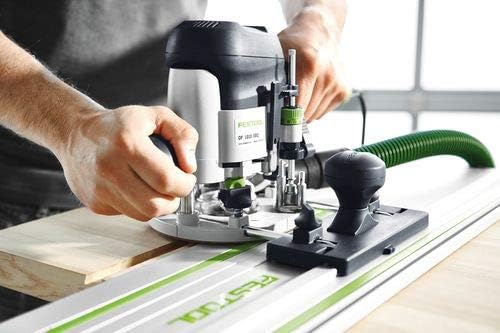
Figure 4.2: Demonstrates the router being used on a workpiece, showing the user's grip and control during operation.
- Stopping the Router: Release the ON/OFF switch. Wait for the bit to come to a complete stop before lifting the router from the workpiece.
5. Maintenance
Regular maintenance ensures the longevity and optimal performance of your Festool router.
- Cleaning: After each use, unplug the router and use a brush or compressed air to remove dust and debris from the motor vents, collet area, and base. Do not use solvents.
- Collet Inspection: Regularly inspect the collet and collet nut for wear or damage. Replace if necessary to ensure proper bit gripping.
- Cord Inspection: Check the power cord for any cuts, fraying, or damage. Do not use the tool if the cord is damaged.
- Storage: Store the router and its accessories in the Systainer case in a dry, secure location, away from direct sunlight and extreme temperatures.
- Service: For any repairs or internal maintenance, contact an authorized Festool service center.
6. Troubleshooting
This section addresses common issues you might encounter with your Festool OF 1010 EBQ Router.
| Problem | Possible Cause | Solution |
|---|---|---|
| Router does not start. | No power supply; damaged cord; faulty switch. | Check power outlet and cord. If problem persists, contact service. |
| Excessive vibration. | Loose router bit; damaged bit; worn bearings. | Ensure bit is securely tightened. Replace damaged bit. Contact service for bearing issues. |
| Poor cut quality / burning wood. | Dull bit; incorrect speed; too fast feed rate. | Replace or sharpen bit. Adjust speed. Reduce feed rate. |
| Dust extraction ineffective. | Hose clogged; dust bag full; improper connection. | Clear hose. Empty dust bag. Ensure secure hose connection. |
7. Technical Specifications
Detailed specifications for the Festool OF 1010 EBQ Router.
| Specification | Value |
|---|---|
| Brand | Festool |
| Model Number | 576201 |
| Power Consumption | 1010 W |
| Idle Speed | 10,000 - 24,000 rpm |
| Collets | 6-8 mm |
| Milling Stroke | 55 mm |
| Milling Depth Fine Adjustment | 8 mm |
| Max. Average | 50 mm |
| Dust Extraction Connection | 27 mm |
| Weight | 2.7 kg |
| Material | Metal |
| Power Source | Corded Electric |
| Maximum Rotational Speed | 24000 RPM |
8. Warranty and Support
Festool offers comprehensive service and support for your product.

Figure 8.1: The Festool Service All-Inclusive program logo, signifying comprehensive customer support.
Festool Service All-Inclusive:
- 36 Months Free Repair: Enjoy free repairs for 36 months, including wear parts and labor.
- 36 Months Theft Protection: In case of theft, Festool will provide a new tool for a small excess fee.
- 10 Years Spare Parts Guarantee: Festool guarantees the availability of spare parts for at least 10 years after a product is discontinued.
- 15 Days Risk-Free Testing: Test your new Festool tool for 15 days without obligation.
For detailed terms and conditions, and to register your product, please visit the official Festool website or contact Festool customer support. Product registration is typically required within 30 days of purchase to activate the full warranty benefits.

Figure 8.2: An image detailing the benefits of the Festool All-Inclusive Guarantee, emphasizing peace of mind for users.
