
1. Introduction
Thank you for purchasing the Offices To Go L Shape Executive Office Desk with Height Adjustable Side Component. This manual provides essential information for the safe assembly, operation, and maintenance of your new office furniture. Please read these instructions carefully before beginning assembly and retain them for future reference.
This desk features a fixed main desk section and a height-adjustable side component, designed to offer flexibility and ergonomic benefits to your workspace.
2. Safety Information
- Always follow assembly instructions precisely. Incorrect assembly can lead to instability and injury.
- Ensure all fasteners are securely tightened before use. Periodically check and re-tighten as necessary.
- Do not overload the desk. Refer to specifications for weight limits.
- Keep children and pets away from the desk during assembly and when operating the height-adjustable mechanism.
- When adjusting the height, ensure no objects are obstructing the movement of the desk surface.
- Avoid placing liquids directly on the desk surface without protective coasters.
- Use only the provided components and hardware. Do not substitute parts.
3. Package Contents
Before beginning assembly, verify that all components listed below are present and undamaged. If any parts are missing or damaged, contact Offices To Go customer support.
- Main Desk Surface (71"x36")
- Height-Adjustable Side Component Surface (48"x24")
- Main Desk Frame and Legs
- Height-Adjustable Side Component Frame and Legs
- 1 Mobile Locking Pedestal
- 1 Box/Box/File Full Pedestal
- Assembly Hardware (screws, bolts, tools, etc.)
- Control Panel for Height Adjustment
4. Setup and Assembly
Assembly is required for this product. It is recommended that two people assemble the desk to ensure safety and ease of construction. Clear a spacious area for assembly.
4.1 Unpacking and Preparation
- Carefully unpack all components and lay them out on a soft, clean surface to prevent scratches.
- Identify all parts against the package contents list.
4.2 Assembling the Main Desk
- Attach the main desk legs to the main desk frame using the provided hardware. Ensure all connections are firm.
- Carefully place the main desk surface onto the assembled frame and secure it with the designated screws.
4.3 Assembling the Height-Adjustable Side Component
- Assemble the height-adjustable frame and legs according to the specific instructions for the adjustable mechanism.
- Mount the height-adjustable side component surface onto its frame, securing it firmly.
- Connect the control panel to the height-adjustable mechanism as per the wiring diagram in the separate adjustable component manual (if provided).
4.4 Integrating Components and Pedestals
- Position the height-adjustable side component adjacent to the main desk, forming the L-shape. Secure the two sections together using the provided connectors, if applicable.
- Place the Mobile Locking Pedestal and the Box/Box/File Full Pedestal in their desired locations under the desk. The mobile pedestal can be moved and locked into place.
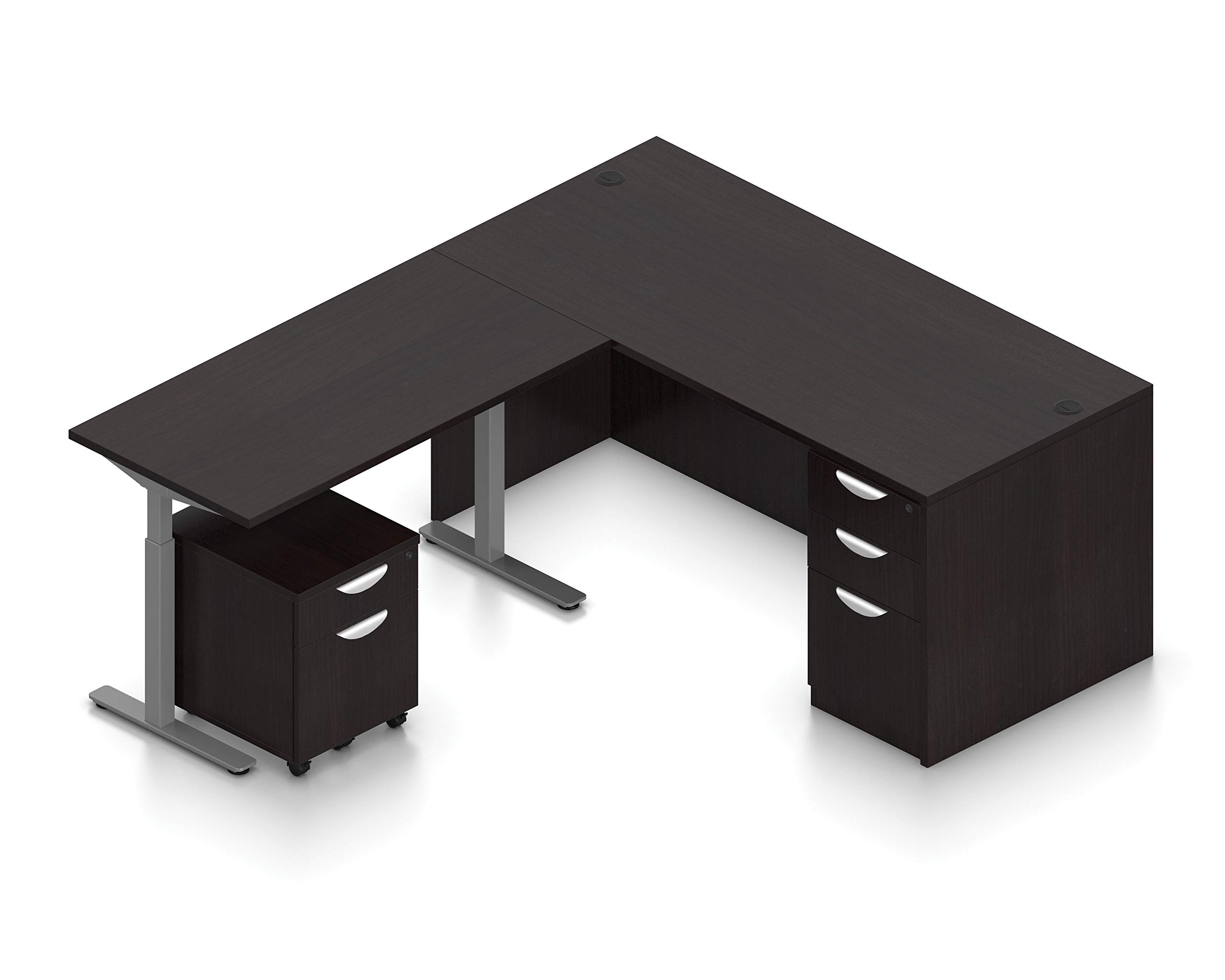
Image 1: Assembled Offices To Go L Shape Executive Office Desk with Height Adjustable Side Component and Pedestals. This image shows the complete desk setup in American Espresso finish, highlighting the L-shape configuration and the two included pedestals.
5. Operating Instructions
The main desk section is fixed and not height adjustable. The side component offers height adjustment for flexible working positions.
5.1 Adjusting the Height-Adjustable Side Component
- Ensure the desk is clear of obstructions that could impede movement.
- Locate the control panel, typically mounted on the underside of the desk or on the front edge of the side component.
- Press and hold the UP button to raise the desk surface.
- Press and hold the DOWN button to lower the desk surface.
- Release the button when the desired height is reached.
- Some models may include memory presets. Refer to the specific control panel manual for programming and using these features.
Note: The height adjustment mechanism is designed for smooth operation. Do not force the desk if it encounters resistance. Check for obstructions.
6. Maintenance
Regular maintenance will help prolong the life and appearance of your desk.
- Cleaning: Wipe surfaces with a soft, damp cloth. Avoid harsh chemicals or abrasive cleaners, which can damage the finish.
- Hardware: Periodically check all screws and bolts to ensure they remain tight. Re-tighten as needed.
- Height Mechanism: Keep the moving parts of the height-adjustable component free from dust and debris. Do not lubricate unless specifically instructed by the manufacturer.
- Spills: Clean up spills immediately to prevent staining or damage to the desk surface.
7. Troubleshooting
If you encounter issues with your desk, refer to the following common troubleshooting steps:
- Desk not adjusting height:
- Check if the power cord is securely plugged into both the desk and a working power outlet.
- Ensure no objects are blocking the desk's movement.
- If the control panel has a reset function, follow its instructions.
- Desk is wobbly:
- Verify that all assembly screws and bolts are securely tightened.
- Ensure the desk is on a level surface. Adjust leg levelers if present.
- Drawers not opening/closing smoothly:
- Check for obstructions inside the drawer or along the slides.
- Ensure the drawer slides are properly aligned and secured.
If these steps do not resolve the issue, please contact Offices To Go customer support.
8. Specifications
| Feature | Detail |
|---|---|
| Brand | Offices To Go |
| Model Number | B08C92CSNB |
| Shape | L-Shape |
| Desk Design | Executive Desk |
| Overall Dimensions (D x W x H) | 84"D x 71"W x 24"H |
| Main Desk Section | 71"x36" (Not height adjustable) |
| Side Component | 48"x24" (Height adjustable) |
| Color | American Espresso |
| Number of Drawers | 3 (1 Mobile Locking Pedestal, 1 Box/Box/File Full Pedestal) |
| Base Material | Petal |
| Assembly Required | Yes |
9. Warranty and Support
For warranty information and customer support, please refer to the official Offices To Go website or contact their customer service department directly. Keep your purchase receipt as proof of purchase.
Offices To Go Customer Support:
- Visit the Offices To Go official website for contact details and support resources.