
Product Overview
The Joyroom JR-T09 Wireless Bluetooth Earbuds provide a convenient and high-quality audio experience. These earbuds feature Bluetooth 5.0 connectivity, a built-in microphone for calls, and a comfortable in-ear design. The included charging case ensures extended usage with no noticeable delay in true wireless audio transmission, thanks to its Airoha chip.

Image: Joyroom JR-T09 Wireless Bluetooth Earbuds with their charging case, highlighting true wireless and Bluetooth 5.0.
Package Contents
Verify that all items are present in the package:
- A pair of Joyroom JR-T09 Wireless Bluetooth Earbuds
- Wireless Charging Case
- Micro Charging Cable
- Instruction Manual (this document)
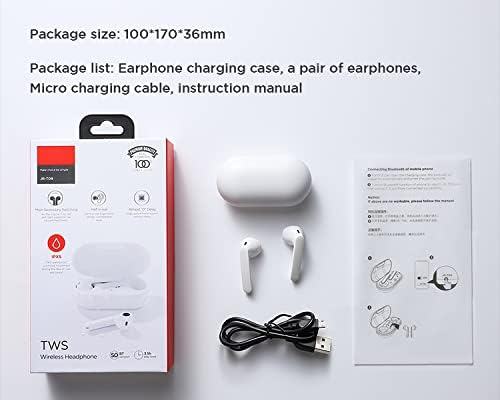
Image: Contents of the Joyroom JR-T09 package, including earbuds, charging case, and cable.
Setup Instructions
1. Charging the Earbuds and Case
Before first use, fully charge the earbuds and the charging case.
- Place the earbuds into the charging case. Ensure they are correctly seated.
- Connect the Micro Charging Cable to the charging port on the case and to a USB power source.
- The indicator light on the charging case will show the charging status. Once fully charged, the indicator light may change or turn off.

Image: Close-up of the charging port on the Joyroom JR-T09 charging case.
2. Pairing with a Bluetooth Device
- Ensure the earbuds are charged.
- Open the charging case. The earbuds will automatically enter pairing mode, indicated by a flashing light (refer to product for specific light indicators).
- On your device (smartphone, tablet, etc.), enable Bluetooth.
- Search for available Bluetooth devices and select "JR-T09" from the list.
- Once connected, the earbuds will indicate successful pairing (e.g., a voice prompt or solid light).
- For subsequent use, the earbuds will automatically connect to the last paired device when removed from the case and Bluetooth is enabled on the device.
Operating Instructions
The Joyroom JR-T09 earbuds feature touch controls for easy management of audio and calls. They are designed for smooth, constant, and clear HD calls, utilizing an imported silicon microphone to eliminate environmental noise and ensure stable voice transmission.
Touch Controls
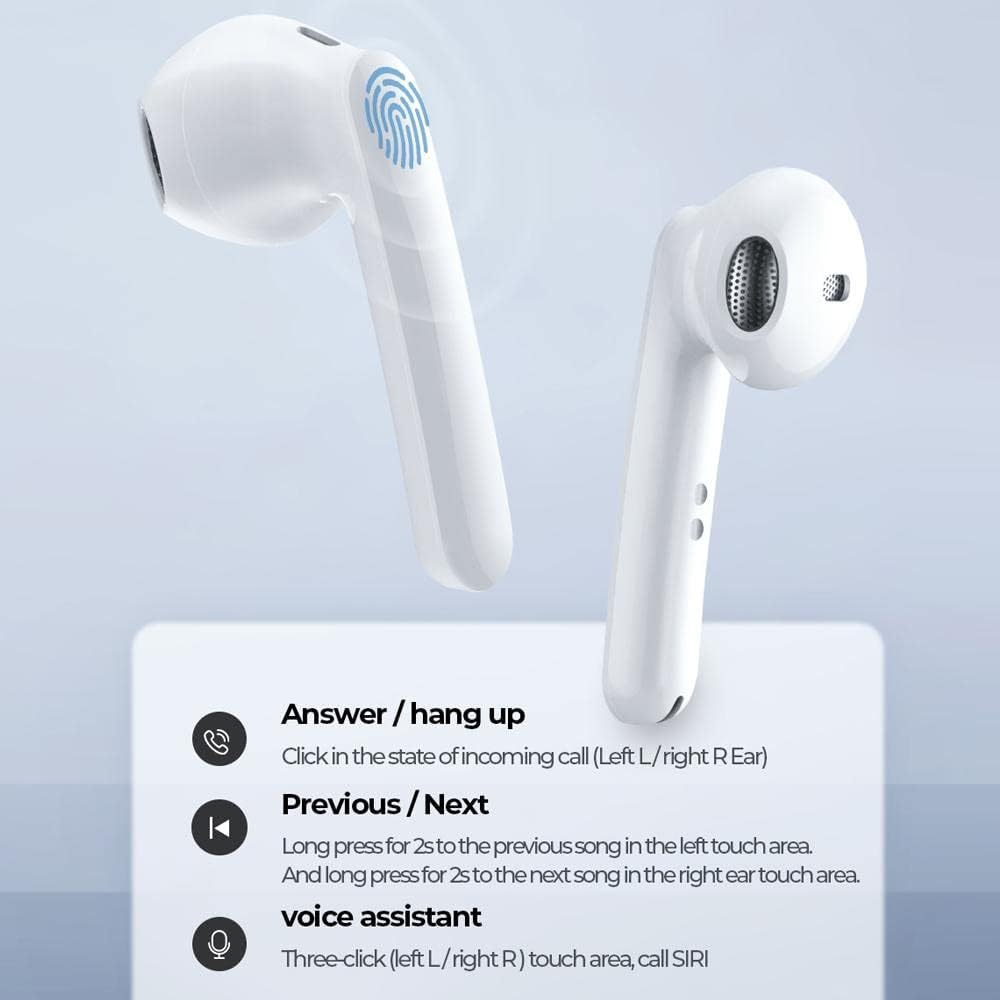
Image: Diagram illustrating the touch control functions on the Joyroom JR-T09 earbuds.
- Answer / Hang Up Call: Click the touch area on either the left (L) or right (R) earbud during an incoming call.
- Previous Song: Long press the touch area on the left (L) earbud for 2 seconds.
- Next Song: Long press the touch area on the right (R) earbud for 2 seconds.
- Voice Assistant (SIRI): Triple-click the touch area on either the left (L) or right (R) earbud.
- Play/Pause: Single click the touch area on either earbud.
Power On/Off
- Power On: The earbuds power on automatically when removed from the charging case.
- Power Off: Place the earbuds back into the charging case to power them off and begin charging.
Maintenance
Proper maintenance ensures the longevity and optimal performance of your earbuds.
- Cleaning: Regularly clean the earbuds and charging case with a soft, dry, lint-free cloth. Do not use harsh chemicals or abrasive materials.
- Charging Contacts: Ensure the charging contacts on both the earbuds and the case are clean and free of debris to maintain proper charging.
- Storage: When not in use, store the earbuds in their charging case to protect them and keep them charged. Store in a cool, dry place away from extreme temperatures.
- Water Resistance: The earbuds have an IPX5 water resistance rating, meaning they are protected against low-pressure water jets from any direction. They are not designed for submersion in water. Avoid exposing them to heavy rain or swimming.

Image: Joyroom JR-T09 earbuds and case, illustrating their water-resistant design.
Troubleshooting
If you encounter issues with your Joyroom JR-T09 earbuds, try the following solutions:
- Earbuds not pairing:
- Ensure both earbuds are charged.
- Place earbuds back in the case, close the lid, then open it again to re-enter pairing mode.
- Turn off and on Bluetooth on your device.
- Forget "JR-T09" from your device's Bluetooth settings and attempt to pair again.
- No sound from one earbud:
- Ensure both earbuds are charged.
- Place both earbuds back in the charging case, close the lid, and then take them out again.
- Try resetting the earbuds (re-pairing often resolves this).
- Earbuds not charging:
- Ensure the charging cable is securely connected to both the case and the power source.
- Check if the charging contacts on the earbuds and inside the case are clean.
- Try a different charging cable or power adapter.
- Poor call quality:
- Ensure the earbuds are fully charged.
- Move closer to your connected device to avoid signal interference.
- Avoid using the earbuds in noisy environments.
Product Specifications
| Brand Name | Joyroom |
| Model Name | JR-T09 |
| Color | White |
| Headphones Form Factor | In-Ear |
| Connectivity Technology | Wireless (Bluetooth 5.0) |
| Included Components | Wireless Charging Case |
| Age Range Description | Adult |
| Material | ABS Plastic |
| Compatible Devices | Multi-device |
| Number of Items | 1 |
| Global Trade Identification Number (UPC) | 06941237113658 |
| Manufacturer | Joyroom |
| Special Features | Built-in Microphone |
| Cable Feature | Cable-free |
| Control Method | Touch |
| Item Weight | 45 grams |
| Unit Count | 1 Count |
| Single Earbud Battery Capacity | 35 mAh |
| Charging Case Battery Capacity | 500 mAh |
| Play Time | Up to 3.5 hours (at 70% volume) |
| Talk Time | Up to 3.5 hours |
| Standby Time | Up to 120 hours |
| Reception Distance | 10 meters |
| Water Resistance Rating | IPX5 |
Warranty Information
The Joyroom JR-T09 Wireless Bluetooth Earbuds come with a one-year warranty from the date of purchase. This warranty covers manufacturing defects and workmanship under normal use. It does not cover damage caused by misuse, accidents, unauthorized modifications, or normal wear and tear. Please retain your proof of purchase for warranty claims.
Customer Support
For further assistance, technical support, or warranty inquiries, please contact Joyroom customer service. You can typically find contact information on the official Joyroom website or through your retailer.
Visit the official Joyroom store: Joyroom Store


