
Introduction
Thank you for choosing the ODK Corner Computer Desk. This manual provides detailed instructions for the assembly, operation, and maintenance of your new desk. Please read this manual thoroughly before beginning assembly and retain it for future reference. Proper assembly and care will ensure the longevity and optimal performance of your desk.
Product Overview
The ODK Corner Computer Desk is designed to maximize space efficiency with its triangular shape, fitting perfectly into room corners. It features a sturdy steel frame, a smooth pull-out keyboard tray, and an open storage shelf, providing a functional workstation for various tasks.
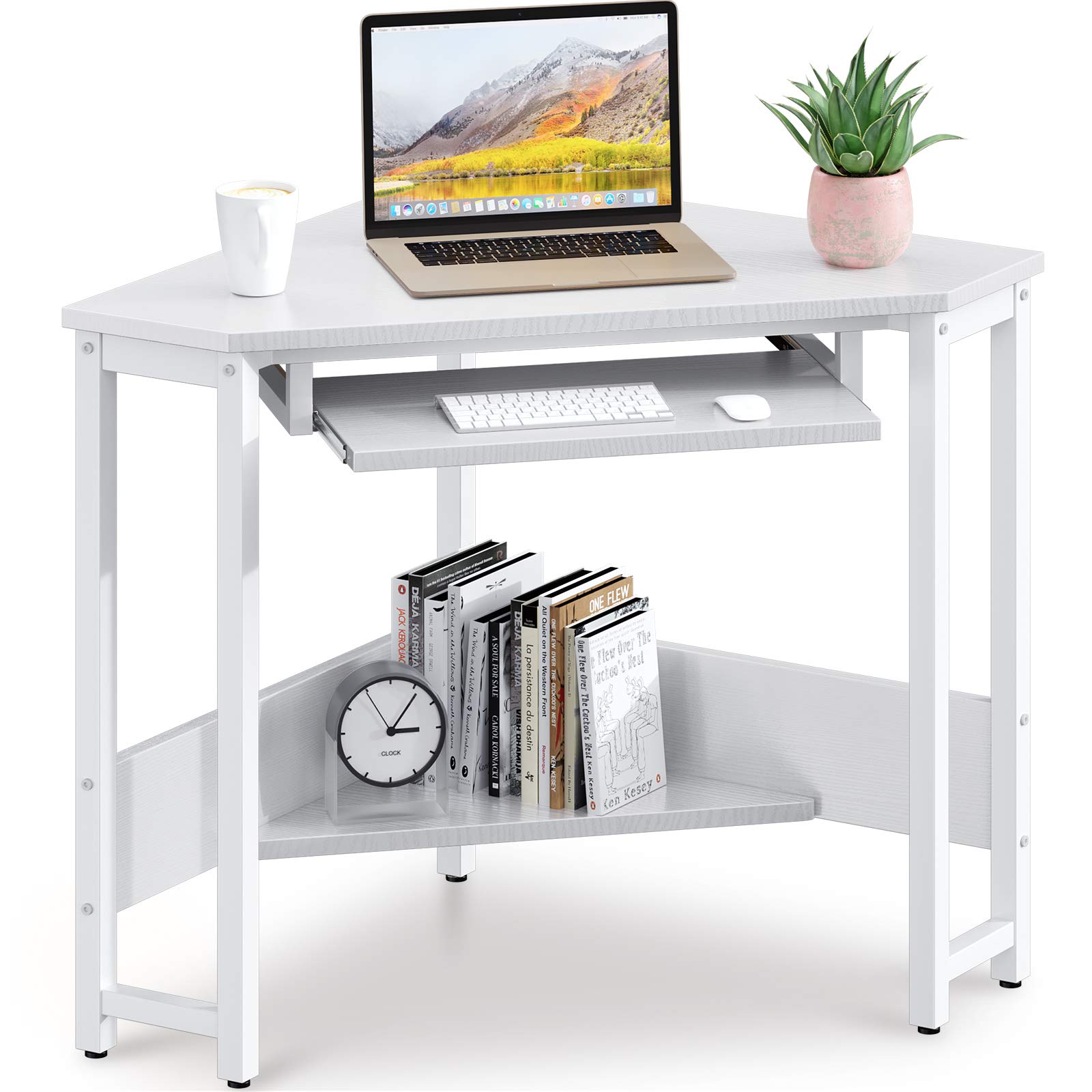
Image: The ODK Corner Computer Desk, fully assembled, positioned in a room corner with a computer monitor, keyboard, and decorative items. This image illustrates the desk's compact design and how it fits into a living space.
Specifications
| Model Number | B01XS01212-2 |
| Dimensions (L x W x H) | 28.3 x 28.3 x 29.9 inches (71.9 x 73.4 x 76.2 cm) |
| Weight Capacity | Up to 220 lbs (100 kg) |
| Material | Alloy Steel (frame), High-Quality Desktop |
| Color | White |
| Special Features | Pull-out Keyboard Tray, Storage Shelf, Scratch-resistant, Waterproof Desktop |

Image: A technical drawing of the ODK Corner Computer Desk showing its precise dimensions, including length, width, height, and measurements for the keyboard tray and lower shelf.
Package Contents
Before assembly, please verify that all components listed below are present and undamaged. If any parts are missing or damaged, please contact customer support.
- Desktop Panel
- Keyboard Tray
- Lower Storage Shelf
- Steel Frame Components (legs, support bars)
- Assembly Hardware (screws, bolts, nuts)
- Assembly Tools (Hex key, Phillips head screwdriver)
- Instruction Manual
Setup and Assembly Instructions
Assembly is straightforward and can typically be completed by one person. Follow these steps carefully:
- Unpack Components: Carefully remove all parts from the packaging and lay them out on a clean, soft surface to prevent scratches.
- Identify Parts: Refer to the parts list in your manual to identify each component and hardware piece. Pay attention to labels (e.g., Part A vs. Part B).
- Assemble Frame: Attach the steel frame components according to the diagrams in your manual. Ensure all connections are secure but do not fully tighten screws until the desk is fully assembled.
- Install Lower Shelf: Secure the lower storage shelf to the frame using the provided hardware.
- Attach Desktop: Place the desktop panel onto the assembled frame and secure it with the appropriate screws.
- Install Keyboard Tray: Mount the keyboard tray slides to the designated positions under the desktop, then attach the keyboard tray itself. Ensure it slides smoothly.
- Final Tightening: Once all parts are in place, carefully tighten all screws and bolts to ensure stability. Do not overtighten.
- Position Desk: Move the assembled desk to its desired corner location.
Image: The fully assembled ODK Corner Computer Desk, demonstrating the final structure after following the assembly steps. This image helps visualize the completed product.
Operating Instructions
The ODK Corner Computer Desk is designed for versatile use in small spaces.
- Desktop Usage: Place your computer monitor, laptop, or other work essentials on the main desktop surface. Ensure items are evenly distributed and do not exceed the desk's weight capacity.
- Keyboard Tray: Utilize the pull-out keyboard tray for your keyboard and mouse. This feature helps save desktop space and promotes ergonomic positioning. Gently pull the tray out when needed and push it back in for storage.

Image: A close-up view of the pull-out keyboard tray, extended with a keyboard and mouse placed on it. This highlights the functionality and space-saving aspect of the tray.
- Storage Shelf: The open lower shelf provides convenient storage for books, office supplies, or decorative items. Organize your items to keep your workspace tidy.

Image: A detailed view of the lower storage shelf, showing books and a clock neatly arranged. This demonstrates the practical storage capabilities of the desk.
Maintenance
To keep your ODK Corner Computer Desk in excellent condition, follow these maintenance guidelines:
- Cleaning: The desktop surface is waterproof and scratch-resistant. Wipe the desk regularly with a soft, damp cloth. Avoid abrasive cleaners or harsh chemicals that could damage the finish.
- Spills: In case of spills, wipe them immediately to prevent any potential staining or damage, although the desktop is designed to be waterproof.
- Hardware Check: Periodically check all screws and bolts to ensure they remain tight. Retighten if necessary to maintain stability.
- Avoid Overloading: Do not exceed the stated weight capacity of 220 lbs (100 kg) to prevent structural damage.

Image: A close-up shot of the desk's premium desktop surface, highlighting its texture and features like waterproof and anti-scratch properties. This visually confirms the durability mentioned in maintenance tips.
Troubleshooting
If you encounter any issues with your ODK Corner Computer Desk, refer to the following common solutions:
- Desk is Wobbly: Ensure all screws and bolts are fully tightened. Check that the desk is placed on a level surface.
- Keyboard Tray Not Sliding Smoothly: Inspect the slides for any obstructions or debris. Ensure the slides are properly aligned and securely attached.
- Missing Parts: If you find any parts missing during assembly, please refer to the "Warranty and Support" section to contact customer service for assistance.
- Damage During Shipping: If any components arrived damaged, document the damage with photos and contact customer service immediately.
Warranty and Support
ODK is committed to providing quality products and customer satisfaction. For any questions, concerns, or warranty inquiries regarding your ODK Corner Computer Desk (Model B01XS01212-2), please contact our professional after-sales support team.
Our team aims to respond to your messages within 24 hours. Please have your model number and purchase information ready when contacting support to facilitate a quicker resolution.
For specific warranty details, please refer to the documentation provided at the time of purchase or contact ODK customer service directly.