
Introduction
Thank you for choosing the PROTEAR AM/FM Radio Headphones. This device is designed to provide effective hearing protection while allowing you to listen to AM/FM radio broadcasts. It features a Noise Reduction Rating (NRR) of 25dB, ensuring your ears are protected in noisy environments. Please read this manual thoroughly before using the headphones to ensure proper operation and maintenance.
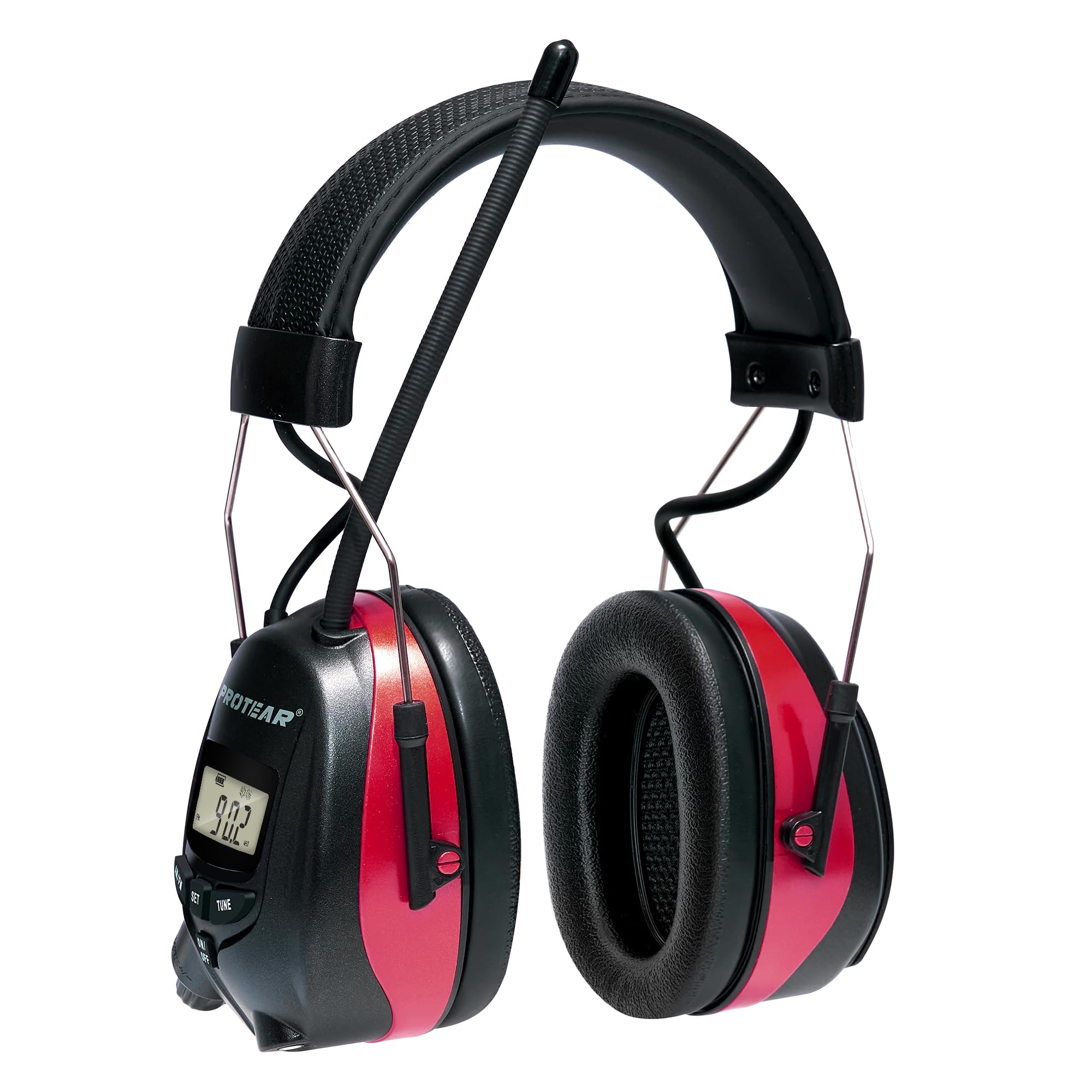
Figure 1: PROTEAR AM/FM Radio Headphones.
Safety Information
Always prioritize your safety. Improper use of hearing protection can lead to hearing damage or other injuries. Adhere to the following safety guidelines:
- Ensure the earmuffs fit snugly over your ears to achieve the stated Noise Reduction Rating (NRR).
- Do not modify the headphones. Any modifications may compromise their protective capabilities.
- Clean the earmuffs regularly as described in the Maintenance section to prevent skin irritation and maintain hygiene.
- Store the headphones in a clean, dry place away from extreme temperatures.
- Be aware of your surroundings, even with hearing protection. The radio feature may reduce your awareness of external sounds.
Package Contents
Verify that all items are present in your package:
- PROTEAR AM/FM Radio Headphones
- 3.5mm Male Audio Cable (for MP3 connection)
- User Manual
Note: AA batteries are not included and must be purchased separately.
Setup
1. Battery Installation
The headphones require two (2) AA batteries for operation.
- Locate the battery compartment cover on one of the earcups.
- Gently open the battery compartment cover.
- Insert two AA batteries, ensuring correct polarity (+/-) as indicated inside the compartment.
- Close the battery compartment cover securely.

Figure 2: Battery compartment with AA batteries.
2. Adjusting the Headband
For optimal comfort and noise reduction, adjust the headband to fit your head snugly.
- Place the headphones over your ears.
- Slide the earcups up or down along the metal wires until the headband rests comfortably on your head and the earcups fully enclose your ears.
- Ensure there are no gaps around your ears, as this can reduce the effectiveness of noise reduction.

Figure 3: Adjustable headband for comfortable fit.
Operating Instructions
1. Power On/Off and Volume Control
The power and volume are controlled by a single knob located on the right earcup.
- To turn on the headphones, rotate the volume control knob clockwise until you hear a click and the LCD display illuminates.
- Continue rotating clockwise to increase the volume.
- Rotate counter-clockwise to decrease the volume.
- To turn off the headphones, rotate the volume control knob counter-clockwise until you hear a click and the LCD display turns off.

Figure 4: Control panel with LCD display and volume knob.
2. AM/FM Radio Tuning
The headphones feature a digital AM/FM radio with station memory.
- Selecting Band: Press the AM/FM button to switch between AM and FM radio bands. The selected band will be shown on the LCD display.
- Automatic Scanning: Press and hold the TUNE button for a few seconds to automatically scan for available stations. The radio will stop on the next strong signal.
- Manual Tuning: Briefly press the TUNE button to manually advance or reverse through frequencies.
- Saving Stations: To save a station to memory, tune to your desired station, then press and hold the SET button until the memory location flashes. Use the TUNE button to select a memory preset number (1-8 for each band), then press SET again to confirm.
- Recalling Stations: Briefly press the SET button to cycle through your saved stations.

Figure 5: Strong reception for AM/FM radio.
3. Connecting External Audio (MP3)
You can connect an external audio device, such as an MP3 player, using the included 3.5mm audio cable.
- Locate the 3.5mm audio input jack on the earcup.
- Connect one end of the 3.5mm audio cable to the headphone's input jack.
- Connect the other end of the cable to the audio output of your external device.
- The audio from your external device will now play through the headphones. Volume can be adjusted via the headphone's volume knob or the external device.
Maintenance
Proper maintenance ensures the longevity and effectiveness of your PROTEAR headphones.
- Cleaning: Wipe the exterior of the earcups and headband with a damp cloth. Do not immerse the headphones in water. Avoid using harsh chemicals or abrasive cleaners.
- Earcup Cushions: Inspect earcup cushions regularly for wear and tear. Replace them if they become cracked or hardened to maintain optimal noise reduction and comfort.
- Storage: When not in use, store the headphones in a cool, dry place. Remove batteries if the headphones will not be used for an extended period to prevent leakage.

Figure 6: Soft earcup cushions for comfort and seal.
Troubleshooting
| Problem | Possible Cause | Solution |
|---|---|---|
| No power/Headphones do not turn on. | Dead or incorrectly inserted batteries. | Replace batteries with fresh AA batteries. Ensure correct polarity. |
| Poor radio reception. | Weak signal area; antenna position; interference. | Adjust the antenna position. Move to an area with better signal. Avoid strong electromagnetic interference. |
| No sound from radio. | Volume too low; wrong band selected; no station tuned. | Increase volume. Ensure correct AM/FM band is selected. Tune to an active station. |
| No sound from external audio device. | Audio cable not connected properly; external device volume too low. | Check 3.5mm cable connections. Increase volume on both headphones and external device. |
| Headphones are uncomfortable or noise reduction is ineffective. | Improper fit; worn earcup cushions. | Adjust headband for a snug fit. Ensure earcups fully seal around ears. Inspect and replace worn earcup cushions. |
Specifications
- Model: EP8830
- Noise Reduction Rating (NRR): 25dB (ANSI S3.19 Certified)
- Power Source: 2 x AA Batteries (not included)
- AM Frequency Range: 520-1710 KHz
- FM Frequency Range: 87.5-108 MHz
- Material: ABS, PU
- Dimensions: Approximately 3 x 2 x 4 inches
- Fit Type: Over the Head, Adjustable
Warranty and Support
PROTEAR provides a 1-Year Warranty for this product from the date of purchase. This warranty covers manufacturing defects under normal use.
For warranty claims, technical support, or any questions regarding your PROTEAR AM/FM Radio Headphones, please contact PROTEAR customer service. Refer to the product packaging or the official PROTEAR website for the most current contact information.
Please retain your proof of purchase for warranty purposes.