
Zoom H8
ZOOM H8 Digital Multitrack Recorder User Manual
Model: H8 | Brand: Zoom
1. Introduction
The Zoom H8 Handy Recorder is a versatile digital multitrack recorder designed to adapt to various creative needs, including field recording, music production, and podcasting. Its intuitive color touchscreen interface provides dedicated applications for different recording scenarios, ensuring optimal workflow and high-quality audio capture.

Figure 1: Front view of the Zoom H8 Handy Recorder, showcasing its intuitive touchscreen and microphone capsule.
2. Key Features
- Customized applications for field recording, music, and podcasting.
- Three distinct interfaces tailored for specific project needs.
- Interchangeable input capsules for diverse microphone configurations.
- 12-track simultaneous recording capability.
- Four mic inputs and two XLR/TRS combo connectors for versatile connectivity.
- Direct input support for guitar and bass.
- Supports SD cards up to 512GB for extensive recording time.
- Functions as a multi-track audio interface for PC/Mac and iPad.
- Headphone output and line output for monitoring and camera integration.
- Remote control functionality via optional Bluetooth adapter and iOS app.
3. Setup
3.1. Powering the Device
The H8 recorder operates on 4 AA batteries. For extended use or studio environments, it can be powered via USB connection to a computer or a compatible USB power adapter.
3.2. Inserting an SD Card
Locate the SD card slot on the side of the device. Insert a compatible SD card (up to 512GB) until it clicks into place. Ensure the card is formatted correctly for optimal performance.

Figure 2: Rear view of the Zoom H8, highlighting the battery compartment for power installation.
4. Operating Modes
The H8 features a color touchscreen that adapts to your project's needs with three distinct application options: Field, Music, and Podcast.
Video 1: An introductory video to the Zoom H8 Handy Recorder, demonstrating its key features and applications.
4.1. Field App
Ideal for location sound and sound design, the Field App provides large meters and quick access to essential processing tools like a low-cut filter and compressor/limiter. This allows for easy capture of dialogue, sound effects, and other ambient audio.
4.2. Music App
The Music App offers comprehensive control for recording and mixing music sessions. It includes fader control, EQ adjustments, and access to various effects. You can even load new effects by connecting the H8 to the free Guitar Lab software via USB.
4.3. Podcast App
For high-quality podcast production, the Podcast App simplifies the process with dedicated sound pads. These pads allow you to trigger sound effects, music beds, and other audio elements directly from the touchscreen during recording.

Figure 3: The H8's color touchscreen displaying the selectable Field, Music, and Podcast application modes.
5. Inputs and Outputs
5.1. Built-in Inputs
The H8 features six built-in inputs, allowing you to connect microphones and line-level devices such as keyboards or external mixers. Inputs A and B are also capable of directly accepting signals from your guitar or bass, making it convenient for musicians.
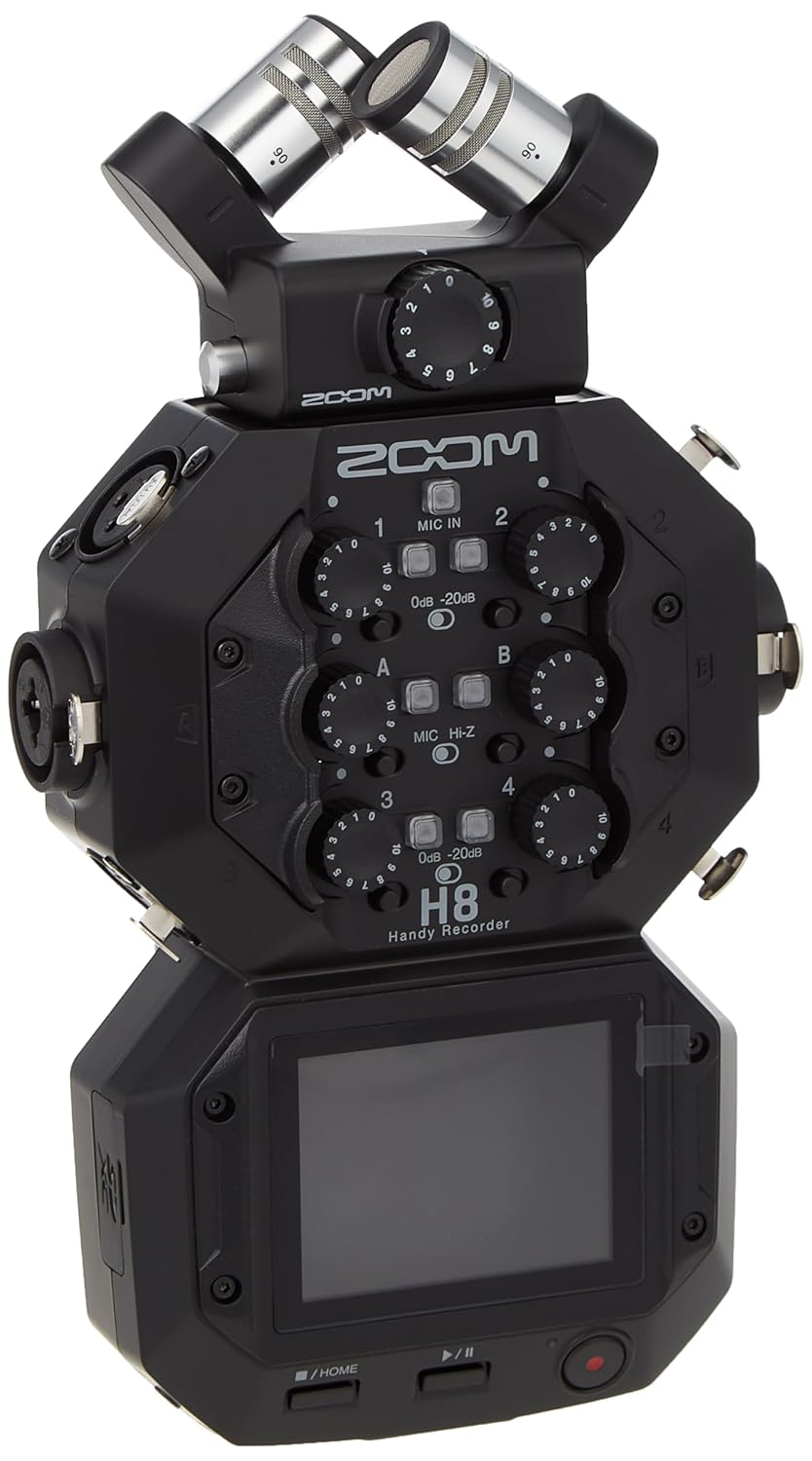
Figure 4: Side view of the H8, illustrating the XLR/TRS combo inputs for connecting various audio sources.
5.2. Interchangeable Capsules
In addition to the six inputs, the H8 features an interchangeable capsule connection. It comes standard with a high-quality XY microphone capsule, suitable for a wide range of recording purposes. Separately, Zoom offers other input capsules such as the Mid-Side capsule or the EXH-6/EXH-8, which provide additional XLR/TRS inputs for expanded recording capabilities.

Figure 5: The interchangeable XY microphone capsule being attached to the top of the Zoom H8.
5.3. Outputs
For monitoring, the H8 includes a headphone output. It also features a line output, commonly used to send audio directly to your camera for synchronized audio and video recording.

Figure 6: Side view of the H8, highlighting the headphone output and line output ports.
6. Storage and Recording
All recordings are saved to an SD card, supporting capacities up to 512GB. The H8 can record up to 12 tracks simultaneously. It always records individual tracks, providing maximum flexibility for post-production editing and mixing.
7. Connectivity
7.1. Audio Interface
The H8 can function as an audio interface, allowing you to record directly into your preferred recording software (DAW) on PC/Mac or iPad. It offers both stereo mix and multi-track modes, enabling individual track recording for detailed mixing.
7.2. Remote Control
For remote operation, the H8 can be controlled wirelessly. By inserting the optional BTA-1 Bluetooth adapter, you can connect to the free iOS Control App. This app allows you to monitor levels and initiate recording from a distance, providing convenience for various setups.

Figure 7: The H8 with the BTA-1 Bluetooth adapter inserted, enabling remote control capabilities.
8. Maintenance
To ensure the longevity and optimal performance of your Zoom H8, regular maintenance is recommended. Keep the device clean and free from dust and debris. Use a soft, dry cloth for cleaning. Avoid exposing the unit to extreme temperatures or humidity. Ensure proper battery handling and removal when the device is not in use for extended periods to prevent drainage.
9. Troubleshooting
9.1. Battery Drain
If the unit experiences rapid battery drain even when turned off, ensure that the batteries are removed when the device is not in use for prolonged periods. This is a known characteristic for some users, and removing batteries can prevent unexpected power loss.
9.2. Audio Interface Setup Issues
When using the H8 as an audio interface, ensure that all recording frequencies (on the H8, computer sound card, and Digital Audio Workstation software) match exactly. Mismatched frequencies can prevent proper function. Refer to your DAW's documentation for specific settings. If issues persist, verify all connections and try restarting the device and your computer.
9.3. General Issues
For any other operational issues, first ensure all cables are securely connected and that the device's firmware is up to date. If problems persist, consult the comprehensive User Manual PDF or contact Zoom customer support.
10. Specifications
| Feature | Detail |
|---|---|
| Model Number | H8 |
| Product Dimensions | 4 x 6.5 x 2 inches |
| Item Weight | 0.01 ounces |
| Batteries Required | 4 AA batteries |
| Manufacturer | Zoom |
| Date First Available | June 25, 2020 |

Figure 8: Dimensional diagram of the Zoom H8 Handy Recorder.
11. Warranty and Support
For detailed warranty information and technical support, please refer to the official Zoom website or the full user manual. You can download the complete User Manual (PDF) and User Guide (PDF) for the Zoom H8 from the links below:
For further assistance, visit the official Zoom Store on Amazon or the Zoom North America website.
Related documentsH8


Ask a question about this manual
Ask about setup, troubleshooting, compatibility, parts, safety, or missing instructions. Manuals+ will review the question and use this page’s manual context to help answer it.