
Preciva 8786D I
Preciva 8786D I 2-in-1 Hot Air Soldering and Soldering Iron Station User Manual
Model: 8786D I | Brand: Preciva
Introduction
Thank you for choosing the Preciva 8786D I 2-in-1 Hot Air Soldering and Soldering Iron Station. This device combines a hot air gun and a soldering iron into a single unit, offering versatility for various electronic repair and soldering tasks. This manual provides essential information for safe operation, setup, maintenance, and troubleshooting to ensure optimal performance and longevity of your station.
Safety Instructions
Please read and understand all safety warnings and instructions before using this product. Failure to follow these instructions may result in electric shock, fire, or serious injury.
- Always operate the soldering station in a well-ventilated area to avoid inhaling fumes.
- Wear appropriate personal protective equipment, including safety glasses and heat-resistant gloves.
- Do not touch the heating elements (soldering iron tip, hot air gun nozzle) directly as they reach very high temperatures. Allow them to cool completely before handling or changing accessories.
- Ensure the hot air gun's wind speed is set appropriately when operating at high temperatures. If the temperature is set above 380°C, the wind speed must be greater than 50 L/min to prevent heat accumulation that could melt the handle.
- When installing or changing nozzles for the hot air gun, ensure the heating tube and nozzle have cooled down. Do not force the nozzle or use pliers to pull its edge. Do not overtighten the bolt.
- Avoid spraying the hot air gun directly towards your face or body.
- A small amount of white smoke may be emitted during the initial startup; this is normal and will dissipate.
- The anti-static design helps prevent damage to sensitive electronic components. Always use proper grounding practices.
- Keep the workstation clean and free of flammable materials.
- Unplug the unit from the power source when not in use or before performing any maintenance.
Product Overview
The Preciva 8786D I integrates a hot air gun and a soldering iron, providing precise temperature control and various features for efficient work.

Image: Overview of the Preciva 8786D I 2-in-1 Hot Air Soldering Station, showing the main unit, hot air gun, soldering iron, and control panel with LED displays for air gun and soldering station temperature, adjustment buttons, and interfaces.

Image: Visual summary of the Preciva 8786D I 740W Hot Air Soldering Station's features, including LED display, PID control, 740W power, short circuit protection, temperature conversion, calibration, constant temperature system, automatic sleep protection, temperature control protection, and cold/hot wind conversion.
Key Features:
- PID Temperature Control: High-precision PID program monitors and corrects real-time temperature with rapid compensation.
- Anti-static Design: Prevents static electricity or electrical leakage from damaging sensitive components.
- Digital Temperature Correction: Allows for precise adjustment of the soldering iron temperature if environmental factors or heating element replacement cause deviations from the display.
- Automatic Sleep Function: After 10 minutes of inactivity, the soldering iron automatically enters sleep mode, reducing its temperature to 200°C to prolong the lifespan of vulnerable parts like soldering tips.
- No Wind Protection (Hot Air Gun): If the hot air gun stops abnormally during use, the system automatically triggers an alarm and cuts power to the heating core for safety.
- Cold/Hot Wind Conversion: Easily switch between hot and cold air modes for various applications.
- LED Display: Clear digital display for both hot air gun and soldering iron temperatures.
- Fast Heating: 740W power ensures quick heat-up times for both tools.

Image: A user performing soldering work on a circuit board using the Preciva 8786D I station, demonstrating its application in electronics repair.

Image: The Preciva 8786D I soldering station displayed with its various accessories, including different soldering tips and hot air nozzles.
Setup
- Unpacking: Carefully remove all components from the packaging. Verify that all items listed in the package contents are present.
- Placement: Place the main unit on a stable, heat-resistant, and non-flammable surface. Ensure adequate ventilation around the unit.
- Connect Hot Air Gun: Connect the hot air gun cable to its designated port on the main unit.
- Connect Soldering Iron: Connect the soldering iron cable to its designated port on the main unit.
- Install Soldering Iron Stand: Assemble the soldering iron stand and place it securely next to the main unit. This stand is designed to save desktop space.
- Install Solder Wire Holder: Attach the solder wire holder to the main unit if desired.
- Power Connection: Connect the power cord to the main unit and then to a grounded electrical outlet (220V).

Image: Diagram illustrating the installation of the soldering iron stand, showing how it attaches to the main unit to save space.
Operating Instructions
1. Power On/Off
- Locate the main power switch on the back of the unit and turn it to the "ON" position.
- Individual power switches for the hot air gun and soldering iron are located on the front panel. Turn on the desired tool.
2. Temperature Adjustment
- Use the dedicated temperature adjustment buttons (up/down arrows) for the hot air gun and soldering iron to set the desired temperature.
- The LED display will show the set temperature and the current temperature.
- The station features PID control for rapid heating and stable temperature maintenance.

Image: Illustration showing the conversion between Celsius (°C) and Fahrenheit (°F) temperature units on the display.
3. Hot Air Gun Operation
- Nozzle Selection: Choose an appropriate nozzle for your task. The kit includes φ5mm, φ8mm, φ10mm, and 13x13mm nozzles. Avoid using nozzles smaller than φ5mm.
- Airflow Adjustment: Use the "AIR" knob to adjust the airflow volume. The maximum airflow is 120 L/min.
- Cold/Hot Wind Conversion: Press the "COOL/HOT" button to switch between hot and cold air modes.
- Safety Precaution: When the hot air gun temperature is set above 380°C, ensure the wind speed is maintained above 50 L/min to prevent overheating and potential damage to the handle.
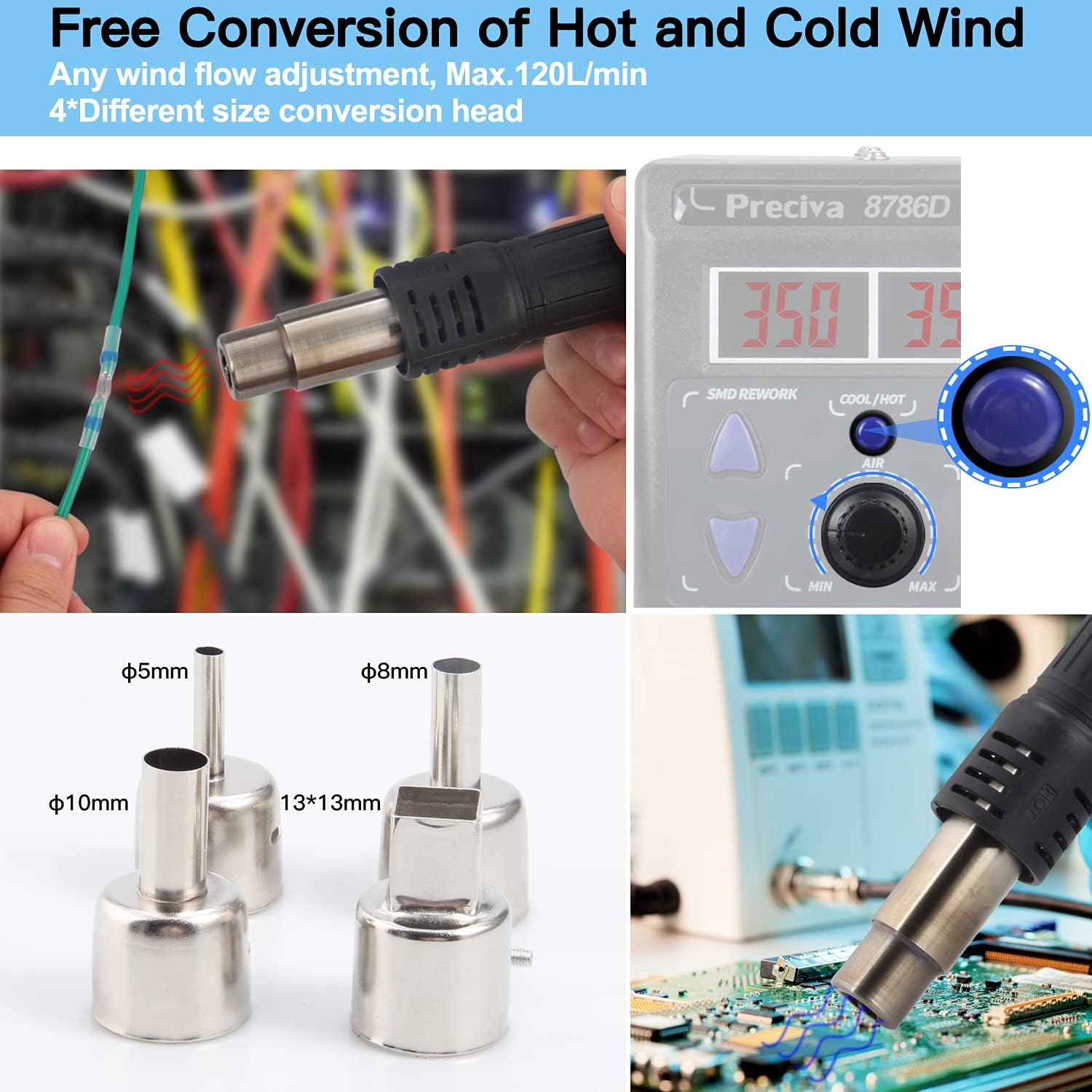
Image: Displaying the hot air gun with various nozzle sizes (φ5mm, φ8mm, φ10mm, 13x13mm) and highlighting the cold/hot wind conversion button on the control panel.

Image: Visual representation of the hot and cold air conversion feature.

Image: Information highlighting the brushless fan, gentle wind, adjustable temperature (100-480°C), and maximum air volume (120 L/min) features of the hot air gun.
4. Soldering Iron Operation
- Tip Selection: Choose the appropriate soldering tip for your application. The kit includes 1 original tip and 5 replacement tips of various sizes (0.2mm, 1.2mm, 2.4mm, 3mm, 5mm).
- Tinning the Tip: Before first use and periodically during use, tin the soldering iron tip with solder to prevent oxidation and ensure efficient heat transfer.
- Automatic Sleep Mode: If the soldering iron is inactive for 10 minutes, it will automatically enter sleep mode, and its temperature will drop to 200°C. To reactivate, simply pick up the iron or shake it gently.

Image: Detailed view of the various soldering iron tips included (900M-T-I, 900M-T-B, 900M-T-2.4D, 900M-T-3C, 900M-T-K) and specifications for the lead-free solder wire (30g, 0.8mm diameter, 227°C melting point).

Image: Explanation of the 10-minute auto sleep mode, showing the display changing from operating temperature to "SLP" (sleep) and then returning to operating temperature upon reactivation.

Image: Icon representing the 10-minute auto sleep mode feature.
Maintenance
Regular maintenance ensures the longevity and optimal performance of your soldering station.
- Cleaning Soldering Tips: Regularly clean soldering tips using a damp sponge or brass wool to remove excess solder and oxidation. This improves heat transfer and tip lifespan.
- Replacing Soldering Tips: Replace worn or damaged soldering tips. Ensure the iron is cool before changing tips.
- Cleaning Hot Air Nozzles: Ensure hot air nozzles are free from debris. Allow them to cool before cleaning or changing.
- Unit Cleaning: Wipe the main unit with a soft, dry cloth. Do not use abrasive cleaners or solvents.
- Storage: Store the soldering station in a dry, dust-free environment when not in use.
Troubleshooting
| Problem | Possible Cause | Solution |
|---|---|---|
| Unit does not power on. | No power, loose connection, main switch off. | Check power cord, ensure main switch is ON, try a different outlet. |
| Soldering iron not heating. | Iron not connected, individual switch off, faulty heating element/tip. | Check connection, ensure iron switch is ON, replace tip, contact support if element is faulty. |
| Hot air gun not heating or no airflow. | Gun not connected, individual switch off, airflow blocked, faulty heating element/fan. | Check connection, ensure gun switch is ON, clear any blockages, contact support if element/fan is faulty. |
| Temperature display inaccurate. | Environmental factors, heating element replacement. | Use the digital temperature correction function to recalibrate. |
| Hot air gun handle melting (at high temp). | Insufficient wind speed at high temperatures. | Ensure wind speed is above 50 L/min when operating above 380°C. |
Specifications
| Feature | Detail |
|---|---|
| Model | 8786D I |
| Brand | Preciva |
| Dimensions (L x W x H) | 16 x 9.5 x 13.6 cm |
| Weight | 2.46 Kilograms |
| Voltage | 220 Volts |
| Power | 750 Watts |
| Display Type | LED |
| Soldering Iron Temperature Range | 200-480°C (392-896°F) |
| Hot Air Gun Temperature Range | 100-480°C (212-896°F) |
| Hot Air Gun Max Air Volume | 120 L/min |
| Number of Channels | 1 |
| UPC | 789371129656 |
Warranty and Support
Preciva products are designed for reliability and performance. For warranty information or technical support, please refer to the contact details provided with your purchase or visit the official Preciva website.
Keep your purchase receipt as proof of purchase for warranty claims.