
Prexiso PLT40LIAU
PREXISO 2-in-1 Laser Tape Measure PLT40LIAU User Manual
Model: PLT40LIAU
1. Introduction
This manual provides detailed instructions for the safe and effective use of your PREXISO 2-in-1 Laser Tape Measure. This device combines a 135 ft (41 m) laser distance meter with a 16 ft (5 m) traditional tape measure, offering versatility for various measurement tasks. Please read this manual thoroughly before operating the device.

Image 1.1: The PREXISO 2-in-1 Laser Tape Measure, showing its compact design and included USB-C charging cable.
2. Safety Information
WARNING: This product contains a Class 2 laser. Avoid direct eye exposure to the laser beam. Do not stare into the beam or view directly with optical instruments. Laser output is less than 1mW at 620-690nm.
- Do not attempt to modify or disassemble the device.
- Keep the device out of reach of children.
- Use the device only for its intended purpose as described in this manual.
- Avoid exposing the device to extreme temperatures, moisture, or direct sunlight for prolonged periods.
3. Product Overview
Familiarize yourself with the components of your PREXISO 2-in-1 Laser Tape Measure.

Image 3.1: Labeled diagram of the device, highlighting the USB-C charging port, belt clip, backlit color display, units/measuring reference button, laser beam outlet, lock, tape, on/measure/continuous measuring button, and function button for area/volume/Pythagorean modes.
Key Components:
- Laser Beam Outlet: Emits the laser for distance measurement.
- Backlit Color Display: Shows measurement data, battery status, and mode indicators.
- UNIT Button: Press to change the measuring reference point. Hold for 3 seconds to switch measurement units (M/In/Ft).
- FUNC Button: Press to cycle through measurement modes (Distance, Continuous, Area, Volume, Pythagorean).
- M Button (On/Measure): Powers on the device, initiates a laser measurement, or starts continuous measurement.
- Tape Measure: Manual 16 ft (5 m) steel tape with magnetic hook.
- Blade Lock: Secures the tape measure blade in position.
- USB-C Charging Port: For recharging the internal Li-ion battery.
- Belt Clip: For convenient carrying.
4. Setup
4.1 Charging the Device
The device is powered by a rechargeable Li-ion battery. Before first use, or when the battery indicator on the display is low, charge the device using the provided Type-C charging cable.
- Locate the USB-C charging port on the side of the device.
- Connect the Type-C end of the charging cable to the device and the USB-A end to a compatible USB power adapter (not included) or computer port.
- The battery indicator on the display will show charging status. A full charge allows for approximately 5000 measurements.
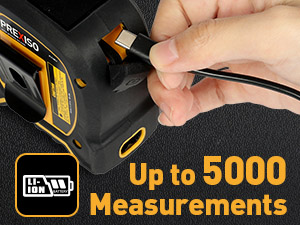

Image 4.1: The USB-C charging port and the device being charged, alongside an image demonstrating the belt clip for portability.
4.2 Powering On/Off
- To power on the device, press the M button. The display will illuminate.
- The device will automatically shut down after 30 seconds of inactivity to conserve battery.
5. Operating Instructions
5.1 Using the Tape Measure
The manual tape measure extends up to 16 ft (5 m) and features a magnetic hook for secure attachment to ferrous materials. The blade is nylon-coated for durability and has clear markings on both sides.
- Pull the tape blade out to the desired length.
- To lock the blade in place, slide the blade lock button forward.
- To retract the blade, slide the blade lock button backward and guide the tape back into the housing.


Image 5.1: Demonstrating the blade lock button for speed control and the strong magnetic movable hook for accurate measurements.
5.2 Using the Laser Measure
The laser measure provides accurate digital measurements up to 135 ft (41 m). The display shows laser measurements, not the manual tape blade distance.

Image 5.2: Illustrates that the digital display shows laser distance measurements, not the length of the extended tape blade.
5.2.1 Changing Units and Reference Point
- To change measurement units: Hold the UNIT button for 3 seconds. The units will cycle through Meters (M), Inches (In), and Feet (Ft).
- To change the measuring reference point: Press the UNIT button briefly. The reference point can be set from the front or the rear of the device. This is crucial for accurate measurements.

Image 5.3: Instructions for changing measurement units by holding the UNIT button and changing the reference point by pressing it briefly.
5.2.2 Basic Distance Measurement
- Power on the device by pressing the M button.
- Ensure the desired reference point and unit are selected.
- Point the laser at the target.
- Press the M button again to take a single measurement. The result will appear on the display.
5.2.3 Continuous Measurement
In continuous measurement mode, the device constantly updates the distance as you move it, useful for finding minimum/maximum distances or marking specific points.
- Power on the device.
- Press the M button once to activate the laser.
- Hold the M button for approximately 2 seconds to enter continuous measurement mode. The display will show real-time measurements.
- Press the M button again to stop continuous measurement and hold the last displayed value.
5.2.4 Area Measurement
This mode calculates the area of a rectangular space.
- Press the FUNC button until the area icon (rectangle) appears on the display.
- Take the first measurement (e.g., length) by pressing M.
- Take the second measurement (e.g., width) by pressing M.
- The device will automatically calculate and display the area.

Image 5.4: Visual representation of using the laser measure for area calculation.
5.2.5 Volume Measurement
This mode calculates the volume of a cubic space.
- Press the FUNC button until the volume icon (cube) appears on the display.
- Take the first measurement (e.g., length) by pressing M.
- Take the second measurement (e.g., width) by pressing M.
- Take the third measurement (e.g., height) by pressing M.
- The device will automatically calculate and display the volume.

Image 5.5: Visual representation of using the laser measure for volume calculation.
5.2.6 Pythagorean Measurement (2-Point)
This mode calculates an indirect height or distance using two measurements, based on the Pythagorean theorem.
- Press the FUNC button until the 2-point Pythagorean icon appears.
- Measure the hypotenuse (diagonal distance) by pressing M.
- Measure the horizontal distance by pressing M.
- The device will calculate and display the vertical height.

Image 5.6: Illustration of the 2-point Pythagorean measurement mode for indirect height calculation.
5.2.7 Pythagorean Measurement (3-Point)
This mode calculates an indirect height using three measurements, useful when the horizontal distance cannot be measured directly.
- Press the FUNC button until the 3-point Pythagorean icon appears.
- Measure the first hypotenuse (from device to top of object) by pressing M.
- Measure the second hypotenuse (from device to bottom of object) by pressing M.
- Measure the horizontal distance from the device to the base of the object by pressing M.
- The device will calculate and display the vertical height.

Image 5.7: Illustration of the 3-point Pythagorean measurement mode for indirect height calculation.
6. Maintenance
- Cleaning: Wipe the device with a soft, damp cloth. Do not use abrasive cleaners or solvents. Ensure the laser lens and display are kept clean for optimal performance.
- Storage: Store the device in a cool, dry place away from direct sunlight and extreme temperatures.
- Battery: Recharge the battery regularly, even if the device is not in frequent use, to maintain battery health.
7. Troubleshooting
| Problem | Possible Cause | Solution |
|---|---|---|
| Device does not power on. | Low or depleted battery. | Charge the device using the provided USB-C cable. |
| Laser measurement is inaccurate. | Incorrect reference point selected. Dirty laser lens. Target surface is too reflective or too dark. | Verify the reference point setting. Clean the laser lens. Measure to a different surface or use a target plate. |
| Display is dim or unreadable. | Low battery. Extreme ambient light conditions. | Recharge the battery. Move to an area with less direct sunlight or adjust viewing angle. |
| Tape measure blade does not retract smoothly. | Debris in the housing. Blade lock engaged. | Ensure the blade lock is disengaged. Gently clean any visible debris. |
8. Specifications
| Feature | Specification |
|---|---|
| Model Number | PLT40LIAU |
| Laser Class | Class 2 |
| Laser Wavelength | 620-690nm |
| Max Laser Output | <1mW |
| Laser Measuring Range | 135 ft (40 m) |
| Laser Measurement Accuracy | ±1/8 inch (±3mm) at 135 ft |
| Tape Measure Length | 16 ft (5 m) |
| Battery Type | Rechargeable Lithium Polymer |
| Estimated Battery Life | Up to 5000 measurements per charge |
| Display Type | Backlit Color LCD |
| Material | Acrylonitrile Butadiene Styrene (ABS) |
| Operating Temperature | 32°F to 104°F (0°C to 40°C) |
| Storage Temperature | 14°F to 140°F (-10°C to 60°C) |
| IP Rating | IP54 |
| Product Dimensions | 8.51 x 8.51 x 4.32 cm |
| Item Weight | 485 g |
9. Warranty and Support
For warranty information or technical support, please refer to the documentation included with your purchase or visit the official PREXISO website. Contact details for customer service are typically provided on the product packaging or within the included user manual.
Related documentsPLT40LIAU


Ask a question about this manual
Ask about setup, troubleshooting, compatibility, parts, safety, or missing instructions. Manuals+ will review the question and use this page’s manual context to help answer it.