
Introduction
This manual provides essential information for the proper installation, operation, and maintenance of your JBL Stage3 527 5-1/4 inch Two-Way Car Audio Speakers. Please read this manual thoroughly before attempting installation or use to ensure optimal performance and longevity of your product. Retain this manual for future reference.

Image: Front view of a single JBL Stage3 527 speaker, showcasing the cone and tweeter design.
Product Features
The JBL Stage3 527 speakers are engineered to deliver enhanced audio performance in your vehicle. Key features include:
- Plus One Polypropylene Woofer Cones: These cones offer an increased cone area by up to 35% due to an optimized attachment point between the surround and the frame. This design provides superior output and performance, whether upgrading a factory system or integrating with aftermarket amplifiers.
- Engineered to Fit: Careful attention has been given to the physical dimensions and design to ensure compatibility with a wide range of vehicle installations.
- Vented Basket Frame Design: The rigid, vented baskets facilitate cooling of the voice coils. This contributes to reduced distortion at high output levels, extended speaker lifespan, and improved power handling capabilities.
- Consistent JBL Sound Signature: These speakers are acoustically tuned to maintain the distinctive JBL sound quality, known for its clarity and balance.

Image: Front view of a JBL Stage3 527 speaker with its protective grille installed, highlighting the robust design.
Setup and Installation
Proper installation is crucial for the performance and safety of your car audio system. It is highly recommended that installation be performed by a qualified professional. If you choose to install the speakers yourself, please follow these general guidelines:
- Safety First: Disconnect the vehicle's battery before beginning any electrical work to prevent short circuits and electrical damage.
- Speaker Placement: Identify suitable mounting locations in your vehicle. Ensure adequate clearance behind the mounting surface for the speaker's depth.
- Mounting: Securely mount the speakers using appropriate hardware. Avoid overtightening screws, which can damage the speaker frame.
- Wiring: Connect the speaker wires to the corresponding positive (+) and negative (-) terminals on the speaker and your car's audio system. Ensure correct polarity to prevent phase issues. Use appropriate gauge wiring for optimal power transfer.
- Testing: Reconnect the battery and test the speakers at a low volume before fully reassembling interior panels.

Image: A pair of JBL Stage3 527 speakers, illustrating the product as a set for installation.
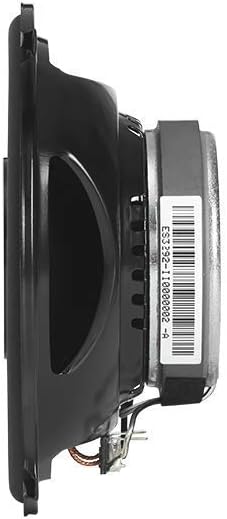
Image: Side profile of the JBL Stage3 527 speaker, useful for assessing mounting depth requirements.
Operating Instructions
Once installed, your JBL Stage3 527 speakers will operate as part of your vehicle's audio system. Follow these general operating guidelines:
- Source Unit Control: All primary audio adjustments, such as volume, balance, fader, bass, and treble, will be controlled via your car's head unit (stereo receiver).
- Volume Levels: Begin playback at a low volume and gradually increase it to a comfortable listening level. Avoid excessively high volumes that can cause distortion or damage to the speakers and your hearing.
- Sound Customization: Experiment with the equalizer and sound settings on your head unit to tailor the audio output to your personal preference.
- Break-in Period: New speakers may benefit from a brief break-in period (typically 10-20 hours of normal use) to allow the cone and surround materials to loosen, potentially improving sound quality.
Maintenance
To ensure the longevity and optimal performance of your JBL Stage3 527 speakers, follow these simple maintenance tips:
- Cleaning: Gently wipe the speaker grilles and surrounds with a soft, dry, or slightly damp cloth. Avoid using harsh chemicals, solvents, or abrasive cleaners, as these can damage the speaker materials.
- Inspection: Periodically inspect the speaker cones and surrounds for any signs of damage, such as tears, punctures, or deterioration. Ensure all mounting screws remain secure.
- Environmental Factors: While designed for automotive use, avoid exposing the speakers to extreme moisture, direct sunlight for prolonged periods, or excessive dust and debris, which can degrade performance over time.
Troubleshooting
If you encounter issues with your JBL Stage3 527 speakers, refer to the following troubleshooting guide. For complex problems, consult a professional car audio technician.
| Problem | Possible Cause | Solution |
|---|---|---|
| No sound from speakers | Loose or disconnected wiring Incorrect head unit settings Blown fuse in head unit or amplifier | Check all speaker connections at the speaker and head unit/amplifier. Ensure the head unit is powered on and outputting audio to the correct channels. Inspect and replace any blown fuses. |
| Distorted or poor sound quality | Incorrect wiring polarity Overdriven signal (volume too high) Damaged speaker cone or surround Improper equalizer settings | Verify correct positive (+) and negative (-) wiring. Reduce volume to a non-distorted level. Inspect speakers for physical damage. Adjust equalizer settings on the head unit. |
| One speaker not working | Loose connection to that specific speaker Faulty speaker wire Speaker damage | Check connections for the non-working speaker. Test speaker wire continuity. If other solutions fail, the speaker may be damaged and require replacement. |
Specifications
The following table outlines the technical specifications for the JBL Stage3 527 5-1/4 inch Two-Way Car Audio Speakers:
| Specification | Detail |
|---|---|
| Brand | JBL |
| Model Name | Stage3 527 |
| Speaker Type | Surround Sound, Woofer |
| Recommended Uses For Product | Car |
| Compatible Devices | MP3 Player, Smartphone |
| Subwoofer Diameter | 5.25 Inches |
| Surround Sound Channel Configuration | 2.0 |
| Is Waterproof | FALSE |
| Control Method | Touch (referring to head unit controls) |
| Speaker Size | 5.25 Inches |
| Power Source | Corded Electric (via vehicle's electrical system) |
| Vehicle Service Type | Car |
| Audio Driver Type | Dynamic Driver |
| Audio Driver Size | 5.25 Inches |
| Subwoofer Connectivity Technology | Wired |
| Product Dimensions | 11.97 x 7.24 x 3.19 inches |
| Item Weight | 2.88 pounds |
| Speaker Maximum Output Power | 90 Watts Peak |
| Connectivity Technology | Coaxial |
| Audio Output Mode | Surround |
| Mounting Type | Car Mount |

Image: Rear view of the JBL Stage3 527 speaker, showing the magnet structure and product label with model information.
Warranty and Support
The JBL Stage3 527 speakers come with a Limited Warranty. For specific terms and conditions of your warranty, please refer to the documentation provided with your purchase or visit the official JBL website. In case of technical issues, warranty claims, or if you require further assistance, please contact JBL customer support or your authorized dealer.
For the most up-to-date support information, product registration, and frequently asked questions, please visit the official JBL support website.


