
Important Safety Instructions
Please read these instructions carefully before installing and operating your microwave oven. Keep this manual for future reference.
- Do not attempt to operate this oven with the door open as this can result in harmful exposure to microwave energy.
- Do not place any object between the oven front face and the door or allow soil or cleaner residue to accumulate on sealing surfaces.
- Do not operate the oven if it is damaged. It is particularly important that the oven door closes properly and that there is no damage to the: (1) door (bent), (2) hinges and latches (broken or loosened), (3) door seals and sealing surfaces.
- The oven should not be adjusted or repaired by anyone except properly qualified service personnel.
- Ensure the appliance is properly grounded.
- Always supervise children when the microwave oven is in use.
- Do not heat liquids or other foods in sealed containers as they are liable to explode.
- Only use utensils that are suitable for use in microwave ovens.
Product Overview
Components
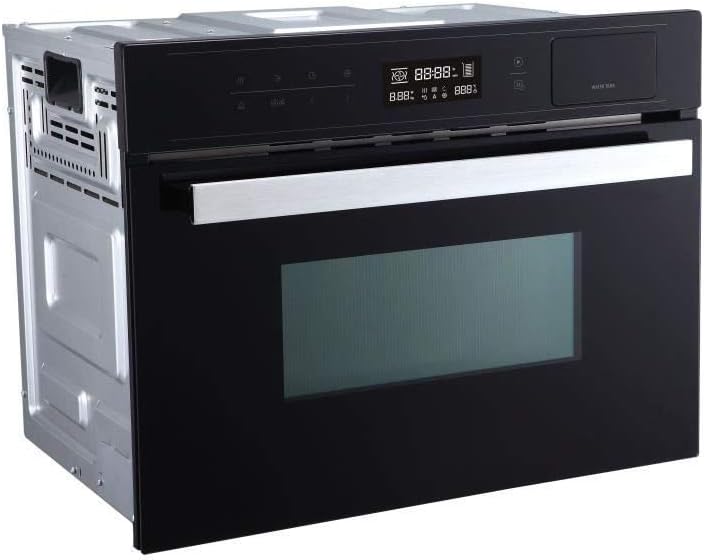
The Sharp KM34S3B combination microwave oven features a sleek design with intuitive controls. Key components include:
- Control Panel: Digital display and sensor buttons for various functions.
- Oven Door: Equipped with a viewing window and safety latch.
- Cooking Cavity: Stainless steel interior for durability and easy cleaning.
- Turntable: Glass tray for even cooking.
- Water Tank: For steam functions (if applicable, inferred from 'WATER TANK' label in image).
Product Images



Setup and Installation
Unpacking
- Carefully remove all packaging materials from the oven and its accessories.
- Check the oven for any damage, such as dents or a misaligned door. Do not operate if damaged.
- Remove any protective film from the exterior surfaces.
Placement
- Place the oven on a flat, stable surface that can support its weight.
- Ensure adequate ventilation by leaving sufficient space around the oven (typically 10 cm at the back, 20 cm at the top, and 5 cm on the sides).
- Keep the oven away from heat sources and strong magnetic fields.
- This model is designed for built-in installation. Follow the specific installation instructions provided with your appliance for proper integration into cabinetry.
Electrical Connection
- Ensure your household electrical supply matches the voltage specified on the oven's rating label.
- Plug the oven into a properly installed and grounded wall outlet. Do not use extension cords or adapters.
First Use
- Before first use, wipe the interior and exterior with a damp cloth.
- Place the turntable and turntable support correctly inside the oven.
- Run the oven empty for a few minutes on a low power setting to eliminate any manufacturing odors.
Operating Instructions
Control Panel Overview
The control panel features a digital display and various sensor buttons for easy operation. Refer to the specific icons on your appliance for exact functions.
- Display: Shows time, power level, cooking mode, and program indicators.
- Power Level Button: Selects microwave power levels (e.g., 100%, 80%, 60%, 40%, 20%).
- Time/Weight Adjustment: Buttons or dial to set cooking time or food weight.
- Start/Pause Button: Initiates or temporarily stops cooking.
- Stop/Cancel Button: Clears settings or stops cooking.
- Function Buttons: For selecting specific cooking modes like Microwave, Grill, Convection, or Combination.
- Program Buttons: Accesses pre-set cooking programs.
Basic Microwave Cooking
- Place food in a microwave-safe container on the turntable.
- Close the oven door securely.
- Press the Power Level button repeatedly to select the desired power (e.g., 900W for full power).
- Use the Time/Weight Adjustment buttons to set the cooking duration.
- Press the Start button to begin cooking.
Combination Cooking Modes
This oven offers combination cooking, blending microwave energy with grill or convection heat for faster and more even results.
- Place food in an appropriate heat-resistant, microwave-safe dish.
- Select the desired Combination mode (e.g., Microwave + Grill, Microwave + Convection) using the Function buttons.
- Set the cooking time and, if applicable, the temperature for convection.
- Press Start.
Pre-set Programs
The oven includes 80 pre-set programs for common dishes. Consult the recipe guide (if provided) for specific program numbers and food types.
- Place the food in the oven.
- Press the Program button and use the adjustment controls to select the desired program number.
- Enter the food weight if prompted.
- Press Start.
Defrost Function
The defrost function allows for quick and efficient thawing of frozen foods.
- Place frozen food in a microwave-safe dish.
- Press the Defrost button (or select the defrost program).
- Enter the weight of the food. The oven will automatically calculate the defrosting time.
- Press Start. Turn the food over halfway through the defrosting process for even thawing.
Maintenance and Cleaning
Regular cleaning and maintenance will ensure the longevity and optimal performance of your microwave oven.
Interior Cleaning
- Always unplug the oven before cleaning.
- Wipe the interior cavity with a damp cloth after each use to prevent food splatters from drying.
- For stubborn stains, place a bowl of water with lemon juice inside and microwave for 2-3 minutes. The steam will loosen the grime, making it easier to wipe away.
- Do not use abrasive cleaners or metal scouring pads.
Exterior Cleaning
- Clean the exterior surfaces with a soft, damp cloth and mild detergent.
- Avoid spraying cleaners directly onto the control panel. Apply cleaner to a cloth first.
Turntable Care
- The glass turntable and roller ring can be removed for cleaning. Wash them in warm, soapy water or in a dishwasher.
- Ensure they are completely dry before placing them back in the oven.
Troubleshooting
If you encounter issues with your Sharp KM34S3B microwave oven, refer to the table below for common problems and solutions.
| Problem | Possible Cause | Solution |
|---|---|---|
| Oven does not start. | Power cord not plugged in; Door not closed properly; Fuse blown or circuit breaker tripped. | Ensure power cord is securely plugged in; Close the door firmly; Check household fuse/circuit breaker. |
| Food not heating. | Incorrect power level or cooking time set; Door not closed properly; Malfunctioning magnetron. | Adjust power level and time; Ensure door is fully closed; Contact service if magnetron is suspected. |
| Light not working. | Bulb is loose or burned out. | Contact qualified service personnel for bulb replacement. |
| Unusual noise during operation. | Turntable not correctly placed; Foreign object in cavity. | Re-position turntable and roller ring; Check for and remove any foreign objects. |
Specifications
Below are the technical specifications for the Sharp KM34S3B Combination Microwave Oven:
| Feature | Detail |
|---|---|
| Brand | SHARP |
| Model Name | KM34S3B |
| Capacity | 34 Liters |
| Wattage | 900 watts |
| Special Features | Defrost |
| Installation Type | Built-in |
| Material | Glass, Stainless steel |
| Human Interface Input | Buttons |
| Color | Black |
Warranty and Support
Warranty information for the Sharp KM34S3B microwave oven is typically provided with the product at the time of purchase. Please refer to your sales receipt or the documentation included in the product packaging for specific warranty terms and conditions.
For technical support, service inquiries, or to purchase replacement parts, please contact SHARP customer service. Contact details, including phone numbers and website information, can usually be found on the SHARP official website or in your product's original packaging.


