
GPZON B26
GPZON Blood Pressure Monitor User Manual
Model: B26
1. Introduction
Thank you for choosing the GPZON Blood Pressure Monitor. This device is designed for accurate and convenient measurement of blood pressure and pulse rate at home. It features a large display, dual-user memory, and irregular heartbeat detection. Please read this manual thoroughly before using the device to ensure correct operation and accurate readings.
What's in the Box
- 1 x GPZON Blood Pressure Monitor (Model B26)
- 1 x Adjustable Cuff (22cm-40cm)
- 1 x USB Cable
- 1 x Instruction Manual

Image: Package contents showing the GPZON Blood Pressure Monitor, adjustable cuff, USB cable, and instruction manual.
2. Safety Information
Please observe the following safety precautions to ensure safe and accurate use of your blood pressure monitor:
- Consult your physician before using this device if you have any medical conditions.
- Do not use this device on infants, young children, or individuals who cannot express their consent.
- Do not use this device for purposes other than measuring blood pressure and pulse rate.
- Avoid taking measurements immediately after exercise, bathing, or consuming alcohol or caffeine.
- Ensure the cuff is applied correctly and comfortably. Over-tightening may cause discomfort or injury.
- If you experience discomfort during measurement, press the START/STOP button to immediately deflate the cuff.
- Keep the device away from strong electromagnetic fields.
- Do not disassemble or attempt to repair the device yourself. Contact customer support for assistance.
3. Product Features and Components
The GPZON Blood Pressure Monitor is equipped with advanced features for reliable blood pressure monitoring:
- Clinically Accurate: Provides precise blood pressure and pulse rate measurements.
- Cuff-Position Self-Detection: Intelligent biochip detects correct cuff placement and alerts for errors.
- Irregular Heartbeat Detection: Identifies and indicates irregular heartbeats during measurement.
- Dual User Mode & 240 Memory: Stores up to 120 readings for each of two users, allowing for long-term tracking.
- Large LCD Display: Clear, easy-to-read numbers, ideal for elderly users.
- One-Button Measurement: Simple operation for quick results in approximately 30 seconds.
- Adjustable Cuff: Fits arm circumferences from 22cm to 40cm.
Main Components

Image: The GPZON Blood Pressure Monitor with its large display and connected cuff.
The monitor features a large LCD screen displaying Systolic (SYS), Diastolic (DIA), Pulse (PUL) readings, time, date, and various indicators. Buttons include SET for settings, START/STOP for measurement, and MEM for memory recall.

Image: The monitor's display indicating an irregular heartbeat with a heart icon and wavy line.
The irregular heartbeat indicator alerts you if an irregular pulse is detected during measurement.

Image: Illustration of the dual user mode, allowing two individuals to store their readings separately.
The device supports two users, each with 120 memory slots, making it convenient for couples or families to track their readings over time.
4. Setup
Power Supply
The GPZON Blood Pressure Monitor can be powered by either 4 AAA batteries (not included) or via the provided USB cable connected to an AC-6V / 1A charger (not included).
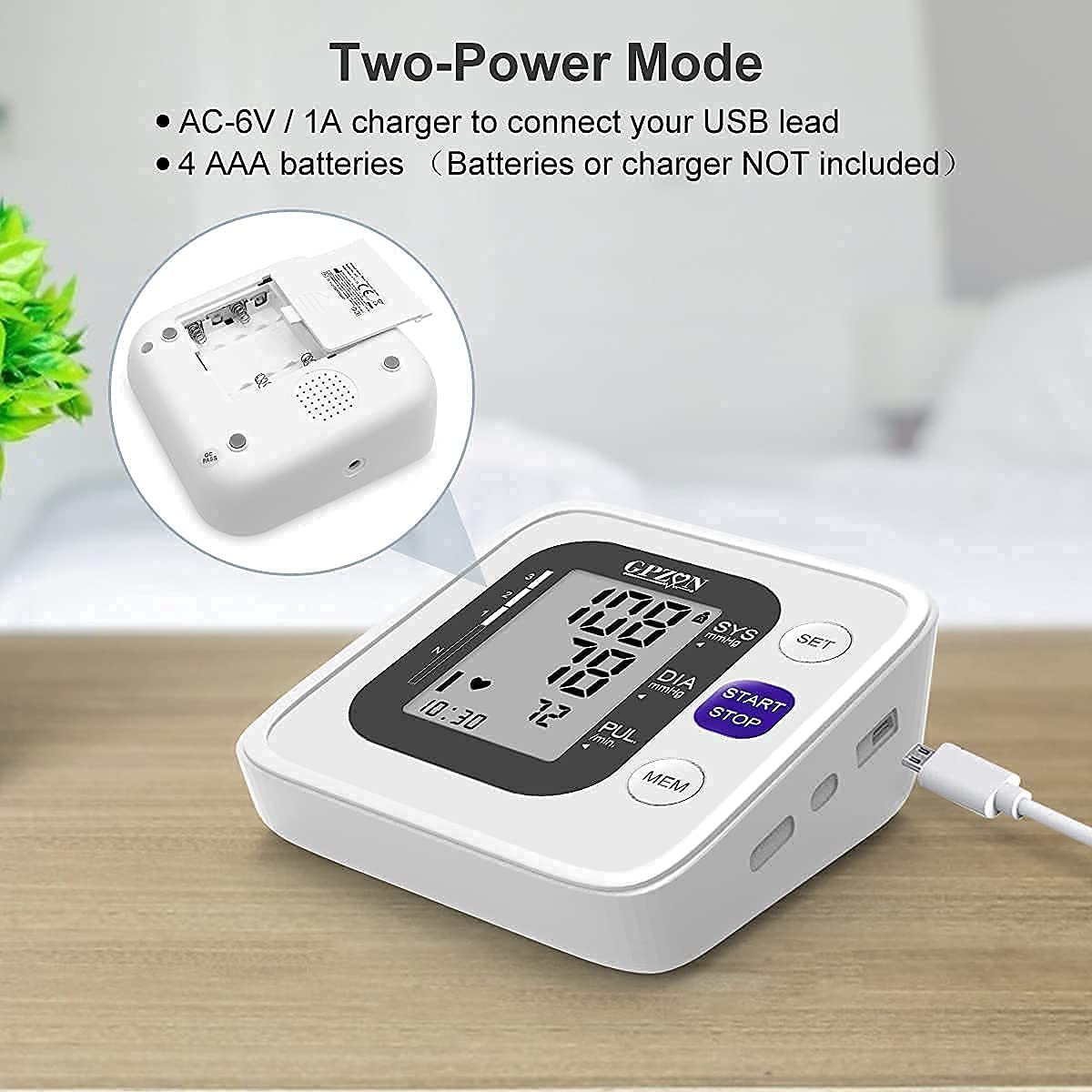
Image: The monitor's battery compartment and USB power input, illustrating the two power modes.
- Battery Installation: Open the battery compartment cover on the back of the device. Insert 4 AAA batteries, ensuring correct polarity (+/-). Close the cover.
- USB Power: Connect the small end of the USB cable to the monitor's USB port and the larger end to a compatible AC-6V / 1A USB power adapter.
Note: The USB cable provides power but does not charge batteries.
Setting Date and Time
Upon first use or after battery replacement, you may need to set the date and time. Refer to the detailed instructions in the included instruction manual for this procedure, typically involving the 'SET' button.
Connecting the Cuff
Insert the air tube connector from the cuff firmly into the air jack on the side of the monitor.
5. Operating Instructions
Proper Cuff Placement
Correct cuff placement is crucial for accurate readings.
- Sit comfortably with your back supported and feet flat on the floor.
- Place the cuff on your bare upper arm, approximately 2-3 cm (0.8-1.2 inches) above the elbow joint. The air tube should run down the inside of your arm.
- Ensure the cuff is snug but not too tight. You should be able to insert two fingers between the cuff and your arm.
- Rest your arm on a table so the cuff is at heart level.

Image: Visual guide for correct cuff positioning and an alert for arm movement during measurement.
The monitor features a Cuff-Position Self-Detection system. If the cuff is worn correctly, a checkmark icon will appear on the display. If incorrectly placed, an "X" icon will prompt you to adjust and re-measure.
An Arm Movement Indicator will also appear if you move during the measurement, indicating a potential error. If this occurs, adjust your posture and repeat the measurement.
Taking a Measurement
Follow these steps for an accurate blood pressure reading:
- Ensure the cuff is correctly placed and you are in a relaxed, seated position.
- Select your user profile (User A or User B) if applicable.
- Press the START/STOP button. The cuff will automatically inflate.
- Remain still and silent during the measurement.
- The cuff will slowly deflate, and your Systolic, Diastolic, and Pulse readings will be displayed on the screen in approximately 30 seconds.
- The reading will automatically be stored in the selected user's memory.
- Press START/STOP again to turn off the device, or it will automatically shut off after a period of inactivity.

Image: Demonstrates the one-button operation and quick 30-second measurement time.
Understanding Your Readings
The display shows three main values:
- SYS (Systolic Pressure): The top number, indicating the pressure in your arteries when your heart beats.
- DIA (Diastolic Pressure): The bottom number, indicating the pressure in your arteries between beats.
- PUL (Pulse Rate): Your heart rate in beats per minute.
The monitor also includes a WHO (World Health Organization) Blood Pressure Classification Indicator bar on the left side of the display, which visually categorizes your blood pressure level.

Image: WHO Blood Pressure Classification Bar, providing a visual reference for blood pressure levels.
Consult your healthcare professional for interpretation of your blood pressure readings.
Memory Function
To review past measurements:
- With the device off, press the MEM button.
- The most recent reading will be displayed first.
- Press MEM repeatedly to scroll through older readings.
- To exit memory mode, press START/STOP or wait for automatic shut-off.
6. Maintenance
Cleaning
- Wipe the monitor and cuff with a soft, dry cloth.
- If necessary, use a cloth lightly dampened with water or a mild detergent. Do not use abrasive cleaners or immerse the device in water.
- Ensure no liquid enters the device.
Storage
- Store the device in a clean, dry place, away from direct sunlight, extreme temperatures, and humidity.
- If the device will not be used for an extended period, remove the batteries to prevent leakage.
- Avoid folding the cuff too tightly or kinking the air tube.
7. Troubleshooting
| Problem | Possible Cause | Solution |
|---|---|---|
| Device does not power on. | Batteries are dead or incorrectly inserted; USB cable not connected. | Replace batteries, check polarity; ensure USB cable is firmly connected to a power source. |
| Inaccurate readings or inconsistent results. | Incorrect cuff placement; arm movement during measurement; talking during measurement; improper posture. | Ensure cuff is correctly positioned (check for icon); remain still and silent; sit in a relaxed position with arm at heart level. Repeat measurement after a few minutes. |
| Cuff does not inflate or inflates too little/much. | Air tube disconnected or kinked; cuff damaged; air leakage. | Check air tube connection; inspect cuff for damage. If problem persists, contact customer support. |
| "X" icon displayed after measurement attempt. | Cuff position error. | Re-adjust cuff according to instructions and re-measure. |
| Arm movement indicator displayed. | Movement during measurement. | Remain completely still and silent during measurement. Repeat. |
8. Specifications
| Parameter | Detail |
|---|---|
| Model Number | B26 |
| Brand | GPZON |
| Measurement Method | Oscillometric method |
| Cuff Circumference | 22 cm - 40 cm (8.7 inches - 15.7 inches) |
| Memory Capacity | 2 users x 120 readings (240 total) |
| Power Source | 4 x AAA batteries or USB DC 6V/1A |
| Product Dimensions (LxWxH) | 18.01 x 16 x 11.99 cm |
| Item Weight | 300 g |
| Included Components | Monitor, Cuff, USB Cable, User Manual |
9. Warranty and Support
GPZON is committed to providing high-quality products and customer satisfaction. If you encounter any issues with your Blood Pressure Monitor, please do not hesitate to contact our professional support team. Our team is ready to assist you with any problems 24/7.
For support, please refer to the contact information provided in the original product packaging or on the official GPZON website.
Related Documents - B26
 |
GPZON B26 Digital Blood Pressure Monitor User Manual - Accurate Home Health Monitoring Comprehensive user manual for the GPZON B26 automatic digital blood pressure monitor. Learn how to use, maintain, and interpret readings for accurate home health monitoring. Features include memory storage, irregular heartbeat detection, and WHO classification. |
 |
Manuel d'utilisation du tensiomètre intelligent pour bras B26 Guide complet pour le tensiomètre automatique intelligent pour bras B26, incluant les instructions d'utilisation, les spécifications techniques, l'entretien et les informations de garantie. |
 |
CAZON B26 Fully Automatic Upper Arm Blood Pressure Monitor User Manual Comprehensive user manual for the CAZON B26 Fully Automatic Upper Arm Blood Pressure Monitor, detailing setup, usage, measurement procedures, error handling, maintenance, and technical specifications. Includes important information on blood pressure and its measurement. |
 |
CAZON B26 Upper Arm Intelligent Blood Pressure Monitor User Manual Comprehensive user manual for the CAZON B26 Upper Arm Intelligent Blood Pressure Monitor. Learn about setup, measurement procedures, error indicators, care, maintenance, and technical specifications for accurate home health monitoring. |
 |
MEDGRAM B26 Fully Automatic Upper Arm Blood Pressure Monitor User's Manual Comprehensive user manual for the MEDGRAM B26 Fully Automatic Upper Arm Blood Pressure Monitor, covering setup, measurement procedures, error codes, maintenance, specifications, and safety guidelines. |