
XMCOSY+ YJ-SW15A
XMCOSY+ Smart Outdoor String Lights - User Manual
Model: YJ-SW15A
Length: 49 Feet (15 Bulbs)
Important Safety Information
Please read all instructions carefully before installation and use. Retain this manual for future reference.
- This product is designed for outdoor use with an IP65 waterproof rating, making it resistant to water, wind, snow, and sun.
- The bulbs are shatterproof plastic, not glass, for enhanced durability and safety.
- Operates on a safe 12V low voltage output. The product is ETL certified to ensure user safety.
- Ensure the power source is compatible with the product's input voltage (110-240V AC).
- Do not submerge the power adapter or connections in water. Ensure all connections are securely tightened to maintain waterproof integrity.
- Avoid installing near heat sources or in areas with excessive vibration.
- Always unplug the lights from the power source before performing any maintenance or bulb replacement.
Package Contents
Your XMCOSY+ Smart Outdoor String Lights package includes the following items:
- 1 x 49Ft String Light with 15 Sockets
- 15 x S14 LED Bulbs (E26 base)
- 1 x Spare S14 LED Bulb
- 1 x Power Adapter
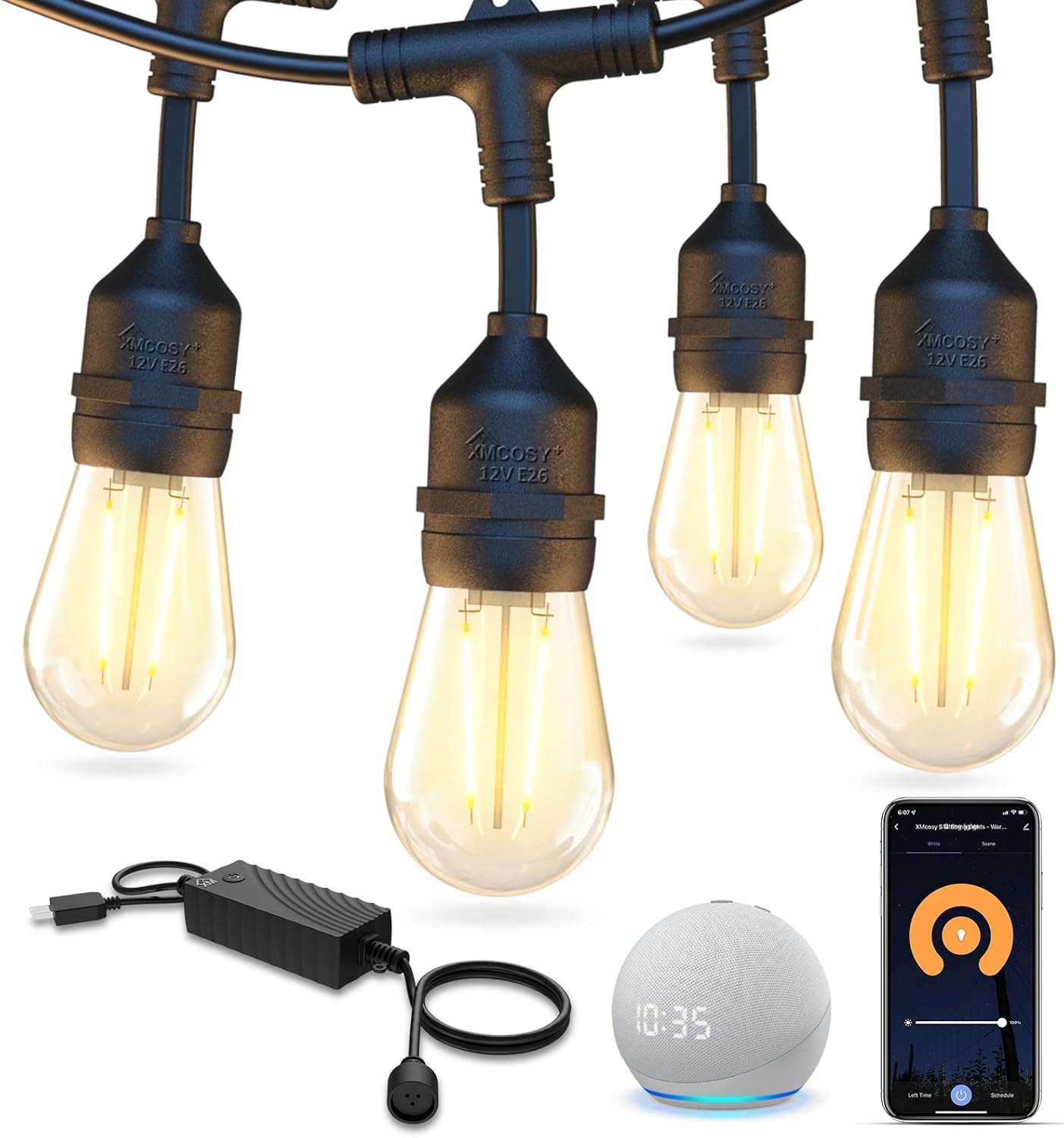
Image: The complete package showing the string lights, individual bulbs, and the power adapter.
Setup Guide
1. Pre-installation Checks
- Unpack all components and inspect for any damage.
- Ensure your desired installation location has access to a compatible power outlet (110-240V AC).
2. Mounting Instructions
The string lights feature built-in hooks above each bulb socket for easy hanging. You can use various methods for installation:
- Using Hooks: Securely attach the built-in hooks to nails, screws, or cup hooks on walls, fences, pergolas, or other structures.
- Using Zip Ties: For a more secure and flexible installation, use zip ties to fasten the string lights to cables, railings, or tree branches.
- Extendable Design: Multiple string light sets can be connected in series, allowing you to extend the total length up to 200 feet for larger spaces.

Image: String lights beautifully installed around an outdoor pool, demonstrating their aesthetic appeal and suitability for large areas.

Image: Detail of the commercial-grade design, highlighting the robust wiring and durable construction of the light string.

Image: A detailed diagram illustrating the 49-foot length, spacing between bulbs, and the connectable feature for extending the string lights.
3. Connecting to Power
Once mounted, simply connect the power adapter to a suitable outdoor power outlet. The lights will illuminate automatically or can be controlled via the app/voice commands.
Operating Instructions
1. App Control
Download the XMcosy App from your smartphone's app store (available for iOS and Android). Follow the in-app instructions to pair your string lights with your device.
- Brightness Adjustment: Use the app to customize the brightness from 1% to 100% to set the perfect ambiance.
- Light Scenes: Select from various pre-set light scenes or create your own custom scenes.
- Scheduling: Set daily schedules for the lights to automatically turn on/off at specific times.

Image: A smartphone displaying the XMcosy app, illustrating the user interface for controlling the string lights' brightness and settings.
Video: A demonstration of the XMCOSY+ app's features, including dimming and brightening the string lights directly from a smartphone.
Video: An unboxing and brief overview of the XMCOSY+ 49ft smart string lights, showcasing the product and its app connectivity.
2. Voice Control
The XMCOSY+ Smart Outdoor String Lights are compatible with Amazon Alexa and other voice assistants. Once paired through the XMcosy App, you can use voice commands for hands-free control, such as turning lights on/off or adjusting brightness.

Image: A family enjoying their patio illuminated by string lights, with speech bubbles indicating voice commands for Alexa and Google Home integration.
Video: A detailed review of the XMCOSY+ 98ft LED Smart String Lights, covering features like 2.4GHz Wi-Fi connectivity and compatibility with the XMcosy App and Alexa.
Maintenance & Care
The XMCOSY+ string lights are built for durability and minimal maintenance.
- Weather Resistance: With an IP65 waterproof rating and shatterproof bulbs, these lights are designed to withstand various weather conditions including rain, wind, snow, and sun.
- Cleaning: To clean the bulbs and string, gently wipe them with a soft, damp cloth. Do not use harsh chemicals or abrasive cleaners.
- Bulb Replacement: The S14 LED bulbs have an E26 base and are easily replaceable. A spare bulb is included in the package. Ensure the lights are unplugged before attempting to replace any bulbs.

Image: String lights shown in a rainy environment, emphasizing their IP65 waterproof and weather-resistant capabilities.

Image: A visual guide demonstrating the stable structure of the light sockets, the durable copper connection, and the simple process for replacing bulbs.
Troubleshooting
If you encounter any issues with your XMCOSY+ Smart Outdoor String Lights, please refer to the following common solutions:
- Lights Not Turning On:
- Ensure the power adapter is securely plugged into a working outlet.
- Check all connections along the string light for tightness.
- Verify that the lights are not set to an 'off' schedule in the app.
- Connectivity Issues (App/Voice Control):
- Confirm your Wi-Fi network is 2.4GHz, as the lights do not support 5GHz.
- Ensure your Wi-Fi router password is correctly entered in the app.
- Restart your Wi-Fi router and the string lights by unplugging and re-plugging them.
- Make sure your smartphone's Bluetooth and location services are enabled for initial pairing.
- Individual Bulb Not Working:
- Unplug the string lights and carefully unscrew and re-screw the affected bulb to ensure proper contact.
- If the issue persists, replace the bulb with the spare provided or a new compatible S14 LED bulb.
Specifications
| Brand | XMCOSY+ |
| Model | YJ-SW15A |
| Total Length | 49 Feet |
| Number of Light Sources | 15 + 1 Spare |
| Bulb Type | S14 LED (Dual Filament) |
| Bulb Base | E26 |
| Light Color | Warm White (2700 Kelvin) |
| Luminous Flux | 80 Lumens per bulb |
| Wattage | 36 Watts (Total) |
| Voltage | 12 Volts (DC Output) |
| Input Voltage | 110-240V AC |
| Connectivity | Wi-Fi (2.4GHz) |
| Control Method | App Control, Voice Control (Alexa compatible) |
| Water Resistance Level | IP65 Waterproof |
| Special Features | Dimmable, Shatterproof, Weather Resistant, Timer Schedule, Automation, Group Control, Device Share |
| Item Weight | 4.59 Pounds |
| Product Dimensions | 588 x 1.77 x 7.78 inches |
Warranty & Support
Warranty: XMCOSY+ provides a 1-year warranty with proof of purchase for this product.
Customer Support: If you have any questions, concerns, or require assistance with your XMCOSY+ Smart Outdoor String Lights, please do not hesitate to contact our customer service team.
Email: support@xmcosy.com
Related documentsYJ-SW15A


Ask a question about this manual
Ask about setup, troubleshooting, compatibility, parts, safety, or missing instructions. Manuals+ will review the question and use this page’s manual context to help answer it.