
Zoook Zoook Show Stopper
Zoook Rocker Show Stopper Duet 100W Karaoke Bluetooth Party Speaker User Manual
1. Introduction
Thank you for choosing the Zoook Rocker Show Stopper Duet 100W Karaoke Bluetooth Party Speaker. This manual provides essential information for setting up, operating, and maintaining your speaker. Please read it thoroughly before use to ensure optimal performance and safety.
Safety Information
- Do not expose the unit to rain or moisture.
- Do not open the casing; refer servicing to qualified personnel.
- Keep away from heat sources and direct sunlight.
- Ensure proper ventilation during use.
2. Package Contents
Verify that all items listed below are included in your package:
- 1 x Zoook Rocker Show-Stopper Bluetooth Speaker
- 1 x Wireless Microphone
- 1 x Remote Control
- 1 x 3.5mm Aux Cable
- 1 x Power Cord
- 1 x User Guide (this document)
- 1 x Certificate of Authenticity

Image: Contents of the Zoook Rocker Show Stopper package, including the speaker, wireless microphone, remote control, and cables.
3. Product Overview
Familiarize yourself with the various parts and controls of your Zoook Rocker Show Stopper speaker.
Front Panel Features
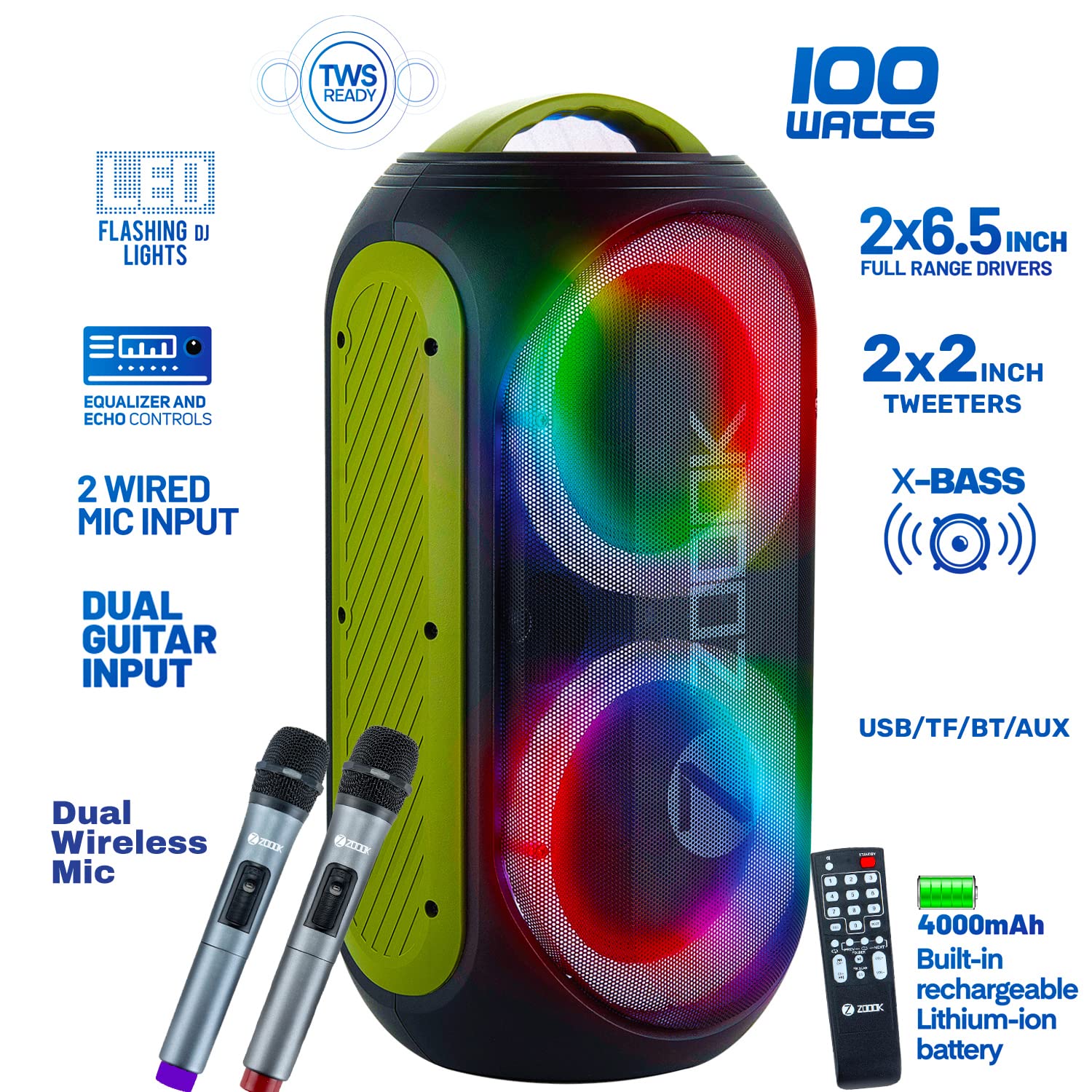
Image: Front view of the speaker highlighting key features like 100W output, dual full-range drivers, tweeters, X-Bass, TWS Ready, LED Flashing DJ Lights, Dual Wireless Mic, 2 Wired Mic Input, Dual Guitar Input, Equalizer and Echo Controls, USB/TF/BT/AUX connectivity, and 4000mAh built-in rechargeable Lithium-ion battery.
Top Panel Controls

Image: Detailed view of the top control panel with numbered buttons and ports. Key controls include AUX In, USB card slot, TF card slot, Previous/Mic-Priority, LED display, Next/TWS, Record, Light, Play-Pause/Accompany, Treble Control, Bass Control, Music Volume, Mic Volume, Echo Control, Power Switch, Mic Input 1, Mic Input 2, Charging Indicator, and Power Indicator.
Rear Panel Connections

Image: Rear view of the speaker showing various input and output ports for connectivity.
4. Initial Setup
Charging the Speaker
Before first use, fully charge the speaker using the provided power cord. The charging indicator will illuminate during charging and turn off when complete. A full charge provides up to 5 hours of battery life, depending on usage.
Powering On/Off
Locate the Power Switch on the top panel. Press and hold to turn the speaker ON or OFF.
5. Operating Instructions
Bluetooth Pairing
- Turn on the speaker. It will automatically enter Bluetooth pairing mode.
- Enable Bluetooth on your mobile device or tablet.
- Search for "ZOOOK SHOW STOPPER" in the list of available devices and select it to pair.
- A confirmation tone will sound upon successful pairing.
TWS (True Wireless Stereo) Pairing
To connect two Zoook Rocker Show Stopper speakers for stereo sound:
- Ensure both speakers are turned on and in Bluetooth mode, but not connected to any device.
- Press the 'TWS' button on one of the speakers. It will emit a pairing tone.
- The two speakers will automatically connect to each other. A confirmation tone will sound.
- Now, connect your mobile device to one of the paired speakers via Bluetooth as described above.
USB/TF Card Playback
Insert a USB drive or TF (MicroSD) card into the respective slot on the top panel. The speaker will automatically detect the media and begin playback. Use the 'Previous' and 'Next' buttons to navigate tracks.
AUX Input
Connect an external audio device (e.g., MP3 player, laptop) to the 'AUX In' port using the provided 3.5mm Aux Cable. The speaker will automatically switch to AUX mode. Adjust volume from both the speaker and the connected device.
Microphone Usage
The speaker supports dual wireless microphones and wired microphones.
- Wireless Mic: Turn on the wireless microphone. It will automatically pair with the speaker. Adjust microphone volume using the 'Mic Volume' knob.
- Wired Mic: Connect a wired microphone (not included) to 'Mic Input 1' or 'Mic Input 2' on the top panel. Adjust microphone volume using the 'Mic Volume' knob.
Guitar Input
Connect your guitar to the 'Guitar Input' port on the top panel. Adjust the guitar volume from your instrument.

Image: A person playing a guitar connected to the speaker, demonstrating the guitar input feature.
One-Click Recording
While playing music from USB/TF card or using a microphone, press the 'Record' button to start recording. Press again to stop. Recordings are saved to the inserted USB/TF card.
LED Light Modes
Press the 'Light' button on the top panel to cycle through different LED flashing DJ light modes. Press and hold to turn the lights off.
Sound Adjustment
Use the 'Bass Control', 'Treble Control', and 'Echo Control' knobs on the top panel to customize your audio experience.
Remote Control Usage
The included remote control allows you to manage playback, volume, light modes, and other functions from a distance.
Image: The remote control for the Zoook Rocker Show Stopper speaker, showing its various buttons for function control.
6. Troubleshooting
| Problem | Possible Cause | Solution |
|---|---|---|
| Speaker does not power on. | Low battery; Power cord not connected. | Charge the speaker; Ensure power cord is securely connected. |
| No sound. | Volume too low; Incorrect input mode; Device not paired. | Increase volume; Select correct input mode (Bluetooth, AUX, USB/TF); Pair device. |
| Bluetooth pairing fails. | Speaker not in pairing mode; Device too far; Interference. | Ensure speaker is in BT mode; Move device closer; Turn off other Bluetooth devices. |
| Microphone not working. | Mic volume too low; Mic not powered on (wireless); Incorrect input. | Increase Mic Volume; Turn on wireless mic; Ensure wired mic is in correct input. |
| Recording not working. | No USB/TF card inserted; Card full or corrupted. | Insert a valid USB/TF card; Use a different card or clear space. |
7. Specifications
| Feature | Detail |
|---|---|
| Model | Zoook Show Stopper |
| Speakers Maximum Output Power | 100 Watts |
| Power Source | Battery Powered |
| Battery Type | Built-in Rechargeable Lithium-ion (4000mAh) |
| Battery Average Life | Up to 5 Hours |
| Connectivity Technology | Bluetooth, USB, TF Card, Aux |
| Audio Input | XLR, 1/4", Aux |
| Special Features | Dual Wireless Mic, Flashing DJ Lights, Dual Guitar Inputs, One Click Recording, TWS Ready, Remote Control, Bass & Treble Control, Echo Control |
| Product Dimensions (LxWxH) | 22 x 24.2 x 50.2 cm |
| Item Weight | 5.7 kg |
| Maximum Operating Distance | 10 Feet (Bluetooth) |

Image: Diagram showing the dimensions of the Zoook Rocker Show Stopper speaker (Height: 502mm, Width: 242mm, Depth: 220mm).
8. Maintenance
Cleaning
Wipe the speaker with a soft, dry cloth. Do not use abrasive cleaners or solvents. Avoid getting moisture into any openings.
Storage
When not in use for extended periods, store the speaker in a cool, dry place away from direct sunlight and extreme temperatures. It is recommended to charge the battery periodically to maintain its lifespan.
9. Warranty and Support
Warranty Information
The Zoook Rocker Show Stopper Duet speaker comes with a 1-year manufacturer's warranty from the date of purchase. This warranty covers manufacturing defects. Please retain your purchase receipt for warranty claims.
Customer Support
For technical assistance, troubleshooting, or warranty inquiries, please contact Zoook customer support through their official website or the contact information provided in your product packaging.
Ask a question about this manual
Ask about setup, troubleshooting, compatibility, parts, safety, or missing instructions. Manuals+ will review the question and use this page’s manual context to help answer it.