
Airpulse A80
Airpulse A80 Powered Bookshelf Speakers User Manual
Model: A80 | Brand: Airpulse
1. Introduction
Thank you for purchasing the Airpulse A80 Powered Bookshelf Speakers. This manual provides essential information for the safe and efficient use of your new audio system. Please read it thoroughly before operation and retain it for future reference.
Package Contents
- Airpulse A80 Active Speaker (Right)
- Airpulse A80 Passive Speaker (Left)
- Remote Control
- Power Cable
- Left/Right Speaker Connection Cable
- USB Cable
- Optical Cable
- RCA Cable
- Urethane Angle Bases (for speaker tilt)

Figure 1: Front view of the Airpulse A80 powered bookshelf speakers.
2. Safety Instructions
To ensure safe operation and prevent damage, please observe the following safety guidelines:
- Power Source: Connect the speakers only to a power outlet with the correct voltage as indicated on the product.
- Ventilation: Ensure adequate ventilation around the speakers. Do not block ventilation openings.
- Water and Moisture: Do not expose the speakers to water, rain, or excessive moisture.
- Heat Sources: Keep speakers away from heat sources such as radiators, heat registers, stoves, or other heat-producing apparatus.
- Cleaning: Unplug the speakers before cleaning. Use a dry cloth only.
- Servicing: Do not attempt to service the speakers yourself. Refer all servicing to qualified service personnel.
3. Setup
3.1 Speaker Placement
Place the speakers on a stable, level surface. For optimal stereo imaging, position the speakers equidistant from your listening position, forming an equilateral triangle. The included urethane angle bases can be used to slightly tilt the speakers upwards for better sound dispersion if placed on a lower surface.
3.2 Connecting Speakers
The right speaker is the active unit containing the amplifier and controls. The left speaker is passive. Connect the left speaker to the "L SPEAKER OUT" port on the rear of the right speaker using the provided speaker connection cable.
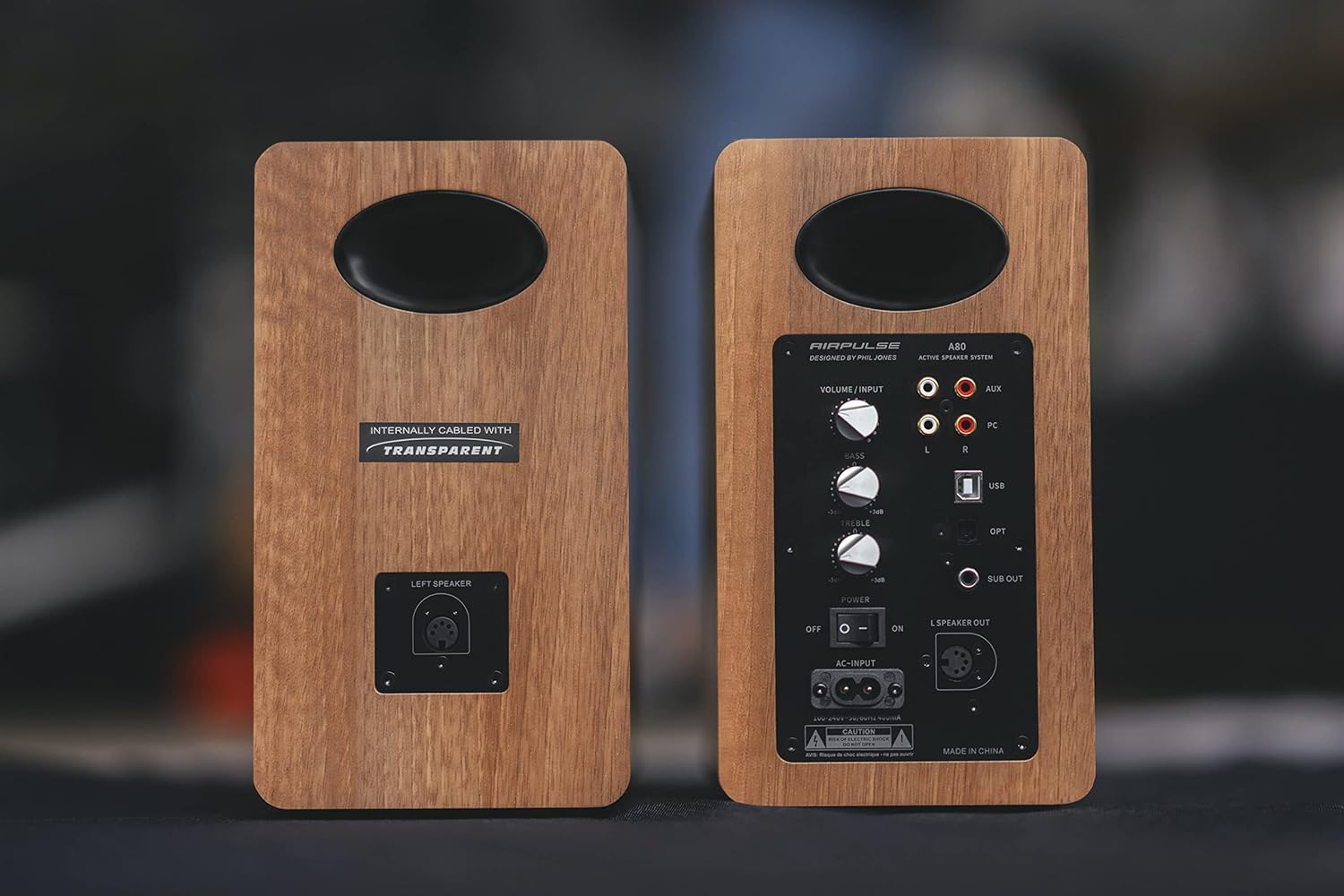
Figure 2: Rear panel of the Airpulse A80 speakers, illustrating the connection points.
3.3 Power Connection
Connect the power cable to the "AC-INPUT" port on the rear of the active (right) speaker, then plug it into a wall outlet. Ensure the power switch is in the "OFF" position before connecting to power.
3.4 Audio Source Connections
The Airpulse A80 offers multiple input options:
- USB Input: Connect your computer to the "USB" port using the provided USB cable for high-quality digital audio playback.
- Optical Input: Connect devices like TVs or game consoles to the "OPT" port using an optical cable.
- RCA (AUX) Input: Use the RCA cable to connect analog audio sources to the "AUX" ports (L/R).
- PC Input: Use the RCA cable to connect your PC's analog audio output to the "PC" ports (L/R).
- Bluetooth: For wireless audio streaming from Bluetooth-enabled devices. (See Section 4.2 for pairing instructions)

Figure 3: Detailed view of the active speaker's rear panel, showing input options and controls.
3.5 Subwoofer Output
The "SUB OUT" port allows you to connect an external active subwoofer for enhanced bass response. Connect a subwoofer cable from this port to the input of your active subwoofer.
4. Operating Instructions
4.1 Powering On/Off
Flip the "POWER" switch on the rear panel of the active speaker to "ON" to power on the system. Flip it to "OFF" to power off.
4.2 Input Selection
You can select the input source using the "VOLUME / INPUT" knob on the rear panel or the input selection buttons on the remote control. Rotate the knob or press the buttons to cycle through USB, Optical, Bluetooth, AUX, and PC inputs.
4.3 Bluetooth Pairing
- Select the Bluetooth input on the speakers. The indicator light will flash.
- On your Bluetooth-enabled device (e.g., smartphone, tablet), search for "Airpulse A80" in the Bluetooth settings.
- Select "Airpulse A80" to pair. Once connected, the indicator light on the speaker will glow steadily.
- To disconnect or pair with another device, press and hold the Bluetooth button on the remote control or the "VOLUME / INPUT" knob for a few seconds until the indicator light flashes again.
4.4 Volume, Bass, and Treble Controls
Adjust the overall volume using the "VOLUME / INPUT" knob on the rear panel or the volume buttons on the remote control. The "BASS" and "TREBLE" knobs on the rear panel allow you to fine-tune the low and high frequencies, respectively, from -6dB to +6dB.
4.5 Remote Control Functions
The included remote control provides convenient access to various functions:
- Power On/Off
- Volume Up/Down
- Mute
- Input Selection (USB, Optical, Bluetooth, AUX, PC)
- Bluetooth Disconnect/Pairing
- Playback Controls (Play/Pause, Next/Previous Track - for Bluetooth/USB)
5. Maintenance
5.1 Cleaning
To clean the speakers, first unplug them from the power outlet. Use a soft, dry cloth to wipe the surfaces. Do not use liquid cleaners, aerosols, or abrasive materials, as these may damage the finish or internal components.
5.2 Storage
If storing the speakers for an extended period, ensure they are powered off and unplugged. Store them in a cool, dry place, away from direct sunlight and extreme temperatures.
6. Troubleshooting
| Problem | Possible Cause | Solution |
|---|---|---|
| No power | Power cable not connected; Power switch off; Wall outlet not active. | Ensure power cable is securely connected. Turn power switch to "ON". Check wall outlet with another device. |
| No sound | Incorrect input selected; Volume too low; Mute activated; Cables loose. | Select correct input. Increase volume. Deactivate mute. Check all audio cables for secure connection. |
| Bluetooth not pairing | Speakers not in pairing mode; Device too far; Interference. | Ensure speakers are in Bluetooth input and indicator is flashing. Move device closer. Avoid other wireless devices. |
| Sound distortion | Volume too high; Source audio quality poor; Bass/Treble settings too extreme. | Reduce volume. Check source audio. Adjust Bass/Treble knobs to neutral or lower settings. |
| Only one speaker has sound | Left speaker cable loose or disconnected; Source audio issue. | Check the connection of the left speaker cable to the active speaker. Test with a different audio source. |
7. Specifications
| Feature | Detail |
|---|---|
| Model | AP-A80 |
| Speaker Type | Powered Bookshelf Speaker System with Subwoofer Output |
| Amplifier Power | Woofer: 40W x 2 | Tweeter: 10W x 2 (Total 100W RMS) |
| Inputs | USB, Optical, Bluetooth 5.0, RCA (AUX), PC |
| Outputs | Subwoofer Output |
| Connectivity Technology | Bluetooth, USB |
| Woofer Size | 4.5 inches (11.5 cm) |
| Product Dimensions (W x D x H) | 14 cm x 24 cm x 25.5 cm (per speaker, including protrusions) |
| Product Weight | 4.8 kg (per speaker) |
| Control Method | Remote Control, On-board Knobs |
| Audio Output Mode | Stereo |
| Mounting Type | Tabletop Mount |

Figure 4: Exploded view of a speaker driver, illustrating its internal components.
8. Warranty and Support
Airpulse products are designed and manufactured to the highest quality standards. For warranty information and technical support, please refer to the warranty card included with your product or visit the official Airpulse website. Keep your purchase receipt as proof of purchase for warranty claims.
For further assistance, please contact your local dealer or Airpulse customer service.
Related documentsA80


Ask a question about this manual
Ask about setup, troubleshooting, compatibility, parts, safety, or missing instructions. Manuals+ will review the question and use this page’s manual context to help answer it.