
Product Overview
The Altec Lansing LifeJacket 3 (IMW578L-RYB) is a rugged, portable Bluetooth speaker designed for outdoor adventures. It features an "Everything Proof" rating, making it waterproof, dirtproof, shockproof, and snowproof, and it even floats. Enjoy powerful sound and extended playtime wherever you go.

Front view of the Altec Lansing LifeJacket 3 Bluetooth Speaker in Royal Blue.
- EVERYTHING PROOF: This speaker boasts a heavy-duty, washable rubberized skin that is everything proof. It is IP67 rated to be waterproof, dustproof, shockproof, and snowproof; it even floats so the music will play on, no matter what.
- LONG RANGE: The perfect speaker for any occasion- parties, traveling, camping, poolside, or anywhere you want to hear your favorite tunes. It has a 50-foot range along with extra audio horsepower, making it a great companion for the outdoors.
- BATTERY LIFE: This speaker holds an outstanding 30 hours of battery life from full charge and even has a built-in smartphone charger to make sure your speaker can keep up with you while on the go.
- TRUE WIRELESS PAIRING: Built with true wireless stereo and pairing which allows you to pair up to 2 speakers simultaneously for a bigger and better sound!
- CONVENIENT MOUNTING: The LifeJacket 3 also features a built-in universal mounting bracket for easy attachment to equipment and structures like bikes, kayaks, jet skis, and motorcycles so the fun never stops!
Package Contents
Ensure all items are present in your package:
- Altec Lansing LifeJacket 3 Bluetooth Speaker
- Charger
Setup Guide
Charging the Speaker
Before first use, fully charge your LifeJacket 3 speaker. Locate the charging port, typically protected by a rubber flap, on the side or back of the unit. Connect the provided charger to the speaker and a power source. The charging indicator light will illuminate during charging and turn off or change color when fully charged.

The speaker's charging port is protected by a rubber flap for waterproofing.
Bluetooth Pairing
To connect your device to the LifeJacket 3 speaker via Bluetooth:
- Power on the speaker by pressing and holding the power button until you hear an audible prompt.
- The Bluetooth indicator light will begin to flash, indicating it is in pairing mode.
- On your smartphone or Bluetooth-enabled device, navigate to the Bluetooth settings.
- Select "LifeJacket 3" from the list of available devices.
- Once connected, the speaker will provide an audible confirmation, and the Bluetooth indicator light will become solid.
Operating Instructions
Basic Controls
The top panel of the LifeJacket 3 features intuitive controls for easy operation:
- Power Button: Press and hold to turn the speaker on or off.
- Volume Up (+): Press to increase the volume.
- Volume Down (-): Press to decrease the volume.
- Play/Pause: Press to play or pause audio.
- Track Skip: Double-press volume up for next track, double-press volume down for previous track.
True Wireless Pairing (Pairing Two Speakers)
Enhance your audio experience by wirelessly connecting two LifeJacket 3 speakers for stereo sound:
- Ensure both LifeJacket 3 speakers are powered on and not connected to any Bluetooth device.
- On one speaker (this will be your primary speaker), press and hold the Bluetooth button until you hear a pairing prompt.
- On the second speaker, press the Bluetooth button once.
- The speakers will automatically connect to each other. Once connected, the primary speaker's Bluetooth light will flash, and the second speaker's light will be solid.
- Now, connect your device to the primary speaker via Bluetooth as described in the "Bluetooth Pairing" section.
Built-in Smartphone Charger
The LifeJacket 3 features a built-in USB port to charge your smartphone or other small devices. Simply open the protective flap on the back of the speaker and connect your device's charging cable to the USB-A port.
Mounting Options
Utilize the integrated universal mounting bracket to attach your speaker to various equipment and structures, such as bikes, kayaks, or jet skis, for secure placement during activities.
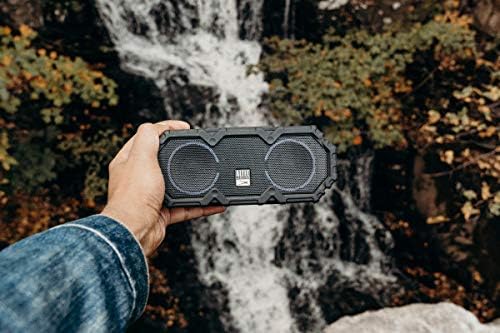
The LifeJacket 3 is designed for rugged outdoor use, perfect for adventures.
Care and Maintenance
Cleaning
The LifeJacket 3 features a washable rubberized skin. To clean, simply rinse with fresh water and wipe with a soft cloth. Avoid using harsh chemicals or abrasive cleaners.
Storage
When not in use, store the speaker in a cool, dry place away from direct sunlight and extreme temperatures. Ensure all ports are securely sealed to maintain its waterproof integrity.
Troubleshooting
If you encounter issues with your Altec Lansing LifeJacket 3, try the following common troubleshooting steps:
- No Power: Ensure the speaker is fully charged. Connect it to the charger and allow it to charge for at least 30 minutes before attempting to power on again.
- Cannot Pair via Bluetooth:
- Make sure Bluetooth is enabled on your device.
- Ensure the speaker is in pairing mode (flashing Bluetooth indicator light).
- Move your device closer to the speaker (within 50 feet).
- Forget the speaker from your device's Bluetooth list and attempt to pair again.
- Poor Sound Quality:
- Check the volume levels on both the speaker and your connected device.
- Ensure there are no obstructions between your device and the speaker.
- If using True Wireless Pairing, ensure both speakers are properly connected.
- Water Damage: While the speaker is IP67 rated, always ensure the rubber flap covering the charging and auxiliary ports is securely closed before exposing the speaker to water. If water enters the ports, allow them to dry completely before charging or connecting cables.
For more detailed troubleshooting or specific issues, please refer to the official user manual.
Technical Specifications
| Feature | Specification |
|---|---|
| Brand | Altec Lansing |
| Model Name | LifeJacket |
| Item Model Number | IMW578L-RYB |
| Speaker Type | Portable |
| Connectivity Technology | Bluetooth |
| Wireless Communication Technology | Bluetooth |
| Bluetooth Range | 50 Feet |
| Water Resistance Level | Waterproof (IP67) |
| Battery Life | Up to 30 Hours |
| Power Source | Battery Powered |
| Speaker Maximum Output Power | 80 Watts |
| Product Dimensions | 9"D x 4.5"W x 4.75"H |
| Item Weight | 2.07 pounds |
| Material | Rubber |
| Color | Royal Blue |
Warranty and Support
For detailed warranty information, safety guidelines, and comprehensive support for your Altec Lansing LifeJacket 3, please refer to the official user manual provided by the manufacturer.
You can access the full user manual in PDF format here: Altec Lansing LifeJacket 3 User Manual (PDF)
For additional assistance, visit the official Altec Lansing website or contact their customer support.


