
Mellanox MCX623106AN-CDAT
Mellanox NVIDIA ConnectX-6 Dx Ethernet SmartNIC User Manual
Model: MCX623106AN-CDAT | Brand: Mellanox
1. Product Overview
The Mellanox NVIDIA ConnectX-6 Dx Ethernet SmartNIC is an advanced network interface card designed for high-performance computing and data center environments. It offers robust features for network acceleration, security, and virtualization. Key capabilities include Crypto-IPsec and TLS data-in-motion inline encryption and decryption offload, AES-XTS block-level data-at-rest encryption, and probes and denial-of-service (DoS) attack protection. The SmartNIC also provides hardware-based L4 firewall capabilities through NVIDIA ASAP (Accelerated Switch and Packet Processing) offload technology, enhancing network security and performance. It supports secure boot and firmware updates using RSA cryptography and offers cloning protection via a device-unique secret key. For virtualization, ConnectX-6 Dx ASAP delivers virtual switch (vSwitch) and virtual router (vRouter) hardware offloads, supporting both SR-IOV and VirtIO with up to 8 million rules. Advanced Quality of Service (QoS) features include traffic shaping and classification-based data policing. The Zero Touch RoCE (ZTR) simplifies RoCE deployments, allowing seamless operation on existing networks without special configuration. Additionally, it includes an API for building user-defined congestion control algorithms.
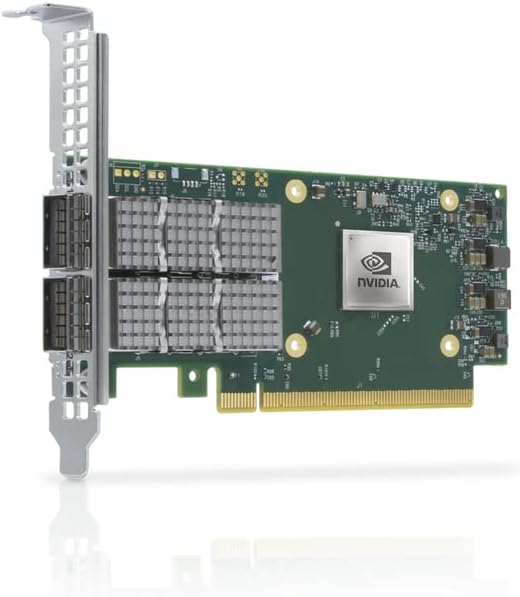
Figure 1: Front view of the Mellanox NVIDIA ConnectX-6 Dx Ethernet SmartNIC, showcasing its dual-port design and the NVIDIA chip.
2. Key Features
- High Bandwidth: 100 Gigabit Ethernet card designed to ease bandwidth and management constraints on service provider networks.
- PCI Express 4.0 x16 Interface: Provides smooth data transfer and outstanding performance for demanding applications.
- Dual Port Design: Allows the addition of two network ports using a single expansion slot, suitable for clients, servers, or workstations.
- Optical Fiber Support: Supports optical fiber cable for longer distance spans and excellent data transmission rates between servers and network components.
- 100GBase-X Technology: Achieves up to 100Gbps data transfer rate over supported network cables.
- Advanced Security: Crypto-IPsec, TLS, and AES-XTS offloads for data-in-motion and data-at-rest encryption. Hardware root-of-trust for secure boot and firmware updates.
- Virtualization Offloads: ASAP technology for vSwitch and vRouter hardware offloads, supporting SR-IOV and VirtIO.
- Quality of Service (QoS): Includes traffic shaping and classification-based data policing.
- Zero Touch RoCE (ZTR): Simplifies RoCE deployments on existing networks without special configuration.
3. Setup and Installation
This section provides general guidelines for installing the ConnectX-6 Dx SmartNIC. For detailed, model-specific instructions, always refer to the official Mellanox/NVIDIA installation guide provided with your product or available on the manufacturer's support website.
3.1. System Requirements
- Available PCI Express 4.0 x16 slot (compatible with earlier PCIe generations, but performance may be limited).
- Compatible operating system (e.g., Linux distributions, Windows Server).
- Sufficient power supply.
- Appropriate network cables (e.g., optical fiber for 100GbE).
3.2. Installation Steps
- Power Down System: Ensure the computer system is completely powered off and disconnected from the power source.
- Open Chassis: Open the computer case to access the motherboard and expansion slots.
- Locate PCIe Slot: Identify an available PCI Express 4.0 x16 slot.
- Insert SmartNIC: Carefully align the ConnectX-6 Dx SmartNIC with the chosen PCIe slot and press firmly until it is securely seated. Ensure the bracket is aligned with the chassis opening.
- Secure Card: Secure the SmartNIC with the retaining clip or screw provided by your chassis.
- Close Chassis: Close the computer case and reconnect the power.
- Power On System: Power on the system.
- Install Drivers: Once the operating system boots, install the necessary drivers for the ConnectX-6 Dx SmartNIC. Drivers are typically available on the Mellanox/NVIDIA support website.

Figure 2: Top view of the Mellanox NVIDIA ConnectX-6 Dx Ethernet SmartNIC, showing the heatsinks and connector ports.
4. Operating Instructions
After successful physical installation and driver setup, the ConnectX-6 Dx SmartNIC will be recognized by your operating system. Configuration typically involves setting up network interfaces, IP addresses, and potentially advanced features like RoCE, SR-IOV, or security offloads.
4.1. Driver Verification
Verify that the drivers are correctly installed. In Linux, use commands like lspci -vv to check the device status and ethtool -i <interface_name> to check driver information. In Windows, check Device Manager.
4.2. Network Configuration
Configure the network interfaces using your operating system's standard networking tools. This includes assigning IP addresses, subnet masks, and gateway information. For advanced features like RoCE or virtualization, refer to the specific Mellanox/NVIDIA software documentation and guides.
4.3. Firmware Updates
Regularly check for and apply firmware updates from the Mellanox/NVIDIA support website. Firmware updates can provide performance improvements, bug fixes, and new features. Follow the manufacturer's instructions carefully when performing firmware updates.
5. Maintenance
The ConnectX-6 Dx SmartNIC is designed for reliability and requires minimal maintenance. However, adhering to the following practices can help ensure optimal performance and longevity:
- Keep System Clean: Ensure the computer chassis is free of dust and debris to maintain proper airflow and cooling for the SmartNIC.
- Driver and Firmware Updates: As mentioned in the operating section, regularly update drivers and firmware to benefit from the latest optimizations and security patches.
- Environmental Conditions: Operate the system within recommended temperature and humidity ranges to prevent hardware degradation.
- Physical Inspection: Periodically inspect the card for any visible damage or loose connections, especially if the system has been moved.
6. Troubleshooting
This section addresses common issues you might encounter with the ConnectX-6 Dx SmartNIC.
| Problem | Possible Cause | Solution |
|---|---|---|
| SmartNIC not detected by OS. | Card not seated correctly; PCIe slot issue; BIOS settings; Driver not installed. | Reseat the card; Try a different PCIe slot; Check BIOS for PCIe settings; Install or reinstall drivers. |
| No network link light. | Cable issue; Port issue on switch/router; Driver issue; Incorrect network configuration. | Check network cable connection; Test with a different cable; Verify switch/router port status; Ensure correct drivers are installed and network settings are applied. |
| Slow network performance. | Driver issue; Network congestion; Cable quality; Incorrect configuration (e.g., duplex mismatch). | Update drivers; Check network traffic; Use high-quality cables; Verify duplex settings on both ends. |
| Advanced features (RoCE, SR-IOV) not working. | Incorrect software configuration; Firmware outdated; OS/BIOS not supporting virtualization features. | Refer to Mellanox/NVIDIA documentation for specific configuration steps; Update firmware; Ensure virtualization features are enabled in BIOS/UEFI. |
7. Specifications
| Attribute | Detail |
|---|---|
| Brand | Mellanox |
| Series | ConnectX-6 Dx |
| Model Number | MCX623106AN-CDAT |
| Hardware Interface | Ethernet, PCI Express 4.0 x16 |
| Data Transfer Rate | Up to 100 Gbps (100GBase-X) |
| Ports | Dual Port |
| Compatible Devices | Desktop (Servers, Workstations) |
| Item Weight | 0.4 ounces (approx. 11.34 grams) |
| Product Dimensions (LxWxH) | 7.5 x 6.25 x 1 inches (approx. 19.05 x 15.88 x 2.54 cm) |
| Operating System Support | RM (Refer to manufacturer for specific OS compatibility list) |
| Key Features | Crypto-IPsec, TLS, AES-XTS offloads, ASAP technology, SR-IOV, VirtIO, QoS, ZTR |
8. Warranty and Support
The Mellanox NVIDIA ConnectX-6 Dx Ethernet SmartNIC is typically covered by a manufacturer's warranty. For specific warranty terms, duration, and conditions, please refer to the official documentation provided with your product or visit the official Mellanox/NVIDIA website.
For technical support, driver downloads, firmware updates, and additional resources, please visit the official Mellanox or NVIDIA support portals. These resources provide comprehensive guides, FAQs, and contact information for assistance.
Note: Warranty and support policies are subject to change by the manufacturer. Always consult the most current information directly from Mellanox/NVIDIA.
Related documentsMCX623106AN-CDAT


Ask a question about this manual
Ask about setup, troubleshooting, compatibility, parts, safety, or missing instructions. Manuals+ will review the question and use this page’s manual context to help answer it.