
1. Introduction
The Gravity 4000.1D is a high-performance Class D monoblock amplifier designed for automotive audio systems. This amplifier delivers 4000 Watts maximum power and is stable at 1 Ohm, 2 Ohm, and 4 Ohm loads, making it suitable for driving subwoofers. It features a digital design with a MOSFET power supply for efficient operation. This manual provides essential information for proper installation, operation, and maintenance of your amplifier.
2. Safety Precautions
- Always disconnect the vehicle's battery negative terminal before starting any installation.
- Ensure all wiring is properly routed and secured to prevent damage or short circuits.
- Use appropriate gauge power and ground wires as specified in the installation section.
- Install the amplifier in a well-ventilated area to prevent overheating.
- Avoid mounting the amplifier in locations exposed to direct sunlight or excessive moisture.
- Consult a professional car audio installer if you are unsure about any installation steps.
3. Package Contents
Verify that all items are present in the package:
- Gravity 4000.1D Class D Car Amplifier
- Remote Bass Knob with Cable
- Mounting Hardware (Screws)
- User Manual (This document)
- SoundXtreme AP6 Bass Machine (Bundle Component)
4. Product Overview
Familiarize yourself with the amplifier's layout and connections.

Figure 1: Top view of the Gravity 4000.1D Class D Car Amplifier, showing the 'GRAVITY' logo and 'WARZONE' branding, along with the model number 'WZ 4000-1D'.
4.1 Input and Control Panel

Figure 2: Close-up view of the amplifier's input and control panel. This side features RCA input jacks, a remote bass knob port, and various adjustment controls.
- PROTECT LED: Illuminates when the amplifier is in protection mode.
- REMOTE: Port for connecting the wired remote bass knob.
- INPUT (RCA): Audio signal input from your head unit or source.
- BRIDGE IN: Used for bridging multiple amplifiers (refer to advanced setup).
- GAIN: Adjusts the input sensitivity of the amplifier.
- LPF (Low Pass Filter): Adjusts the low-pass crossover frequency (40 Hz ~ 180 Hz).
- SUBSONIC: Adjusts the subsonic filter frequency (0 Hz ~ 50 Hz).
- BASS BOOST FREQ: Selects the center frequency for bass boost (30 Hz, 40 Hz, 60 Hz).
- BASS BOOST: Adjusts the level of bass boost (0 dB ~ 12 dB).
- POWER LED: Illuminates when the amplifier is powered on.
4.2 Power and Speaker Terminal Panel

Figure 3: Close-up view of the amplifier's power and speaker terminal panel. This side includes connections for power, ground, remote turn-on, and speaker outputs.
- SPEAKER: Output terminals for connecting your subwoofer(s).
- POWER (+12V): Connects to the positive terminal of the vehicle's battery.
- REM (Remote): Connects to the remote turn-on output of your head unit.
- GND (Ground): Connects to a solid chassis ground point in the vehicle.
5. Installation
5.1 Mounting the Amplifier
Choose a mounting location that is dry, well-ventilated, and secure. Ensure there is sufficient airflow around the amplifier to prevent overheating. The amplifier can be mounted horizontally or vertically. Use the provided mounting screws to secure the amplifier to a solid surface in your vehicle.
5.2 Wiring Connections
Proper wiring is crucial for optimal performance and safety. Refer to Figure 3 for terminal locations.
- Power Connection (+12V): Run a heavy-gauge power cable (e.g., 4-gauge or larger) directly from the vehicle's positive battery terminal to the amplifier's +12V terminal. Install an in-line fuse holder with an appropriate fuse (not included) within 18 inches (45 cm) of the battery.
- Ground Connection (GND): Run a heavy-gauge ground cable (same gauge as power cable) from the amplifier's GND terminal to a clean, unpainted metal surface on the vehicle's chassis. Ensure a good electrical connection by scraping away any paint or rust. The ground cable should be as short as possible, ideally less than 3 feet (1 meter).
- Remote Turn-On Connection (REM): Connect a smaller gauge wire (e.g., 18-gauge) from the amplifier's REM terminal to the remote turn-on output of your head unit. This wire tells the amplifier to turn on when your head unit is active.
- RCA Input Connection: Connect RCA cables from the pre-out outputs of your head unit to the INPUT RCA jacks on the amplifier.
- Speaker Connection: Connect your subwoofer(s) to the SPEAKER output terminals. Ensure correct polarity (+ to + and - to -). The amplifier is stable down to 1 Ohm. Consult your subwoofer's specifications for proper wiring configurations to achieve the desired impedance.
- Remote Bass Knob: Plug the remote bass knob cable into the REMOTE port on the amplifier and mount the knob in a convenient location for adjustment.
6. Operation
6.1 Initial Power-Up
After all connections are made and verified, reconnect the vehicle's battery. Turn on your head unit. The POWER LED on the amplifier should illuminate. If the PROTECT LED illuminates, refer to the Troubleshooting section.
6.2 Adjusting Amplifier Settings
Adjust these settings carefully to optimize sound quality and prevent damage to your speakers.
- GAIN: Start with the GAIN control at minimum. Play a familiar piece of music at a moderate volume on your head unit. Slowly increase the GAIN until you hear distortion, then back off slightly. This sets the amplifier's input sensitivity to match your head unit's output.
- LPF (Low Pass Filter): Adjust the LPF to filter out frequencies above your desired subwoofer range. A common starting point is 80-100 Hz. This ensures only low frequencies are sent to your subwoofer.
- SUBSONIC Filter: This filter removes extremely low frequencies that your subwoofer cannot reproduce efficiently, preventing damage and improving sound quality. Set it slightly below your subwoofer's port tuning frequency or around 25-30 Hz for sealed enclosures.
- BASS BOOST FREQ & BASS BOOST: Use these controls to enhance bass output at a specific frequency. Start with Bass Boost at 0 dB and adjust only if needed. Excessive bass boost can cause distortion and damage.
6.3 Remote Bass Knob

Figure 4: The wired remote bass knob, used for convenient adjustment of bass level from the driver's seat.
The remote bass knob allows you to adjust the subwoofer output level conveniently from your listening position. This control typically acts as a master volume for the subwoofer channel, allowing you to fine-tune bass levels without accessing the amplifier directly.
7. Specifications
| Feature | Specification |
|---|---|
| Model | 4000.1D |
| Output Power | 4000 Watts Max |
| Class | Class D |
| Stability | 1 Ohm, 2 Ohm, 4 Ohm Stable |
| S/N Ratio | > 70 dB |
| Frequency Response | 8 Hz ~ 180 Hz |
| THD | < 0.2% |
| Bass Boost Level | 0 ~ 12 dB |
| LPF (Low Pass Filter) | 40 Hz ~ 180 Hz |
| Subsonic Filter | 0 ~ 50 Hz |
| Inputs | High and Low Level Inputs |
| Dimensions (L×W×H) | 286 mm (11.3 in) × 211 mm (8.3 in) × 64.5 mm (2.5 in) |
| Number of Channels | 1 (Monoblock) |
| Mounting Type | Freestanding |
8. Troubleshooting
If you experience issues with your amplifier, consult the following table:
| Problem | Possible Cause | Solution |
|---|---|---|
| Amplifier does not turn on (POWER LED off) | No power, no ground, or no remote signal. Blown fuse. | Check +12V, GND, and REM connections. Verify in-line fuse. |
| PROTECT LED illuminates | Short circuit in speaker wiring, impedance too low, overheating, or DC offset. | Check speaker wiring for shorts. Verify speaker impedance. Ensure proper ventilation. Allow amplifier to cool. |
| No sound output | No input signal, incorrect gain setting, or speaker wiring issue. | Check RCA input connections. Adjust GAIN. Verify speaker connections and polarity. |
| Distorted sound | GAIN set too high, improper crossover settings, or damaged speakers. | Reduce GAIN. Adjust LPF and Subsonic filters. Inspect speakers for damage. |
| Engine noise/whine | Poor grounding, RCA cable routing, or power cable interference. | Ensure solid ground connection. Route RCA cables away from power cables. Consider a ground loop isolator. |
9. Maintenance
To ensure the longevity and optimal performance of your Gravity 4000.1D amplifier:
- Keep the amplifier clean and free of dust. Use a soft, dry cloth for cleaning.
- Ensure that the cooling fins are not obstructed to allow for proper heat dissipation.
- Periodically check all wiring connections for tightness and corrosion.
- Avoid spilling liquids on the amplifier.
10. SoundXtreme AP6 Bass Machine (Bundle Component)
The Gravity 4000.1D amplifier may be bundled with a SoundXtreme AP6 Bass Machine. This component is designed to enhance bass response and provide additional control over low frequencies in your audio system.
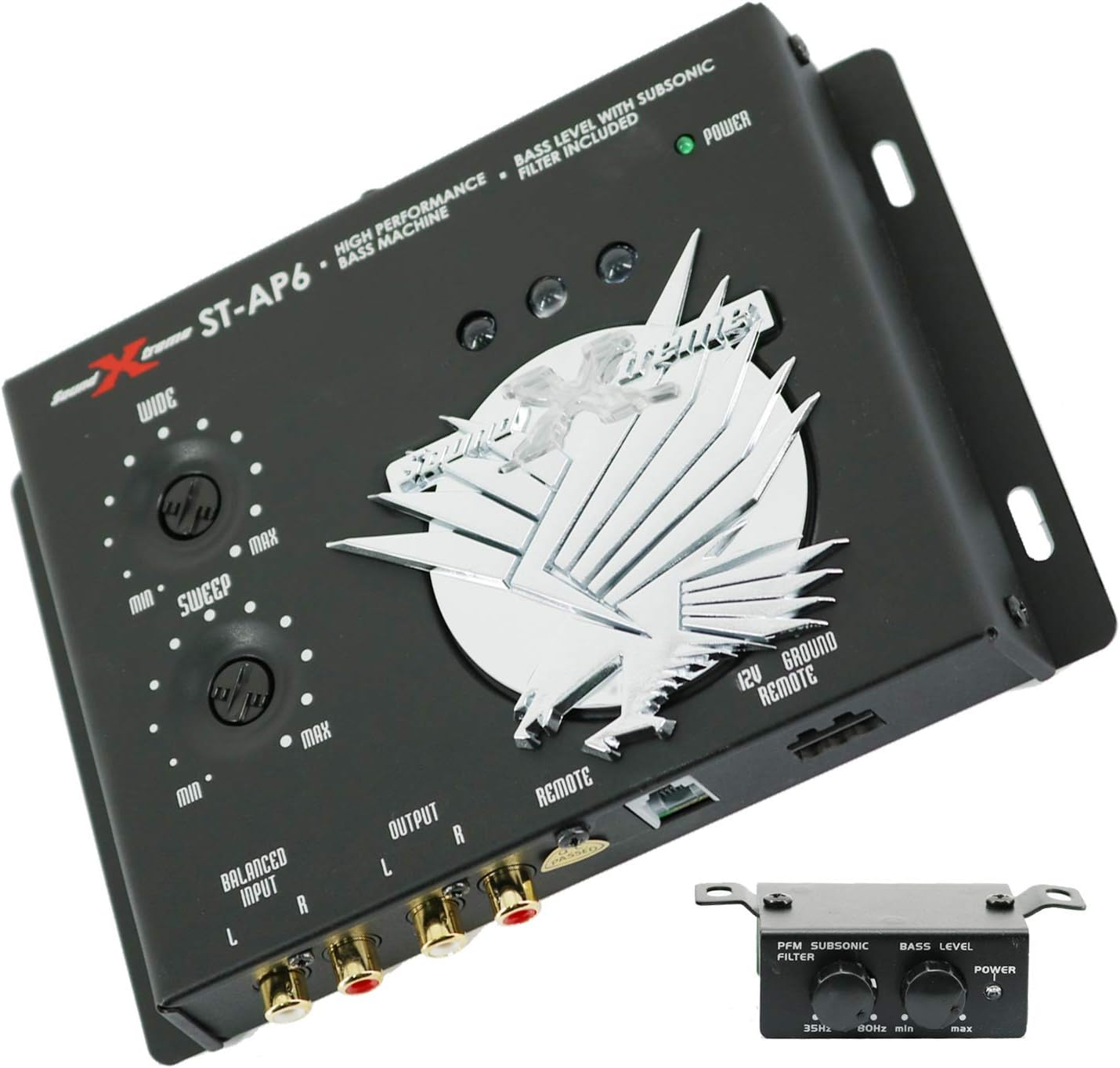
Figure 5: The SoundXtreme AP6 Bass Machine, a high-performance bass processor included in some bundles.
For detailed installation and operation instructions for the SoundXtreme AP6 Bass Machine, please refer to its dedicated user manual, as its functionality is separate from the Gravity 4000.1D amplifier.
11. Warranty and Support
For warranty information and technical support, please refer to the documentation provided with your purchase or contact Gravity customer service. Keep your proof of purchase for warranty claims.