
1. Introduction
The Singing Machine Festival SDL9050 is a versatile HD Digital MP4 Karaoke Player designed for an immersive entertainment experience. It features an integrated 7-inch Color TFT LCD monitor, Bluetooth connectivity for wireless audio streaming, and compatibility with various music and karaoke applications.
This system is equipped with a long-lasting rechargeable battery, multi-colored dome LED Disco Lights, and front panel Disco LED lights that synchronize with the music, creating a dynamic party atmosphere. Its robust audio output is delivered through built-in 8-inch speakers and two 2.5-inch tweeters, providing up to 125 Watts of peak power, also allowing it to function as a PA system.
An interactive user interface with menu navigation simplifies selecting, searching, and creating custom karaoke playlists. Users can record audio performances onto a USB flash drive (not included) for sharing and playback. The system also supports connection to a TV for scrolling lyrics via an HDMI cable (not included) and includes a line-in for other external devices. Adjustable echo control and a lead vocal ON/OFF feature enhance the singing experience. Two microphones are included for duets, and a keyboard/guitar input jack with separate volume control allows for accessory instrument integration (instruments sold separately). The system is compatible with the Singing Machine Karaoke App for Android and iOS devices, offering access to thousands of karaoke songs.
2. Setup Guide
2.1 Unpacking and Contents
Carefully remove all components from the packaging. Ensure the following items are present:
- Festival HD Karaoke System Model SDL9050
- 2 wired microphones
- AC adapter
- 10 downloadable HD karaoke videos (via included code/instructions)

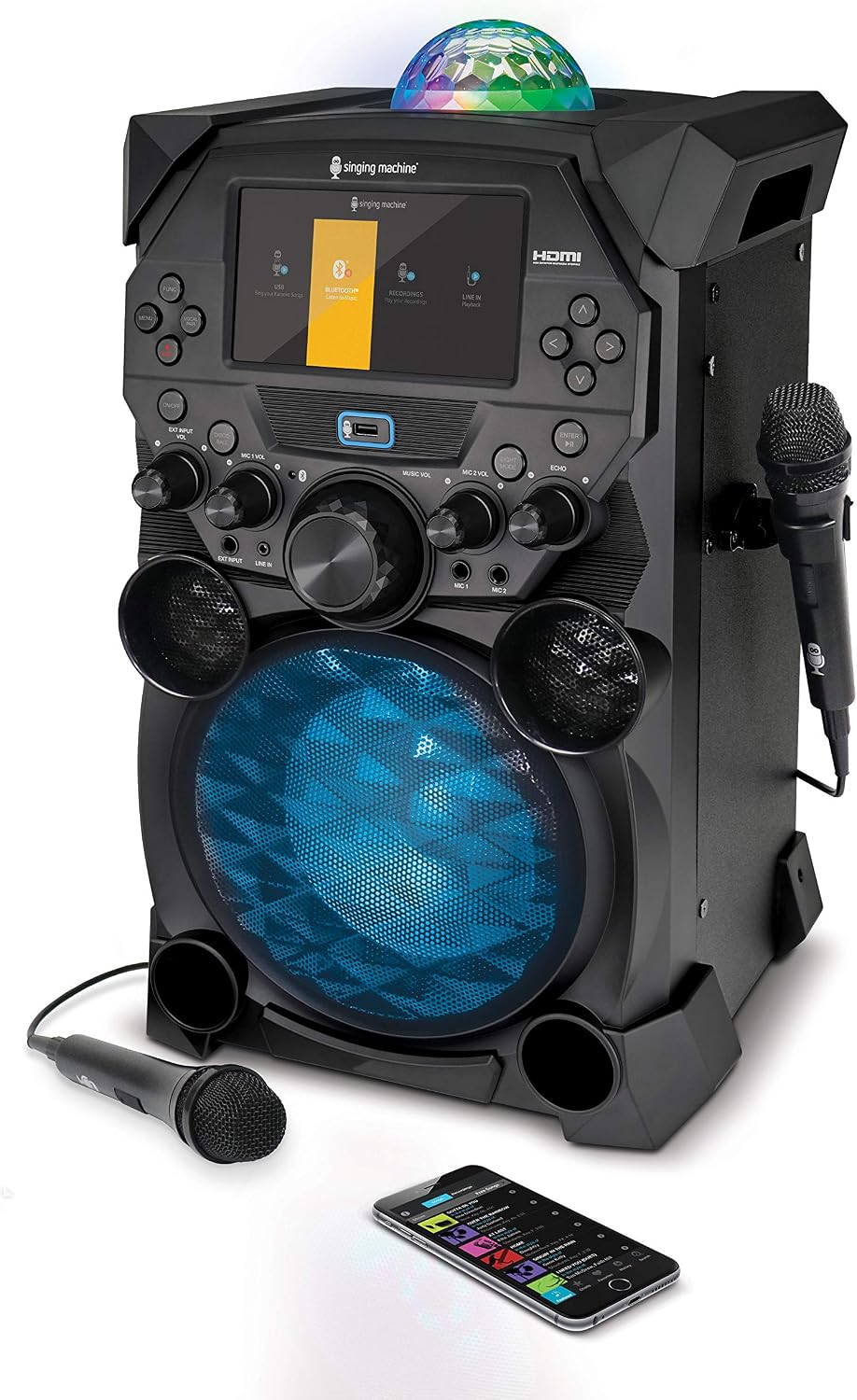
This image displays the front of the Singing Machine Festival SDL9050, highlighting its integrated 7-inch color TFT LCD monitor, control panel, main speaker with LED lights, and a connected microphone. The top features a multi-colored dome LED disco light.
2.2 Powering On and Charging
Before first use, fully charge the built-in rechargeable battery. Connect the supplied AC adapter to the DC IN jack on the unit and then to a standard wall outlet. The battery indicator on the LCD screen will show charging status. A full charge provides several hours of operation.
2.3 Microphone Connection
Connect the two wired microphones to the MIC 1 and MIC 2 input jacks on the front panel of the unit.

A front view of the karaoke system, showcasing its ability to connect two microphones simultaneously for duets. The control panel and LCD screen are clearly visible, along with the main speaker grille.
2.4 HDMI Connection to TV (Optional)
For displaying lyrics on a larger screen, connect an HDMI cable (not included) from the HDMI OUT port on the unit to an HDMI input on your television. Select the corresponding HDMI input on your TV.
2.5 Line-in Connection (Optional)
To connect external audio devices (e.g., MP3 players, smartphones) via a 3.5mm audio cable (not included), plug one end into the LINE IN jack on the unit and the other into the headphone or audio output jack of your external device.
2.6 USB Flash Drive Connection (Optional)
Insert a USB flash drive (not included) into the USB port on the unit to play MP4 or MP3+G files, or to record your performances.
3. Operating Instructions
3.1 Power On/Off
Press the POWER button located on the control panel to turn the unit on or off.
3.2 Control Panel Overview
The control panel features the 7-inch LCD monitor, various buttons for navigation and function selection, and rotary knobs for adjusting volume, echo, and other audio settings.
3.3 Bluetooth Streaming
To stream audio wirelessly from a compatible device:
- Ensure the unit is powered on and in Bluetooth mode (select via the menu on the LCD).
- Enable Bluetooth on your external device and search for 'Singing Machine'.
- Select 'Singing Machine' to pair. A confirmation sound will indicate successful pairing.
- Play music from your device, and it will stream through the karaoke system.

The LCD screen is shown displaying the Bluetooth pairing interface, indicating the system is ready to connect wirelessly to compatible devices for audio streaming.
3.4 Karaoke Playback (MP4/MP3+G)
Use the integrated 7-inch LCD monitor to view lyrics and navigate your karaoke files. You can play MP4 files directly from a USB drive or utilize the Singing Machine Karaoke App on your smartphone/tablet (connected via Bluetooth or Line-in) for a wider selection of songs.

This image focuses on the 7-inch color TFT LCD monitor of the karaoke system, showing song lyrics in progress, indicating its primary function as a karaoke player.
3.5 Microphone Controls
- MIC 1 VOL / MIC 2 VOL: Adjust the volume for each microphone independently using the dedicated knobs.
- ECHO: Rotate the ECHO knob to add or reduce an echo effect to your vocals.
- LEAD VOCAL ON/OFF: This feature allows you to reduce or remove the lead vocals from certain karaoke tracks, enabling you to sing along more prominently.
3.6 LED Disco Lights
The unit features multi-colored dome LED Disco Lights and front panel Disco LED lights. These lights automatically synchronize with the music to enhance the party atmosphere. There may be a dedicated button or menu option to control the light modes or turn them off.

A side perspective of the karaoke system, highlighting the vibrant red illumination of the main speaker's grille, demonstrating the built-in disco LED lights.
3.7 Recording Performances
To record your singing performances:
- Insert a USB flash drive into the USB port.
- Navigate to the recording function on the LCD screen.
- Follow the on-screen prompts to start, pause, and stop recording.
- Recorded files will be saved to the USB drive for later playback or transfer.
3.8 Mobility Features
The unit is designed with an integrated retractable handle and wheels for easy transport. Simply extend the handle and tilt the unit to roll it to your desired location.
This image shows the rear of the karaoke system, emphasizing its integrated retractable handle and wheels, designed for easy portability and mobility.
4. Maintenance
4.1 Cleaning
To clean the unit, use a soft, dry cloth. Do not use abrasive cleaners, waxes, or solvents as they may damage the finish. For the LCD screen, use a soft, lint-free cloth specifically designed for electronics screens.
4.2 Battery Care
To maximize battery life, avoid fully discharging the battery frequently. Recharge the unit regularly, even if not in use, to maintain battery health. Store the unit in a cool, dry place when not in use for extended periods.
4.3 Storage
When storing the unit, ensure it is powered off and disconnected from the power outlet. Store it in a clean, dry environment away from extreme temperatures and direct sunlight. Protect the microphones and cables from kinks or damage.
5. Troubleshooting
If you encounter issues with your Singing Machine Festival SDL9050, refer to the following common problems and solutions:
| Problem | Possible Cause | Solution |
|---|---|---|
| No power | Unit not charged; AC adapter not connected properly. | Ensure AC adapter is securely connected and unit is charged. |
| No sound from speakers | Volume too low; incorrect input selected; external device volume low. | Increase MUSIC VOL; select correct input mode (Bluetooth, Line-in, USB); increase volume on external device. |
| Microphone not working | Microphone not connected; MIC VOL too low; microphone faulty. | Ensure microphone is securely plugged in; increase MIC VOL; try another microphone if available. |
| Bluetooth pairing issues | Unit not in Bluetooth mode; device too far; interference. | Ensure unit is in Bluetooth mode; move device closer; clear other Bluetooth devices. |
| LCD screen blank/frozen | Temporary software glitch. | Turn the unit off, wait a few seconds, then turn it back on. |
If the problem persists after trying these solutions, please refer to the support section or contact customer service.
6. Specifications
| Feature | Detail |
|---|---|
| Model Number | SDL9050 |
| Item Weight | 20.7 pounds |
| Product Dimensions | 12.1 x 17.1 x 21.3 inches |
| Batteries | 1 Lithium Ion battery (included) |
| Color | Grey |
| Compatible Devices | Android, iOS Devices |
| Connector Type | HDMI |
| Hardware Interface | Bluetooth, HDMI, USB |
| Speaker Count | 1 (with two 2.5" tweeters) |
| Power Source | Battery Powered |
7. Warranty and Support
For detailed warranty information and customer support, please refer to the official Singing Machine website or the documentation included with your product. A comprehensive User Manual in PDF format is also available for download from the product's Amazon page or the manufacturer's support section.
Legal Disclaimer: The actual battery life varies from different playback functions and features operation. This is an upgraded HD system from the analog CDG technology which does not support CDs.
For further assistance, you may contact Singing Machine customer service directly. Keep your purchase receipt and model number (SDL9050) handy for faster service.

