
E-flite EFL16550
E-flite Ultimate 3D 950mm Smart BNF Basic RC Airplane User Manual
Model: EFL16550
Introduction
The E-flite Ultimate 3D 950mm Smart BNF Basic is a high-performance radio-controlled biplane designed for advanced aerobatics and 3D flying. This model incorporates cutting-edge Smart Technology, along with AS3X (Artificial Stabilization – 3-aXis) and SAFE (Sensor Assisted Flight Envelope) technologies, providing enhanced stability and flight envelope protection. It is a Bind-N-Fly (BNF) Basic version, meaning it comes with a factory-installed receiver and requires a compatible Spektrum DSMX/DSM2 transmitter, battery, and charger to complete.

Image: The E-flite Ultimate 3D 950mm Smart BNF Basic RC Airplane, showcasing its distinctive biplane design and red, white, and grey color scheme.
Safety Information
WARNING: Read the ENTIRE instruction manual to become familiar with the features of the product before operating. Failure to operate the product correctly can result in damage to the product, personal property and cause serious injury. This is a sophisticated hobby product. It must be operated with caution and common sense and requires some basic mechanical ability. Failure to operate this Product in a safe and responsible manner could result in injury or damage to the product or other property. This product is not intended for use by children without direct adult supervision. Do not use with incompatible components or alter this product in any way outside of the instructions provided by Horizon Hobby, LLC. The product manual contains instructions for safety, operation and maintenance. It is essential to read and follow all the instructions and warnings in the manual, prior to assembly, setup or use, in order to operate correctly and avoid damage or serious injury.
What's in the Box
Upon opening the product packaging, you will find the following components:
- (1) E-flite® Ultimate 3D 950mm
- (1) Spektrum™ Avian™ 60A Brushless Smart ESC (installed)
- (1) Brushless Outrunner Motor (installed)
- (4) High-Torque Metal-Geared Servos (installed)
- (1) Spektrum™ AR637TA 6-Channel Receiver (installed)
- Product Manual (digital version provided here)
Needed to Complete
To operate your E-flite Ultimate 3D 950mm Smart BNF Basic RC Airplane, you will need to acquire the following items separately:
- A compatible Spektrum DSMX/DSM2 aircraft transmitter (6+ channel recommended)
- A suitable LiPo flight battery (e.g., 3S-4S 2200-3200mAh LiPo with EC3 or IC3 connector)
- A compatible LiPo charger

Image: Visual representation of items needed to complete the setup: Battery, Charger, and Transmitter.
Key Features
- EASY TO FLY RC AIRPLANE: Equipped with exclusive SAFE technology that helps prevent crashes and makes it easy to learn how to fly.
- UNMATCHED CAPABILITY: Updated and upgraded to offer improved scale and sport flying, precision aerobatic and all-out 3D capabilities.
- FAST AND EASY ASSEMBLY: Quick and easy final assembly, without the use of glue or special tools, and you'll be ready to fly in less time than it takes to charge a battery!
- HIGH PERFORMANCE: Oversized control surfaces capable of extreme throws plus vortex generators to enhance 3D performance.
- BIND-N-FLY BASIC: With BNF Basic products you can use the transmitter of your choice and bind it to the Spektrum 6-Channel Receiver included with this model.

Image: Detail of the fuselage showing the "SAFE" logo and a control surface servo, highlighting the integrated flight assistance technology.
Skill Level
This aircraft is rated for Skill Level 2, indicating that some experience is required. Skill Level 2 aircraft are a great choice for intermediate pilots who already have some experience with "Next Step" and beyond aircraft. While SAFE technology assists with stability, familiarity with RC flight controls and basic maneuvers is recommended for optimal enjoyment and safety.

Image: Official "Skill Level 2: Some Experience Required" emblem, indicating the recommended pilot proficiency for this model.
Assembly and Setup
The E-flite Ultimate 3D is designed for quick and easy final assembly, typically requiring no glue or special tools. Follow these general steps for preparation:
- Unpacking: Carefully remove all components from the packaging. Inspect for any damage.
- Wing Installation: Attach the wings according to the detailed instructions in the full manual. Ensure all struts and connections are secure.
- Landing Gear: Install the main landing gear and tail wheel assembly.
- Battery Installation: Connect your charged flight battery to the ESC. Secure the battery within the battery compartment using the provided hook-and-loop straps to ensure proper center of gravity (CG).

Image: Side view of the E-flite Ultimate 3D, illustrating the overall structure and wing placement.

Image: Detailed view of the robust landing gear, essential for ground handling and takeoffs/landings.
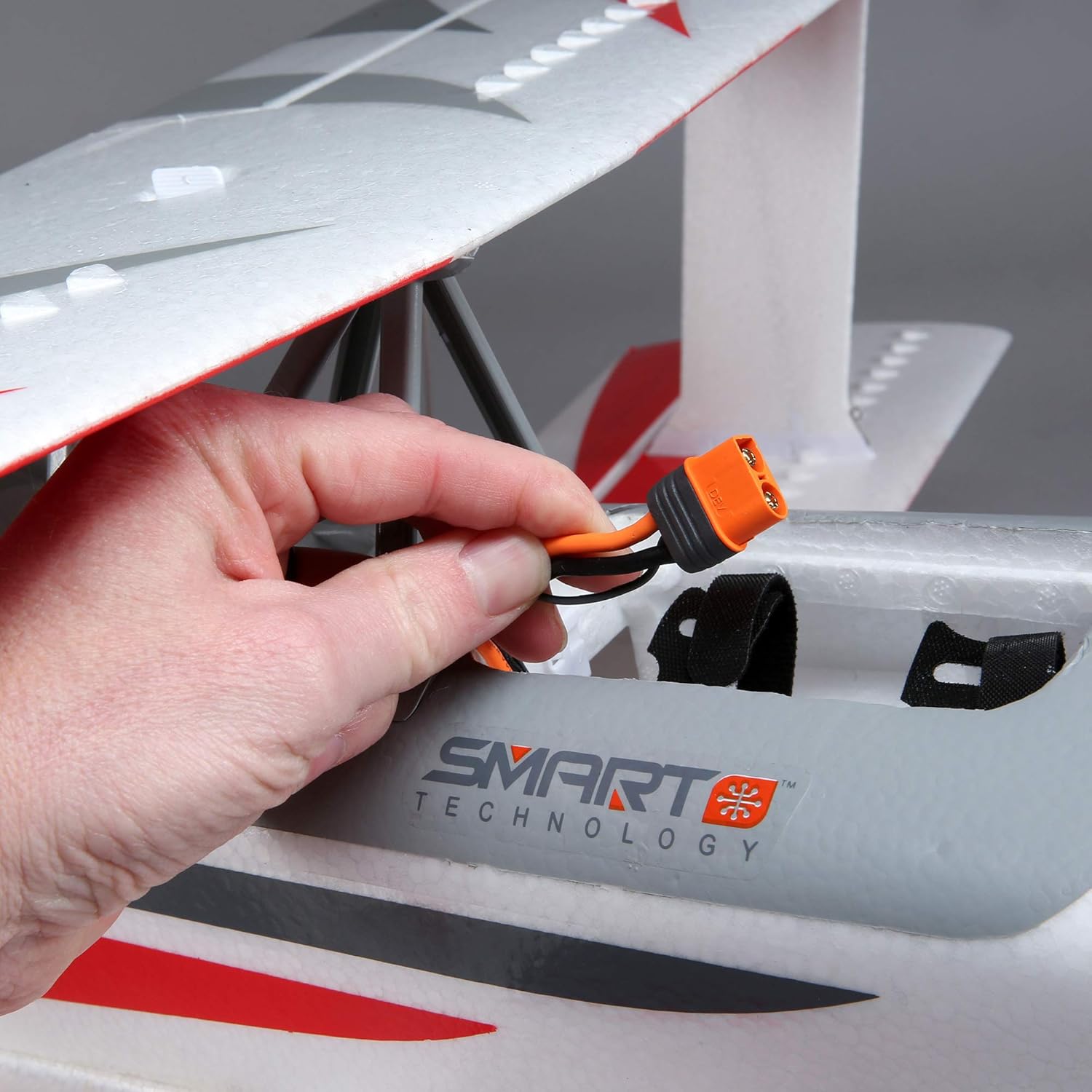
Image: A hand demonstrating the connection of the flight battery to the aircraft's internal power system, located within the fuselage compartment.
Binding and Configuration
As a Bind-N-Fly Basic model, the Ultimate 3D 950mm comes with a Spektrum AR637TA 6-Channel Receiver pre-installed. To prepare for flight, you must bind this receiver to your compatible Spektrum DSMX/DSM2 transmitter.
- Transmitter Setup: Ensure your transmitter is set up for a new aircraft model, with all trims centered and sub-trims at zero. Refer to your transmitter's manual for specific model setup procedures.
- Binding Process: Follow the binding instructions provided with your Spektrum transmitter and the aircraft's full manual. This typically involves putting the receiver into bind mode and then initiating the bind process from the transmitter.
- Control Surface Checks: After successful binding, verify that all control surfaces (ailerons, elevator, rudder) respond correctly to transmitter inputs and move in the appropriate direction. Adjust servo directions on your transmitter if necessary.
- SAFE Select Activation: The AR637TA receiver includes SAFE Select technology. You can choose to enable or disable SAFE Select based on your flying preference and skill level. Refer to the full product manual for detailed instructions on activating or deactivating SAFE Select.
Operating Instructions
The E-flite Ultimate 3D is capable of a wide range of flight maneuvers, from precise sport flying to aggressive 3D aerobatics, thanks to its powerful motor, oversized control surfaces, and integrated AS3X and SAFE technologies.
- Pre-Flight Checks: Before each flight, perform a thorough pre-flight inspection. Check all control linkages, ensure the battery is fully charged and secured, and confirm proper control surface movement.
- Takeoff: For ground takeoffs, apply throttle smoothly and maintain directional control with the rudder. For hand launches, ensure sufficient power and a level toss into the wind.
- Flight Characteristics:
- Sport Flying: Enjoy stable and predictable flight characteristics for general cruising and sport maneuvers.
- Aerobatics: The large control surfaces allow for crisp rolls, loops, and inverted flight.
- 3D Flying: With high rates and proper setup, the Ultimate 3D excels at hovering, harriers, torque rolls, and other extreme 3D maneuvers.
- Landing: Approach into the wind, reduce throttle, and manage descent with elevator. Flare gently just above the ground for a smooth touchdown.
- AS3X Technology: This technology works behind the scenes to smooth out the effects of wind and turbulence, making the aircraft feel larger and more stable, even in challenging conditions.
- SAFE Technology: When activated, SAFE provides bank angle limits and automatic self-leveling, which can be invaluable for new pilots or when regaining control.

Image: A pilot holding the E-flite Ultimate 3D, providing a sense of the aircraft's size and portability.
Maintenance
Regular maintenance is crucial for the longevity and safe operation of your E-flite Ultimate 3D RC Airplane.
- Post-Flight Inspection: After each flight, check for any loose screws, damaged foam, or bent components. Ensure all control linkages are secure and free from binding.
- Cleaning: Wipe down the airframe with a soft, damp cloth to remove dirt, grass stains, or oil residue. Avoid using harsh chemicals.
- Propeller and Motor: Inspect the propeller for nicks or cracks. Replace if damaged. Check the motor mount and propeller adapter for tightness.
- Battery Care: Always store LiPo batteries at a storage charge and in a fire-safe container. Do not overcharge or over-discharge.
- Storage: Store the aircraft in a cool, dry place, away from direct sunlight and extreme temperatures.
Troubleshooting
This section provides solutions to common issues you might encounter with your E-flite Ultimate 3D.
| Problem | Possible Cause | Solution |
|---|---|---|
| Aircraft does not respond to transmitter. | Not bound, low transmitter/receiver battery, incorrect model selected. | Ensure binding is complete. Check battery levels. Select correct model memory on transmitter. |
| Motor does not start or runs intermittently. | Battery not connected, ESC not armed, motor/ESC issue. | Check battery connection. Ensure throttle trim is at lowest setting and throttle stick is at zero. Consult full manual for ESC calibration. |
| Aircraft flies erratically or is difficult to control. | Control surfaces reversed, incorrect CG, damaged components, strong winds. | Verify control surface directions. Check CG. Inspect for damage. Avoid flying in high winds, especially if inexperienced. |
| SAFE Select not functioning as expected. | Not activated, incorrect switch assignment. | Refer to the full manual for SAFE Select activation and transmitter switch assignment procedures. |
Specifications
| Attribute | Detail |
|---|---|
| Product Dimensions | 43 x 17 x 9.5 inches |
| Item Weight | 8.82 pounds |
| Country of Origin | China |
| ASIN | B08BRXTWG7 |
| Item model number | EFL16550 |
| Manufacturer recommended age | 14 months and up (Note: RC aircraft typically require higher age/maturity for safe operation) |
| Release date | July 30, 2020 |
| Manufacturer | E-flite |
Warranty and Support
For detailed warranty information, terms, and conditions, please refer to the official product manual included with your purchase or visit the E-flite / Horizon Hobby website. Product support, including technical assistance and spare parts, is also available through the manufacturer's official channels.
Manufacturer Website: www.horizonhobby.com (E-flite is a Horizon Hobby brand)
Related documentsEFL16550


Ask a question about this manual
Ask about setup, troubleshooting, compatibility, parts, safety, or missing instructions. Manuals+ will review the question and use this page’s manual context to help answer it.