
1. Introduction and Overview
This manual provides essential instructions for the safe and efficient operation of your SAHAUHY 120 Pints Smart ENERGY STAR Dehumidifier. Designed for spaces up to 6200 sq.ft, this unit effectively removes up to 120 pints of moisture per day, helping to maintain optimal humidity levels in your home, basement, bedroom, or garage. Please read this manual thoroughly before use and retain it for future reference.

Figure 1.1: SAHAUHY 120 Pints Smart ENERGY STAR Dehumidifier. This image displays the dehumidifier unit alongside a smartphone screen illustrating its smart app control interface.
2. Safety Instructions
To prevent injury to the user or others and property damage, the following instructions must be followed. Incorrect operation due to ignoring instructions may cause harm or damage.
- Always ensure the dehumidifier is placed on a level, stable surface to prevent tipping.
- Do not operate the unit with a damaged power cord or plug. If the cord is damaged, it must be replaced by the manufacturer or a qualified service agent.
- Ensure the air inlet and outlet are not obstructed. Maintain at least 8 inches (20 cm) of clear space around the unit for proper airflow.
- Do not insert fingers or foreign objects into the air inlets or outlets.
- Unplug the dehumidifier before cleaning, moving, or performing any maintenance.
- This appliance is not intended for use by persons (including children) with reduced physical, sensory or mental capabilities, or lack of experience and knowledge, unless they have been given supervision or instruction concerning use of the appliance by a person responsible for their safety.
- Do not use the unit in areas where flammable gases or combustible materials are present.
- Only use the unit with the specified voltage and frequency.
3. Product Components
Familiarize yourself with the main parts of your dehumidifier:
- Control Panel with Digital Display
- Air Outlet
- Air Inlet with Washable Filter
- Water Tank (1.14 Gallon capacity)
- Continuous Drain Port
- Power Cord
- Casters (Wheels) for portability
- Side Handles

Figure 3.1: Control Panel Overview. This image highlights the various buttons and indicators on the dehumidifier's top panel, including Power, Display, Filter, Fan Speed, Mode, Timer, Lock, Humidity, and WiFi.
4. Setup
Follow these steps for initial setup:
- Unpacking: Carefully remove the dehumidifier from its packaging. Retain packaging materials for future storage or transport.
- Placement: Place the unit upright on a firm, level surface. Ensure there is at least 8 inches (20 cm) of space around the unit for proper air circulation. Avoid placing it near heat sources or in direct sunlight.
- Power Connection: Plug the power cord into a grounded electrical outlet. Ensure the voltage matches the specifications of the unit.
- Initial Operation: Allow the unit to stand upright for at least 24 hours before plugging it in and turning it on if it was not stored or transported in an upright position.
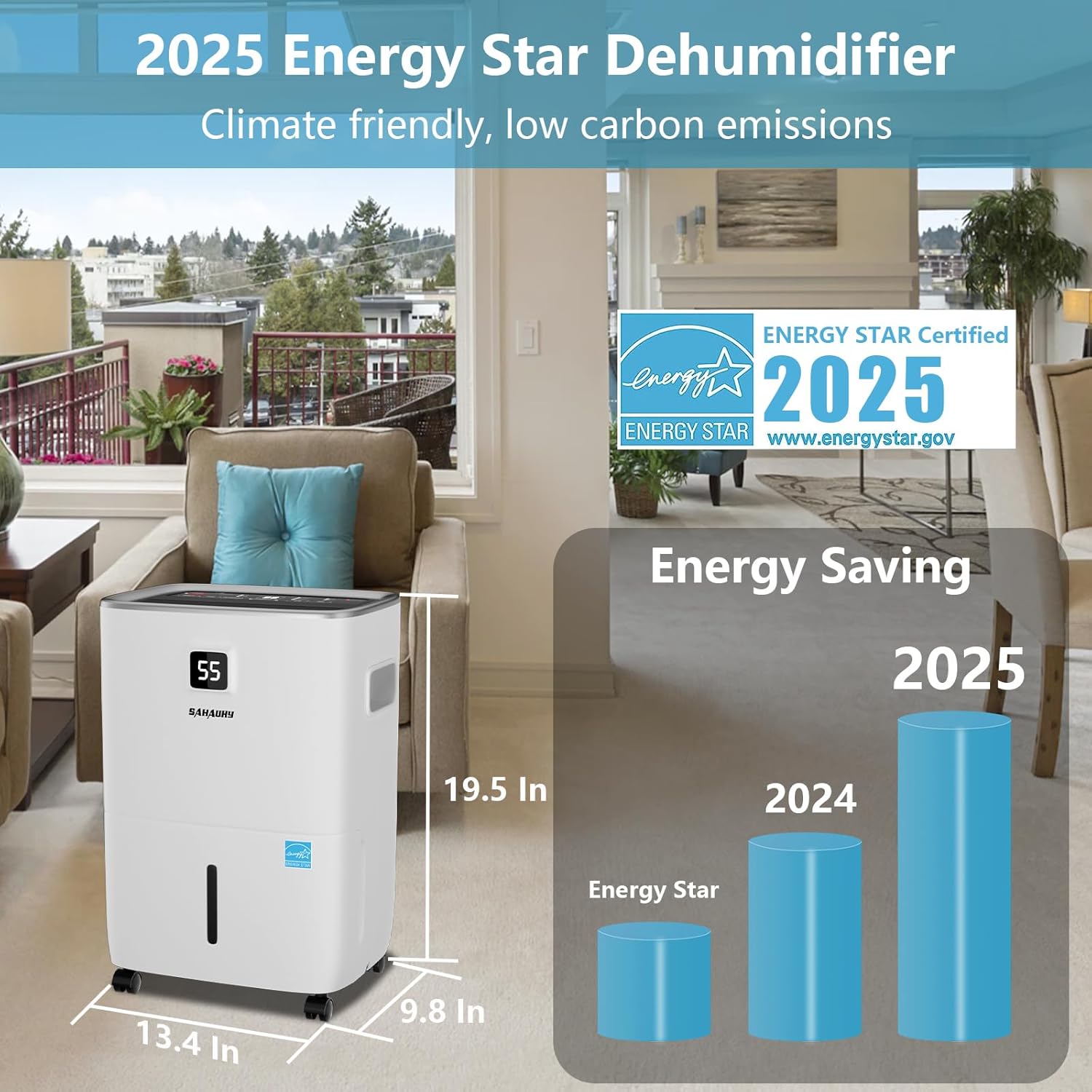
Figure 4.1: Dehumidifier Dimensions and Energy Star Certification. This image shows the physical dimensions of the dehumidifier (13.4 in x 9.8 in x 19.5 in) and prominently features the ENERGY STAR Certified 2025 logo, indicating its energy efficiency.
5. Operating Instructions
The control panel allows you to manage all functions of your dehumidifier.
Control Panel Functions:
- POWER: Press to turn the dehumidifier on or off.
- DISPLAY: Shows the current humidity level or timer settings.
- FILTER: Illuminates to remind you to clean the air filter.
- FAN SPEED: Adjusts the fan speed (Low, Medium, High).
- MODE: Selects operating modes:
Sleeping Mode: Operates quietly for nighttime use.
Living Mode: Standard operation for general living spaces.
Basement Mode: Optimized for higher humidity environments.
Continuous Mode: Runs continuously regardless of humidity level. - TIMER: Sets the 24-hour timer for automatic on/off operation.
- LOCK (Child Lock): Press and hold for 3 seconds to activate/deactivate the child lock, preventing accidental changes to settings.
- HUMIDITY %: Adjusts the desired humidity level (from 30% to 80% RH). The unit will operate until this level is reached.
- WIFI: Press 'Fan Speed' and 'Humidity %' buttons simultaneously for 3 seconds to activate Wi-Fi pairing mode for smart app control.
6. Drainage Options
Your dehumidifier offers multiple ways to remove collected water:
6.1 Manual Drainage (Water Tank)
When the water tank is full, the unit will automatically shut off and an indicator light will illuminate. Carefully remove the tank, empty the water, and reinsert it securely. The unit will resume operation.
6.2 Continuous Drainage (Drain Hose)
For continuous operation without emptying the tank, attach the included 3.28 ft drain hose to the continuous drain port on the back of the unit. Ensure the hose is sloped downwards to allow gravity drainage into a suitable floor drain or container. A standard garden hose (not included) can also be used for extended length.

Figure 6.1: Drainage Options. This image illustrates three methods for water drainage: manual drainage using the 1.14 Gallon water tank, automatic drainage with the included 3.28 ft drain hose, and automatic drainage using a user-supplied garden hose.
7. Smart App Control
Control your dehumidifier remotely using the dedicated smart app. This feature allows you to adjust settings, monitor humidity, and set schedules from anywhere.
- Download App: Download the SAHAUHY smart app from your device's app store.
- Pairing: On the dehumidifier, press and hold the 'Fan Speed' and 'Humidity %' buttons simultaneously for 3 seconds to activate Wi-Fi pairing mode. Follow the in-app instructions to connect your device.
- Functions: The app allows you to turn the unit on/off, set desired humidity, adjust fan speed, select operating modes, and set a 24-hour timer.

Figure 7.1: Smart App Functions. This image displays four screenshots of the SAHAUHY smart app, illustrating controls for power on/off, 3-speed fan settings, mode selection (Continuous, Basement, Living, Sleeping), and a 24-hour timer setup.
8. Maintenance
Regular maintenance ensures optimal performance and longevity of your dehumidifier.
8.1 Cleaning the Air Filter
The reusable and washable filter should be cleaned every two weeks or when the 'FILTER' indicator light illuminates.
- Turn off the unit and unplug it from the power outlet.
- Remove the filter from the back of the unit.
- Wash the filter with warm, soapy water. Rinse thoroughly.
- Allow the filter to air dry completely before reinserting it.
- Reinsert the dry filter and plug in the unit.
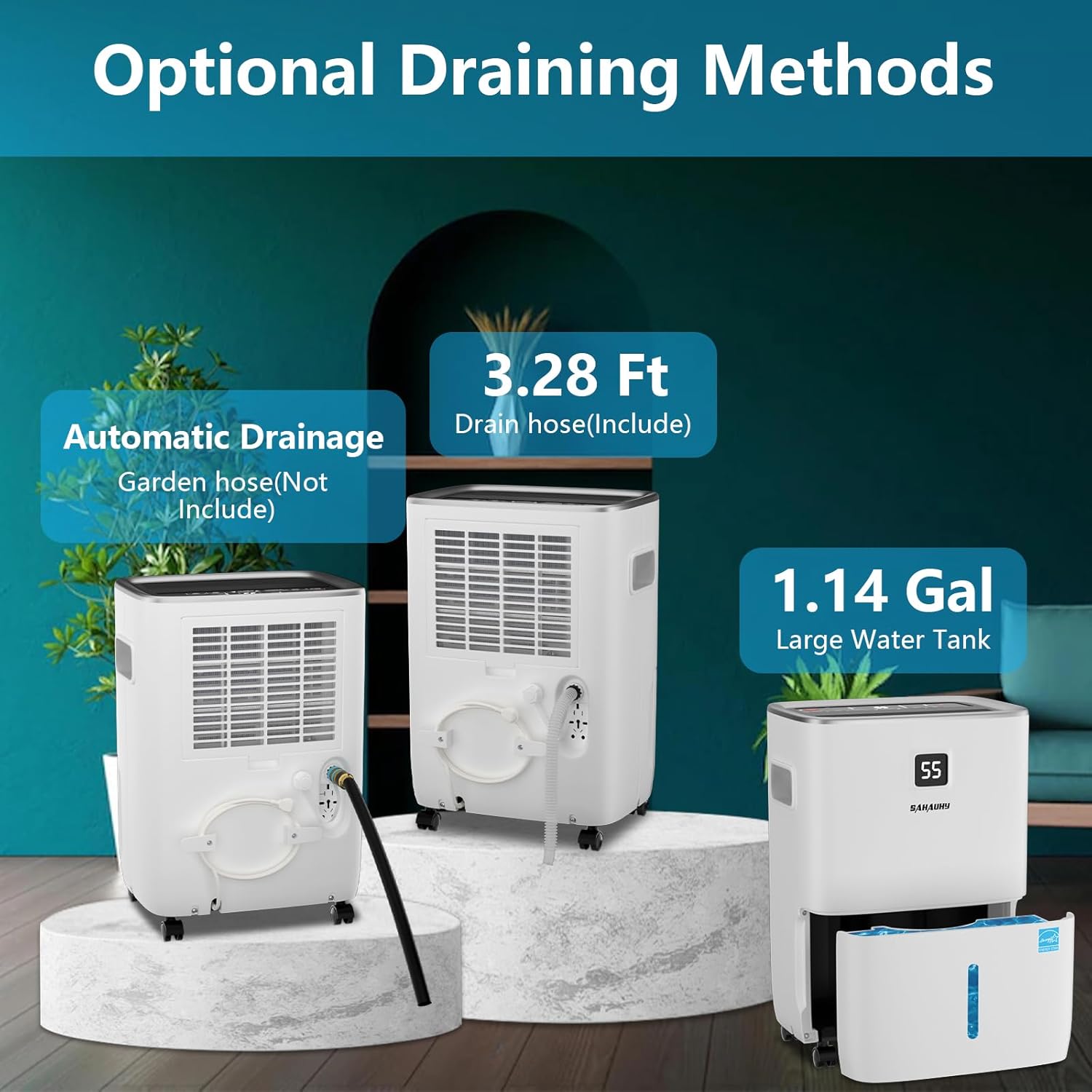
Figure 8.1: Air Filter Cleaning. This image provides a visual guide on how to access and clean the reusable air filter located on the back of the dehumidifier.
8.2 Cleaning the Unit Exterior
Wipe the exterior with a soft, damp cloth. Do not use harsh chemicals or abrasive cleaners.
8.3 Storage
If storing the unit for an extended period, ensure the water tank is empty and clean, and the filter is clean and dry. Store in an upright position in a cool, dry place.
9. Troubleshooting
Before contacting customer support, please refer to the following troubleshooting guide for common issues.
| Problem | Possible Cause | Solution |
|---|---|---|
| Dehumidifier does not turn on. | No power; Water tank full or not properly seated; Child lock activated. | Check power connection; Empty and reinsert water tank correctly; Deactivate child lock by pressing and holding the LOCK button. |
| Unit runs but does not dehumidify. | Air filter clogged; Room temperature too low; Humidity setting too high; Unit size inadequate for space. | Clean air filter; Ensure room temperature is above 5°C (41°F); Lower desired humidity setting; Consider if unit is appropriate for room size. |
| Water leaks from the unit. | Water tank not properly seated; Drain hose connection loose or clogged; Unit tilted. | Reinsert water tank securely; Check drain hose for proper connection and clear any obstructions; Ensure unit is on a level surface. |
| Unit is noisy. | Air filter clogged; Unit not on a level surface; Fan speed set to high. | Clean air filter; Place unit on a level surface; Reduce fan speed. |
| Wi-Fi connection issues. | Incorrect pairing procedure; Router issues; Distance from router. | Repeat pairing steps; Restart router; Move unit closer to router or use a Wi-Fi extender. |
10. Specifications
- Model: B08BR34KLR
- Brand: SAHAUHY
- Capacity: 120 Pints/Day (under 89°F, 95%RH condition)
- Coverage Area: Up to 6200 Square Feet
- Water Tank Capacity: 1.14 Gallons
- Item Weight: 9.9 Kilograms
- Color: White
- Included Components: Automatic Drainage & Manual Drainage, 3.28 ft Drain Hose
- Special Features: Smart APP Control, Automatic Defrost, Automatic Moisture Removal, Automatic Restart, Automatic Shutoff (tank full), Overheat Protection, Portable, Removable Tank, Washable Filter, 24 Hour Timer, Child Lock.
- Noise Level: ≤36 dB(A)
- ENERGY STAR Certified: Yes (2025)
11. Warranty and Support
Your SAHAUHY Dehumidifier is covered by the following:
- Return Policy: 30-Day Return period.
- Standard Warranty: 1-Year warranty.
- Extended Warranty: A 2nd year extended warranty may be available. Refer to the user manual for details on how to register or activate.
- Technical Support: Lifetime expert technical support is provided.
For any questions or assistance, please contact SAHAUHY customer service. We aim to respond within 24 hours to help resolve any issues.