
1. Introduction
This manual provides instructions for the installation, operation, and maintenance of your HD Switch Starter Ignition Key Switch. This product is designed for use with various Kohler Engines, including models CH18, CH20, CH23, CH620, CH640, CH670, CH680, CH730, and CH740. The kit includes a premium ignition switch and an HD Switch Protective Soft Grip Umbrella Key, engineered for durability and reliable starts in outdoor conditions.
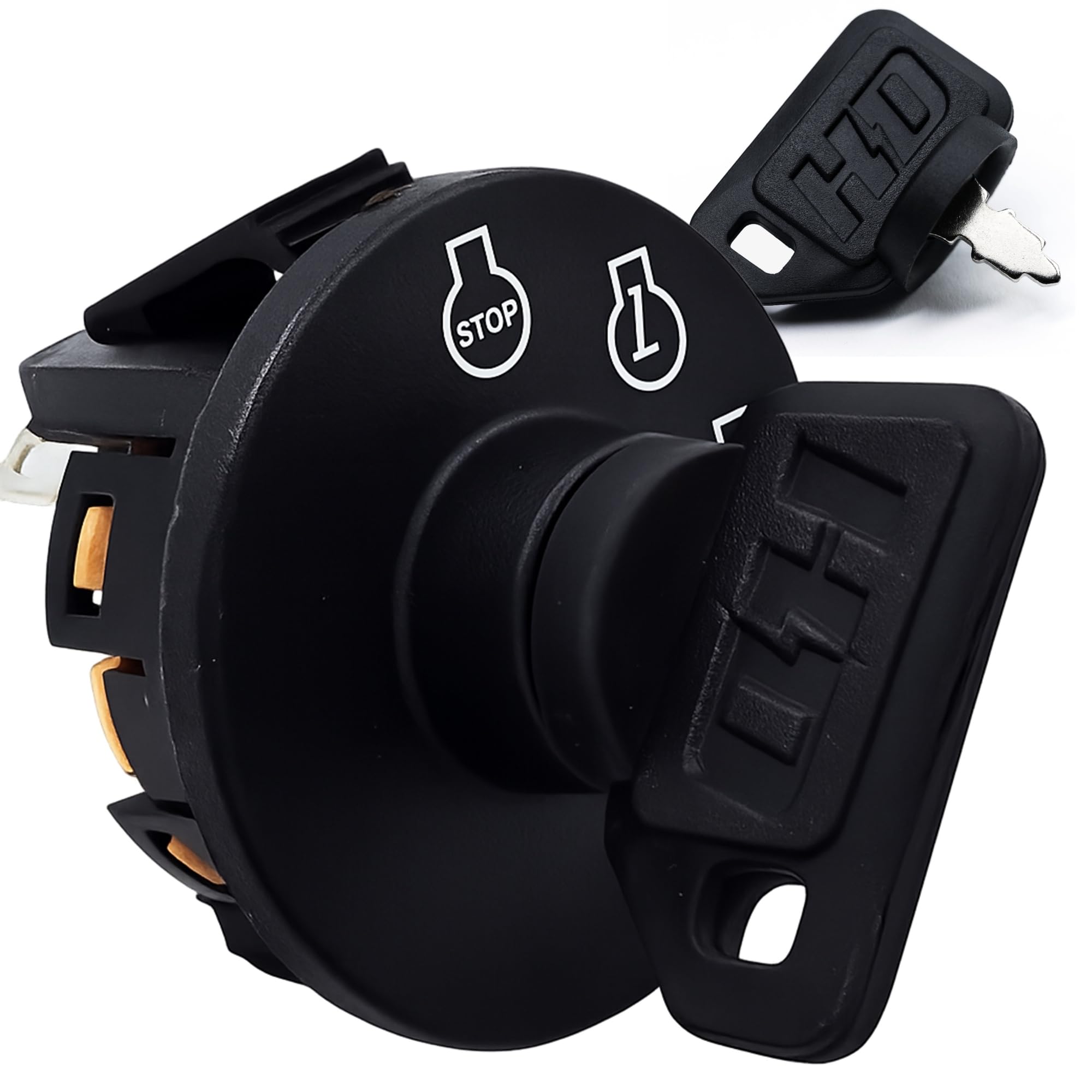
Figure 1: Front view of the HD Switch Starter Ignition Key Switch, showing the keyhole and positions for 'Stop', 'Ignition', and 'Start'.

Figure 2: The HD Switch Ignition Key Switch with the protective umbrella key inserted, ready for operation.
2. Setup and Installation
Before beginning installation, ensure the engine is turned off and the battery is disconnected to prevent electrical shock or damage. Refer to your engine's specific service manual for detailed wiring diagrams and safety procedures.
2.1 Components Included
- HD Switch Starter Ignition Key Switch
- HD Switch Protective Soft Grip Umbrella Key
- Standard keys (quantity may vary)

Figure 3: The HD Switch Protective Soft Grip Umbrella Key and two standard keys provided with the ignition switch.
2.2 Installation Steps
- Safety First: Disconnect the negative terminal of the battery to prevent accidental starting or electrical shorts.
- Remove Old Switch: Carefully disconnect the wiring from the existing ignition switch. Note the position of each wire or take a photograph for reference. Remove the old switch from its mounting location.
- Install New Switch: Insert the new HD Switch Starter Ignition Key Switch into the mounting hole. Secure it in place according to the engine's design (e.g., with a retaining nut).
- Connect Wiring: Reconnect the wires to the corresponding terminals on the new switch. Refer to your engine's wiring diagram or your reference photo. The switch typically features multiple terminals for different functions (e.g., battery, ignition, starter, accessories).

Figure 4: Rear view of the ignition switch, illustrating the various terminals for electrical connections. Consult your engine's specific wiring diagram for correct connections.
- Reconnect Battery: Once all wiring is securely connected, reattach the negative terminal of the battery.
- Test Functionality: Insert the key and test the switch positions (Stop, Ignition, Start) to ensure proper operation before full use.
3. Operating Instructions
The HD Switch Starter Ignition Key Switch features standard operating positions for engine control.
- STOP: In this position, the engine is off. The key can typically be removed in this position.
- IGNITION (I): Turning the key to this position supplies power to the engine's ignition system and accessories. This is the running position for the engine.
- START: This is a momentary position. Turning the key to 'Start' engages the starter motor to crank the engine. Release the key once the engine starts; it will spring back to the 'Ignition' position.
Always ensure the key is fully inserted and turned firmly to each position. Do not force the key if it resists turning.
4. Maintenance
The HD Switch is designed for durability, especially with the included Protective Soft Grip Umbrella Key. This key helps seal the keyhole, protecting the internal components from dust and water ingress, which are common causes of switch failure.
4.1 Key Protection
Regularly use the HD Switch Protective Soft Grip Umbrella Key. Its design creates a barrier against environmental elements, extending the life of your ignition switch.

Figure 5: The HD Switch Protective Umbrella Key providing a seal around the keyhole, preventing dust and water from entering the switch mechanism.
4.2 Cleaning
Keep the exterior of the switch clean from dirt and debris. Use a dry cloth to wipe down the switch and key. Avoid using harsh chemicals or excessive moisture directly on the switch.
4.3 Video: The Key That Protects
Video 1: This video demonstrates how the HD Switch Protective Umbrella Key works to prevent dust and water from entering the ignition switch, highlighting its protective features.
5. Troubleshooting
If you encounter issues with your HD Switch Starter Ignition Key Switch, consider the following common troubleshooting steps:
- Engine Does Not Start:
- Ensure the battery is fully charged and connections are secure.
- Check all wiring connections to the ignition switch for looseness or corrosion.
- Verify that the key is fully inserted and turned to the 'Start' position.
- No Power to Ignition/Accessories:
- Confirm the key is in the 'Ignition' position.
- Inspect fuses related to the ignition system and accessories.
- Check for continuity across the switch terminals in the 'Ignition' position (requires a multimeter and knowledge of wiring).
- Key Difficult to Turn or Remove:
- Ensure the switch is clean and free of debris.
- Do not force the key. If resistance persists, the internal mechanism may be damaged.
If these steps do not resolve the issue, it is recommended to consult a qualified technician or refer to your engine's service manual for further diagnostics. Due to variations in engine wiring, specific troubleshooting for terminal layouts cannot be provided without the engine's detailed schematic.
6. Specifications
| Feature | Specification |
|---|---|
| Brand | HD Switch |
| Model Number | 25 099 30-S |
| Compatible Engines | Kohler Engines (CH18, CH20, CH23, CH620, CH640, CH670, CH680, CH730, CH740) |
| Operation Mode | Manual |
| Current Rating | 3 Amps |
| Contact Type | Normally Open |
| Connector Type | Plug In |
| Switch Type | Ignition Switch |
| Terminal Type | SPDT |
| Material | Plastic (Housing), Metal (Contacts) |
| Circuit Type | 1-way |
| Mounting Type | Snap-In Mount |
| Actuator Type | Ignition |
| Number of Positions | 1 (with multiple key positions) |
| International Protection Rating | IP54 |
7. Warranty Information
Warranty coverage for the HD Switch Starter Ignition Key Switch is provided by the manufacturer or seller at the time of purchase. Please refer to your purchase documentation, packaging, or the seller's terms and conditions for specific details regarding warranty duration, coverage, and claims procedures.
8. Support
For technical assistance, replacement parts, or further inquiries regarding your HD Switch Starter Ignition Key Switch, please contact HD Switch customer support. Contact information can typically be found on the product packaging or the official HD Switch website.