
MACHSWON V7
MACHSWON Car Radar Detector V7 User Manual
Model: V7
1. Introduction
This manual provides essential information for the proper installation, operation, and maintenance of your MACHSWON Car Radar Detector V7. This device is designed to detect radar and laser signals used by speed monitoring equipment, providing timely alerts to assist drivers in maintaining awareness of their speed.
Please read this manual thoroughly before using the device to ensure optimal performance and safety.
2. Package Contents
Verify that all items listed below are included in your package:
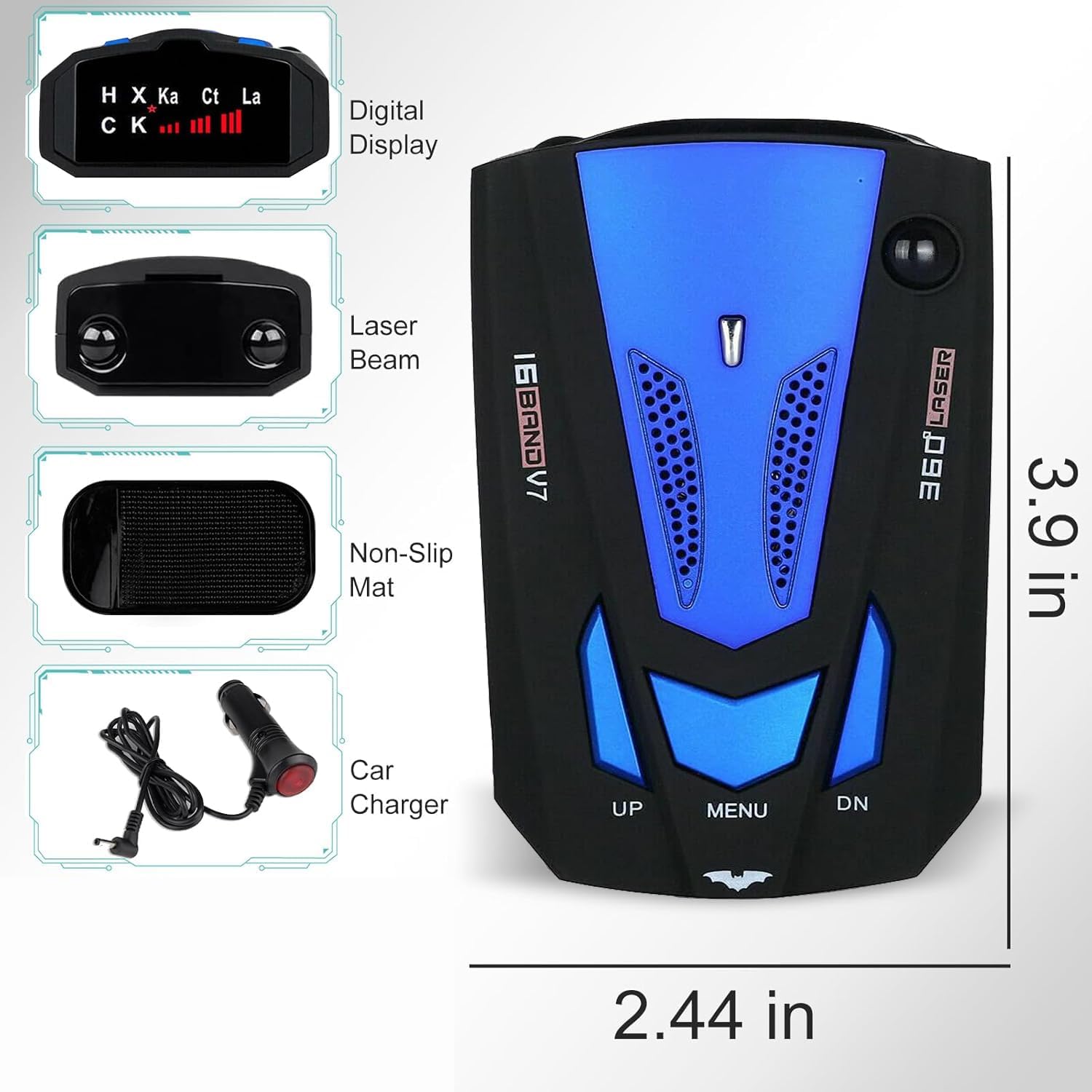
- 1 x MACHSWON V7 Radar Detector
- 1 x Car Charger
- 1 x Non-Slip Mat
- 1 x User Manual (this document)

3. Product Overview
3.1 Device Components
- Digital Display: Shows detected band types and signal strength.
- Laser Beam Sensor: Detects laser signals.
- Power Port: Connects to the car charger.
- Speaker: Emits audible alerts and voice prompts.

3.2 Controls and Functions
- UP Button: Press to increase volume.
- MENU Button: Press once to switch between City and Highway modes. Press and hold for 10 seconds to switch the voice alert language (English/Russian).
- DN Button: Press to decrease volume.


4. Setup and Installation
Follow these steps to install your radar detector:
- Choose a Location: Select a location on your dashboard or windshield that provides a clear view of the road ahead and behind, ensuring the detector's sensors are unobstructed. The non-slip mat can be used to secure the device on the dashboard.
- Connect Power: Insert the small end of the car charger cable into the power port on the radar detector. Plug the larger end of the car charger into your vehicle's 12V accessory outlet (cigarette lighter socket).
- Power On: The device will typically power on automatically when the vehicle's ignition is turned on. A startup sequence and voice prompt will confirm it is active.

5. Operating Instructions
5.1 Power On/Off
The device powers on automatically when connected to a powered 12V outlet. To power off, disconnect the car charger from the vehicle's accessory outlet.
5.2 Mode Selection (City/Highway)
Press the MENU button once to toggle between City mode and Highway mode. Each mode is designed to optimize detection and minimize false alerts in different driving environments:
- Highway Mode: Provides maximum detection range for open road driving.
- City Mode: Reduces sensitivity to minimize false alerts from common urban sources like automatic door openers.
5.3 Volume Control
Use the UP button to increase the alert volume and the DN button to decrease it.
5.4 Language Selection
To change the voice alert language, press and hold the MENU button for approximately 10 seconds. The device supports English and Russian languages.
5.5 Alert System
Upon detecting a radar or laser signal, the device will emit an audible alert and a voice prompt, indicating the type of signal detected (e.g., X-band, K-band, Ka-band, Laser). The digital display will show the detected band and signal strength.

The detector features an auto 360-degree detection system with super-fast sweep circuitry, providing an advanced warning range of 250-2500 meters for stable or mobile radial speed monitors.

A relative speed sensing auto-mute system helps to reduce false alerts. The device also includes a shutdown feature designed to render it undetectable by radar detector-detectors.
6. Maintenance
To ensure the longevity and optimal performance of your MACHSWON V7 Radar Detector, follow these maintenance guidelines:
- Cleaning: Use a soft, dry cloth to clean the exterior of the device. Do not use abrasive cleaners, solvents, or chemical sprays, as these can damage the casing or internal components.
- Sensor Care: Keep the front and rear sensor areas clear of dust and obstructions to ensure accurate detection.
- Storage: When not in use for extended periods, store the device in a cool, dry place away from direct sunlight and extreme temperatures.
- Cable Inspection: Periodically check the car charger cable for any signs of wear or damage. Replace if necessary.
7. Troubleshooting
If you encounter issues with your radar detector, refer to the following common problems and solutions:
| Problem | Possible Cause | Solution |
|---|---|---|
| Device does not power on. | No power from 12V outlet; faulty car charger; loose connection. | Check vehicle's 12V outlet (test with another device). Ensure car charger is securely plugged in. Try a different car charger if available. |
| No alerts or weak detection. | Sensors obstructed; incorrect mode (City mode in Highway); low volume. | Ensure clear line of sight for sensors. Switch to Highway mode for open roads. Increase volume using the UP button. |
| Frequent false alerts. | Operating in Highway mode in urban areas; interference from other devices. | Switch to City mode. Reposition the device to minimize interference. |
| Cannot change language. | MENU button not held long enough. | Press and hold the MENU button for a full 10 seconds until the language changes. |
If the problem persists after attempting these solutions, please contact customer support.
8. Specifications
| Feature | Detail |
|---|---|
| Model | V7 |
| Item Weight | 6.4 ounces |
| Product Dimensions | 0.39 x 2.48 x 1.34 inches (10 x 63 x 34 mm) |
| Display Type | LED |
| Voltage | 12 Volts |
| Detection Range | 250-2500 meters (approx. 820-8200 feet) |
| Supported Bands | X, K, Ka, Laser |
| Manufacturer | MACHSWON |
| UPC | 782947065693 |
9. Warranty and Support
9.1 Warranty Information
Specific warranty details for the MACHSWON Car Radar Detector V7 are not provided in this manual. Please refer to the product packaging or contact the retailer/manufacturer directly for warranty terms and conditions.
9.2 Customer Support
For technical assistance, troubleshooting beyond this manual, or inquiries regarding your product, please contact MACHSWON customer support through their official website or the retailer where the product was purchased.
Ask a question about this manual
Ask about setup, troubleshooting, compatibility, parts, safety, or missing instructions. Manuals+ will review the question and use this page’s manual context to help answer it.