
1. Product Overview
The NEWTRY Induction Sealer is a handheld electromagnetic sealing machine designed for sealing bottle caps with aluminum foil. It features adjustable power and time settings, making it suitable for various non-metal plastic and glass bottles with flat caps. This device is ideal for sealing medicines, food, and beverages, ensuring product integrity and freshness.
Key Features:
- Adjustable Sealing Range: 0.79"-3.94" (20-100mm)
- Adjustable Power: 500W-1000W (5 gears)
- Adjustable Time: 0.1-5.9 seconds
- Memory Function: Automatically recalls last sealing parameters upon restart.
- Portable Design: Ergonomic handle for comfortable, long-term use.
- Self-Cooling: Built-in fan prevents overheating.
- Wide Application: Suitable for pharmaceutical, chemical, food, beverage, and cosmetic industries.
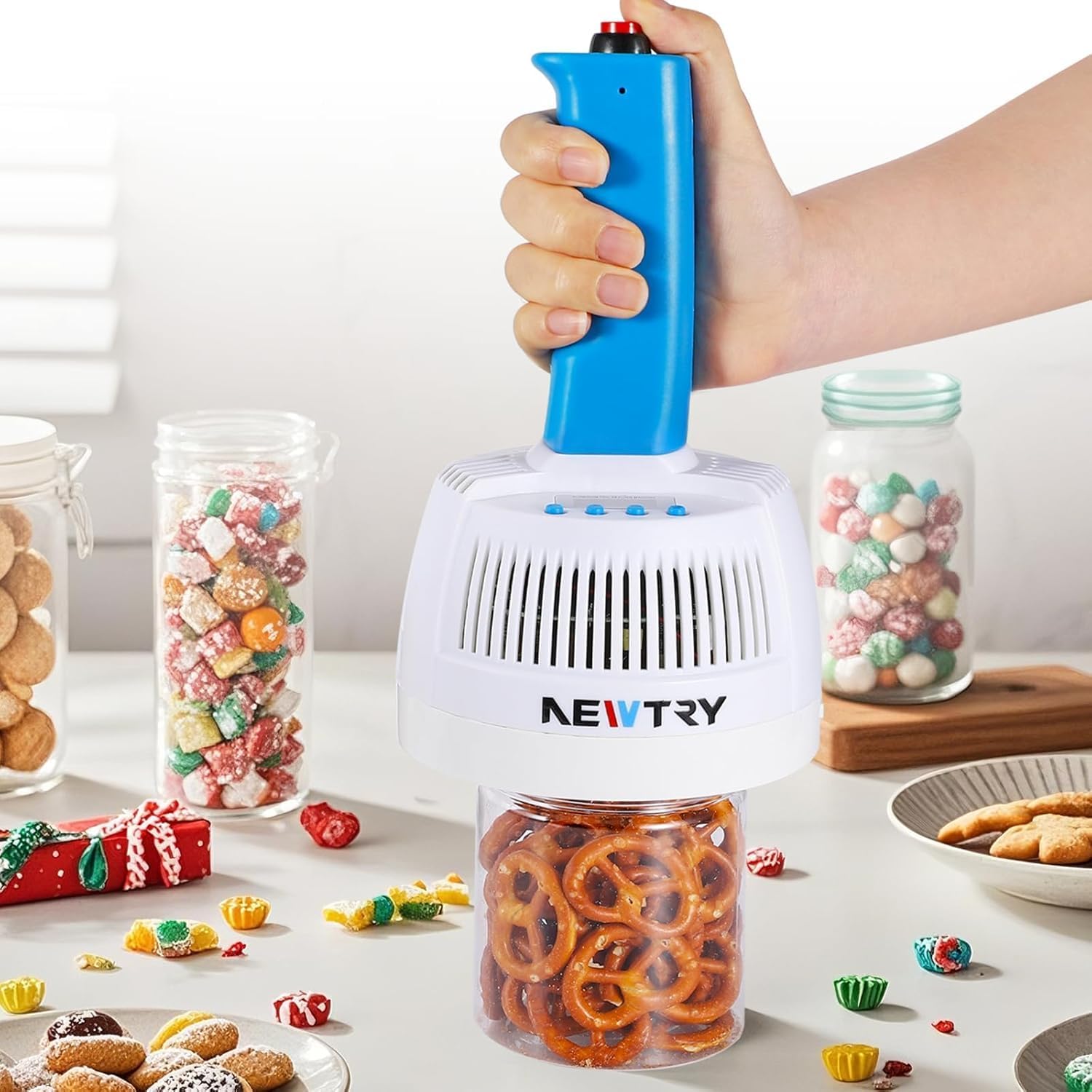
Figure 1: NEWTRY Induction Sealer, a handheld device for sealing bottle caps.
2. Safety Instructions
Please read all safety instructions carefully before operating the device to prevent injury or damage.
- Ensure the power supply matches the device's voltage (110V).
- Do not operate the sealer with wet hands or in damp environments.
- Keep the device away from flammable materials.
- Only use the sealer with non-metal bottles and caps that are compatible with aluminum foil or lined caps.
- Avoid direct contact with the induction plate during and immediately after operation, as it may be hot.
- Do not attempt to seal pointed bottles, metal bottles, or bottles with metal caps.
- Keep out of reach of children.
- If the device malfunctions, disconnect it from the power supply immediately and contact customer support.

Figure 2: Illustration of compatible (glass/plastic body, plastic/flat caps) and incompatible (pointed, metal bottles/caps) containers.
3. Package Contents
Verify that all items are present in the package:
- NEWTRY Induction Sealer Unit
- Power Cable
- Two 0.98'' diameter bottles with aluminum foil for testing
- Instruction Manual

Figure 3: Included test bottles for initial sealing practice.
4. Specifications
| Feature | Specification |
|---|---|
| Brand | NEWTRY |
| Model | NEWTRY Induction Sealer 20-100mm |
| Sealing Range | 20-100mm (0.79"-3.94") |
| Power Range | 500W-1000W (5 gears) |
| Time Adjustment Range | 0.1-5.9 seconds |
| Applicable Bottle Cap Type | Flat Cap |
| Material | Aluminum, Metal, Plastic |
| Product Dimensions (L x W x H) | 5.12"L x 6.7"W x 8.27"H |
| Item Weight | 1.6 Pounds |
| Power Source | Handheld |
| Operation Mode | Manual |
| Voltage | 110V (as per variant) |

Figure 4: Product dimensions and portable design.
5. Setup
Follow these steps to prepare your NEWTRY Induction Sealer for use:
- Connect Power: Plug the power cable into a suitable 110V electrical outlet.
- Turn On: Press the fourth button on the control panel to turn on the device. The digital display will illuminate.
- Adjust Power: Press the first button to cycle through the 5 power gears (500W, 600W, 800W, 900W, 1000W). Select the appropriate power level for your cap size and material.
- Adjust Sealing Time: Use the second and third buttons to set the desired sealing time, ranging from 0.1 to 5.9 seconds. The display shows power and time (e.g., "2.15" means 200W and 15 seconds, though the device has 5 power gears, the display format might vary slightly).

Figure 5: Step 1 - Plug in the power supply.

Figure 6: Step 2 - Set the power gear using the control buttons.

Figure 7: Step 3 - Set the sealing time using the control buttons.
Video: NEWTRY Induction Sealer Instruction
Video 1: A detailed instruction video demonstrating the setup and basic operation of the NEWTRY Induction Sealer.
6. Operation
Once the sealer is set up, follow these steps to seal your containers:
- Prepare Container: Ensure your bottle is non-metal and has a flat cap. Place an appropriate aluminum foil or lined cap inside the bottle cap.
- Tighten Cap: Securely tighten the cap onto the bottle.
- Position Sealer: Place the induction sealer's head directly over the center of the bottle cap.
- Initiate Sealing: Press the red switch on top of the sealer's handle. The display will count down the set sealing time. Hold the sealer steady during this process.
- Complete Sealing: The device will beep when the sealing process is complete. Remove the sealer.
- Check Seal: After a short cooling period (approximately 30 minutes), check the integrity of the seal. The foil should be firmly attached to the bottle rim.

Figure 8: Digital panel for power and time adjustment.

Figure 9: Proper placement of the aluminum foil liner within the bottle cap before sealing.

Figure 10: Applying the sealer to a bottle cap to initiate the sealing process.

Figure 11: Examples of various items that can be sealed using the device.
Video: NEWTRY Handheld Electromagnetic Induction Sealer
Video 2: Demonstration of the handheld induction sealer in action, showing the sealing process for different containers.
Video: Effortless Sealing in Seconds - Try It Now!
Video 3: A quick demonstration highlighting the ease and speed of sealing with the NEWTRY Induction Sealer.
7. Maintenance
Proper maintenance ensures the longevity and optimal performance of your induction sealer:
- Cleaning: After each use, wipe the induction plate and the exterior of the device with a soft, dry cloth. Do not use abrasive cleaners or immerse the device in water.
- Storage: Store the sealer in a cool, dry place away from direct sunlight and moisture.
- Inspection: Periodically check the power cord for any signs of damage. If any damage is found, discontinue use and contact customer support.
8. Troubleshooting
If you encounter issues with your NEWTRY Induction Sealer, refer to the following common problems and solutions:
- Poor Seal:
- Ensure the aluminum foil liner is correctly placed and the cap is tightly secured.
- Adjust the power and sealing time settings. Different cap sizes and materials may require different settings. Refer to the recommended settings for your specific application.
- Verify that the bottle and cap are non-metal and compatible with induction sealing.
- Device Not Turning On:
- Check if the power cable is securely plugged into both the device and the electrical outlet.
- Ensure the power outlet is functional.
- Press the power button firmly.
- Overheating:
- The device has a built-in cooling fan. If it feels excessively hot, allow it to cool down before further use.
- Ensure the ventilation slots are not obstructed.
If the problem persists after attempting these solutions, please contact NEWTRY customer support for assistance.
9. Warranty and Support
For warranty information, technical support, or service inquiries, please contact NEWTRY customer service through the retailer where the product was purchased or visit the official NEWTRY website. Please have your product model number and purchase date available when contacting support.