
Introduction
Thank you for choosing the DESIGNA Gaming Desk. This manual provides essential information for the safe assembly, operation, and maintenance of your new gaming desk. Please read these instructions carefully before beginning assembly and retain them for future reference.
Safety Information
- Weight Capacity: Do not exceed the maximum weight load of 200 lbs (90.7 kg) on the desktop. Overloading can cause damage or injury.
- Assembly: Ensure all screws and fasteners are securely tightened before use. Periodically check and re-tighten as necessary.
- Placement: Place the desk on a level surface to prevent instability. Use the adjustable leveling feet to compensate for uneven floors.
- Children: Keep small parts away from children during assembly. This product is not a toy.
- Electrical Safety: When using the USB charging ports, ensure devices are compatible and cables are not damaged. Avoid spilling liquids near electrical components.
Package Contents
Before assembly, verify that all components are present and undamaged. If any parts are missing or damaged, please contact customer support.
- Desktop Panels (Carbon Fiber Texture)
- Desk Legs (I-shaped steel frame)
- Support Beams and Brackets
- Adjustable Leveling Feet
- Assembly Hardware (Screws, Allen Wrench)
- Full-Surface Mousepad
- Cup Holder (Reversible)
- Headphone Hooks (Dual)
- Gaming Handle Rack with 4 USB Charging Ports
- Cable Management Grommets and Tray

Figure 1: This image provides precise measurements for the desk's length, width, height, and the dimensions of the included handle rack, cup holder, and headphone hook.
Setup and Assembly
Assembly typically requires two people. Follow these steps carefully:
- Unpack Components: Lay out all parts on a clean, soft surface (e.g., a blanket or carpet) to prevent scratches. Identify each component using the parts list.
- Assemble Desk Frame: Attach the support beams to the desk legs using the provided screws. Ensure all connections are firm but do not fully tighten yet.
- Attach Desktop Panels: Carefully place the desktop panels onto the assembled frame. Align the pre-drilled holes on the desktop with the frame. Secure the desktop to the frame using the appropriate screws.
- Tighten All Fasteners: Once the desktop is in place, fully tighten all screws on the frame and desktop connections.
- Install Leveling Feet: Screw the adjustable leveling feet into the bottom of the desk legs. Adjust them to ensure the desk is stable and level.
- Attach Accessories:
- Cup Holder: Attach the cup holder to either side of the desk using the designated slot. It is reversible.
- Headphone Hooks: Attach the headphone hooks to the underside of the desk as desired.
- Gaming Handle Rack: Place the gaming handle rack on the desktop or a suitable surface. Connect its USB cable to a power source (e.g., a computer USB port or a USB wall adapter) to enable charging functionality.
- Apply Mousepad: Unroll the full-surface mousepad and carefully place it over the desktop. Ensure it is aligned with the cable management grommets.
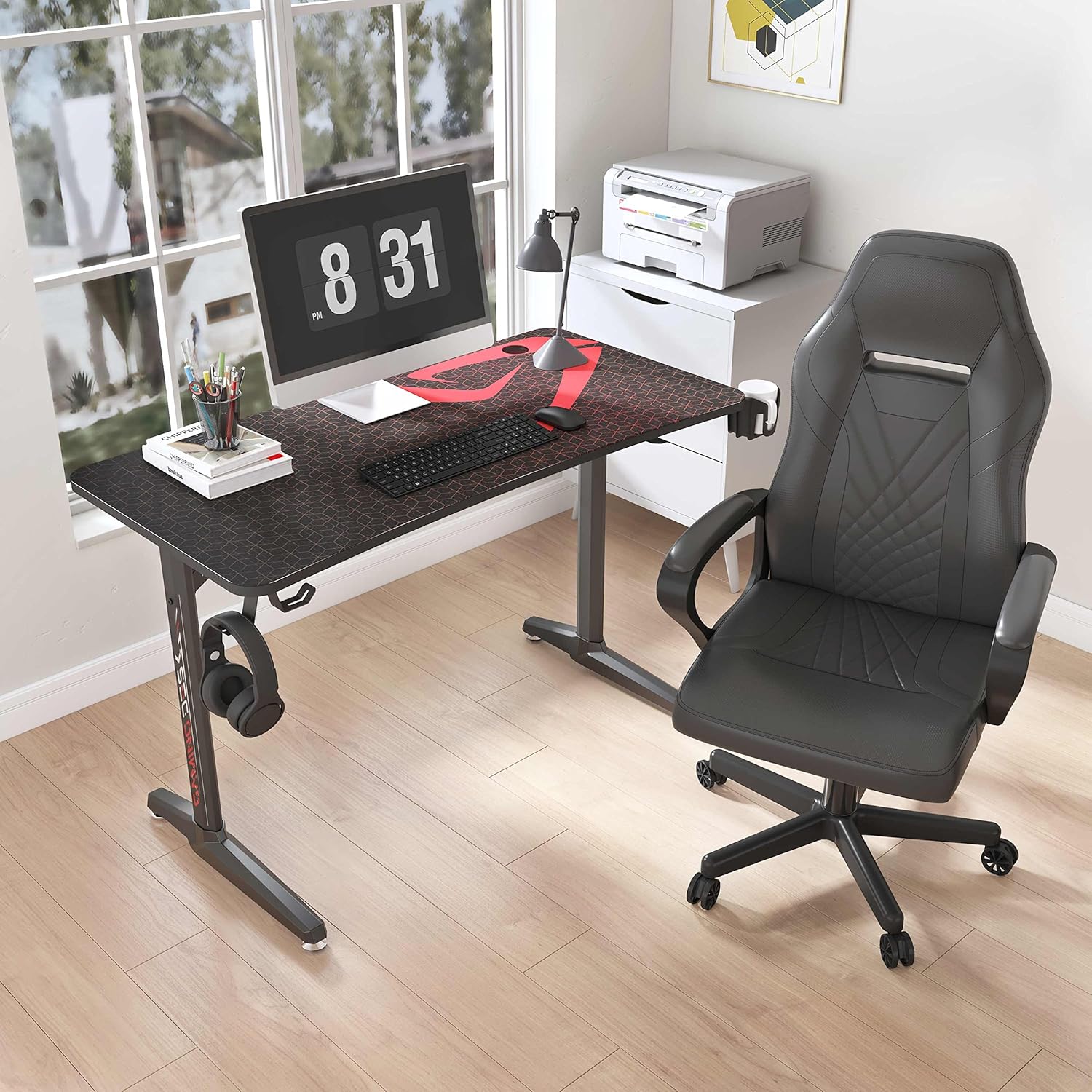
Figure 2: Illustrates the robust I-shaped steel frame and the adjustable feet designed to ensure desk stability on uneven surfaces.

Figure 3: A visual guide to the professional accessories that come with the desk, including the multi-device charging rack, the large mousepad, the reversible cup holder, and the dual headphone hooks.
Operating Instructions
Your DESIGNA Gaming Desk is designed for optimal functionality and comfort.
- USB Charging Ports: The gaming handle rack features 4 USB charging ports. Connect your phone, tablet, headphones, or other USB-powered devices for convenient charging. Ensure the rack is connected to a power source.
- Cup Holder: Use the integrated cup holder to keep your beverages secure and prevent spills on your desktop.
- Headphone Hooks: Hang your gaming headset or other headphones on the hooks to keep them organized and within easy reach.
- Cable Management: Utilize the cable management grommets and tray to route and organize your computer and accessory cables, maintaining a tidy workspace.
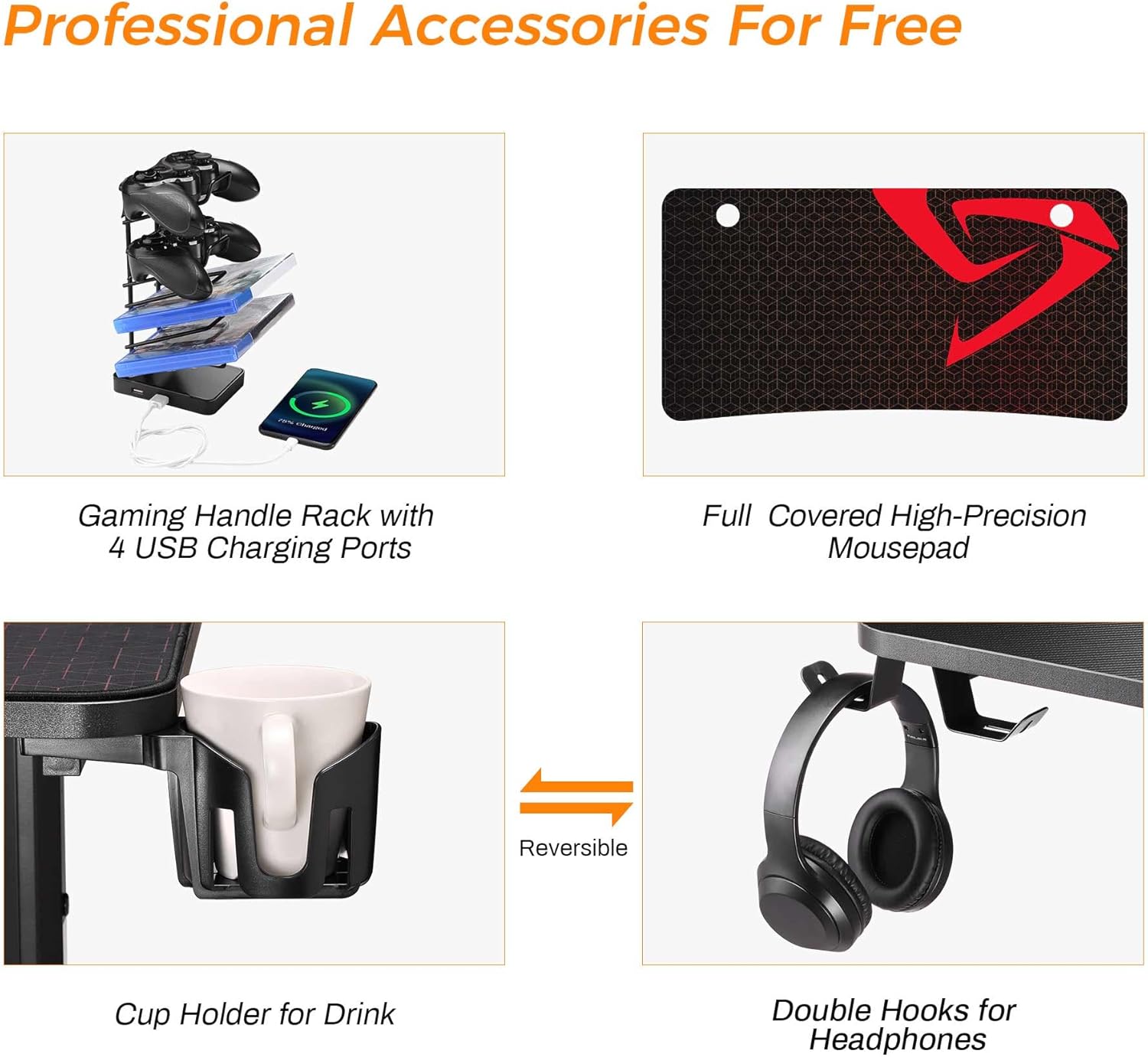
Figure 4: Detail of the integrated cable management system, showing how cables can be neatly routed through the desktop grommet to reduce clutter.

Figure 5: Highlights the key attributes of the desktop surface, including its carbon fiber texture, ergonomic design, and resistance to water and scratches.
Maintenance
- Cleaning: Wipe the carbon fiber desktop and steel frame with a soft, damp cloth. Avoid abrasive cleaners or harsh chemicals that could damage the finish.
- Mousepad Care: The full-surface mousepad can be cleaned with a damp cloth. Allow it to air dry completely before use.
- Fastener Check: Periodically check all screws and bolts to ensure they remain tight. Re-tighten if necessary to maintain desk stability.
- Spills: In case of liquid spills, wipe them immediately to prevent potential damage to the desktop or electrical components.
Troubleshooting
- Desk is Wobbly:
- Ensure all assembly screws are fully tightened.
- Adjust the leveling feet on the bottom of the desk legs to stabilize the desk on uneven floors.
- USB Ports Not Charging:
- Verify that the gaming handle rack's USB cable is securely connected to a powered USB port (e.g., on your computer or a wall adapter).
- Try connecting a different device or using a different USB cable to rule out device/cable issues.
- Desktop Scratches: While the carbon fiber desktop is scratch-resistant, extreme force or sharp objects can still cause damage. Use the included mousepad for protection during gaming.
Specifications
| Feature | Detail |
|---|---|
| Brand | DESIGNA |
| Model Number | FN02GAMEDESK47X30X23B |
| Color | Black |
| Product Dimensions (L x W x H) | 120.02 x 59.99 x 76.5 cm (approx. 47.2 x 23.6 x 30.1 inches) |
| Material | Engineered Wood (Desktop), Coated Steel (Frame) |
| Features | Ergonomic, Cable Management, USB Charging |
| Item Weight | 23 Kilograms (approx. 50.7 lbs) |
| Maximum Weight Recommendation | 90.7 kg (200 lbs) |
| Desktop Finish | Laminated Carbon Fiber Texture |
Warranty and Support
DESIGNA is committed to providing high-quality products. For any issues regarding product quality, missing parts, or assembly assistance, please contact our customer support. Your satisfaction is our priority.
Please refer to your purchase documentation for specific warranty terms and contact information.