
FLEXISPOT EN2
FLEXISPOT EN2 Standing Desk User Manual
Model: EN2 (48x24" White Top + White Frame)
1. Introduction
Thank you for choosing the FLEXISPOT EN2 Whole-Piece Standing Desk. This electric height-adjustable desk is designed to provide a versatile and ergonomic workspace, allowing you to easily switch between sitting and standing positions. It features a spacious one-piece desktop, an integrated clamp power strip with USB charging ports, and efficient cable management solutions. This manual provides essential information for assembly, operation, and maintenance to ensure optimal performance and longevity of your desk.
2. Safety Information
Please read all safety warnings and instructions carefully before assembly and use.
- This desk has a maximum weight limit of 154 pounds (70 kg). Do not exceed this capacity.
- Assembly may require an electric drill, which is not included. Exercise caution when using power tools.
- Proper anchoring may be necessary to ensure stability and prevent tipping, especially when the desk is at its maximum height or if heavy items are placed on it.
- Always follow the assembly instructions precisely. Incorrect assembly can lead to instability and potential injury.
- Keep children and pets away from the desk during operation to prevent accidents.
- Ensure all cables are properly managed and secured to prevent tripping hazards or damage to the motor.
- Do not place liquids directly on the desktop without proper coasters or protection to avoid spills that could damage electronic components.
3. Components and Parts List
Before beginning assembly, verify that all components are present and undamaged. Refer to the packaging list for a complete inventory.

Figure 3.1: Overview of the FLEXISPOT EN2 Standing Desk with accessories.
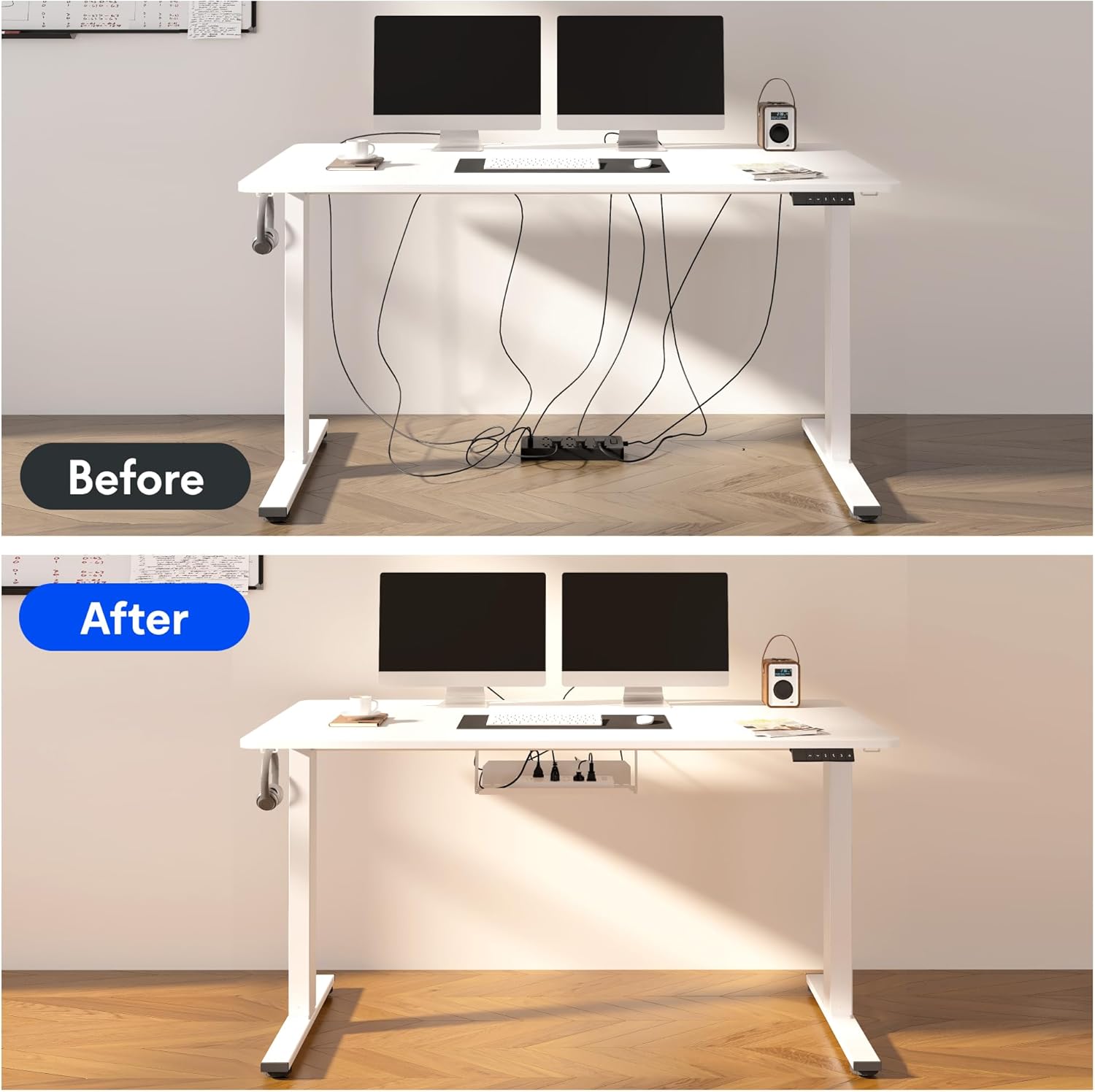
Figure 3.2: Key dimensions and features of the desk components.
- Desktop: 48x24 inch one-piece FSC-Certified wood desktop.
- Desk Frame: Sturdy industrial-grade steel frame with adjustable legs.
- Control Panel: 6-button digital controller with LED display and memory presets.
- Clamp Power Strip: Removable unit with 3 AC outlets (125V/12A) and 2 USB charging ports (5V/2A).
- Cable Management Device: Basket and ties for organizing cables.
- Assembly Hardware: Screws, bolts, and tools (note: electric drill not included).
4. Setup and Assembly
Assembly of the FLEXISPOT EN2 desk is designed to be straightforward. It is recommended to have two people for assembly due to the weight of the components. An electric drill is recommended for faster assembly, though not strictly required.
4.1 Unpacking and Preparation
- Carefully unpack all components and lay them out on a clean, soft surface to prevent scratches.
- Identify all parts against the provided parts list in your separate assembly guide.
4.2 Frame Assembly
- Assemble the desk frame according to the detailed instructions in your separate assembly manual. Ensure all screws are tightened securely.
- Attach the lifting columns to the feet and crossbar.
4.3 Desktop Attachment
- Carefully place the desktop upside down on a soft, protected surface.
- Align the assembled frame with the pre-drilled holes on the underside of the desktop. Secure the frame to the desktop using the provided screws.
4.4 Power Strip and Cable Management Installation
- The removable desktop power outlet can be clipped to the back or side of your desk. Choose a location that best suits your needs for convenient access.
- Install the cable management device (basket) under the desktop to organize power cords and other cables. Use the included cable ties to secure loose wires.

Figure 4.1: Detail of the clamp power strip.

Figure 4.2: Effective cable management for a tidy workspace.
5. Operating Instructions
Your FLEXISPOT EN2 desk features an intuitive digital control panel for easy height adjustment and memory functions.
5.1 Basic Height Adjustment
- Use the Up (▲) and Down (▼) arrow buttons on the control panel to manually adjust the desk height. The current height will be displayed on the LED screen.
- The desk adjusts smoothly from 28.1 inches (71.4 cm) to 45.7 inches (116.1 cm). The motor operates quietly, typically below 50 dB.
5.2 Memory Presets
The control panel features 4 programmable memory presets to save your preferred sitting and standing heights.
- Adjust the desk to your desired height using the Up/Down buttons.
- Press the 'M' button (or similar memory set button, refer to your specific control panel diagram). The display may flash.
- Immediately press one of the numbered preset buttons (1, 2, 3, or 4) to save the current height to that memory slot.
- To recall a saved height, simply press the corresponding numbered preset button. The desk will automatically move to the saved position.
5.3 Anti-Collision System
The desk is equipped with a smart anti-collision system. If the desk encounters an obstacle during adjustment, it will automatically stop and reverse slightly to prevent damage.

Figure 5.1: Digital control panel for height adjustment.

Figure 5.2: Features including anti-collision and cable management.
6. Maintenance
Regular maintenance will help keep your FLEXISPOT EN2 desk in excellent condition.
- Cleaning: Wipe the desktop and frame with a soft, damp cloth. Avoid abrasive cleaners or harsh chemicals that could damage the finish.
- Cable Check: Periodically inspect all cables for wear or damage. Ensure they are securely routed and not pinched.
- Fastener Check: Occasionally check all screws and bolts to ensure they remain tight. Retighten if necessary.
- Motor Care: The motor is designed for long-term use and generally requires no special maintenance. Avoid overloading the desk to prevent strain on the motor.
7. Troubleshooting
If you encounter any issues with your FLEXISPOT EN2 desk, refer to the following common troubleshooting tips. For persistent problems, please contact customer support.
| Problem | Possible Cause | Solution |
|---|---|---|
| Desk does not move or respond to controls. | Power cable disconnected; control panel error; motor overload. | Check power connections. Unplug and replug the desk. Reduce weight on the desk. Refer to your specific control panel manual for reset procedures. |
| Desk moves unevenly or makes unusual noises. | Loose fasteners; uneven weight distribution; obstruction. | Check and tighten all assembly screws. Redistribute weight evenly on the desktop. Inspect for any obstructions under or around the desk. |
| Anti-collision system frequently activates. | Obstruction in path; sensitive setting. | Ensure clear path for desk movement. Check for any items that might be triggering the sensor. |
8. Specifications
| Feature | Detail |
|---|---|
| Brand | FLEXISPOT |
| Model Number | M-FLEXISPOT-GRAY-DESK (EN2 Series) |
| Product Dimensions (D x W x H) | 24"D x 48"W x 28"H (61cm D x 122cm W x 71cm H) |
| Color | White Top + White Frame |
| Adjustable Height Range | 28.1" - 45.7" (71.4 cm - 116.1 cm) |
| Maximum Weight Recommendation | 154 Pounds (70 kg) |
| Tabletop Thickness | 1 Inch (2.54 cm) |
| Power Strip Outlets | 3 AC Outlets (125V/12A) |
| USB Charging Ports | 2 USB Ports (5V/2A) |
| Motor Noise Level | Less than 50 dB |
| Required Assembly | Yes (Electric drill recommended) |
| Certifications | FSC-Certified wood (desktop), UL Listed |
9. Warranty and Support
FLEXISPOT stands behind the quality of its products.
9.1 Product Warranty
- 5-Year Warranty: Applies to frames, motors, and other mechanical devices.
- 2-Year Warranty: Applies to controllers, switches, and electronics.
Please retain your proof of purchase for warranty claims. The warranty covers manufacturing defects and malfunctions under normal use conditions.
9.2 Customer Support
For any questions, assistance with assembly, troubleshooting, or warranty inquiries, please contact FLEXISPOT customer support. Refer to the contact information provided with your purchase or visit the official FLEXISPOT website.
Note: No relevant official product videos from the seller were found in the provided data to embed in this manual.
Related documentsEN2

Ask a question about this manual
Ask about setup, troubleshooting, compatibility, parts, safety, or missing instructions. Manuals+ will review the question and use this page’s manual context to help answer it.