
Motorola Solutions TLK100
Motorola Solutions TLK100 Two-Way Radio User Manual
Model: TLK100
1. Introduction
This manual provides essential instructions for the proper setup, operation, and maintenance of your Motorola Solutions TLK100 Two-Way Radio. The TLK100 is a robust communication device designed for nationwide coverage utilizing 4G LTE and Wi-Fi networks, offering reliable and clear communication.
Key features of the TLK100 include over-the-air device management, a powerful yet slim design, Wi-Fi connectivity, extended battery life for full shifts, and loud, clear audio output.

Image 1.1: Four Motorola Solutions TLK100 two-way radios. These devices provide instant push-to-talk communication over 4G LTE and Wi-Fi networks.

Image 1.2: Various views of the TLK100 radio, highlighting its compact design and antenna.
2. Setup
2.1. Battery Installation and Charging
The TLK100 requires one Lithium Ion battery for operation. Ensure the battery is fully charged before initial use.
- Align the battery with the compartment on the back of the radio.
- Gently press the battery into place until it clicks securely.
- Place the radio in its charging cradle or connect the charging cable to the radio. The charging indicator will illuminate.
- Allow the battery to charge completely. A full charge typically provides up to 18 hours of operation.
2.2. SIM Card and Service Activation
The TLK100 utilizes an embedded MIF2 UICC (SIM card) for 4G LTE connectivity. A monthly service fee is required for nationwide coverage. Activation and device management are typically handled over-the-air by your service provider.
- Contact your Motorola Solutions service provider to activate your TLK100 radio and establish your service plan.
- Your provider will guide you through the over-the-air provisioning process.
3. Operating Instructions
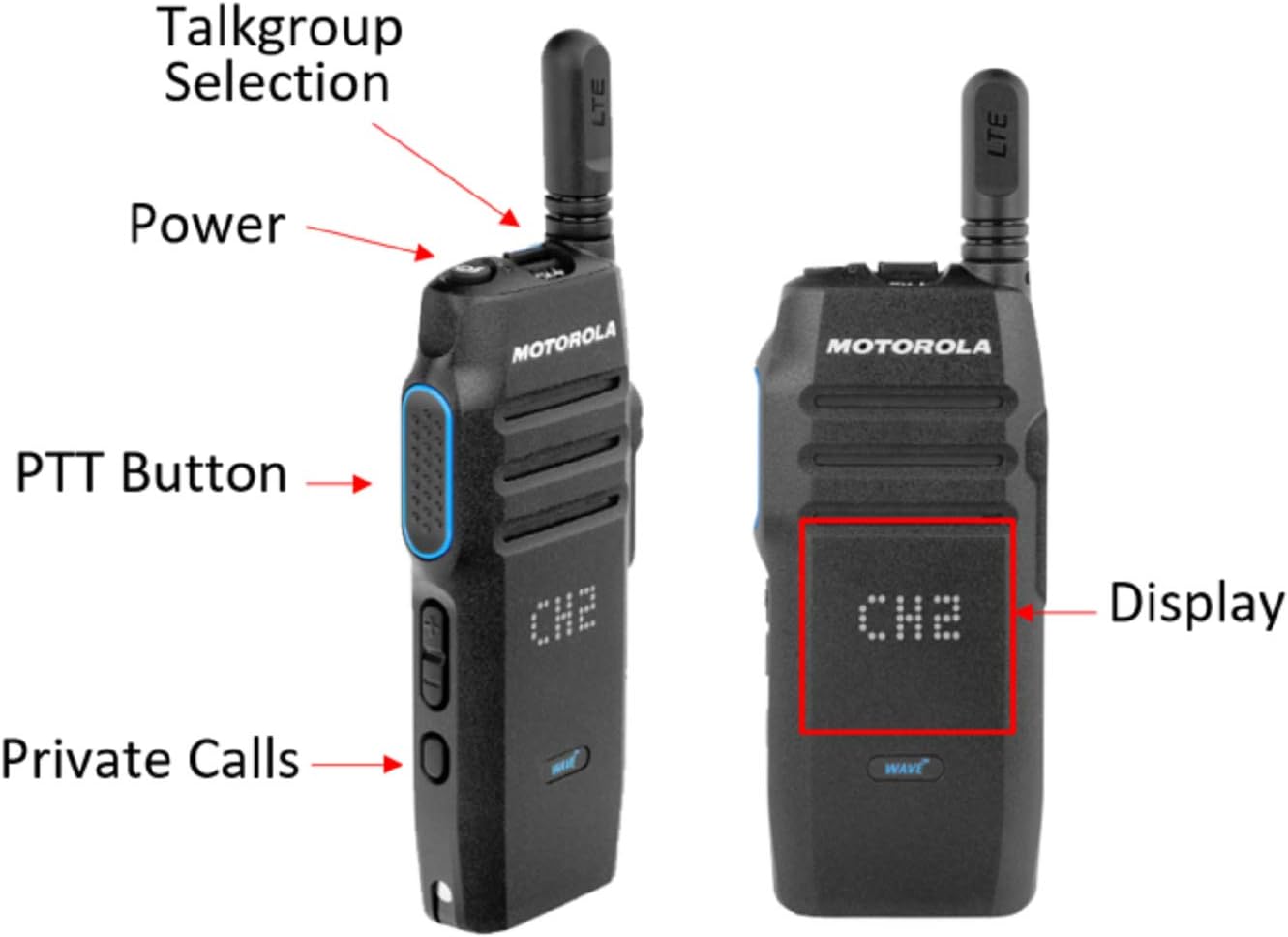
Image 3.1: TLK100 radio with key controls labeled for easy identification.
3.1. Radio Controls Overview
- Power Button: Located on the top of the radio, used to turn the device on or off.
- Talkgroup Selection: Rotary knob on the top, used to select different communication channels or talkgroups.
- PTT (Push-to-Talk) Button: Large button on the side, pressed to transmit your voice.
- Private Calls Button: Button on the side, used to initiate private conversations.
- Display: Front screen showing current channel, battery status, and other information.
3.2. Powering On/Off
- To Power On: Press and hold the Power Button until the radio powers on and the display illuminates.
- To Power Off: Press and hold the Power Button until the radio powers off.
3.3. Selecting a Talkgroup
Rotate the Talkgroup Selection knob on the top of the radio to cycle through available talkgroups. The selected talkgroup will be shown on the display.
3.4. Transmitting and Receiving
- To Transmit: Press and hold the PTT Button on the side of the radio. Speak clearly into the microphone. Release the PTT button when you finish speaking.
- To Receive: Ensure the PTT button is not pressed. The radio will automatically receive audio from the selected talkgroup.
3.5. Initiating Private Calls
Press the Private Calls Button to initiate a private conversation with a specific contact, if configured by your service provider. Follow the on-screen prompts to select the desired contact.
3.6. Wi-Fi Connectivity
The TLK100 supports Wi-Fi connectivity. This feature allows the radio to operate on local Wi-Fi networks when 4G LTE coverage is unavailable or to offload data traffic. Wi-Fi settings are typically managed over-the-air by your service provider.
4. Maintenance
4.1. Battery Care
- Always use genuine Motorola Solutions batteries and chargers.
- Avoid exposing the battery to extreme temperatures.
- Do not short-circuit the battery terminals.
- Recycle used batteries responsibly.
4.2. Cleaning the Radio
To ensure optimal performance and longevity, keep your radio clean.
- Wipe the exterior of the radio with a soft, damp cloth.
- Do not use harsh chemicals, solvents, or abrasive cleaners.
- Ensure all ports and covers are sealed before cleaning to maintain its waterproof rating.
4.3. Water Resistance
The TLK100 is rated as waterproof (IP54 Cat 2). While it can withstand splashes and dust, avoid submerging the radio in water for extended periods or exposing it to high-pressure water jets.
5. Troubleshooting
If you encounter issues with your TLK100 radio, try the following basic troubleshooting steps:
- No Power: Ensure the battery is properly installed and fully charged. Try charging the radio.
- No Network Connection: Check if you are in an area with 4G LTE or Wi-Fi coverage. If using Wi-Fi, ensure you are connected to a valid network.
- Cannot Transmit/Receive: Verify that you have selected the correct talkgroup. Ensure the PTT button is fully pressed when transmitting and released when receiving.
- Poor Audio Quality: Check for obstructions around the microphone or speaker. Ensure the radio's volume is adjusted appropriately.
- Device Malfunction: If issues persist, contact your Motorola Solutions service provider. Many issues can be resolved through over-the-air device management.
6. Specifications
The following table details the technical specifications of the Motorola Solutions TLK100 Two-Way Radio:

Image 6.1: Comprehensive specifications for the TLK100 radio.
| Feature | Specification |
|---|---|
| Network | 4G LTE |
| Channel Capacity | 50 (expandable to 96) |
| Contact List | 300 contacts |
| Dimensions (H x W x L) | 7.48 x 6.1 x 2.09 inches (With Antenna: 6.65 x 2.31 x 0.94 in / 168.9 x 58.7 x 23.9 mm) |
| Weight with Battery | 5.86 oz (166g) |
| Battery Capacity | 3.7V (Nominal) 2300 mAh with PMNN4468A |
| Battery Life (5-5-90 Duty Cycle) | 18 Hours |
| Voice Codec | OPUS |
| Bluetooth | Bluetooth Capable*, V4.1, BLE |
| GPS | GPS/AGPS |
| Wi-Fi | 802.11 a/b/g/n |
| SIM Card | Embedded MIF2 UICC |
| IP Rating | IP54 (Dust and Water Intrusion Cat 2) |
| Apps Supported | Powered by WAVE OnCloud |
| Encryption | AES-256 |
| Operating Temperature | -4°F/+140°F (-20°C/+60°C) |
| Storage Temperature | -40°F/+185°F (-40°C/+85°C) |
| Water Resistance Level | Waterproof |
| UPC | 856806008883 |
7. Warranty and Support
7.1. Warranty Information
For detailed warranty information regarding your Motorola Solutions TLK100 radio, please refer to the warranty card included with your product packaging or visit the official Motorola Solutions website. Warranty terms and conditions may vary by region and purchase agreement.
7.2. Customer Support
If you require technical assistance, service, or have questions not covered in this manual, please contact your authorized Motorola Solutions dealer or visit the official Motorola Solutions support website for further assistance.
Official Motorola Solutions Website: www.motorolasolutions.com
Related documentsTLK100


Ask a question about this manual
Ask about setup, troubleshooting, compatibility, parts, safety, or missing instructions. Manuals+ will review the question and use this page’s manual context to help answer it.