
1. Introduction
This manual provides detailed instructions for the proper use and maintenance of your BOBLOV C19 Mini Body Camera. Please read this manual thoroughly before operating the device to ensure optimal performance and longevity.
The BOBLOV C19 is a compact body camera designed for various recording needs, featuring 1080P video recording, external memory support up to 256GB, and a long battery life.
2. Package Contents
Verify that all items listed below are included in your package:
- BOBLOV C19 Camera Body
- Removable Clips
- USB Cable
- User Manual
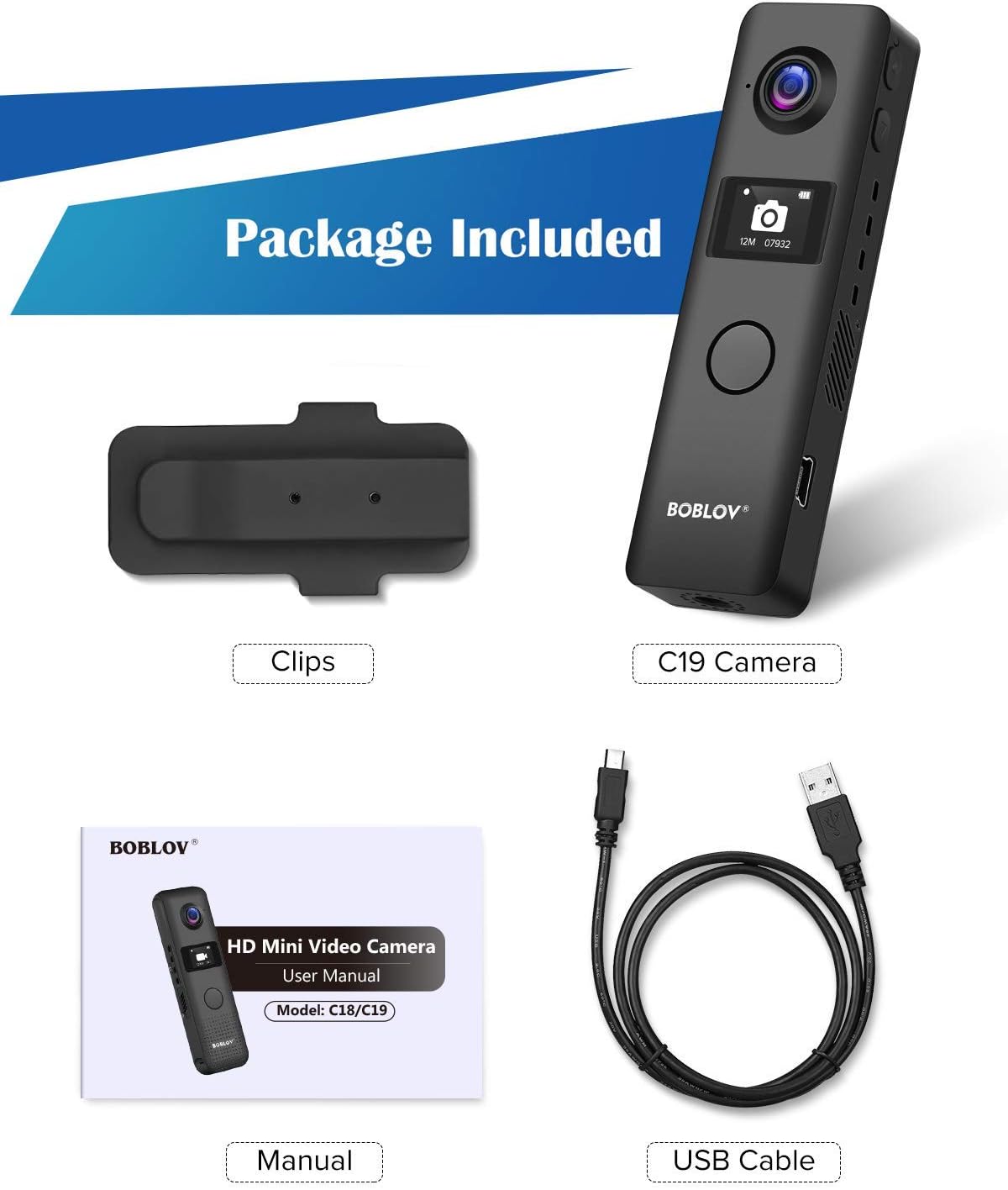
Figure 2.1: Included items in the BOBLOV C19 package. This image displays the C19 camera, two clips, a USB cable, and the user manual.
3. Product Overview
Familiarize yourself with the physical components of your BOBLOV C19 camera.
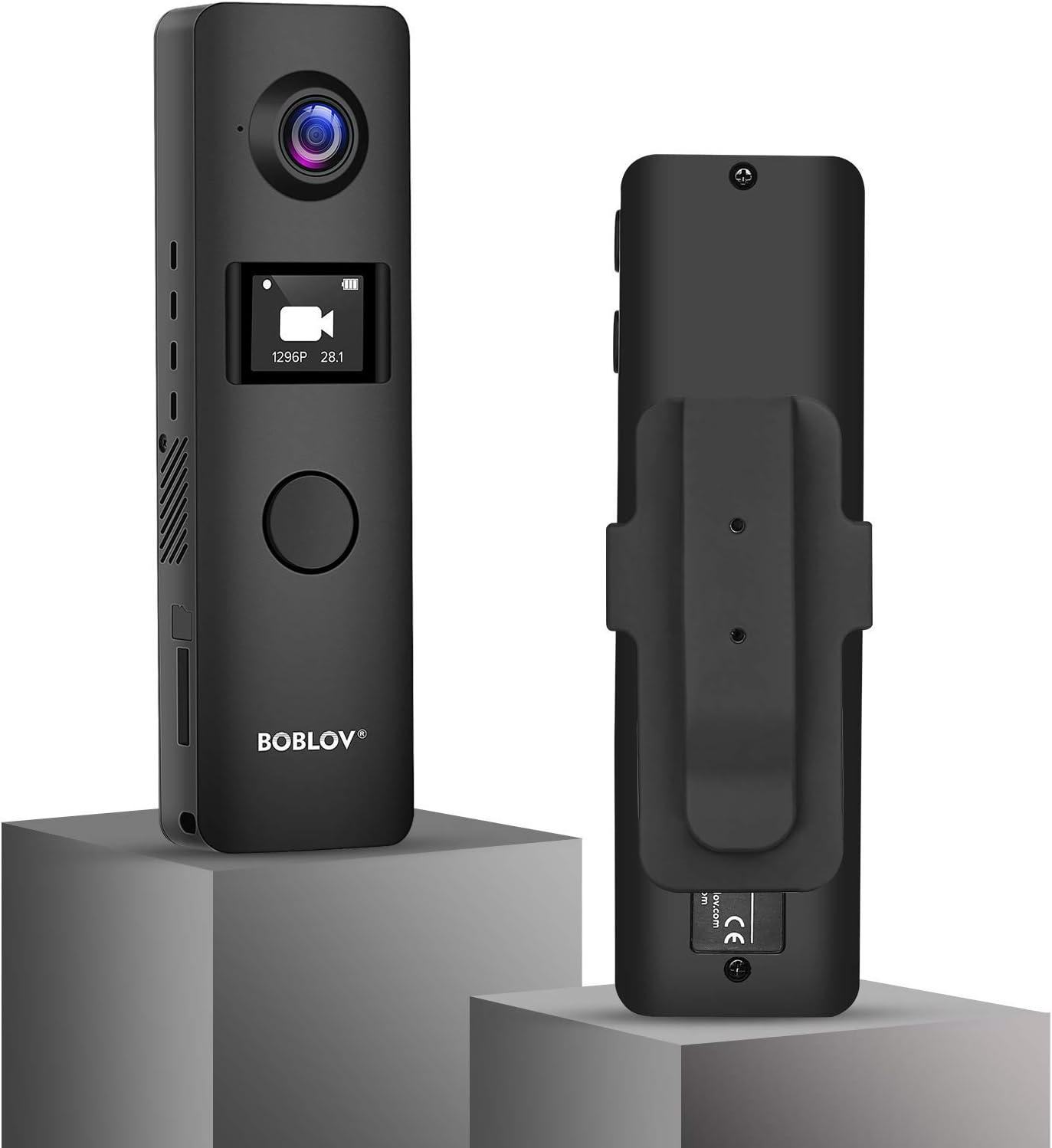
Figure 3.1: Front and back view of the BOBLOV C19 Mini Body Camera. The front features the lens, OLED screen, and main recording button. The back shows the removable clip attachment point.

Figure 3.2: Dimensions of the BOBLOV C19 Mini Body Camera. The camera measures approximately 102mm (4 inches) in length, 30mm (1.2 inches) in width, and 12mm (0.5 inches) in depth, with a net weight of 53g (1.80 lb).

Figure 3.3: Labeled diagram of the BOBLOV C19 Mini Body Camera. This diagram highlights the Reset button, Power/Up button, Down button, OK Button/Recording button, USB port, SD Card Slot, Working Indicator, and 1/4 Screw Connection.
Key Components:
- Lens: Captures video and images.
- OLED Screen: Displays recording status, menu options, and battery level.
- OK Button/Recording Button: Main button for starting/stopping recordings and confirming menu selections.
- Power/Up Button: Powers the device on/off and navigates up in menus.
- Down Button: Navigates down in menus.
- USB Port: For charging and data transfer.
- SD Card Slot: For external memory card insertion.
- Working Indicator: LED light indicating device status.
- 1/4 Screw Connection: For mounting the camera on tripods or other accessories.
4. Setup
4.1. Charging the Battery
Before first use, fully charge the camera's internal 1200mAh battery. Connect the camera to a USB power source using the provided USB cable. The charging time is approximately 2 hours.

Figure 4.1: The BOBLOV C19 supports recording while charging. A full charge takes approximately 2 hours, providing 3-4 hours of recording time (at 1080P with WiFi off).
4.2. Inserting a Memory Card
The BOBLOV C19 supports external memory cards up to 256GB. A Class 10 or higher brand card is recommended for optimal performance. Ensure the camera is powered off before inserting or removing the memory card.
- Locate the SD card slot on the side of the camera.
- Insert the memory card with the gold contacts facing down until it clicks into place.
- To remove, gently push the card in until it springs out.

Figure 4.2: The BOBLOV C19 supports external memory cards up to 256GB. A Class 10 card is recommended for reliable performance.
4.3. Attaching the Clip
The camera comes with removable clips that can be attached to the front or back, allowing for flexible mounting options. If the clip is attached to the front, the main recording button may be covered, requiring the use of the side buttons for recording.

Figure 4.3: The BOBLOV C19 features removable clips for versatile attachment. The image shows how the clip can be positioned on the camera, and notes that if the clip covers the front button, recording can be initiated via the side "Down" button.
5. Operation
5.1. Powering On/Off
- To Power On: Press and hold the Power/Up button until the OLED screen illuminates.
- To Power Off: Press and hold the Power/Up button until the screen turns off.
5.2. Recording Video
The BOBLOV C19 can record video at various resolutions, including 1080P at 30fps.
- Ensure the camera is powered on and in video mode (indicated on the OLED screen).
- Press the large OK Button/Recording Button on the front to start recording. The working indicator will flash, and a recording icon will appear on the screen.
- Press the OK Button/Recording Button again to stop recording. The video file will be saved to the memory card.

Figure 5.1: The BOBLOV C19 features a large central button for easy one-touch recording. Pressing this button initiates or stops video recording.
5.3. Taking Photos
The camera can capture still images.
- Navigate to photo mode using the menu (see Section 5.5).
- Press the OK Button/Recording Button to take a photo.
5.4. Audio Recording
The camera also supports audio-only recording.
- Navigate to audio mode using the menu (see Section 5.5).
- Press the OK Button/Recording Button to start audio recording.
- Press the OK Button/Recording Button again to stop recording.
5.5. OLED Screen Menu Settings
The OLED screen allows you to access and adjust various camera settings.
Figure 5.2: The OLED screen displays current mode (Video, Audio, Settings, Photo) and other relevant information.

Figure 5.3: Available menu options on the BOBLOV C19. These include Resolution, Image Size, Super Store, Loop Recording, Vibration, Video Time Detection, Power off, Indicator, Language, Date/Time, Unit ID, Format, and Version.
Use the Power/Up and Down buttons to navigate through the menu options, and the OK Button/Recording Button to select an option or confirm a setting.
5.6. Loop Recording
The camera supports loop recording, which automatically overwrites the oldest files when the memory card is full. This ensures continuous recording without manual deletion.

Figure 5.4: Illustration of the loop recording feature, which automatically deletes older files to make space for new recordings when the memory card is full.
5.7. Motion Detection
The camera includes a motion detection feature. When enabled, the camera will automatically start recording when motion is detected within its field of view. Refer to the menu settings to enable or disable this function.
6. Maintenance
- Cleaning: Use a soft, dry cloth to clean the camera body. For the lens, use a specialized lens cleaning cloth and solution. Avoid harsh chemicals.
- Storage: Store the camera in a cool, dry place away from direct sunlight and extreme temperatures.
- Battery Care: To prolong battery life, avoid fully discharging the battery frequently. Charge the camera regularly, even if not in use for extended periods.
7. Troubleshooting
Common Issues and Solutions:
- Camera does not power on:
- Ensure the battery is charged. Connect the camera to a power source and try again.
- Perform a reset by gently pressing the reset button with a thin object (e.g., a paperclip).
- Recording stops unexpectedly or files are corrupted:
- Ensure a Class 10 or higher memory card is used. Lower class cards may not keep up with the data write speed.
- Format the memory card using the camera's menu settings or a computer.
- Check if the memory card is full. Enable loop recording or transfer files to free up space.
- Poor video quality in low light:
- The camera's low-light performance may be limited. Ensure adequate lighting for optimal video quality.
- Muffled or poor audio quality:
- Ensure the microphone is not obstructed.
- Sound quality can be affected by clothing movement when worn on the body.
- Battery life is shorter than expected:
- Recording at higher resolutions (e.g., 1080P) consumes more power.
- Ensure WiFi is off if not in use, as it can drain the battery faster.
- Battery performance can degrade over time with repeated charge cycles.
8. Specifications
| Feature | Detail |
|---|---|
| Brand | BOBLOV |
| Model Number | C19 |
| Video Capture Resolution | 1080p (up to 1296P with Novatek 96658 chipset) |
| Photo Sensor Technology | CCD or CMOS (IMX323 sensor) |
| Flash Memory Type | SD (External, up to 256GB) |
| Video Capture Format | MOV |
| Supported Audio Format | AAC, MP3 |
| Connectivity Technology | Wired (USB) |
| Color | Black |
| Special Feature | Night Vision |
| Battery Capacity | 1200 mAh |
| Recording Time | Approx. 3-4 hours (1080P, WiFi off) |
| Charging Time | Approx. 2 hours |
| Dimensions | 102mm x 30mm x 12mm (4-1/8" x 1-1/8" x 1") |
| Weight | 53g (1.80 lb) |
9. Warranty and Support
For warranty information and technical support, please refer to the official BOBLOV website or contact their customer service directly. Keep your purchase receipt as proof of purchase for warranty claims.


