

1. Introduction
This manual provides essential information for the safe installation, operation, and maintenance of the Satco S28938 110 Watt LED Hi-Lumen Shoe Box Style lamp. This LED lamp is designed for use in compatible commercial fixture applications, offering high luminous output and energy efficiency. Please read this manual thoroughly before installation and retain it for future reference.
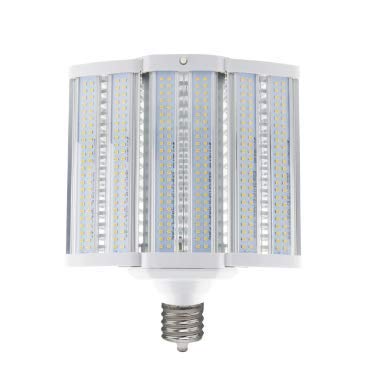
Figure 1: Satco S28938 110W LED Hi-Lumen Shoe Box Style Lamp. This image displays the tubular LED lamp, which is designed for installation into existing commercial shoe box style fixtures.
2. Safety Information
WARNING: Risk of electric shock. Installation requires knowledge of luminaires electrical systems. If not qualified, do not attempt installation. Contact a qualified electrician.
- Always disconnect power at the circuit breaker or fuse box before installation, removal, or maintenance.
- Do not handle the lamp with wet hands or when standing on wet or damp surfaces.
- Ensure the fixture receiving this lamp is rated for the lamp's wattage and voltage.
- Do not modify the lamp or its components.
- This lamp is intended for commercial fixture applications. Ensure the fixture is properly grounded.
- Operate the lamp within its specified temperature range.
- Dispose of the lamp according to local regulations.
3. Package Contents
Verify that your package contains the following items:
- Satco S28938 110W LED Hi-Lumen Shoe Box Style Lamp (Quantity as purchased)
- This Instruction Manual
4. Setup and Installation
The Satco S28938 lamp is designed for direct replacement in compatible commercial shoe box style fixtures. Professional installation is highly recommended for commercial applications.
Installation Steps:
- Power Disconnection: Before beginning any installation, ensure the power supply to the fixture is completely disconnected at the circuit breaker or fuse box. Verify with a voltage tester.
- Access Fixture: Open the commercial shoe box style fixture to access the existing lamp and wiring.
- Remove Old Lamp: Carefully remove the old lamp from the fixture. If it is a traditional HID or fluorescent lamp, ensure proper disposal according to local regulations.
- Bypass Ballast (if applicable): Many LED replacement lamps require bypassing the existing ballast. Consult the wiring diagram provided with your specific fixture or the lamp's packaging for detailed instructions. If a ballast is present and needs to be bypassed, a qualified electrician should perform this step.
- Install New LED Lamp: Insert the Satco S28938 LED lamp into the appropriate socket within the fixture. Ensure it is securely seated.
- Close Fixture: Securely close the fixture, ensuring all seals and covers are properly reinstalled to maintain its weather resistance (if applicable).
- Restore Power: Restore power to the fixture at the circuit breaker.
- Test Operation: Turn on the light switch to confirm the lamp is functioning correctly.


Figure 2: Examples of commercial applications where the Satco S28938 lamp can be utilized, such as agricultural facilities and office spaces.
5. Operating Instructions
The Satco S28938 LED lamp operates by receiving power from the commercial fixture it is installed in. Once properly installed and power is supplied to the fixture, the lamp will illuminate. Control of the lamp (on/off) is typically managed by the fixture's existing power switch or control system. If the fixture has advanced control capabilities (e.g., app control, dimming), the lamp will respond according to the fixture's specifications, provided it is compatible.
6. Maintenance
Minimal maintenance is required for the Satco S28938 LED lamp.
- Cleaning: Ensure power is disconnected before cleaning. Use a soft, dry, or slightly damp cloth to wipe the exterior of the lamp. Do not use harsh chemicals or abrasive cleaners.
- Inspection: Periodically inspect the lamp and its connections within the fixture for any signs of damage or wear. If any damage is observed, disconnect power immediately and replace the lamp.
- Replacement: When the lamp reaches the end of its operational life, replace it with a new Satco S28938 lamp or an equivalent compatible LED lamp.
7. Troubleshooting
If you encounter issues with your Satco S28938 lamp, refer to the following common troubleshooting steps:
| Problem | Possible Cause | Solution |
|---|---|---|
| Lamp does not turn on |
|
|
| Lamp flickers |
|
|
| Reduced light output |
|
|
8. Specifications
| Feature | Detail |
|---|---|
| Brand | Satco |
| Model Number | S28938 |
| Light Type | LED |
| Wattage | 110 Watts |
| Specific Uses For Product | Lamp for Commercial Fixture Applications |
| Shape | Tubular (T) |
| Material | Copper |
| Item Weight | 4.25 Pounds |
| Control Method | App (Dependent on compatible fixture's control system) |
| Global Trade Identification Number (GTIN) | 10045923289382 |
| ASIN | B08BCS5N8C |
9. Warranty Information
Satco products are manufactured to high-quality standards and are backed by a manufacturer's warranty. For specific warranty terms and conditions applicable to the S28938 lamp, please refer to the warranty statement provided with your purchase or visit the official Satco website. Keep your proof of purchase for warranty claims.
10. Support
If you require further assistance, have questions not covered in this manual, or need to report an issue, please contact Satco customer support. Contact information can typically be found on the official Satco website or on the product packaging.


