
1. Introduction
This manual provides essential instructions for the safe operation, installation, maintenance, and troubleshooting of your TRUSTECH Electric Infrared Patio Heater, Model PD15R. Please read this manual thoroughly before using the product and retain it for future reference. This heater is designed for both indoor and outdoor use, providing efficient and instant warmth.
2. Important Safety Instructions
Failure to follow these safety instructions may result in fire, electric shock, injury, or property damage. Always exercise caution when operating electrical appliances.
- Initial Setup: Before first use, ensure all internal packing materials, such as black pearl cotton, are removed from the heater. Failure to do so can cause heat and smoke upon activation.
- Power Requirements: The heater has a rated power of 1500W. Ensure the power supply device, especially for outdoor use, can support at least 1500W. A fuse of 15A or more, preferably household AC, is recommended.
- Overheat Protection: The heater is equipped with an automatic overheat protection system. If the unit overheats, power will be cut off automatically to prevent damage and ensure safety.
- Placement: Position the heater on a stable, level surface. Maintain adequate clearance from combustible materials (e.g., furniture, curtains, paper) as specified in the setup section. Do not block air inlets or outlets.
- Water and Moisture: Do not use the heater near water, in wet environments, or where it may be exposed to rain or splashes.
- Children and Pets: Keep children and pets away from the heater, especially when it is in operation, due to hot surfaces.
- Supervision: Do not leave the heater unattended while it is operating.
- Power Cord: Do not run the power cord under carpeting or cover it with throw rugs. Arrange the cord away from traffic areas to prevent tripping hazards. Do not use with a damaged cord or plug.
- Maintenance: Always unplug the heater before cleaning or performing any maintenance.
3. Package Contents
Please check the package for the following items:
- TRUSTECH Electric Infrared Patio Heater Unit
- Remote Control
- Base Assembly Components (if not pre-assembled)
- User Manual (this document)
4. Setup Instructions
Follow these steps to set up your heater for safe and effective operation.
- Unpacking: Carefully remove all components from the packaging. Retain packaging for storage or if return is necessary.
- Remove Packing Materials: Locate and remove any internal black pearl cotton or other protective packing materials from within the heater unit. This is critical for safe operation.
- Base Assembly: If the base is not pre-attached, secure the heater unit to its base using the provided screws and a screwdriver. Ensure the base is firmly attached for stability. The heater features a large, anti-dumping base design for enhanced stability.
- Placement:
- Place the heater on a firm, level surface.
- Ensure there is at least 3 feet (0.9 meters) of clear space around the heater from any walls, furniture, or other objects.
- This heater is suitable for both indoor (e.g., living room, bedroom, garage) and outdoor (e.g., patio, backyard, studio porch, balconies) use.
- Power Connection: Plug the power cord into a grounded electrical outlet that meets the specified voltage and wattage requirements (150V AC, 15A fuse or higher). The power cord is designed to be short for safety; use an appropriate outdoor-rated extension cord if necessary, ensuring it can handle 1500W.
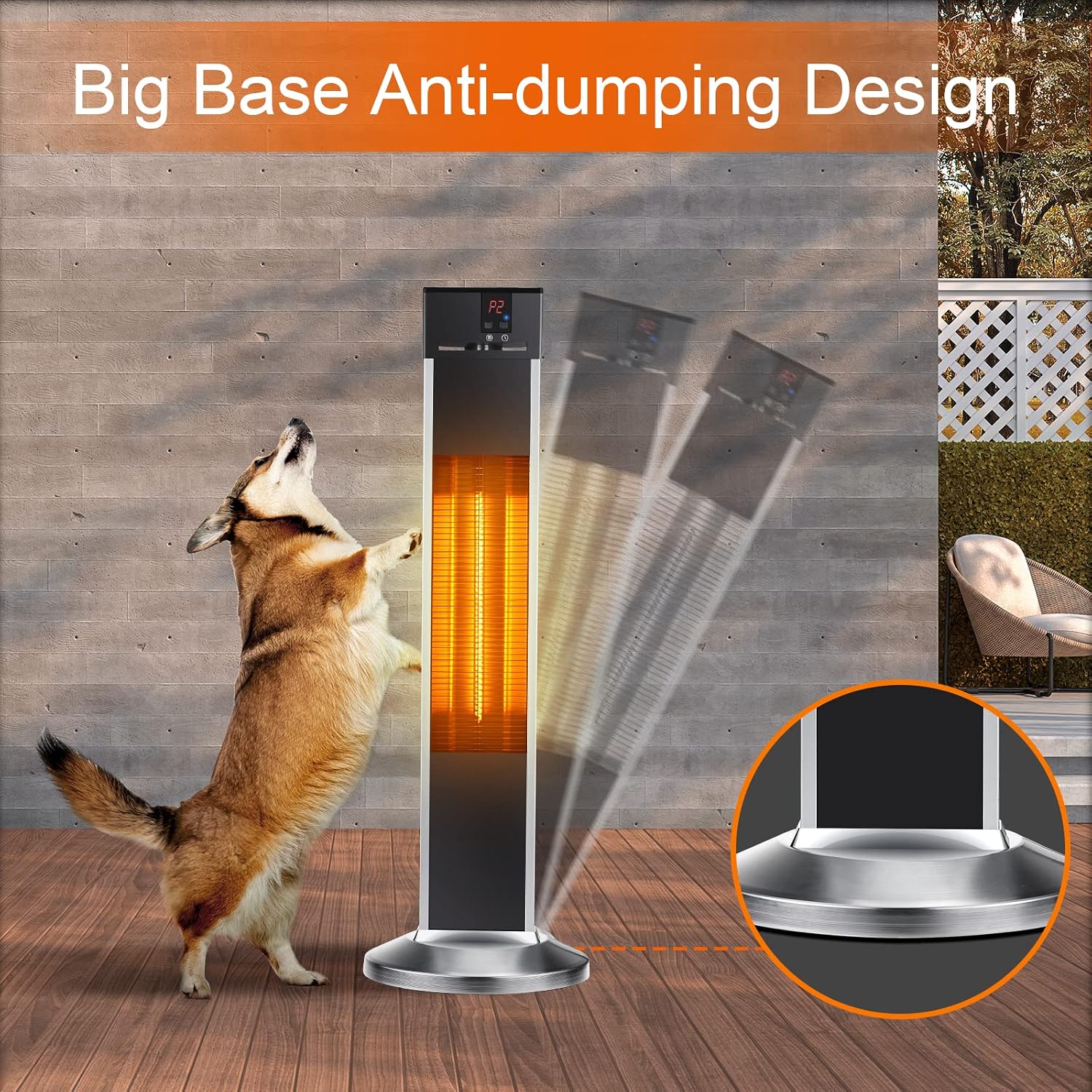
Image: The heater's stable, large base is designed to prevent accidental tipping, ensuring safety even around active pets.

Image: The heater's 31.7-inch height allows for effective heat distribution to individuals in a seated position, enhancing comfort.
5. Operating Instructions
Your TRUSTECH infrared heater provides instant, efficient warmth with multiple settings and convenient control options.
5.1 Powering On/Off
- Ensure the heater is plugged into a suitable power outlet.
- Press the Power button on the control panel or the remote control to turn the heater ON or OFF.
5.2 Heat Settings
The heater offers three heat levels to suit your comfort needs:
- Low (500W): Ideal for personal heating or smaller areas.
- Middle (1000W): Suitable for moderate heating requirements.
- High (1500W): Provides maximum warmth for larger spaces or colder conditions.
Use the 'Mode' or 'Heat' button on the control panel or remote to cycle through the heat settings.
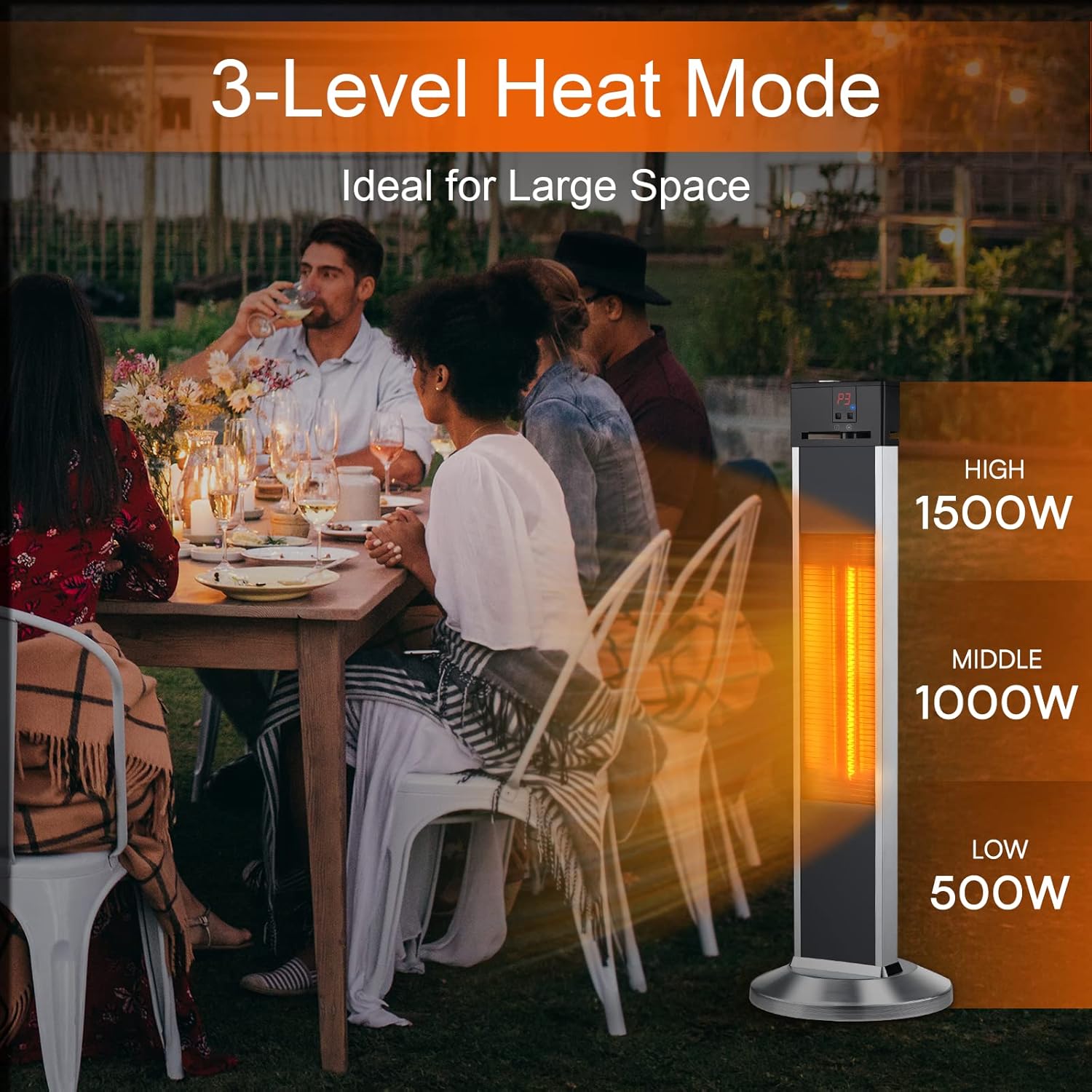
Image: The heater offers three distinct heat levels (500W, 1000W, 1500W) to provide customizable warmth for various settings, including outdoor dining.
5.3 Instant Warmth Technology
Equipped with carbon fiber gold-coated tubes, this infrared heater delivers warmth within 3 seconds of activation. Infrared heating directly warms objects and people, rather than heating the air, providing efficient and focused heat.

Image: The advanced carbon fiber gold-coated tubes enable the heater to provide instant warmth within 3 seconds of being turned on.
5.4 Remote Control Operation
The included remote control allows you to conveniently adjust settings from a distance.
- Power Button: Turns the heater ON or OFF.
- Mode/Heat Button: Cycles through 500W, 1000W, and 1500W heat settings.
- Timer Button: Activates and adjusts the 24-hour timer function.

Image: The remote control provides convenient operation, allowing users to adjust settings without needing to approach the heater.
5.5 24-Hour Timer Function
Set the heater to automatically shut off after a specified period, up to 24 hours. This feature is useful for ensuring comfort while sleeping or when you need the heater to operate for a set duration.
- Press the 'Timer' button on the control panel or remote.
- Each press will increase the timer duration.
- The heater operates quietly, making it suitable for use in bedrooms without disturbing sleep.

Image: The heater's quiet operation and 24-hour timer function allow for comfortable, undisturbed sleep while maintaining warmth.

Image: The TRUSTECH heater is versatile, suitable for providing warmth in diverse environments such as bedrooms, living rooms, commercial areas, and outdoor courtyards.
6. Maintenance
Regular cleaning and proper storage will ensure the longevity and efficient operation of your heater.
- Before Cleaning: Always unplug the heater from the power outlet and allow it to cool completely before cleaning.
- Exterior Cleaning: Use a soft cloth dampened with tap water to wipe the exterior surfaces. For stubborn dirt, a soft cloth with a mild household detergent or soapy water can be used.
- Avoid Harsh Chemicals: Do not use gasoline, toluene, or other harsh solvents, abrasive cleaners, or scouring pads, as these can damage the heater's finish.
- Interior Cleaning: Do not attempt to clean the interior of the heater or the heating elements. If dust accumulates inside, gently use a vacuum cleaner with a brush attachment on the exterior grilles.
- Storage: When not in use, store the heater in a cool, dry place, preferably in its original packaging, away from direct sunlight and moisture.
7. Troubleshooting
If you encounter issues with your heater, refer to the following common problems and solutions:
| Problem | Possible Cause | Solution |
|---|---|---|
| Heater does not turn on. | No power supply; Overheat protection activated; Damaged power cord/plug. | Check if the heater is properly plugged in. Verify the power outlet is functional. Allow the heater to cool down for 30 minutes if overheat protection was triggered. Inspect power cord for damage. |
| Insufficient heat output. | Low heat setting selected; Room/area too large; Heater too far from target. | Increase the heat setting (1000W or 1500W). Ensure the heater is appropriately sized for the space (up to 500 sq. ft.). Move the heater closer to the desired heating area. |
| Heater suddenly turns off. | Overheat protection activated; Timer function reached its set duration. | Allow the heater to cool down. Check for obstructions around the heater. Verify if the timer was set for automatic shut-off. |
| Unusual smell or smoke on first use. | Residual manufacturing oils; Unremoved packing materials. | A slight odor is normal for new heaters and should dissipate. Ensure all internal packing materials (e.g., black pearl cotton) were removed before use. If smoke persists, unplug immediately and contact support. |
| Remote control not working. | Dead batteries; Obstruction between remote and heater. | Replace the batteries in the remote control. Ensure there is a clear line of sight between the remote and the heater's sensor. |
If the problem persists after attempting these solutions, please contact TRUSTECH customer support.
8. Specifications
| Feature | Detail |
|---|---|
| Brand | TRUSTECH |
| Model Number | PD15R |
| Product Dimensions | 7.34"D x 13.38"W x 35.92"H |
| Item Weight | 11.02 pounds |
| Color | Black |
| Form Factor | Tower |
| Indoor/Outdoor Usage | Indoor, Outdoor |
| Recommended Uses | Outdoor, Living Room, Backyard, Bedroom, Garage |
| Heating Coverage | Up to 500 square feet |
| Burner Type | Radiant (Carbon Fiber Gold-Coated Tubes) |
| Fuel Type | Electric |
| Number of Speeds | 3 (500W, 1000W, 1500W) |
| Voltage | 150 Volts (AC) |
| Special Features | Electronic Thermostat, On/Off Timer, Overheat Protection, Portable, Remote Control |
| Assembly Required | No (Minor base attachment may be needed) |
| Batteries Required | No (for main unit, remote requires batteries) |
9. Warranty and Support
TRUSTECH is committed to providing high-quality products and customer service.
- 12-Month Replacement: A replacement is available within 12 months of purchase for qualifying issues.
- Lifetime After-Sales Service: Enjoy lifetime after-sales service and technical support for your product.
- Quick Support: Expect a quick reply to your inquiries within 24 hours.
For support, please visit the TRUSTECH Store on Amazon or contact customer service through your purchase platform.

Image: TRUSTECH offers comprehensive customer support including 24-hour replies, 12-month replacement, and lifetime technical assistance.

