
1. Introduction
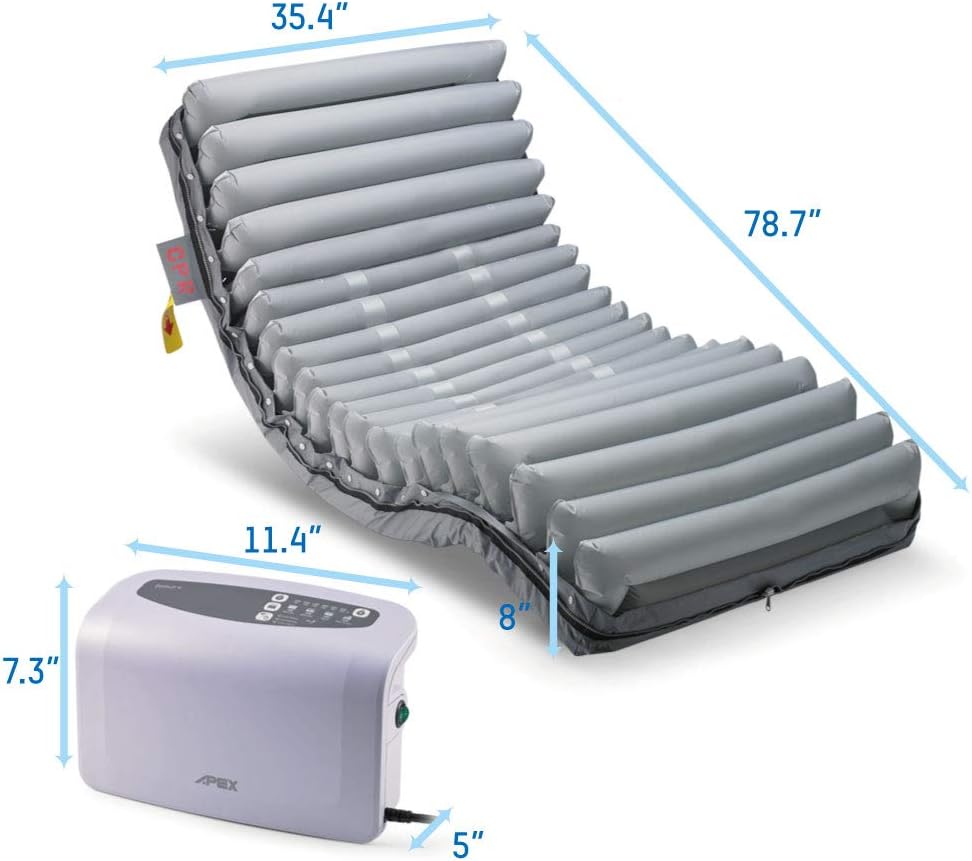
The Apex Medical Domus 4 is an advanced 8-inch low air loss alternating pressure mattress system designed for individuals at medium to high risk of pressure injuries. It features a quiet digital pump and multiple therapy modes to provide optimal pressure redistribution and patient comfort. This manual provides essential information for the proper installation, operation, maintenance, and troubleshooting of your Domus 4 system.
2. Safety Information
Please read all safety warnings and instructions carefully before using the Domus 4 system. Failure to do so may result in injury or damage to the product.
- Always ensure the mattress is properly secured to the bed frame to prevent shifting.
- Keep the pump unit away from water or excessive moisture.
- Do not attempt to repair the pump or mattress yourself. Contact authorized service personnel for any repairs.
- Ensure all connections are secure before operating the system.
- In case of emergency, utilize the CPR tags to rapidly deflate the mattress.
3. Package Contents
Verify that all components are present in your package:
- Domus 4 Alternating Pressure Mattress
- Digital Pump Unit
- Nylon/PU Cover (pre-installed)
- Power Cord
- User Manual
4. Setup
Follow these steps for proper installation of your Domus 4 system:
- Install the Mattress: Place the Domus 4 mattress on the bed frame. Ensure the mattress is centered and aligned with the bed.
- Secure the Mattress: Use the integrated fastening straps to secure the mattress to the bed frame. This prevents the mattress from sliding during use.
- Hang the Pump Unit: Hang the digital pump unit onto the bed-end panel. Adjust the hooks to ensure the pump is securely positioned.
- Connect the Quick Connector: Connect the quick connector hose from the mattress to the corresponding port on the pump unit. Ensure a firm and secure connection.
- Manage Power Cord: Pull any extra length of the power cord through the cable management loops on the mattress cover to keep it tidy and prevent tripping hazards.
- Connect to Power: Plug the power cord into a standard mains power socket.
- Turn On Power: Locate the power switch on the pump unit and turn it ON. The system will begin initial inflation.

Setup Video Guide
This video provides a comprehensive guide to the installation and initial operation of the Domus 4 system, demonstrating how to secure the mattress, connect the pump, and power on the unit.
5. Operating the Domus 4 System
The Domus 4 pump unit features an intuitive digital control panel. After initial inflation, the pump will automatically switch to Alternating Mode. To adjust settings, you may need to unlock the panel.

5.1. Adjusting Air Pressure (Patient Weight)
Press the weight adjustment buttons (+/-) on the control panel to set the appropriate air pressure based on the patient's weight. Refer to the weight indicators on the panel for guidance (e.g., 40-250 kg / 85-550 lb).
5.2. Therapy Modes
The Domus 4 offers five therapy modes to suit various patient needs:
- Alternating Mode: For relieving pressure exerted to the patient's body tissue periodically (10-minute cycle). This mode continuously redistributes pressure by inflating and deflating alternating air cells.
- Static (CLP) Mode: The air cells are equally inflated with lower pressure constantly to increase the contact area and thus redistribute the pressure through a better immersion and envelopment. This provides a stable surface with continuous low pressure.
- Alternating + Seat Inflate: For supporting the patient in an upright position without bottoming out while relieving the pressure exerted to patient's body tissue periodically (10-minute cycle). This mode combines alternating pressure with increased inflation in the sacral area.
- Static + Seat Inflate: For supporting the patient in an upright position without bottoming out while the air cells are equally inflated with lower pressure constantly. This mode provides a stable surface with increased inflation in the sacral area.
- Max Firm Mode: For caregiver to conduct nursing activities. This mode inflates all air cells to maximum firmness, providing a stable surface for patient care. It will return to the previous setting after 20 minutes.


6. Maintenance
Regular maintenance ensures the longevity and optimal performance of your Domus 4 system.
- Cleaning: The Nylon/PU cover is water-resistant and vapor permeable. Clean the cover regularly with a mild disinfectant solution and a soft cloth. Do not use abrasive cleaners.
- Inspection: Periodically inspect the mattress and pump for any signs of wear, damage, or loose connections.
- Storage: If storing the system, ensure it is clean and dry. Store in a cool, dry place away from direct sunlight.

7. Troubleshooting
If you encounter any issues with your Domus 4 system, refer to the following troubleshooting guide:
| Problem | Indicator/Alarm | Possible Cause | Solution |
|---|---|---|---|
| System Malfunction | Service Alarm indicator is ON (wrench icon) | Internal technical issue. | Contact the place of purchase or authorized distributor for repair. |
| Mattress not inflating properly / Low pressure | Low Pressure Alarm indicator is ON (yellow light) | CPR tags pulled off, loose tubing connections, or internal leak. | Check if CPR tags are pulled off. Check if connections along the tubing inside the mattress are secured. Ensure the quick connector to the pump is secure. |
| No power to pump | Power Failure Alarm indicator is ON (blue light) | Power cord disconnected or power outage. | Check if the plug is disconnected from the mains power socket. Verify power supply. |
7.1. Emergency CPR Operation
In an emergency requiring rapid mattress deflation, pull the yellow CPR tags located on the side of the mattress. This will quickly release air from the mattress cells.
8. Specifications
| Feature | Detail |
|---|---|
| Product Dimensions | 78.7 x 35.4 x 8 inches |
| Product Weight | 20.3 Pounds |
| Weight Capacity | 450 lbs |
| Pressure Range | 15-40 mmHg |
| Fabric Type | Nylon/PU |
| Special Features | Quilted, Water Resistant, Low Air Loss, Cell-on-Cell Design |
| Pump Noise Level | ≤ 26dB(A) |
| Manufacturer | Apex Medical |
9. Warranty and Support
The Apex Medical Domus 4 system comes with a 1-year guarantee on both the mattress and the pump unit. For technical support, repairs, or warranty claims, please contact the place of purchase or an authorized Apex Medical distributor. Do not attempt to service the unit yourself.


