
Behringer 121 DUAL VCF
Behringer 121 Dual VCF Eurorack Module User Manual
Model: 121 DUAL VCF | Brand: Behringer
1. Introduction
The Behringer 121 Dual VCF (Voltage Controlled Filter) Eurorack Module is a high-quality, authentic reproduction of the classic 80's dual VCF design. This module provides two independent voltage-controlled filters, essential for shaping the timbre of audio signals within your modular synthesizer system. Its versatile controls allow for precise sound sculpting, from subtle tonal adjustments to dramatic sweeps and resonant effects.
2. Important Safety Instructions
- Read these instructions.
- Keep these instructions.
- Heed all warnings.
- Follow all instructions.
- Do not use this apparatus near water.
- Clean only with dry cloth.
- Do not block any ventilation openings. Install in accordance with the manufacturer's instructions.
- Do not install near any heat sources such as radiators, heat registers, stoves, or other apparatus (including amplifiers) that produce heat.
- Only use attachments/accessories specified by the manufacturer.
- Refer all servicing to qualified service personnel. Servicing is required when the apparatus has been damaged in any way, such as power-supply cord or plug is damaged, liquid has been spilled or objects have fallen into the apparatus, the apparatus has been exposed to rain or moisture, does not operate normally, or has been dropped.
3. Package Contents
Upon opening the package, please verify that all items are present and in good condition:
- Behringer 121 Dual VCF Eurorack Module
- Bag (likely containing mounting screws and power cable)
- This User Manual
4. Product Overview
The Behringer 121 module features two identical voltage-controlled filter sections, each offering independent control over cutoff frequency and resonance. It is designed for integration into a standard Eurorack modular synthesizer system.

Figure 4.1: Front panel of the Behringer 121 Dual VCF module, showing all controls and jacks for both VCF sections.
4.1. Front Panel Controls and Connections
Each of the two VCF sections on the 121 module includes the following:
- SIG IN 1, 2, 3: Audio signal inputs for the filter.
- CUTOFF: Slider control for the filter's cutoff frequency.
- RES (Resonance): Slider control for the filter's resonance.
- VCF OUT: Audio output of the filtered signal.
- MOD IN 1, 2, 3: Modulation inputs for controlling the cutoff frequency.
- FIXED HPF (High-Pass Filter): A switch to engage a fixed high-pass filter, with settings for OFF, +1, +2, and +3.
- Input Level Knobs: Small rotary knobs above each input jack to adjust the input signal level.
- Modulation Level Knobs: Small rotary knobs above each modulation input jack to adjust the modulation amount.
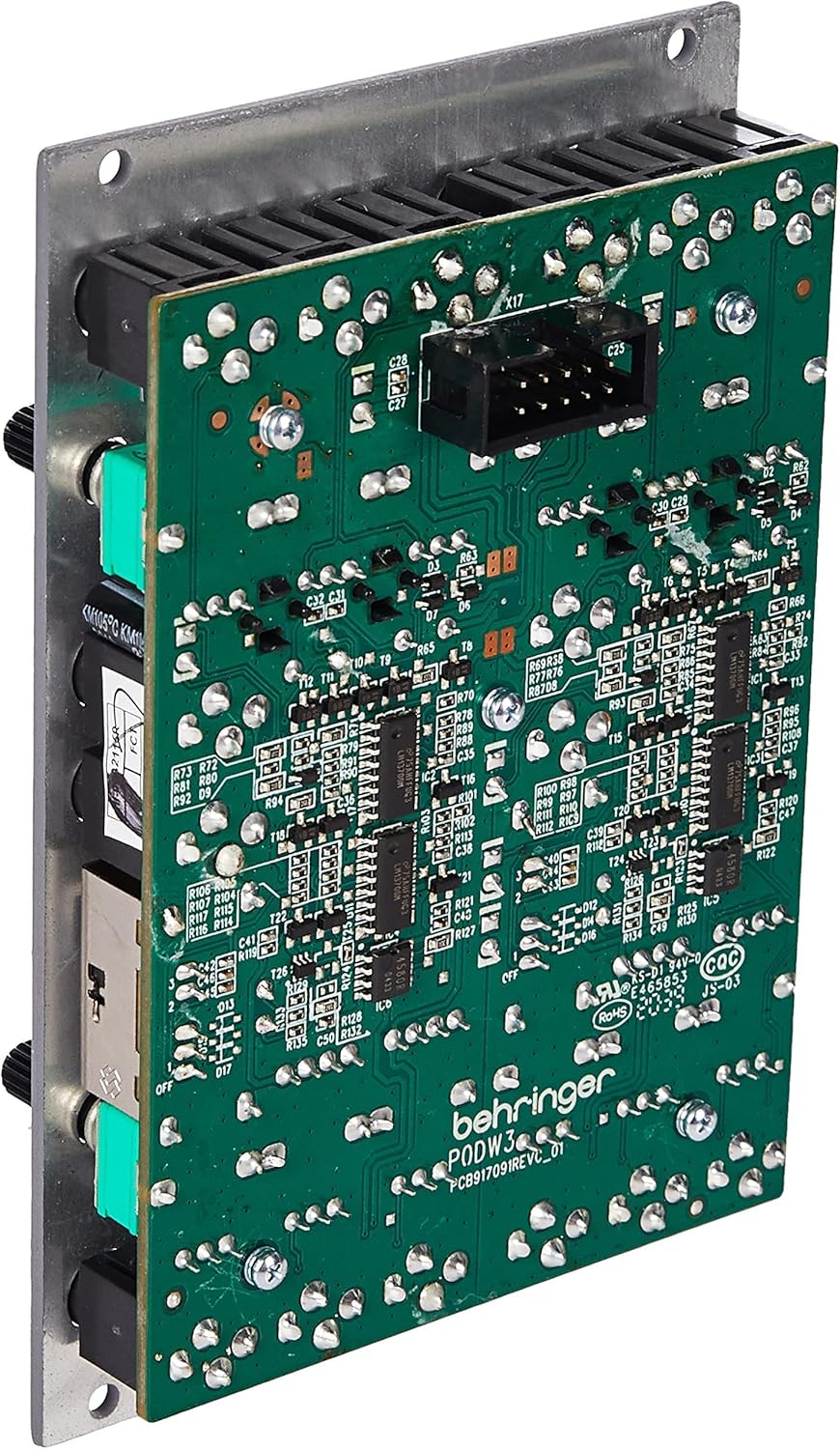
Figure 4.2: Rear view of the Behringer 121 module, displaying the circuit board and the Eurorack power connector.
The rear of the module houses the power connector for integration into your Eurorack case's power bus board.
5. Setup
5.1. Eurorack Installation
The Behringer 121 is a 16HP (HP = Horizontal Pitch) Eurorack module. Ensure your Eurorack case has sufficient space and power available before installation.
- Power Off: Always ensure your Eurorack case is powered off and unplugged from the mains before installing or removing any modules.
- Locate Space: Find an available 16HP space in your Eurorack case.
- Connect Power: Connect the ribbon cable from your Eurorack power supply to the 16-pin header on the back of the 121 module. Ensure the red stripe on the ribbon cable aligns with the -12V pin on both the module and the power bus board. Incorrect connection can damage the module or your power supply.
- Mount Module: Carefully align the module with the rail screws in your case. Secure the module using the provided screws. Do not overtighten.
- Power On: Once securely installed, you can power on your Eurorack case.
5.2. Initial Connections
To begin using the 121 module, connect an audio signal from another module (e.g., an oscillator) to one of the SIG IN jacks. Connect the VCF OUT jack to an audio mixer or another module for further processing.
6. Operating Instructions
The 121 Dual VCF module offers two independent filter sections, allowing for complex sound design or stereo filtering. Each section operates identically.
6.1. Filter Controls
- CUTOFF Slider: This is the primary control for the filter. Moving the slider up increases the cutoff frequency, allowing more high-frequency content to pass through. Moving it down decreases the cutoff, making the sound darker.
- RES (Resonance) Slider: This control emphasizes frequencies around the cutoff point. Increasing resonance can create a "wah" effect or, at higher settings, self-oscillate, producing a sine wave.
- Input Level Knobs (SIG IN 1, 2, 3): Adjust these knobs to control the level of the audio signal entering the filter. Proper gain staging is crucial to avoid clipping or a weak signal.
- Modulation Level Knobs (MOD IN 1, 2, 3): These knobs control the amount of external modulation applied to the cutoff frequency. Connect an LFO, envelope generator, or other modulation source to the corresponding MOD IN jack.
- FIXED HPF Switch: This switch engages a fixed high-pass filter before the main low-pass filter. This can be used to remove unwanted low-end rumble or to create different filter characteristics. Experiment with the +1, +2, and +3 settings to hear their effect.
6.2. Patching Examples
- Basic Filtering: Connect an oscillator's output to SIG IN 1. Connect VCF OUT to an amplifier or mixer. Adjust CUTOFF and RES to shape the sound.
- Modulated Filter Sweeps: Connect an LFO's output to MOD IN 1. Adjust the corresponding modulation level knob to control the depth of the filter sweep.
- Stereo Filtering: Use both VCF sections independently for left and right channels of a stereo signal, or process two different mono signals simultaneously.
- Self-Oscillation: Increase the RES slider to its maximum setting. The filter will begin to self-oscillate, producing a sine wave at the cutoff frequency. This can be used as an additional sound source.
7. Maintenance
The Behringer 121 Dual VCF module requires minimal maintenance. Keep the module clean and free from dust to ensure optimal performance and longevity.
- Cleaning: Use a soft, dry cloth to wipe down the front panel. For stubborn grime, a slightly damp cloth with a mild, non-abrasive cleaner can be used, but ensure no liquid enters the module.
- Dust: Regularly dust the module and your Eurorack case to prevent dust buildup, which can affect components and ventilation.
- Storage: If storing the module outside of a case, keep it in a dry, cool environment, away from direct sunlight and extreme temperatures.
8. Troubleshooting
| Problem | Possible Cause | Solution |
|---|---|---|
| No sound from VCF OUT |
|
|
| Distorted sound |
|
|
| Modulation not working |
|
|
9. Specifications
| Feature | Detail |
|---|---|
| Model Name | 121 DUAL VCF |
| Module Type | Dual Voltage Controlled Filter (VCF) |
| Eurorack HP | 16 HP |
| Dimensions (L x W x H) | 6.15 x 3.85 x 2.05 inches (15.62 x 9.78 x 5.21 cm) |
| Item Weight | 6.7 ounces (0.19 kg) |
| Body Material | Alloy Steel |
| Power Source | Eurorack (Corded Electric) |
| Voltage | 12 Volts (typical Eurorack +/-12V) |
| Color | Grey |
| Date First Available | June 1, 2020 |
10. Warranty and Support
For detailed warranty information and technical support, please refer to the official Behringer website or contact their customer service. Keep your purchase receipt as proof of purchase for any warranty claims.
For the most up-to-date information, visit: www.behringer.com
Related documents121 DUAL VCF


Ask a question about this manual
Ask about setup, troubleshooting, compatibility, parts, safety, or missing instructions. Manuals+ will review the question and use this page’s manual context to help answer it.