
1. Introduction
The MeterTo KF-10A is a benchtop intelligent ESD (Electrostatic Discharge) ionizing air blower designed to neutralize and eliminate static charges. This device is suitable for environments where static electricity can negatively impact delicate electronic products, manufacturing processes, and sensitive materials. It provides a balanced ion flow and wide coverage, making it an effective solution for static control in various industrial applications.
2. Safety Information
Please read and understand all safety instructions before operating the KF-10A ionizing air blower. Failure to follow these instructions may result in electric shock, fire, or damage to the product.
- Ensure the power supply voltage matches the device's requirements (DC24V).
- Do not operate the device in wet or damp conditions.
- Do not insert objects into the fan grille or internal components.
- Disconnect power before performing any maintenance or cleaning.
- Keep the device away from flammable materials.
- Only qualified personnel should attempt repairs.
3. Package Contents
Verify that all items are present in the package:
- KF-10A Benchtop ESD Ionizing Air Blower Unit
- DC24V Power Adapter (if included with purchase)
- Instruction Manual
4. Product Features
The MeterTo KF-10A offers the following key features:
- Rapidly neutralizes static charges.
- Continuously adjustable wind speed.
- Indicator lamp for ion production status.
- Equipped with a magnetic leakage transformer for long lifespan and short-circuit protection.
- Variable speed fan with a wide range of airflow.
- Inherently balanced ion output.
- Ionization indicator lamp.
- Integrated ion emitter cleaner for easy maintenance.
5. Setup
Follow these steps for initial setup of your KF-10A unit:
- Unpack the Unit: Carefully remove the KF-10A from its packaging. Inspect for any signs of damage during transit.
- Placement: Place the unit on a stable, flat surface in the desired work area. Ensure there is adequate space around the unit for proper airflow.
- Adjust Angle: Use the knobs on the sides of the unit to adjust the tilt angle of the fan to direct the ionized air towards the target area.
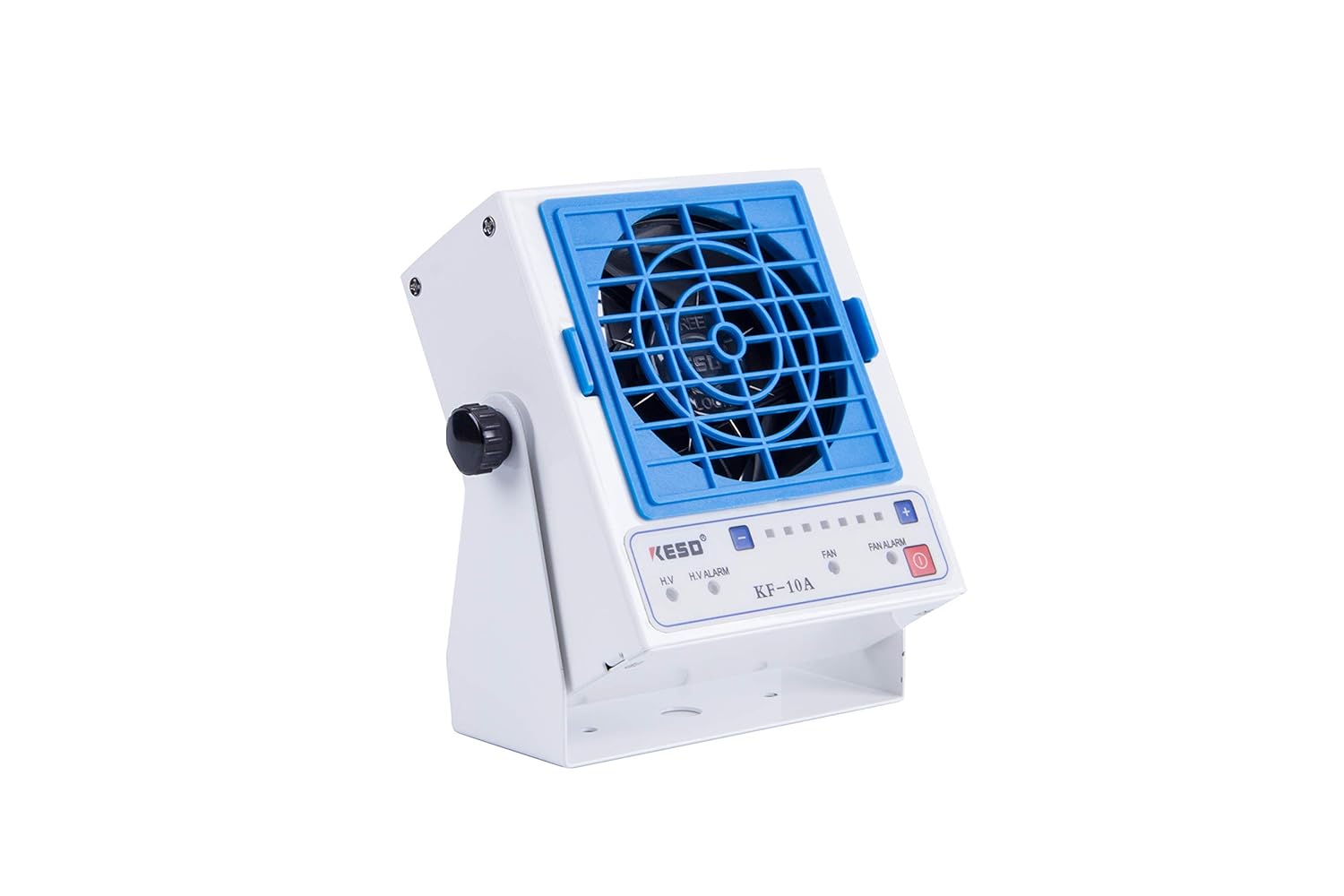
Figure 5.1: Angled view of the KF-10A, showing the adjustable stand.
- Connect Power: Connect the DC24V power adapter to the power input port on the unit. Plug the adapter into a suitable electrical outlet.

Figure 5.2: Front view of the KF-10A unit, showing controls and indicators.
6. Operation
To operate the MeterTo KF-10A:
- Power On: Press the power button (usually marked with a circle and vertical line symbol) on the control panel.
- Indicator Lights:
- A green indicator light signifies normal destaticizing operation.
- A red indicator light (H.V. ALARM or FAN ALARM) indicates an abnormal condition. Refer to the Troubleshooting section if a red light appears.
- Adjust Air Volume: Use the fan speed control (often marked with '+' and '-' buttons or a rotary knob) to adjust the airflow to the desired level. The KF-10A features continuously adjustable wind speed.
The unit will begin emitting ionized air to neutralize static charges in the designated area.
7. Maintenance
Regular maintenance ensures optimal performance and longevity of your KF-10A ionizing air blower.
- Power Disconnection: Always disconnect the power adapter from the unit before performing any cleaning or maintenance.
- Cleaning the Ion Emitter: The KF-10A includes an internal ion emitter cleaner. Refer to the device's specific mechanism for activating this cleaner, which typically involves a simple external lever or button. Regular cleaning prevents ion output degradation due to dust accumulation on the emitter needles.
- Cleaning the Fan Grille: Periodically remove the front grille to clean any dust or debris from the fan blades and the grille itself. This helps maintain optimal airflow.

Figure 7.1: KF-10A with the front grille removed for cleaning access.
- General Cleaning: Wipe the exterior of the unit with a soft, dry cloth. Do not use abrasive cleaners or solvents.
8. Troubleshooting
If you encounter issues with your KF-10A, refer to the following common problems and solutions:
| Problem | Possible Cause | Solution |
|---|---|---|
| Unit does not power on | No power supply; Faulty power adapter; Unit malfunction | Check power connection; Test power adapter; Contact support |
| Red H.V. ALARM light is on | High voltage circuit issue; Ion emitter contamination | Clean ion emitter; Power cycle the unit; If issue persists, contact support |
| Red FAN ALARM light is on | Fan obstruction; Fan malfunction | Check for obstructions in fan grille; Clean fan blades; If issue persists, contact support |
| Reduced static elimination effectiveness | Dirty ion emitter; Incorrect placement; Unit malfunction | Clean ion emitter; Adjust unit placement; Contact support |
9. Specifications
Detailed technical specifications for the MeterTo KF-10A:
| Parameter | Value |
|---|---|
| Model | KF-10A |
| Input Power Supply Voltage | DC24V |
| Destaticizing Time (200mm distance) | Approximately 1.3 seconds |
| Ion Balance | Automatic ion balance system 0±15V |
| Air Volume | 0.82 - 1.52 m³/min (constant airflow) |
| Ozone Concentration (150mm distance) | Below 0.03 ppm |
| Applied Environmental Temperature | 0°C to 40°C (no condensation) |
| Applied Environmental Humidity | 30% to 70% RH (no water drop condensation) |
| Overall Size (excluding stents) | 106 x 61 x 120 mm |
| Weight (excluding stents) | 0.63 Kg |
Anti-static Test Conditions:
- Operating Voltage: DC24V
- Test Voltage: ±1000V to ±100V
- Ambient Temperature: 23°C ±2°C
Destaticizing Performance:
| Distance | Positive Destaticizing Time | Negative Destaticizing Time | Residual Voltage |
|---|---|---|---|
| 200mm | 1.5s | 1.7s | <0±15V |
| 300mm | 2.1s | 2.4s | <0±15V |
10. Warranty and Support
For warranty information and technical support, please refer to the documentation provided at the time of purchase or contact your vendor directly. MeterTo is committed to providing quality products and customer service.