
1. Introduction
This manual provides essential instructions for the proper setup, operation, maintenance, and troubleshooting of your Panasonic KX-T7665 Digital Phone. Please read this manual thoroughly before using the phone to ensure optimal performance and longevity.
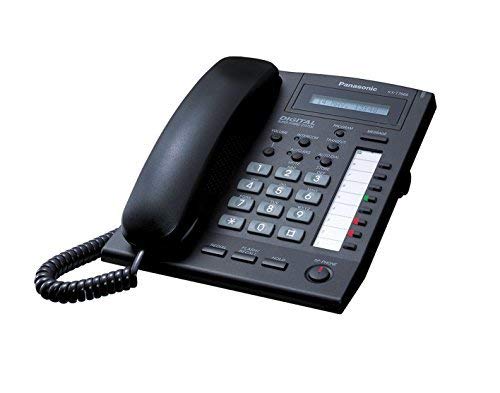
Image of the Panasonic KX-T7665 phone, showing its keypad, display, and handset.
2. Setup
2.1 Unpacking
Carefully remove all components from the packaging. Ensure the following items are present:
- Panasonic KX-T7665 Digital Phone unit
- Handset
- Handset cord
- Line cord
2.2 Connecting the Phone
- Connect one end of the handset cord to the handset and the other end to the handset jack on the phone unit.
- Connect one end of the line cord to the line jack on the phone unit and the other end to your telephone wall jack.
- Ensure all connections are secure.
3. Operating Instructions
3.1 Making and Receiving Calls
- To Make a Call: Lift the handset, wait for a dial tone, and then dial the desired number. Alternatively, press the Speaker button, wait for a dial tone, and dial.
- To Receive a Call: Lift the handset when the phone rings, or press the Speaker button.
- To End a Call: Replace the handset in the cradle or press the Speaker button if using speakerphone.
3.2 LCD Display
The 1-line, 16-character LCD display shows call information, menu options, and phone status. Navigate through menus using the designated navigation keys (if present) or follow on-screen prompts.
3.3 Volume Control
Adjust the volume for the speaker, handset, and ringer using the dedicated volume control buttons, typically located on the side or front of the phone unit.
3.4 Hold and Transfer
- Hold: During a call, press the Hold key to place the call on hold. Press it again to resume the call.
- Transfer: During a call, press the Transfer key, dial the extension or number you wish to transfer to, and then hang up or wait for the other party to answer before hanging up.
3.5 Last Number Redial
To redial the last number called, lift the handset (or press Speaker) and then press the Last Number Redial key.
3.6 Message Waiting / Ringing Light
The Message Waiting / Ringing Light will flash to indicate an incoming call or a new message in your voicemail system (if subscribed to a compatible service).
3.7 Caller Identification (Caller ID)
If you subscribe to Caller ID service, the caller's name and number will appear on the LCD display before you answer the call.
3.8 Digital Answering System
The phone features a digital answering system. Refer to your service provider's instructions or the full Panasonic KX-T7665 manual for detailed setup and operation of the answering system features, including recording outgoing messages and retrieving incoming messages.
4. Maintenance
4.1 Cleaning
To clean the phone, wipe it with a soft, damp cloth. Do not use abrasive cleaners, waxes, or solvents. Ensure the phone is unplugged before cleaning.
4.2 General Care
- Avoid placing the phone in direct sunlight or near heat sources.
- Do not expose the phone to excessive moisture or liquids.
- Handle the handset and cords gently to prevent damage.
5. Troubleshooting
If you encounter issues with your phone, try the following solutions:
| Problem | Solution |
|---|---|
| No dial tone | Check all cable connections. Ensure the line cord is securely plugged into both the phone and the wall jack. Test with another phone if available. |
| Cannot hear caller / Caller cannot hear me | Adjust the handset or speaker volume. Check handset cord connection. Ensure the microphone is not obstructed. |
| Display is blank | Ensure the phone is properly connected to the telephone line. The phone draws power from the line. |
| Caller ID not working | Confirm that you have subscribed to Caller ID service from your telephone service provider. |
6. Specifications
| Feature | Description |
|---|---|
| Model Number | KX-T7665B-cr |
| Display | 1 Line 16-Characters LCD Display |
| Answering System Type | Digital |
| Multiline Operation | Single-Line Operation |
| Caller Identification | Yes |
| Dimensions (L x W x H) | 25 x 25 x 25 millimeters (approximate) |
| Weight | 975.22 g (approximate) |
| Color | Black |
7. Warranty and Support
7.1 Warranty Information
This Panasonic KX-T7665 phone comes with a 90-day limited warranty. Please retain your proof of purchase for warranty claims. The warranty covers defects in materials and workmanship under normal use.
7.2 Customer Support
For further assistance, technical support, or warranty inquiries, please contact your retailer or the Panasonic customer support channels available in your region. Refer to the original packaging or Panasonic's official website for contact details.


