
ALONEFIRE X901UV
Alonefire X901UV 365nm UV Flashlight User Manual
Model: X901UV
Brand: ALONEFIRE
Introduction
This manual provides detailed instructions for the safe and effective use of your Alonefire X901UV 365nm UV Flashlight. Please read this manual thoroughly before operation and retain it for future reference.

Image: The Alonefire X901UV UV Flashlight, shown with its included yellow UV protective glasses and USB-C charging cable. The flashlight emits a purple UV light.
Product Features
- Quality 365nm UV LED: Utilizes a high-quality 365nm UV LED light source, providing up to 10W power consumption and 2400mW luminous power for professional applications.
- Black UV Filter Lens: Equipped with a hard toughened black filter optical lens to filter out ambient light, ensuring a purer and more powerful ultraviolet output.
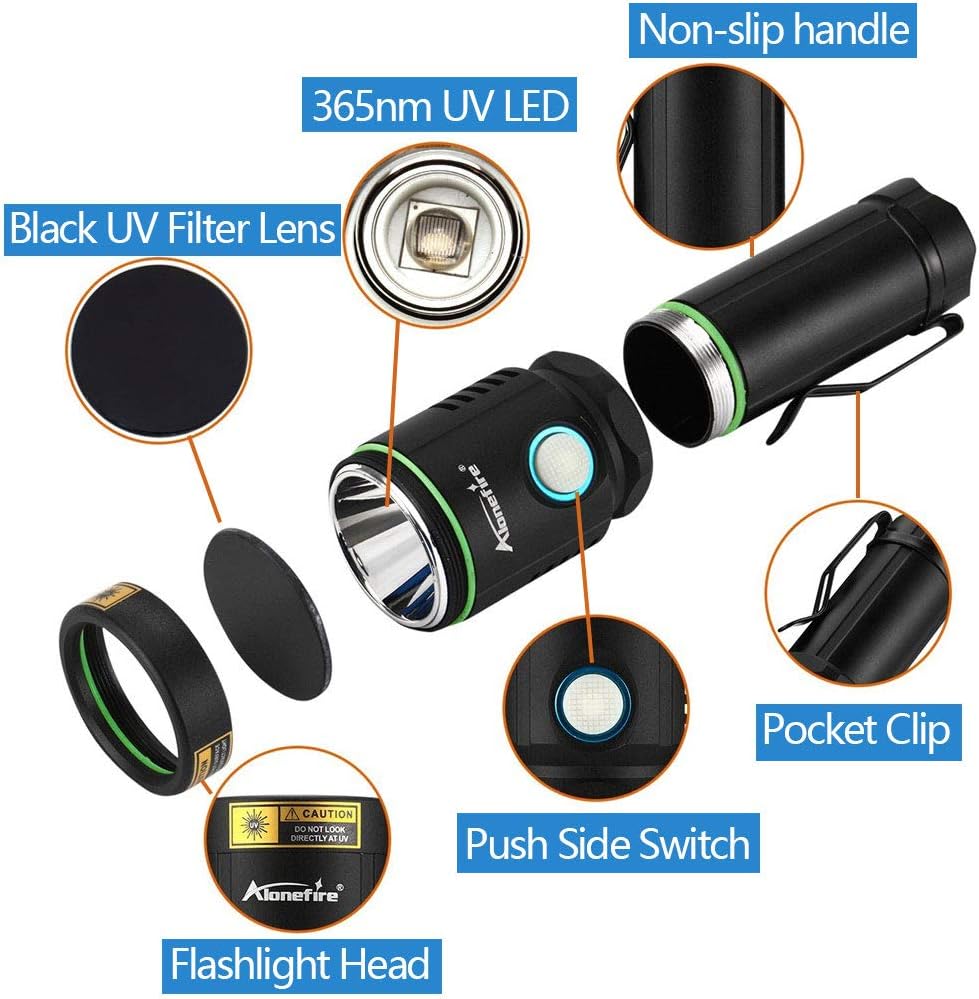
Image: A diagram illustrating the function of the black UV filter lens, showing how it blocks unwanted ambient light to enhance the purity of the UV output.
- Quality Aluminum Alloy Shell: Constructed from high-quality aluminum alloy for enhanced heat dissipation, extending the lamp bead life and improving reliability and durability.
- USB C Rechargeable: Features a convenient USB-C charging port for easy and reversible connection. Includes a charging indicator (red for charging, green for fully charged) and a high-capacity rechargeable battery.

Image: The Alonefire X901UV flashlight plugged into a laptop via its USB-C port, demonstrating the charging indicator lights (red for charging, green for fully charged).
- UV Protective Glasses: Includes upgraded protective glasses with darker lenses for enhanced UV protection. It is recommended to use these glasses during operation due to the flashlight's powerful output.
- Wide Range of Uses: Suitable for detecting fluorescent substances, including pet urine, cat ringworm, currency authentication, scorpion detection, mineral detection, bed bug detection, and ID checking. Also effective for curing resins and glues.

Image: A collage of nine images demonstrating the diverse applications of the UV flashlight, including identifying pet stains, verifying currency, and locating scorpions in dark environments.
Package Contents
- Alonefire X901UV 365nm UV Flashlight
- Rechargeable Lithium Ion Battery (pre-installed or separate)
- USB-C Charging Cable
- UV Protective Glasses
Setup
1. Initial Charge
Before first use, fully charge the flashlight battery. Connect the provided USB-C cable to the flashlight's charging port and the other end to a compatible USB power source (e.g., computer USB port, wall adapter). The charging indicator light will be red during charging and turn green when fully charged. Charging typically takes 5-7 hours.
2. Battery Installation (if not pre-installed)
- Unscrew the tail cap of the flashlight.
- Insert the rechargeable Lithium Ion battery with the positive (+) end facing towards the flashlight head.
- Screw the tail cap back on securely.
3. Protective Glasses
Always wear the provided UV protective glasses when operating the flashlight to protect your eyes from the powerful UV light. The glasses are designed to filter out harmful UV radiation.
Operating Instructions
Turning On/Off
Press the side switch button to turn the flashlight on. Press it again to turn it off.
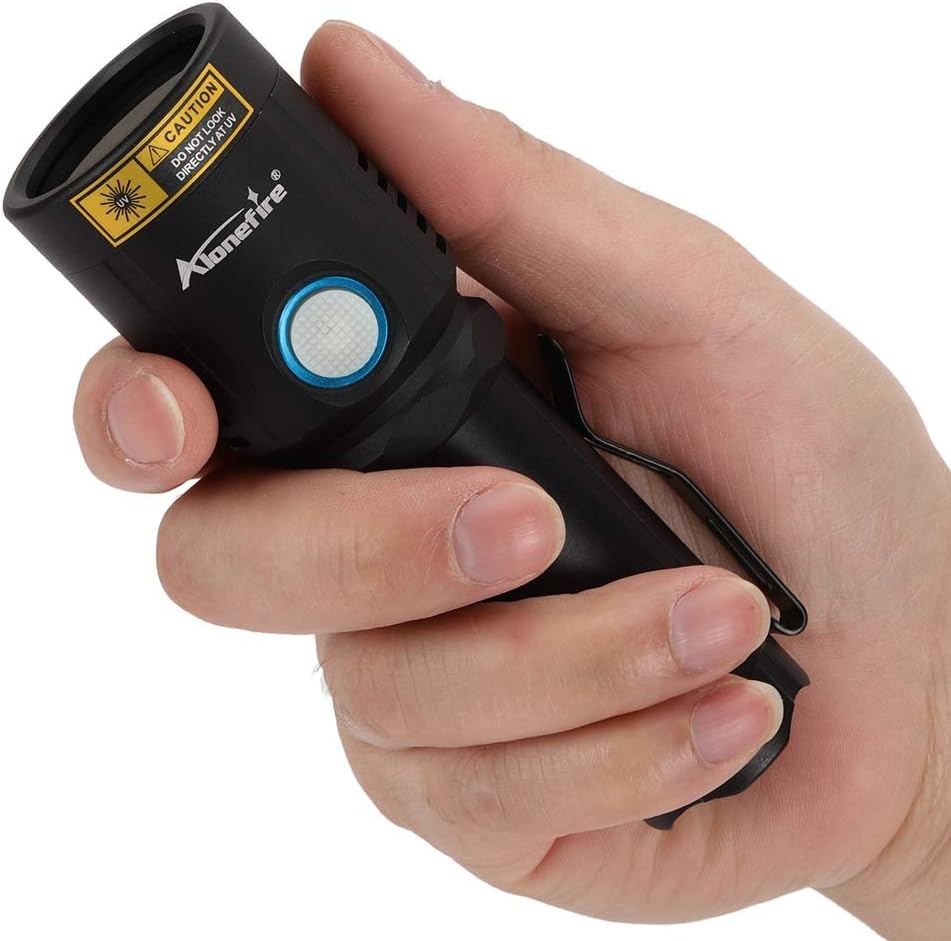
Image: A hand gripping the Alonefire X901UV flashlight, highlighting the location of the side switch button for operation.
Applications
- Pet Urine/Stain Detection: Darken the room and slowly scan the area with the UV flashlight. Pet urine and other organic stains will fluoresce under the UV light.
- Currency/ID Verification: Shine the UV light on banknotes or identification cards to reveal security features that are only visible under UV light.
- Scorpion Detection: Scorpions are known to fluoresce brightly under UV light, making them easier to spot in dark environments.
- Resin Curing: Position the flashlight over UV-sensitive resins or glues to initiate the curing process. Follow the resin manufacturer's instructions for optimal curing times.
Maintenance
- Cleaning: Wipe the flashlight body with a soft, damp cloth. Do not use abrasive cleaners or solvents. Ensure the lens is clean for optimal performance.
- Battery Care: Recharge the battery when the charging indicator shows red or when the light output diminishes. Avoid fully discharging the battery for extended periods. If storing for a long time, charge the battery to about 50% and recharge every 3-6 months.
- Storage: Store the flashlight in a cool, dry place away from direct sunlight and extreme temperatures.
Troubleshooting
| Problem | Possible Cause | Solution |
|---|---|---|
| Flashlight does not turn on. | Battery is depleted or not installed correctly. | Charge the battery. Ensure the battery is inserted with correct polarity and the tail cap is fully tightened. |
| Light output is dim. | Low battery charge. | Recharge the battery. |
| Charging indicator does not light up. | Charging cable or power source issue; loose connection. | Check USB-C cable connection. Try a different USB port or power adapter. Ensure the tail cap is tightened as some reviews mention connection issues with loose caps. |
| Flashlight gets hot during use. | Normal operation for high-power UV LED. | This is normal. The aluminum alloy body is designed for heat dissipation. If it becomes excessively hot, turn it off and allow it to cool. |
Specifications
- Model: X901UV
- UV Wavelength: 365nm
- Power Consumption: Up to 10W
- Luminous Power: 2400mW
- Light Source: High-quality UV LED
- Battery Type: 1 x Lithium Ion (included)
- Charging Port: USB-C
- Charging Time: 5-7 hours
- Battery Life: 4-6 hours (approximate, depending on usage)
- Material: Aluminum Alloy
- Color: Black
- Dimensions: 18.7 x 8.4 x 5.9 cm (Parcel Dimensions)
- Weight: 181 g (Item Weight)
- Water Resistance: Not Water Resistant
Safety Information
- Eye Protection: Never look directly into the UV light beam. Always wear the provided UV protective glasses during operation.
- Skin Exposure: Avoid prolonged direct exposure of skin to UV light.
- Children: Keep out of reach of children. This is not a toy.
- Water Exposure: This flashlight is not water resistant. Avoid exposure to water or high humidity.
- Battery Safety: Use only the specified rechargeable battery. Do not attempt to disassemble or short-circuit the battery. Dispose of batteries properly according to local regulations.
Warranty and Support
For warranty information or technical support, please contact ALONEFIRE customer service through the retailer where the product was purchased or visit the official ALONEFIRE website. Please have your model number (X901UV) and purchase details ready when contacting support.
Note: The manufacturer is Alonefire. The product was first available on June 15, 2020.
Related documentsX901UV


Ask a question about this manual
Ask about setup, troubleshooting, compatibility, parts, safety, or missing instructions. Manuals+ will review the question and use this page’s manual context to help answer it.