1. Introduction
This manual provides comprehensive instructions for the safe and effective operation, assembly, and maintenance of your iRest A306 Massage Chair. Please read this manual thoroughly before using the product and retain it for future reference.
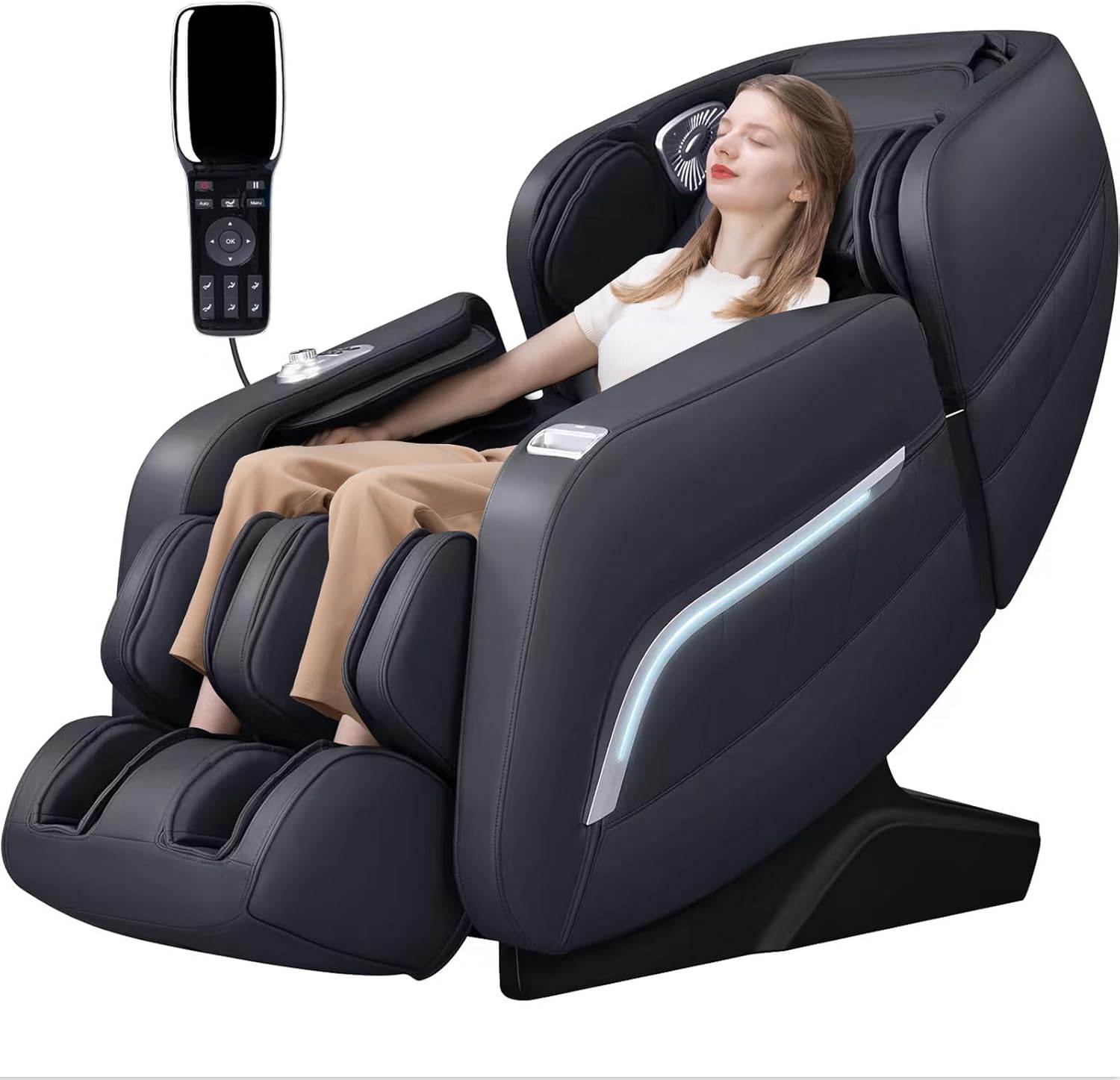
Image: The iRest A306 Massage Chair in black, with a user comfortably seated and relaxing. A remote control is visible near the chair.
2. Important Safety Information
WARNING: To reduce the risk of burns, fire, electric shock, or injury to persons:
- Always unplug the chair from the electrical outlet immediately after using and before cleaning.
- Do not use while bathing or in a shower.
- Do not place or store appliance where it can fall or be pulled into a tub or sink.
- Do not place in or drop into water or other liquid.
- Do not reach for an appliance that has fallen into water. Unplug immediately.
- An appliance should never be left unattended when plugged in. Unplug from outlet when not in use, and before putting on or taking off parts.
- Close supervision is necessary when this appliance is used by, on, or near children, invalids, or disabled persons.
- Use this appliance only for its intended use as described in this manual. Do not use attachments not recommended by the manufacturer.
- Never operate this appliance if it has a damaged cord or plug, if it is not working properly, if it has been dropped or damaged, or dropped into water. Return the appliance to a service center for examination and repair.
- Do not carry this appliance by supply cord or use cord as a handle.
- Keep the cord away from heated surfaces.
- Never operate the appliance with the air openings blocked. Keep the air openings free of lint, hair, and the like.
- Never drop or insert any object into any opening.
- Do not use outdoors.
- Do not operate where aerosol (spray) products are being used or where oxygen is being administered.
- To disconnect, turn all controls to the off position, then remove plug from outlet.
- This appliance is intended for household use only.
- Ensure the user's weight does not exceed 300 LBS and the user's height is within the recommended range of 6.1 ft for safe usage.
3. Product Features
The iRest A306 Massage Chair is equipped with advanced features designed to provide a comprehensive and relaxing massage experience.
- Five Massage Techniques: Offers Finger pressing, Kneading, Tapping, Tapping and Kneading simultaneously, and Shiatsu.
- SL Track System: A 53.15-inch SL track allows the robot hands to provide massage from the neck down to the legs, following the natural curve of your spine.
- AI Voice Control: Activate the voice control function by saying "hi, Alice" or pressing the voice control wake-up button on the right armrest for hands-free operation.
- Zero Gravity Function: Features 3 levels of zero gravity angles, allowing you to recline to a position where your heart and knees are horizontally aligned, reducing heart pressure and stimulating blood circulation.
- Full Body Air Massage: Integrated airbags provide compression massage for various body parts, including shoulders, arms, hips, and feet.
- Foot Rollers: Specialized rollers target the soles of your feet for a comprehensive foot massage.
- Heating Function: Lumbar heating elements provide soothing warmth to the lower back area.
- Bluetooth Connectivity: Connect your device via Bluetooth to enjoy music during your massage.
- Yoga Stretching: A program designed to gently stretch the body, promoting flexibility and relaxation.
- 12 Auto Programs: Pre-set massage programs for various needs, including Comfortable, Easy, Stretch, Neck & Shoulder, Full Body, Chiropractic, Back & Waist, Full Air Pressure, Fatigue Recovery, Elderly Care, Beautiful Buttock, and Sleep Peacefully.
- Body Sensing Technology: Automatically adjusts the massage to your body's contours.
- Multiple Control Methods: Control via hand remote, quick access buttons on the armrest, and AI voice control.

Image: Diagram illustrating the SL-Track, highlighting the massage path from the neck, back, waist, hip, to the legs.

Image: A visual representation of the Zero Gravity recline position, showing a person in a weightless posture above the massage chair.

Image: Diagram detailing the full body air massage system, indicating the placement of airbags for shoulders, arms, hips, and feet.
4. Components and Parts List
Before assembly, ensure all components are present and undamaged. Refer to the diagram below for identification.
- Main Body of Massage Chair
- Footrest Assembly
- Remote Control
- Power Cord
- User Manual (this document)
- Small Accessory Bag (screws, tools, etc.)

Image: Technical drawing displaying the dimensions of the iRest A306 Massage Chair from different perspectives (front, side, top).
5. Setup and Assembly
The iRest A306 Massage Chair is designed for easy assembly. Typically, only the footrest requires attachment.
- Unpacking: Carefully remove all components from the packaging. Retain packaging materials for potential future transport or service.
- Positioning: Place the main body of the massage chair in your desired location. Ensure there is sufficient space for reclining and zero gravity functions (refer to dimensions).
- Attaching the Footrest: Align the footrest assembly with the main body. Secure it using the provided screws and tools. This process typically takes about 5 minutes.
- Connecting Power: Plug the power cord into the chair's power input, then into a suitable electrical outlet.
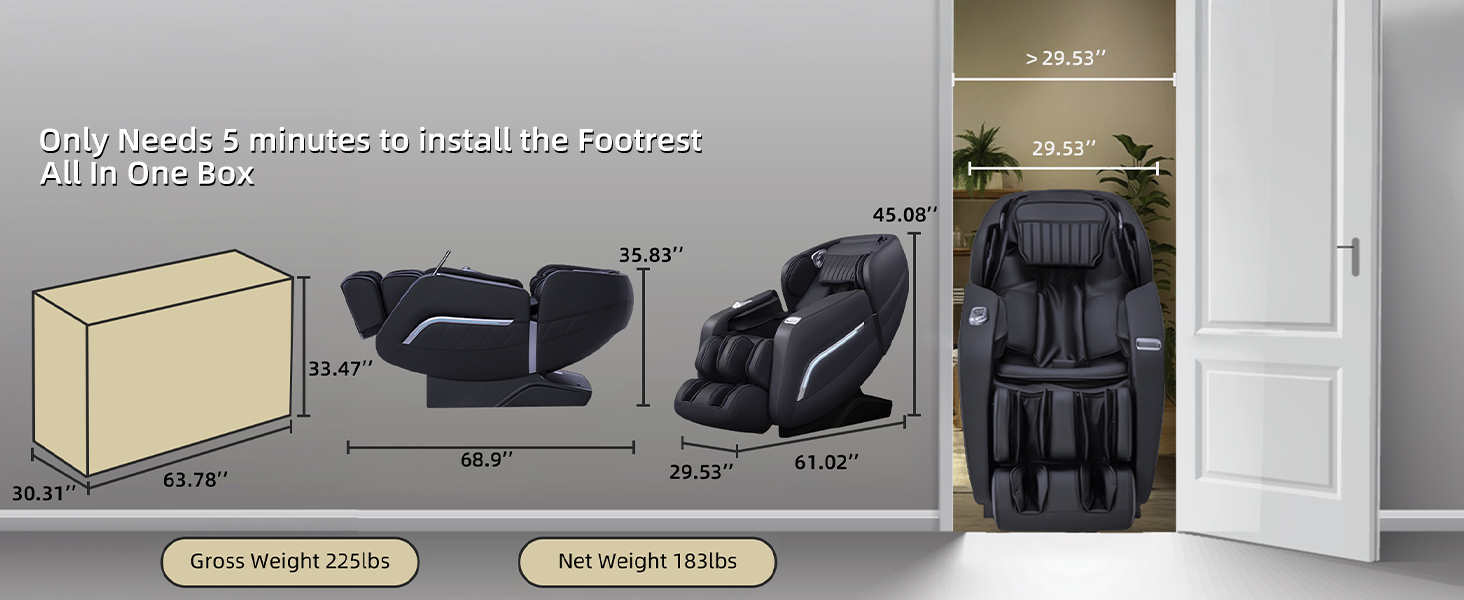
Image: Visual guide for installation, showing the chair's packaging, its two main parts (main body and footrest), and the assembled chair, along with clearance dimensions for doorways.
6. Operating Instructions
6.1 Power On/Off
Press the power button on the remote control or the quick access button on the armrest to turn the chair on or off.
6.2 Control Methods
- Hand Remote Control: Use the wired remote to navigate menus, select programs, adjust intensity, and control specific massage functions.
- Quick Access Buttons: Located on the armrest, these buttons provide convenient access to power, recline, and other frequently used functions.
- AI Voice Control: When the chair is on or in standby, say "hi, Alice" to activate voice commands. Follow the voice prompts to control various functions without using your hands.

Image: Diagram illustrating the AI Voice Control feature, showing a voice icon next to the massage chair.

Image: Close-up view of the handrail shortcut keys on the massage chair's armrest, highlighting the control panel.

Image: A composite image showing the three primary ways to control the iRest A306: the wired hand remote, the quick access buttons on the armrest, and the AI voice control feature.
6.3 Massage Programs and Techniques
The chair offers 12 preset auto programs and 5 manual massage techniques.
- Auto Programs: Select from options like "Comfortable massage", "Yoga Stretching", "Sleep peacefully", etc., using the remote or voice commands.
- Manual Techniques: Choose specific techniques such as Kneading, Tapping, Shiatsu, Rolling, or Knocking to customize your massage.
- Adjustments: Adjust massage intensity, speed, and airbag pressure levels as desired.

Image: A visual display of the 12 preset massage programs available on the iRest A306, alongside the 5 core massage techniques (Kneading, Knocking, Tapping & Kneading, Tapping, Shiatsu).
6.4 Zero Gravity and Stretching
- Zero Gravity: Press the dedicated Zero Gravity button to cycle through 3 recline angles. This position elevates your legs above your heart, minimizing spinal pressure.
- Yoga Stretching: Select the "Stretch" auto program for a gentle full-body stretch.

Image: Diagram illustrating the Yoga Stretching function, showing the chair's movement and air pressure points for a full-body stretch.
6.5 Bluetooth Audio
To use the Bluetooth audio feature:
- Ensure the massage chair is powered on.
- Enable Bluetooth on your mobile device.
- Search for "iRest A306" (or similar name) in your device's Bluetooth settings and pair.
- Once connected, audio from your device will play through the chair's integrated speakers.
7. Maintenance
Proper maintenance ensures the longevity and optimal performance of your iRest A306 Massage Chair.
- Cleaning: Wipe clean with a soft, damp cloth. Do not use abrasive cleaners or solvents. Ensure the chair is unplugged before cleaning.
- Storage: If storing for an extended period, unplug the chair and cover it to protect from dust. Store in a cool, dry place.
- Regular Checks: Periodically check the power cord for any damage. Ensure all connections are secure.
- Avoid Liquids: Keep liquids away from the chair to prevent electrical hazards and damage to internal components.
8. Troubleshooting
If you encounter issues with your iRest A306 Massage Chair, refer to the table below for common problems and solutions.
| Problem | Possible Cause | Solution |
|---|---|---|
| Chair does not power on. | Power cord not properly connected; Power outlet malfunction; Chair is in standby mode. | Ensure power cord is securely plugged into both the chair and a working electrical outlet. Try a different outlet. Press the power button to exit standby. |
| Massage intensity is too weak/strong. | Intensity settings are not adjusted. | Adjust the intensity settings using the remote control. Some programs have fixed intensities. |
| Voice control not responding. | Microphone is blocked; Voice command not recognized; Chair is off. | Ensure no obstructions near the microphone. Speak clearly. Confirm the chair is powered on or in standby. Try pressing the voice control wake-up button. |
| Bluetooth not connecting. | Bluetooth on device is off; Chair not in pairing mode; Incorrect device selected. | Ensure Bluetooth is enabled on your device. Search for the correct device name (e.g., "iRest A306"). Restart both the chair and your device. |
| Unusual noises during operation. | Normal operational sounds; Loose component; Obstruction. | Some mechanical sounds are normal. Check for any loose items around or under the chair. If the noise is persistent or loud, contact customer support. |
If the problem persists after attempting these solutions, please contact iRest customer support for assistance.
9. Specifications
| Attribute | Detail |
|---|---|
| Brand | iRest |
| Model Name | SL-A306 |
| Color | Black |
| Product Dimensions (D x W x H) | 61.02"D x 29.92"W x 45.08"H |
| Item Weight | 200 pounds |
| Maximum Weight Recommendation | 330 Pounds |
| SL Track Length | Approx. 53.15 inches |
| Zero Gravity Positions | 3 levels |
| Massage Techniques | Finger pressing, Kneading, Tapping, Tapping and Kneading, Shiatsu |
| Control Methods | Hand Remote, Quick Access Buttons, AI Voice Control |
| Connectivity | Bluetooth |
| Heating Function | Lumbar heating |
| Recommended User Height | Up to 6.1 ft |
| UPC | 308324459901 |
10. Warranty and Support
iRest provides comprehensive support for your massage chair.
- 3-Year Coverage: The iRest A306 Massage Chair comes with a 3-year coverage period.
- Expert Support: Access to expert support for any operational or technical queries.
- 24/7 Local Customer Support: Dedicated customer support is available around the clock for your convenience.
- Protection Plans: Additional protection plans are available for purchase, including 2-Year and 3-Year options, as well as a monthly Complete Protect plan.
For warranty claims, technical assistance, or general inquiries, please refer to the contact information provided with your purchase documentation or visit the official iRest website.