
1. Introduction
Thank you for choosing the FLEXISPOT E7 Pro Electric Standing Desk. This manual provides detailed instructions for assembly, operation, maintenance, and troubleshooting to ensure you get the most out of your new ergonomic workstation. Please read this manual thoroughly before assembly and use.
2. Important Safety Instructions
- Ensure all components are present and undamaged before assembly. Do not use if any parts are missing or broken.
- Keep children and pets away from the desk during operation to prevent injury.
- Do not place hands or fingers near moving parts of the desk frame to avoid pinching.
- Ensure the power cord is not pinched or damaged. Do not operate the desk with a damaged cord or plug.
- Do not overload the desk beyond its maximum weight capacity of 355 lbs (161 kg).
- Only use the desk indoors in a dry environment. Avoid exposure to water or excessive humidity.
- Disconnect power before cleaning or performing any maintenance.
- The anti-collision system is designed to prevent damage, but always be aware of objects in the desk's path during height adjustments.
3. Package Contents
Carefully unpack all items and verify that you have received the following components:
- Desktop (Seamless Solid Slab, 48"x30")
- Desk Frame (3-Stage, Dual Motor)
- Control Panel (One-Touch LED)
- Power Adapter and Cable
- Installation Tools
- Wire Management Accessories
- User Manual

Image: Overview of the FLEXISPOT E7 Pro Electric Standing Desk.
4. Setup and Assembly
Assembly is required for this product. It is recommended for one person to assemble the desk. Follow these general steps for assembly. Refer to the included detailed assembly guide for specific diagrams and hardware instructions.
- Unpack Components: Lay out all parts on a clean, flat surface.
- Assemble Desk Frame: Attach the lifting columns to the feet and then connect them with the crossbeam.
- Attach Desktop: Secure the assembled frame to the underside of the desktop using the provided screws.
- Install Control Panel: Mount the control panel to the desired location on the desktop, typically on the front edge.
- Connect Wiring: Connect the motor cables, control panel cable, and power adapter to the control box according to the diagram. Use wire management accessories to keep cables tidy.
- Initial Power-Up: Plug the desk into a power outlet. The desk may require an initial reset as per the detailed guide.
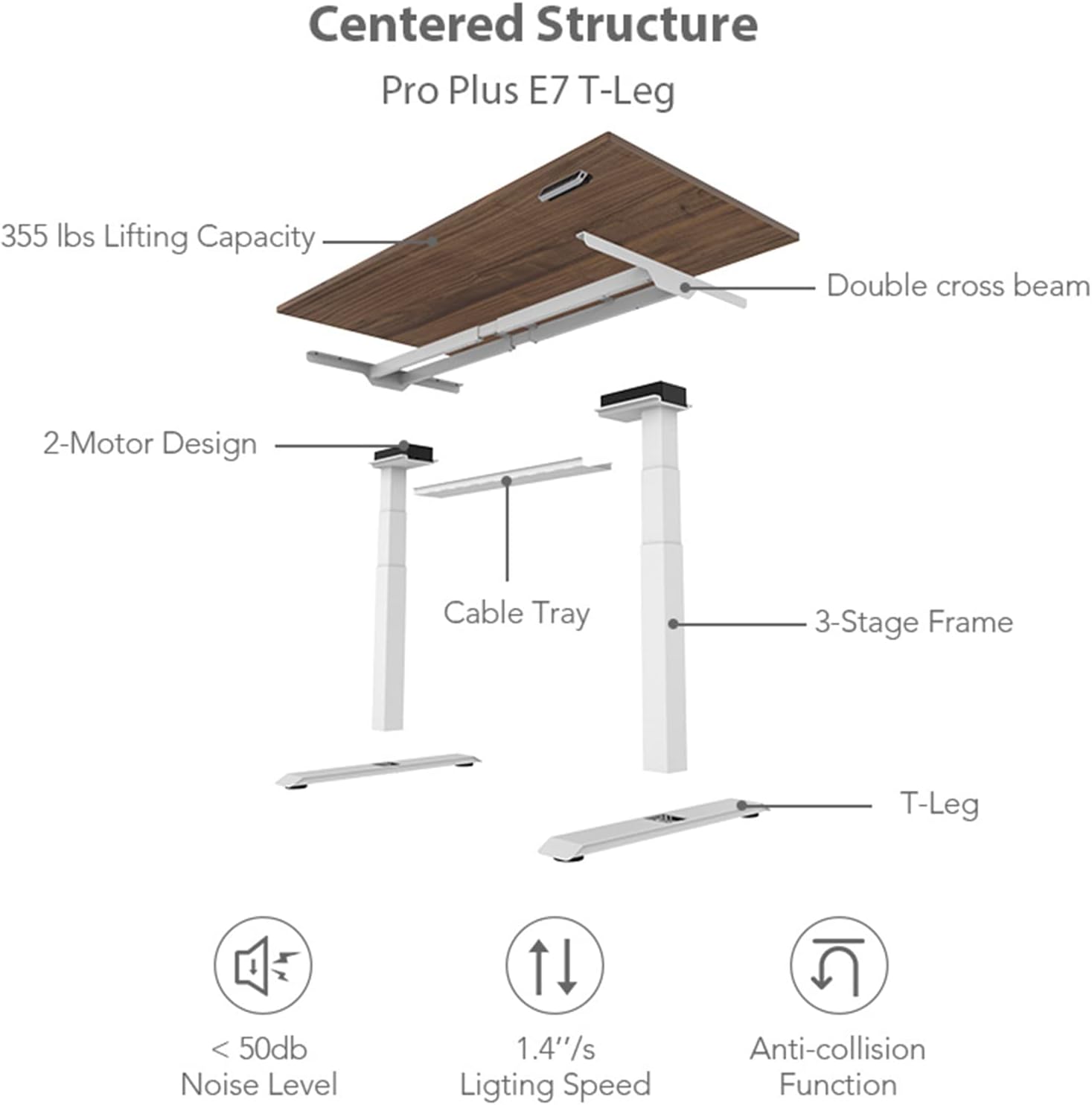
Image: Exploded view of the desk components and key features.
5. Operating Instructions
5.1 Control Panel Overview
The FLEXISPOT E7 Pro features a user-friendly LED control panel for easy height adjustment and memory functions.
Image: Detailed view of the control panel.
- Up/Down Buttons (⌃ / ⌄): Press and hold to manually adjust the desk height.
- Memory Buttons (1, 2, 3): Store and recall preferred desk heights.
- Memory Set Button (M): Used to program memory presets.
- Child-Lock Button: Activates/deactivates the child lock function to prevent accidental adjustments.
- USB Charging Ports: Conveniently located for charging devices.
- Reminder Button: Set a timer for sit-stand alerts.
5.2 Adjusting Height
Press and hold the ⌃ (Up) or ⌄ (Down) button to move the desk to your desired height. Release the button to stop the movement. The desk can adjust from 22.8 inches to 48.4 inches.
5.3 Setting Memory Presets
To program a favorite desk height:
- Adjust the desk to your desired height using the Up/Down buttons.
- Press the M button. The LED display will show 'S-'.
- Within 3 seconds, press the desired memory button (1, 2, or 3). The display will show 'S-1', 'S-2', or 'S-3' to confirm the setting.
To recall a saved height, simply press the corresponding memory button (1, 2, or 3). The desk will automatically move to the programmed height.
5.4 Sit-Stand Reminder
The reminder function helps you maintain a healthy sit-stand routine. Press the reminder button to activate or adjust the timer. The desk will beep to remind you to change positions.
5.5 Anti-Collision System
The desk is equipped with an anti-collision system. If the desk encounters an obstacle during height adjustment, it will automatically stop and reverse slightly to prevent damage. Ensure the area around the desk is clear before operation.
6. Key Features
- Seamless Solid Slab Desktop: Features a single-piece 48" x 30" desktop for a smooth, comfortable, and durable surface, unlike multi-piece desktops.
- 3-Stage Lift System: Offers a wide height adjustment range from 22.8" to 48.4", accommodating users of various heights.
- Quiet Dual Motors: Operates with less than 45dB noise level, ensuring a quiet environment.
- High Loading Capacity: Supports up to 355 lbs (161 kg), providing robust stability for your workstation.
- One-Touch LED Control Panel: Intuitive control with 3 programmable memory presets, child-lock, and sit-stand reminder.

Image: Seamless solid slab desktop feature.

Image: Desk in standing position.
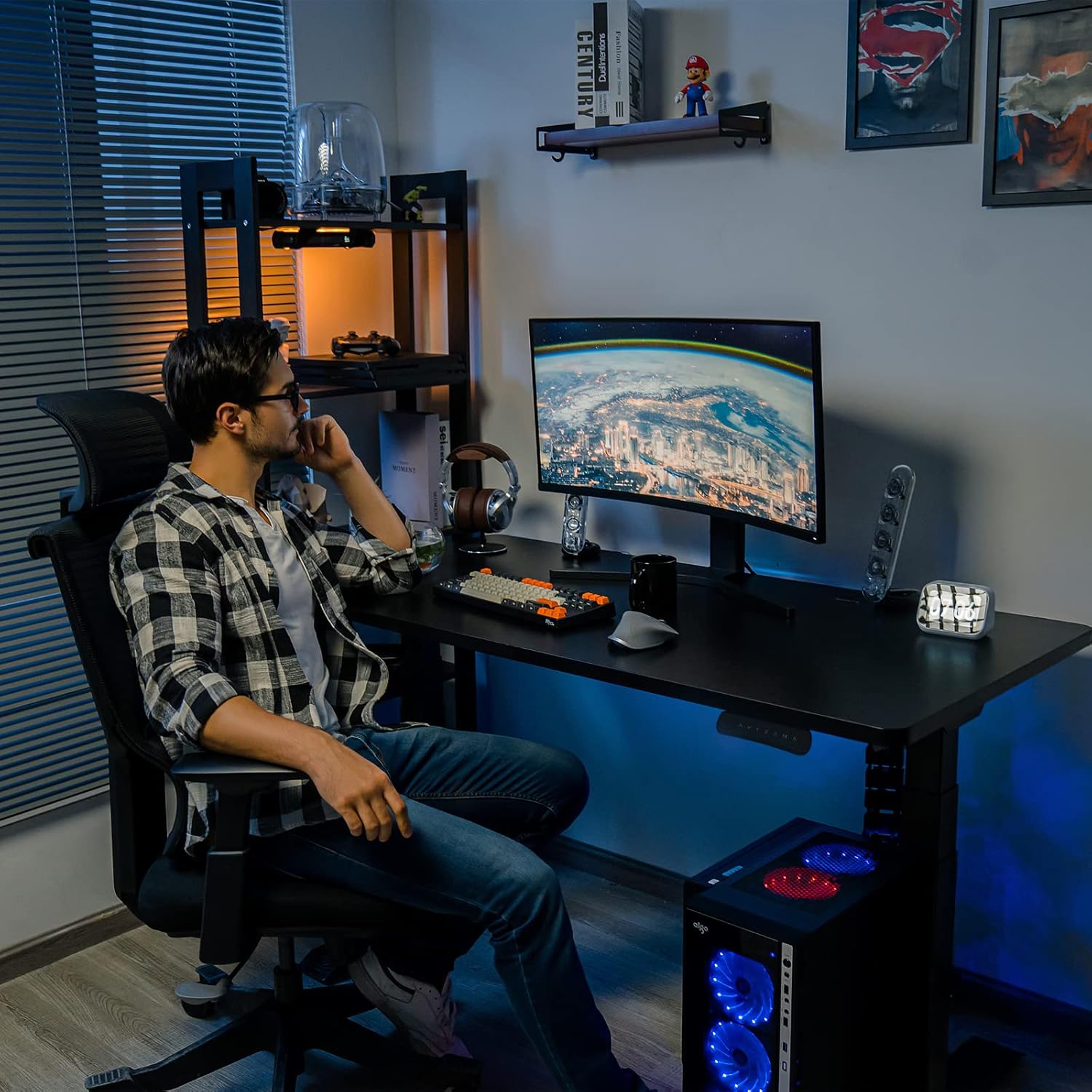
Image: Desk in sitting position.
7. Maintenance and Care
- Cleaning: Wipe the desktop and frame with a soft, damp cloth. Avoid harsh chemicals or abrasive cleaners.
- Inspection: Periodically check all screws and connections to ensure they are tight. Retighten if necessary.
- Cable Management: Ensure cables are neatly managed and not interfering with the desk's movement.
- Power: Always unplug the desk from the power outlet before cleaning or if it will not be used for an extended period.
8. Troubleshooting Guide
If you encounter any issues with your FLEXISPOT E7 Pro desk, please refer to the table below for common problems and solutions.
| Problem | Possible Cause | Solution |
|---|---|---|
| Desk does not move. | No power; Loose cable connection; Overload. | Check power cord connection; Ensure all motor and control panel cables are securely plugged in; Reduce weight on desk. |
| Desk moves unevenly. | Uneven weight distribution; Loose frame components. | Distribute weight evenly on the desktop; Check and tighten all assembly screws. |
| Error code on display. | Specific system error. | Refer to the detailed assembly guide for specific error code meanings and reset procedures. Often, unplugging and replugging the power can resolve minor errors. |
| Anti-collision system triggers frequently. | Obstacles in the path; Sensitivity setting. | Ensure clear path during movement; Consult manual for adjusting anti-collision sensitivity if applicable. |
9. Product Specifications
| Feature | Specification |
|---|---|
| Brand | FLEXISPOT |
| Model Number | EC4B |
| Product Dimensions (D x W x H) | 30"D x 48"W x 48.4"H |
| Desktop Material | Engineered Wood (Seamless Solid Slab) |
| Base Material | Alloy Steel |
| Color | Black Frame & Black Top |
| Minimum Height | 22.8 Inches |
| Maximum Height | 48.4 Inches |
| Lifting Mechanism | Electric Dual Motor, 3-Stage |
| Maximum Weight Recommendation | 355 Pounds (161 kg) |
| Noise Level | Less than 45dB |
| Special Features | Anti-collision System, One-touch Height Adjustable System, Memory Presets, Child-lock, USB Charging Ports |

Image: Desktop dimensions.
10. Warranty Information and Support
The FLEXISPOT E7 Pro Electric Standing Desk is covered by a comprehensive warranty:
- 5-Year Warranty: Applies to the standing desk frame and motors.
- 2-Year Warranty: Applies to the control panel, switch, electronic components, and other mechanisms.
This warranty covers defects in materials and workmanship under normal use. For warranty claims or technical support, please contact FLEXISPOT customer service through their official website or the retailer where the product was purchased. Please have your model number (EC4B) and purchase information ready.


