
1. Introduction
This manual provides essential information for the safe and efficient operation of your Smart Tech 55UA10V3 55-inch 4K Smart TV. Please read these instructions thoroughly before using the television and retain them for future reference. This television features a 55-inch 4K display, integrated Wi-Fi, LAN connectivity, and DVB-T2/S2/C tuners for a comprehensive entertainment experience.
2. Safety Information
- Power Supply: Ensure the TV is connected to a power supply within the specified voltage range. Do not overload power outlets.
- Ventilation: Do not block ventilation openings. Allow adequate space around the TV for proper airflow to prevent overheating.
- Water and Moisture: Do not expose the TV to rain or moisture. Do not place objects filled with liquids, such as vases, on the TV.
- Cleaning: Unplug the TV before cleaning. Use a soft, dry cloth. Do not use liquid cleaners or aerosol cleaners.
- Placement: Place the TV on a stable, level surface. Avoid placing it in direct sunlight or near heat sources.
- Servicing: Do not attempt to service the TV yourself. Refer all servicing to qualified service personnel.
3. Package Contents
Please check that the following items are included in your TV package:
- Smart Tech 55UA10V3 55-inch 4K Smart TV
- Remote Control
- TV Stand (if applicable)
- Power Cable
- User Manual (this document)

Image 1: Front view of the Smart Tech 55UA10V3 TV, showing its dimensions and the included remote control. The screen displays a smart TV interface with various app icons.
4. Setup
4.1. Installing the TV Stand or Wall Mounting
Carefully place the TV face down on a soft, flat surface. Attach the stand according to the instructions provided with the stand components. Ensure all screws are securely fastened. If wall mounting, follow the instructions of your wall mount bracket and ensure it is suitable for the TV's weight and VESA pattern.
4.2. Connecting External Devices
Connect your external devices (e.g., cable box, Blu-ray player, game console) to the appropriate ports on the TV. The TV features:
- 3 HDMI Ports: For high-definition audio and video.
- 2 USB Ports: For media playback from USB drives.
- 1 VGA Port: For PC connection.
- LAN Port: For wired internet connection.
- Antenna Input: For DVB-T2/S2/C signals.
- Common Interface (CI) Slot: For conditional access modules.
- Digital Audio Out: For connecting to external audio systems.
- 3.5mm Headphone Output: For private listening.
4.3. Power On and Initial Setup
- Connect the power cable to the TV and then to a wall outlet.
- Press the power button on the remote control or on the TV.
- Follow the on-screen instructions to complete the initial setup, including language selection, network connection (Wi-Fi or LAN), and channel scanning for DVB-T2/S2/C signals.
5. Operating
5.1. Remote Control Functions
The remote control allows you to navigate the TV's features. Common buttons include:
- Power: Turns the TV on or off.
- Source: Selects input source (HDMI, USB, TV).
- Volume +/-: Adjusts volume.
- Channel +/-: Changes TV channels.
- Navigation Buttons (Up/Down/Left/Right) & OK: For menu navigation and selection.
- Back/Exit: Returns to the previous screen or exits a menu.
- Smart TV/Home: Accesses the Smart TV interface.
5.2. Smart TV Features
Your Smart Tech TV offers a range of smart features:
- Internet Connectivity: Connect to the internet via integrated Wi-Fi or the LAN port to access online content.
- Applications: Access pre-installed applications and download more from the app store (if available).
- Web Browser: Browse the internet directly on your TV.
- Google Home Compatibility: Integrate your TV with Google Home for voice control (requires compatible Google Home device).
5.3. DVB-T2/S2/C Tuner Operation
The TV includes integrated tuners for digital terrestrial (DVB-T2), satellite (DVB-S2), and cable (DVB-C) broadcasts. After initial channel scanning, you can switch between these sources using the 'Source' button on your remote control.
5.4. HDR Functionality
This TV supports HDR (High Dynamic Range), providing enhanced contrast and a wider range of colors for compatible content. Ensure your content source and settings are configured for HDR to experience its full benefits.
6. Maintenance
- Screen Cleaning: Gently wipe the screen with a soft, lint-free cloth. For stubborn marks, slightly dampen the cloth with water or a specialized screen cleaner (apply to cloth, not directly to screen).
- Cabinet Cleaning: Use a soft, dry cloth to clean the TV cabinet.
- Dusting: Regularly dust the ventilation openings to prevent dust buildup.
- Power Cord: Periodically check the power cord for any damage. If damaged, replace it with an approved cord.
7. Troubleshooting
| Problem | Possible Cause | Solution |
|---|---|---|
| No power | Power cord not connected; power outlet not working. | Ensure power cord is securely plugged in. Test the outlet with another device. |
| No picture, but sound is present | Incorrect input source selected; backlight issue. | Press the 'Source' button on the remote to select the correct input. |
| No sound, but picture is present | Volume muted or too low; external audio system issue. | Unmute the TV or increase volume. Check connections to external audio devices. |
| Cannot connect to Wi-Fi | Incorrect password; router too far; router issue. | Verify Wi-Fi password. Move TV closer to router or use LAN cable. Restart router. |
| Remote control not working | Batteries depleted; obstruction between remote and TV. | Replace batteries. Remove any obstructions. |
8. Specifications
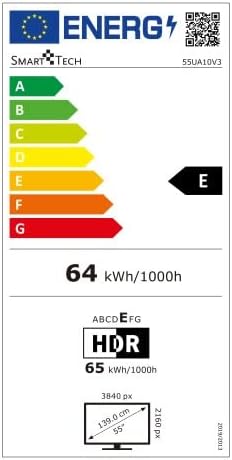
Image 2: Energy efficiency label for the Smart Tech 55UA10V3 television, indicating an energy class of E and a power consumption of 64 kWh per 1000 hours for standard dynamic range content, and 65 kWh per 1000 hours for HDR content.
- Brand: Smart Tech
- Model Number: 55UA10V3
- Display Size: 55 inches
- Resolution: 4K (3840x2160)
- Display Technology: LED (Full LED/Direct LED)
- HDR Function: Yes
- TV Tuner: DVB-T2, DVB-S2, DVB-C
- Wi-Fi: Integrated
- LAN: Yes
- HDMI Ports: 3
- USB Ports: 2
- VGA Port: 1
- Headphone Output (3.5mm): 1
- Digital Audio Output: 1
- Common Interface (CI): Yes
- Bluetooth: No
- Audio Output Power: 16 W (2 speakers)
- Audio Mode: Surround
- Smart Home Compatibility: Google Home
- Dimensions with Stand (W x H x D): 122.85 cm x 75.13 cm x 27.2 cm
- Dimensions without Stand (W x H x D): 122.85 cm x 71.07 cm x 7.68 cm
- Product Weight: 10.6 kg
9. Warranty and Support
Information regarding product warranty and specific support contacts is not available in the provided product details. Please refer to the warranty card included with your product or contact your retailer for details on warranty coverage and technical support.


