
1. Important Safety Information
Please read this entire manual carefully before installation and use. Keep these instructions for future reference.
- Always disconnect power at the circuit breaker before installation or servicing.
- Installation must be performed by a qualified electrician in accordance with all local codes and regulations.
- Do not attempt to modify the mirror or its electrical components.
- Avoid using abrasive cleaners or sharp objects on the mirror surface.
- This mirror is rated IP44 for water resistance, suitable for bathroom environments. However, avoid direct water spray onto electrical components.
2. Setup and Installation
2.1 Package Contents
Verify that all components are present before beginning installation:
- ExBrite LED Lighted Bathroom Mirror (30x36 inch)
- Mounting hardware (screws, anchors)
- Instruction Manual
2.2 Choosing a Location
Select a suitable wall location in your bathroom. Ensure the wall can support the mirror's weight (approximately 33.8 pounds). The mirror can be mounted vertically or horizontally.
2.3 Mounting Instructions
- Measure and mark the desired mounting height and width on the wall. Refer to the mirror's dimensions (30 inches wide by 36 inches long).
- Drill pilot holes at the marked locations. Insert wall anchors if necessary.
- Secure the mounting brackets to the wall using the provided screws. Ensure they are level and firmly attached.
- Carefully lift the mirror and hang it onto the installed mounting brackets. Ensure it is securely seated.

Image: ExBrite 30x36 inch LED Bathroom Mirror installed above a vanity, showcasing its backlit illumination.

Image: Diagram illustrating the 30-inch width and 36-inch length of the mirror.
2.4 Electrical Connection
The mirror can be connected via a standard plug or hardwired. For hardwiring, consult a qualified electrician.
- Plug-in Installation: Plug the mirror's power cord into a standard electrical outlet.
- Hardwired Installation: Disconnect power at the circuit breaker. Connect the mirror's wiring to the appropriate household wiring (Live, Neutral, Ground) according to local electrical codes. Ensure all connections are secure and insulated.
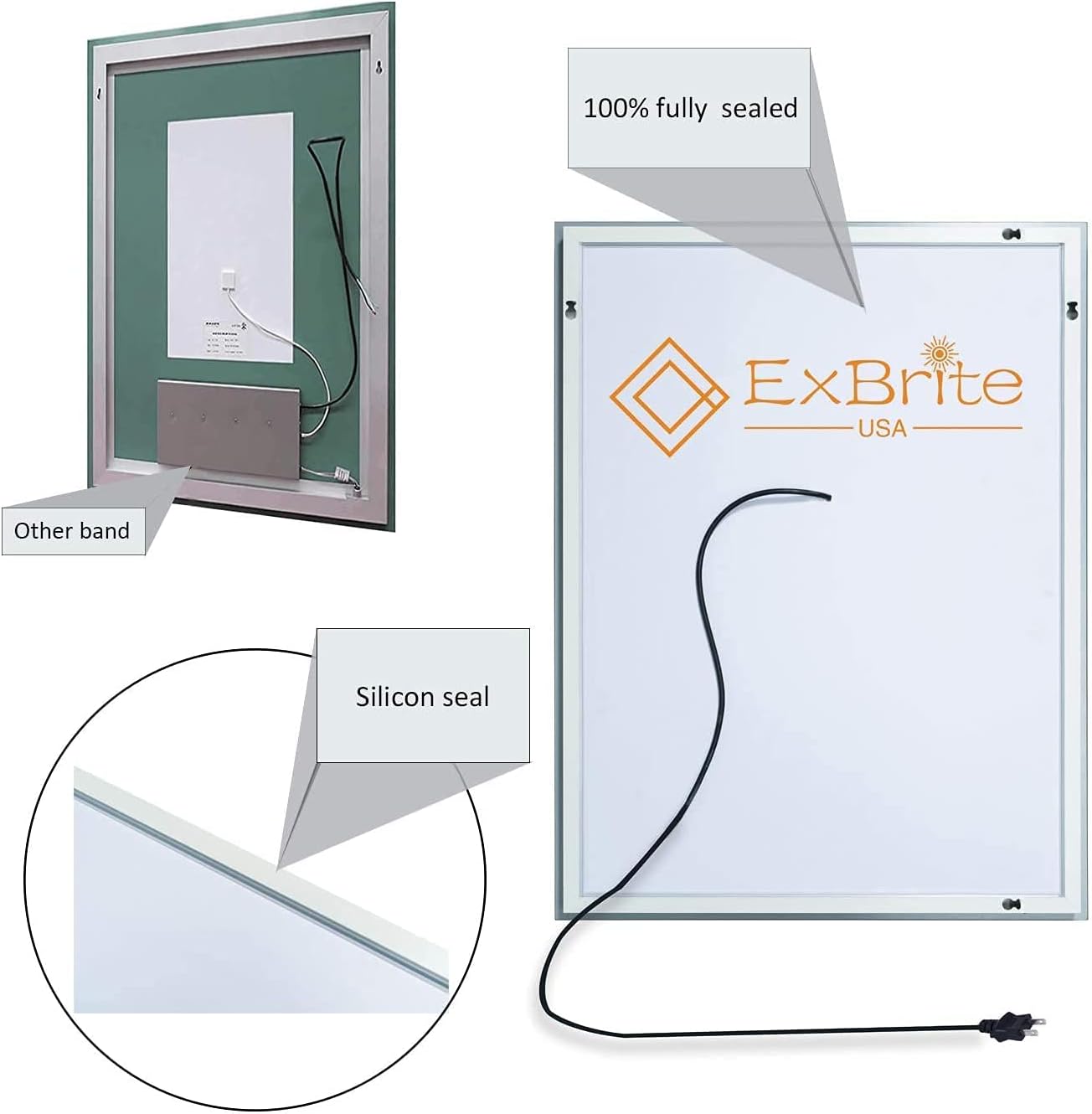
Image: Rear view of the mirror, highlighting the fully sealed construction and power cord connection point.
3. Operating Instructions
The ExBrite LED mirror features intuitive touch controls for lighting and anti-fog functions.
3.1 Power On/Off and Brightness Adjustment
- Power: Touch the power button icon on the mirror surface to turn the LED lights on or off.
- Brightness Adjustment (Dimming): With the lights on, press and hold the power button icon for approximately 3 seconds to adjust the brightness level. The brightness will cycle through its range; release the button when the desired brightness is reached. The mirror will memorize your last brightness setting when turned off.

Image: Visual representation of the dimmable feature, showing brightness adjustment by pressing and holding the switch button.
3.2 Color Temperature Adjustment
- Color Temperature: With the lights on, touch the color temperature button icon (often represented by a sun or color spectrum) to cycle through different color temperatures: Warm (3000K), Warm White, and Cold White (6400K).
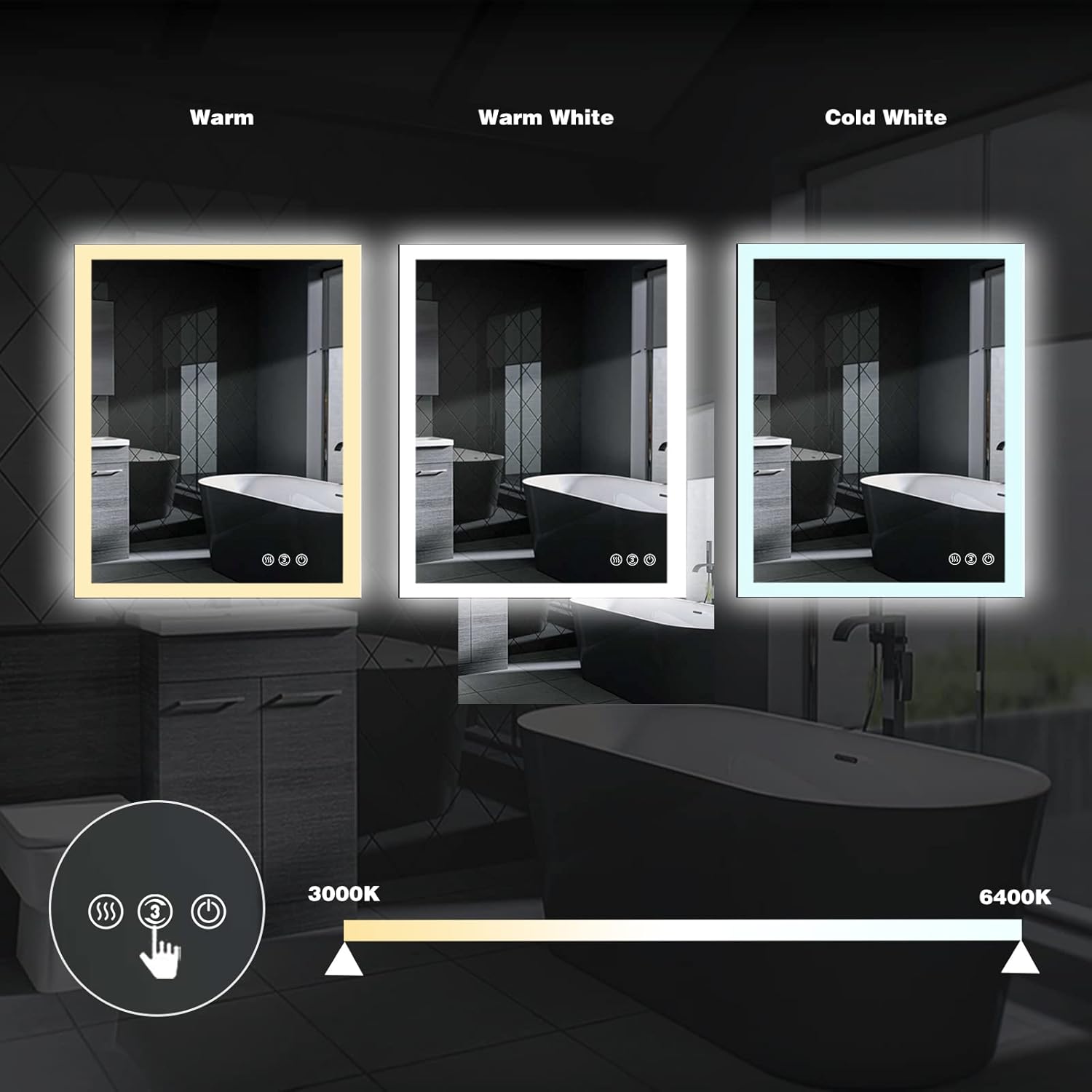
Image: Three mirrors displaying the adjustable color temperatures: Warm (3000K), Warm White, and Cold White (6400K).
3.3 Anti-Fog Function
- Activate Defogger: Touch the defogger button icon (often represented by steam or wavy lines) to activate the anti-fog function. This will clear condensation from the mirror surface.
- Automatic Shut-off: The anti-fog function is designed to automatically switch off after 1 hour to conserve energy.

Image: Diagram illustrating the anti-fog function, showing how it clears condensation from the mirror surface from inside to outside.
3.4 Operational Overview Video
Video: This video demonstrates the intelligent touch-screen switch, showing how to turn the light on/off, adjust brightness by holding the button, activate the defogger, and the memory function for brightness settings.
4. Maintenance and Care
4.1 Cleaning the Mirror
- Always turn off the mirror and disconnect power before cleaning.
- Use a soft, damp cloth with a mild glass cleaner. Spray cleaner onto the cloth, not directly onto the mirror surface, especially near electrical components.
- Wipe the mirror surface gently to avoid scratches.
- Do not use abrasive cleaners, ammonia-based products, or harsh chemicals, as these can damage the mirror's finish or electrical components.
4.2 LED Light Longevity
The integrated LED lights are designed for long-term use, with an estimated lifespan of 50,000 hours and 90% energy saving compared to traditional lighting. They also feature a Color Rendering Index (CRI) of over 90 for accurate color representation.

Image: Features of the LED lighting, including 50,000 hour lifespan, 90% energy saving, and a Color Rendering Index greater than 90.
5. Troubleshooting
If you encounter issues with your ExBrite LED mirror, please refer to the following common solutions:
- Lights not turning on:
- Check if the power cord is securely plugged into the outlet or if the hardwired connection is properly made.
- Verify that the circuit breaker for the bathroom is not tripped.
- Ensure the touch power button is being pressed correctly.
- Dimming or color temperature not changing:
- Ensure you are pressing and holding the power button for dimming, or tapping the color temperature button for color changes.
- Clean the touch sensor area to ensure no obstructions.
- Anti-fog not working:
- Ensure the anti-fog button is activated.
- Allow a few minutes for the defogger to heat up and clear the mirror surface.
If these steps do not resolve the issue, please contact ExBrite customer support for further assistance.
6. Product Specifications
| Feature | Detail |
|---|---|
| Brand | ExBrite |
| Product Dimensions | 36"L x 30"W |
| Shape | Rectangular |
| Mounting Type | Wall Mount (Vertical & Horizontal) |
| Frame Material | Aluminum |
| Mirror Material | Copper-free glass |
| Special Features | Fogless, Lighted, Dimmable, Touch Sensor, Color Temperature Adjustment (3000K-6400K) |
| Color Temperature Range | 3000K (Warm) - 6400K (Cold White) |
| Color Rendering Index (CRI) | >90 |
| Waterproof Rating | IP44 |
| LED Life Time | 50,000 hours |
| Energy Efficiency | 90% Energy Saving |
| Item Weight | 33.8 pounds |
| Assembly Required | No |
7. Warranty Information
ExBrite provides a 5-year warranty for this product, covering manufacturing defects and malfunctions under normal use. Please retain your proof of purchase for warranty claims.
For detailed warranty terms and conditions, please refer to the official ExBrite website or contact customer service.
8. Customer Support
Should you require assistance, have questions, or need to report an issue, please contact ExBrite customer service.
- Email Support: Expect a reply by email within 24 hours.
- Online Resources: Visit the official ExBrite website for FAQs and additional product information.
We are committed to providing excellent service and support for your ExBrite product.


