
1. Introduction
The BTMETER BT-1500C is a professional non-contact infrared thermometer designed for accurate high-temperature measurements in various industrial and scientific applications. It provides a wide temperature range, dual laser targeting, and multiple measurement modes for enhanced usability. This device is intended for inanimate objects only and should not be used for measuring human or animal body temperature.
2. Safety Information
Please read and understand all safety information before using this product.
- Laser Safety: This device uses a Class II laser with an optical power of less than 0.5mW and a wavelength of 630-670nm. DO NOT STARE INTO THE LASER BEAM. Direct eye exposure can cause eye damage.
- Temperature Range: The BT-1500C is designed for temperatures from -50°C to 1500°C (-58°F to 2732°F). Do not attempt to measure temperatures outside this range.
- Not for Human/Animal Use: This thermometer is specifically designed for inanimate objects. Measurements for humans or animals may be inaccurate.
- Electrical Hazards: Exercise caution near live electrical circuits. The device is non-contact, but awareness of surroundings is crucial.
- Maintenance: Refer to the maintenance section for proper cleaning and care.
3. Product Overview
The BTMETER BT-1500C features a robust design with a color LCD and intuitive controls for efficient temperature measurement.
Key Features:
- Wide temperature range: -50°C to 1500°C (-58°F to 2732°F).
- High distance-to-spot ratio (D:S) of 30:1 for safe measurements from a distance.
- Dual laser pointers for precise targeting.
- Large color LCD with backlight and flashlight for visibility in dark conditions.
- Measurement modes: MIN/MAX/AVG/DIF (Minimum, Maximum, Average, Difference).
- Adjustable high/low/difference temperature alarms.
- Adjustable emissivity (0.1-1.00).
- Fast response time: 0.25 seconds.
- Automatic power-off and low power indicator to conserve battery life.
Components:
Familiarize yourself with the parts of your BT-1500C thermometer:
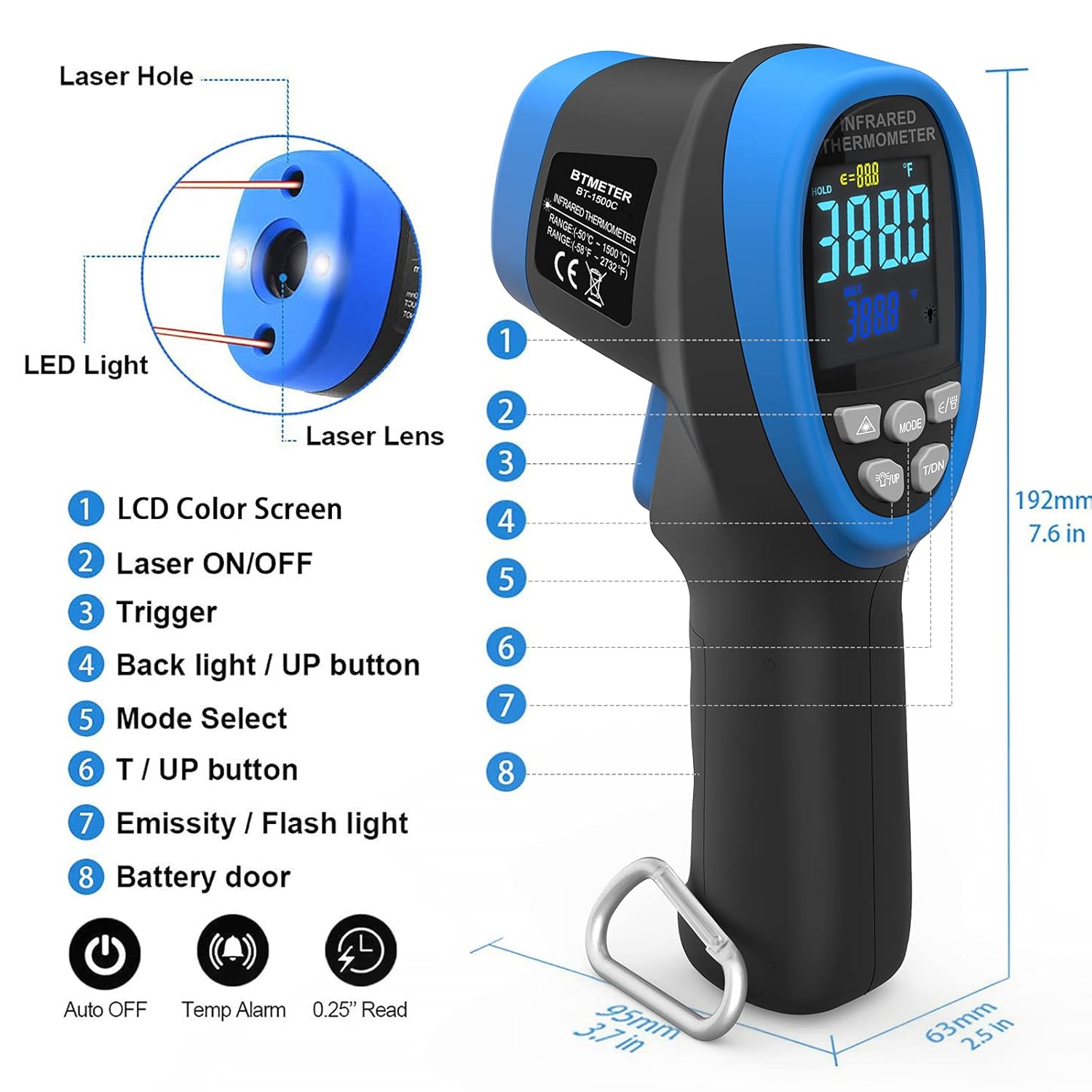
This image displays the various components of the BT-1500C thermometer, including the LCD Color Screen, Laser ON/OFF button, Trigger, Backlight/UP button, Mode Select button, T/UP button, Emissivity/Flashlight button, and Battery door. It also shows the Laser Hole, LED Light, and Laser Lens.
- LCD Color Screen: Displays temperature readings and mode indicators.
- Laser ON/OFF Button: Activates or deactivates the dual laser pointers.
- Trigger: Press and hold to take a measurement.
- Backlight / UP Button: Toggles the display backlight and navigates menus upwards.
- Mode Select Button: Cycles through measurement modes (MIN/MAX/AVG/DIF).
- T / DOWN Button: Changes temperature units (°C/°F) and navigates menus downwards.
- Emissivity / Flashlight Button: Adjusts emissivity settings and activates the built-in flashlight.
- Battery Door: Located at the base of the handle for battery access.
What's in the Box:
- BTMETER BT-1500C Infrared Thermometer
- 9V Battery
- Instruction Manual
- Carabiner clip
- Small screwdriver
- Carrying pouch

This image shows the complete package contents: the BT-1500C thermometer, a carrying pouch, a 9V battery, a small screwdriver, a carabiner clip, and the instruction manual.
4. Setup
Battery Installation:
The BT-1500C requires one 9V battery (included) for operation.
- Locate the battery compartment door at the bottom of the handle.
- Use the included screwdriver to loosen the screw on the battery door.
- Open the battery door and connect the 9V battery to the terminal.
- Place the battery inside the compartment and close the door.
- Secure the battery door by tightening the screw.
Video demonstrating how to properly remove and insert batteries into the BTMETER infrared thermometer.
5. Operating Instructions
Taking a Measurement:
- Point the thermometer at the target object.
- Press and hold the trigger. The dual laser pointers will indicate the measurement area.
- The temperature reading will appear on the LCD screen within 0.25 seconds.
- Release the trigger to hold the reading on the screen.

This image shows the BT-1500C thermometer in operation, highlighting its dual laser pointers for accurate targeting of the measurement area.
Distance to Spot Ratio (D:S):
The BT-1500C has a D:S ratio of 30:1. This means that at a distance of 30 units from the target, the measurement spot diameter will be 1 unit. For example, if you are 30 inches away, the measurement spot will be 1 inch in diameter. This allows for accurate measurements of smaller areas from a safe distance.

This diagram illustrates the 30:1 distance-to-spot ratio, showing how the measurement area expands with increased distance from the target.
Changing Temperature Units (°C/°F):
Press the T/DOWN button to switch between Celsius (°C) and Fahrenheit (°F) temperature units.

This image demonstrates the thermometer's display showing temperature readings in both Celsius and Fahrenheit, indicating the unit switching capability.
Measurement Modes (MIN/MAX/AVG/DIF):
Press the MODE button to cycle through the following measurement modes:
- MAX: Displays the maximum temperature recorded during the measurement session.
- MIN: Displays the minimum temperature recorded during the measurement session.
- AVG: Displays the average temperature recorded during the measurement session.
- DIF: Displays the difference between the maximum and minimum temperatures recorded.

This image illustrates the thermometer's display showing the various measurement modes: MAX, MIN, AVG, and DIF.
Emissivity Adjustment:
The BT-1500C allows for adjustable emissivity from 0.1 to 1.00. Emissivity is a measure of an object's ability to emit infrared energy. Different materials have different emissivity values. For accurate readings, adjust the emissivity to match the target material. Consult an emissivity table for common materials if needed.
To adjust emissivity, press the Emissivity / Flashlight button and use the UP and DOWN buttons to change the value.
Temperature Alarms:
You can set high, low, and difference temperature alarms. If the measured temperature falls outside the set range or exceeds the difference, the device will alert you. Refer to the full instruction manual for detailed steps on setting these alarms.
Flashlight and Backlight:
The device includes a built-in flashlight and a backlit LCD screen for use in low-light conditions. Use the Emissivity / Flashlight button to toggle the flashlight and the Backlight / UP button to toggle the backlight.
Video providing an overview of the BTMETER Non-Contact Pyrometer 1500, including its features and operation.
6. Maintenance
Proper maintenance ensures the longevity and accuracy of your BT-1500C thermometer.
- Cleaning: Wipe the device clean with a soft, damp cloth. Do not use abrasive cleaners or solvents. Ensure the lens is clean and free of dust or debris for accurate readings.
- Storage: Store the thermometer in a cool, dry place, away from direct sunlight and extreme temperatures. If storing for extended periods, remove the battery to prevent leakage.
- Battery Replacement: Replace the 9V battery when the low power indicator appears on the display.
7. Troubleshooting
If you encounter issues with your BT-1500C thermometer, refer to the following common problems and solutions:
| Problem | Possible Cause | Solution |
|---|---|---|
| No display/Device won't turn on | Dead or incorrectly installed battery | Replace the 9V battery or ensure it is installed correctly. |
| Inaccurate readings | Incorrect emissivity setting; Lens is dirty; Distance to spot ratio too large; Object temperature outside range | Adjust emissivity for the target material; Clean the lens; Move closer to the target (within D:S ratio); Ensure object temperature is within -50°C to 1500°C. |
| Laser not visible | Laser turned off; Bright ambient light | Press the Laser ON/OFF button; Use in dimmer conditions or rely on the D:S ratio for targeting. |
| Display shows "ERR" or other error codes | Internal error; Temperature too high/low | Turn off and restart the device. If the error persists, contact customer support. Ensure the target temperature is within the specified range. |
For more detailed troubleshooting, please refer to the Troubleshooting Guide (PDF).
8. Specifications
Detailed technical specifications for the BTMETER BT-1500C Infrared Thermometer:
| Feature | Specification |
|---|---|
| Brand | BTMETER |
| Model Name | BT-1500C |
| Temperature Range | -50°C to 1500°C (-58°F to 2732°F) |
| Accuracy | +/- 2% (average) |
| Repeatability | 1% of reading or 1°C |
| Distance to Spot Ratio (D:S) | 30:1 |
| Response Time | 0.25 seconds |
| Emissivity | 0.1-1.00 (Adjustable) |
| Laser Type | Class II, <0.5mW, 630-670nm |
| Display Type | Digital Color LCD with Backlight |
| Power Source | 9V Battery |
| Auto Power OFF | Yes |
| Included Components | Battery, Screwdriver, Carabiner, Carrying Pouch |
| Material | Plastic |
| Item Weight | 160 g |
| Dimensions (approx.) | 7.6 inches (length) |
9. Warranty and Support
BTMETER products are designed for reliability and performance. For warranty information, technical support, or service inquiries, please contact BTMETER customer service through their official website or the retailer where the product was purchased. Keep your purchase receipt as proof of purchase.


