
1. Introduction
This manual provides detailed instructions for the installation, operation, and maintenance of the NOTIFIER NH-200 Low Profile Thermal Sensor. The NH-200 is a fixed-temperature thermal sensor designed for fire detection systems, capable of detecting temperatures reaching 135°F. It is supplied with a B300-6 base, ensuring compatibility and ease of integration into FlashScan systems.
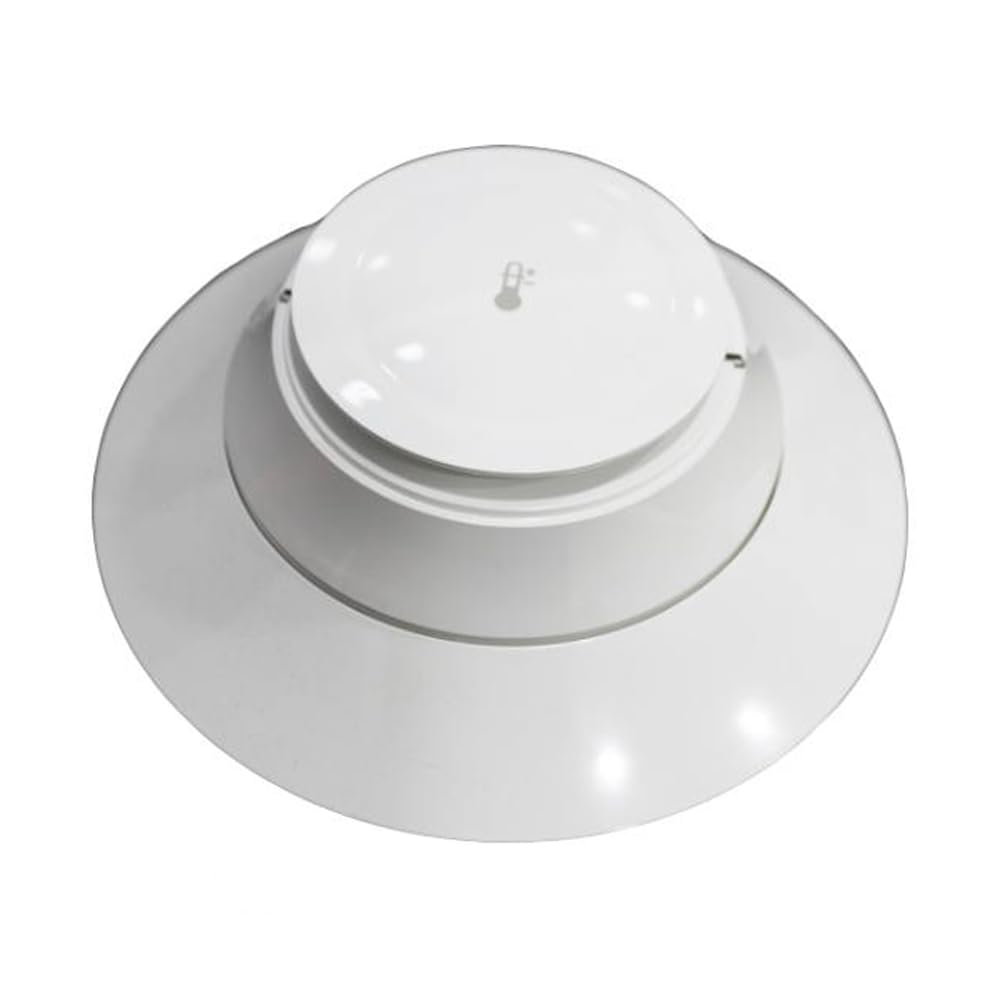
Figure 1: Notifier NH-200 Low Profile Thermal Sensor with its included base. This white, circular device is designed for discreet installation and reliable temperature monitoring.
2. Setup and Installation
The NH-200 thermal sensor is designed for straightforward installation. Ensure all local and national electrical codes are followed during installation. This device is intended for use with compatible fire alarm control panels.
2.1 Unpacking
Carefully remove the NH-200 sensor and B300-6 base from its packaging. Inspect for any signs of damage. Do not install damaged components.
2.2 Mounting the Base (B300-6)
- Position the B300-6 base on the desired mounting surface (e.g., ceiling or wall).
- Secure the base using appropriate screws through the designated mounting holes. Ensure the base is firmly attached and level.
- Connect the system wiring to the terminals on the B300-6 base according to the fire alarm control panel's wiring diagram. Pay close attention to polarity.
2.3 Attaching the Sensor
- Align the NH-200 sensor with the mounted B300-6 base.
- Gently push the sensor onto the base and rotate it clockwise until it clicks into place. This secures the sensor and makes the electrical connection.
- Verify that the sensor is securely seated and cannot be easily removed without intentional rotation.
2.4 Powering On
Once the sensor is installed and wired, power on the fire alarm control panel. The sensor will perform a self-diagnostic check upon initial power-up. Refer to your control panel's manual for specific power-up sequences and indications.
3. Operating Principles
The NOTIFIER NH-200 is a fixed-temperature thermal sensor. It is designed to activate an alarm when the ambient temperature at the sensor location reaches or exceeds 135°F (57.2°C). This sensor operates as part of a FlashScan fire alarm system, providing reliable temperature monitoring.
3.1 Alarm Indication
Upon detecting a temperature of 135°F or higher, the sensor will trigger an audible alarm through the connected fire alarm system. The specific alarm sound and system response are configured at the fire alarm control panel.
3.2 Normal Operation
Under normal operating conditions, the sensor continuously monitors the ambient temperature. There are no user-adjustable settings on the sensor itself. Its operation is entirely passive until the fixed temperature threshold is met.
4. Maintenance
Regular maintenance ensures the continued reliable operation of your NH-200 thermal sensor. It is recommended to follow a routine inspection and cleaning schedule.
4.1 Cleaning
Dust and debris can accumulate on the sensor over time, potentially affecting its performance. To clean the sensor:
- Carefully remove the sensor from its base by rotating it counter-clockwise.
- Use a soft, dry cloth or a vacuum cleaner with a brush attachment to gently remove dust from the exterior of the sensor. Do not use liquid cleaners or solvents.
- Reattach the sensor to its base, ensuring it is securely locked in place.
4.2 Testing
Periodic testing of the thermal sensor is crucial to confirm its functionality. Consult your fire alarm system's documentation for specific testing procedures. Typically, this involves using a heat source (e.g., a hairdryer on a low setting, held at a safe distance) to raise the temperature around the sensor until it activates. Always notify relevant personnel before conducting tests to avoid false alarms.
4.3 Battery Replacement
The NH-200 sensor is powered by the fire alarm control panel and does not contain user-replaceable batteries. If the system indicates a power issue with the sensor, consult a qualified technician.
5. Troubleshooting
This section addresses common issues you might encounter with the NH-200 thermal sensor.
5.1 Sensor Not Responding / No Alarm
- Check Wiring: Ensure all wiring connections to the B300-6 base are secure and correctly terminated according to the system's wiring diagram.
- Verify Power: Confirm that the fire alarm control panel is powered on and providing power to the sensor loop.
- Sensor Seating: Make sure the sensor is properly seated and locked onto its base. Remove and re-attach the sensor if necessary.
- System Fault: Check the fire alarm control panel for any fault indications related to the sensor or its zone.
- Temperature Threshold: Ensure the ambient temperature has actually reached or exceeded 135°F.
5.2 False Alarms
- Environmental Factors: Identify if the sensor is located near a heat source (e.g., heating vents, direct sunlight, industrial equipment) that could cause temperatures to exceed 135°F under normal conditions.
- Sensor Contamination: Dust or debris on the sensor can sometimes interfere with its operation. Refer to the cleaning instructions in Section 4.1.
- System Malfunction: If false alarms persist without an apparent cause, there may be an issue with the fire alarm control panel or wiring. Consult a qualified fire alarm technician.
For persistent issues not resolved by these steps, contact a certified fire alarm system technician or Notifier technical support.
6. Specifications
The following table provides detailed technical specifications for the NOTIFIER NH-200 Low Profile Thermal Sensor.
| Attribute | Value |
|---|---|
| Brand | Notifier |
| Model Number | NNH200 |
| Style | Thermal |
| Sensor Type | Fixed Temperature Thermal Sensor |
| Activation Temperature | 135°F (57.2°C) |
| Power Source | System Powered (via control panel) |
| Alarm Type | Audible (via system) |
| Item Weight | 8 ounces |
| Included Base | B300-6 (FlashScan compatible) |
| Manufacturer | NOTIFIER |
| UPC | 767571884629 |
| ASIN | B08B1XVL6L |
| Date First Available | June 11, 2020 |
7. Warranty and Support
For information regarding the warranty of your NOTIFIER NH-200 thermal sensor, please refer to the documentation provided by Notifier or contact your authorized Notifier distributor or installer. Warranty terms typically cover defects in materials and workmanship under normal use.
7.1 Technical Support
If you require technical assistance, have questions about system compatibility, or need advanced troubleshooting, please contact Notifier's official technical support channels. You may also reach out to the supplier from whom you purchased the product, such as The Alarm Source, for initial support or guidance on contacting Notifier directly.
Always ensure that any work on fire alarm systems is performed by qualified and certified professionals to maintain system integrity and compliance with safety regulations.