
Walfront BX3
Walfront BX3 Button Switch Box User Manual
Brand: Walfront | Model: BX3
1. Introduction
The Walfront BX3 Button Switch Box is a protective enclosure designed for housing various types of 22mm button switches. Constructed from flame-retardant ABS material, this box provides a durable and secure environment for electrical components. Its design incorporates a sealing rubber strip on the top cover, offering dust-proof and waterproof properties, ensuring longevity and reliable performance in diverse environments.
This enclosure is suitable for direct mounting on walls or equipment, making it ideal for field control and indication applications in industrial and scientific settings.
2. Key Features
- Flame-Retardant ABS Material: Manufactured from high-quality, flame-retardant ABS plastic for enhanced safety and durability.
- Dust and Water Protection: Features a sealing rubber strip on the top cover, providing dust-proof, waterproof, and anti-aging characteristics to protect internal components.
- Versatile Compatibility: Designed to accommodate various types of 22mm button switches, allowing for flexible customization of control panels.
- Easy Installation: Can be directly mounted on walls or equipment, simplifying setup for field control and indication purposes.
- Robust Design: Exquisite appearance combined with practical design ensures ease of installation and maintenance.
3. Product Specifications
| Attribute | Detail |
|---|---|
| Brand | Walfront |
| Material | ABS (Flame-Retardant) |
| Hole Size | 22mm (0.9 inch) |
| Product Dimensions (L x W x H) | 5.83 x 2.72 x 2.48 inches |
| Weight | 5.96 ounces (approx. 169g) |
| Mounting Type | Wall Mount |
| Color Options | White (as reviewed), Yellow (optional) |
| ASIN | B08B1Q9X1K |
| Date First Available | June 11, 2020 |
4. Setup and Installation
The Walfront BX3 Button Switch Box is designed for straightforward installation. Follow these steps for proper setup:
- Unpack Components: Carefully remove the switch box and any included accessories (e.g., mounting screws) from the packaging.
- Prepare Mounting Surface: Identify a suitable, flat surface for mounting the box. This can be a wall or a piece of equipment. Ensure the surface is clean and stable.
- Mark Mounting Points: Use the pre-drilled mounting holes on the switch box as a template to mark the corresponding drill points on your chosen surface.
- Drill Pilot Holes: Drill pilot holes at the marked locations, ensuring the drill bit size is appropriate for the mounting screws.
- Install Button Switches: Before mounting, install your desired 22mm button switches into the three pre-cut holes on the top cover of the box. Ensure they are securely fastened according to the switch manufacturer's instructions.
- Secure the Box: Align the switch box with the pilot holes and secure it to the surface using appropriate screws. Ensure the box is firmly attached and does not wobble.
- Connect Wiring: Route necessary wiring through the designated entry points (e.g., cable glands) and connect them to the installed button switches. Ensure all electrical connections comply with local electrical codes and safety standards.
- Seal the Cover: Once all internal components and wiring are complete, securely fasten the top cover of the switch box. Ensure the sealing rubber strip is properly seated to maintain dust-proof and waterproof integrity.

Figure 1: Exploded view of the Walfront BX3 switch box, illustrating the separate top cover, bottom enclosure, and included mounting screws for installation.

Figure 2: Interior perspective of the Walfront BX3 switch box, highlighting the ample internal space and designated mounting points for electrical components and wiring.
5. Operation
The Walfront BX3 Button Switch Box itself is a passive enclosure. Its operation is directly tied to the functionality of the button switches installed within it. Once the switches are properly wired and the box is securely mounted, the operation involves interacting with the installed buttons to control the connected electrical circuits or equipment.
Refer to the specific user manuals or instructions provided with the button switches you have installed for detailed information on their operational modes (e.g., momentary, latching) and wiring diagrams.
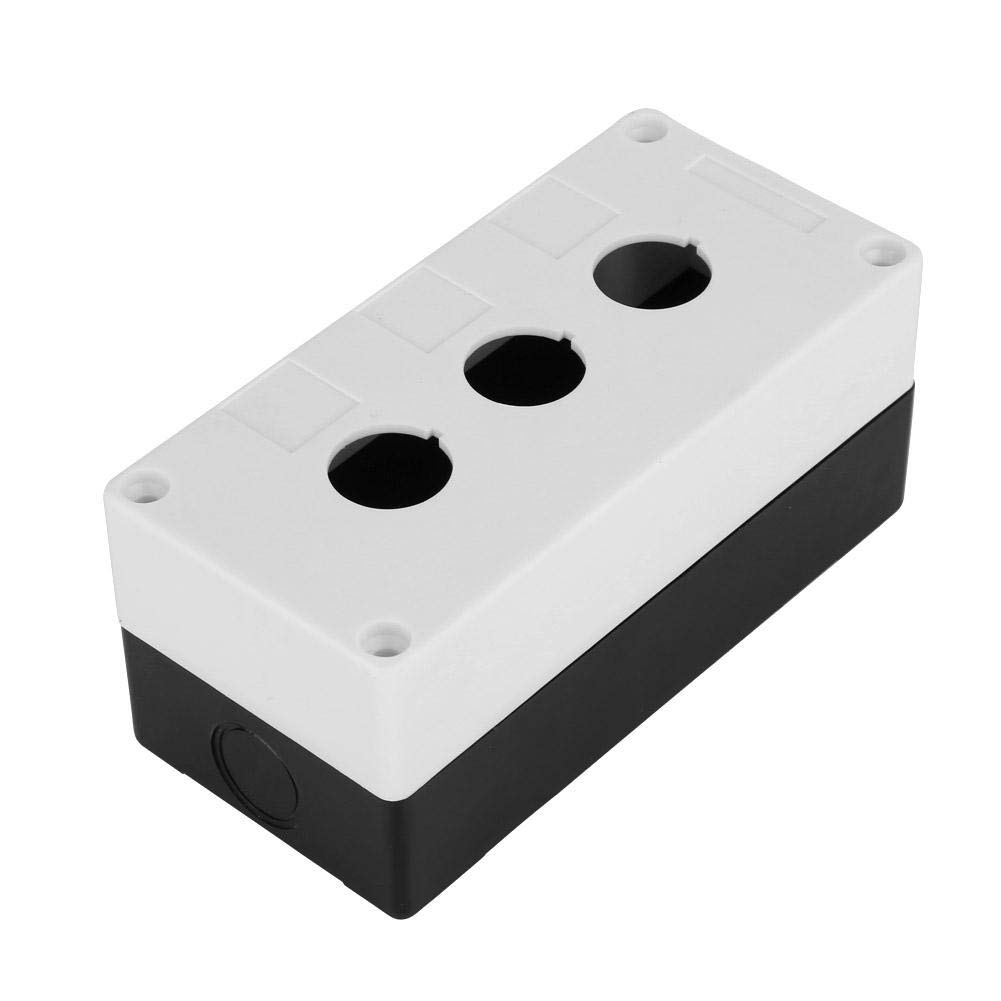
Figure 3: The Walfront BX3 button switch box, ready for the installation of 22mm switches.
6. Maintenance
To ensure the longevity and optimal performance of your Walfront BX3 Button Switch Box, follow these simple maintenance guidelines:
- Regular Cleaning: Periodically wipe the exterior of the box with a soft, damp cloth to remove dust and dirt. Avoid using abrasive cleaners or solvents that could damage the ABS material.
- Inspect Sealing Strip: Annually inspect the sealing rubber strip around the top cover for any signs of wear, cracking, or degradation. A damaged seal can compromise the dust-proof and waterproof properties. Replace if necessary.
- Check Mounting Security: Ensure that the box remains securely mounted to its surface. Tighten any loose screws if detected.
- Internal Inspection (if necessary): If the box is opened for internal component access or modification, ensure that all wiring is neat and secure before re-sealing the cover.
The flame-retardant and anti-aging properties of the ABS material contribute to the box's low maintenance requirements.
7. Troubleshooting
As a passive enclosure, the Walfront BX3 Button Switch Box has limited points of failure related to its own function. Most issues will stem from the installed components or external factors. However, consider the following if you encounter problems:
| Problem | Possible Cause | Solution |
|---|---|---|
| Water/Dust Ingress | Damaged or improperly seated sealing rubber strip; loose cover screws. | Ensure the top cover is securely fastened and the sealing strip is correctly positioned. Replace the sealing strip if it shows signs of damage. |
| Box feels loose after mounting | Mounting screws are loose or insufficient for the surface material. | Tighten all mounting screws. If the issue persists, consider using more robust anchors or screws appropriate for the mounting surface. |
| Installed button switches not functioning | This issue is typically related to the button switch itself or its wiring, not the enclosure. | Refer to the troubleshooting guide for your specific button switches. Check all wiring connections inside the box for proper termination and continuity. Ensure power supply is active. |
8. Warranty and Support
For specific warranty information regarding your Walfront BX3 Button Switch Box, please refer to the documentation provided at the time of purchase or contact the seller directly. Warranty terms typically cover manufacturing defects.
If you require technical assistance or have questions not covered in this manual, please contact Walfront customer support through their official channels or the retailer from whom you purchased the product. When contacting support, please have your product model (BX3) and purchase details readily available.
Ask a question about this manual
Ask about setup, troubleshooting, compatibility, parts, safety, or missing instructions. Manuals+ will review the question and use this page’s manual context to help answer it.