
Introduction
The Muddy Manifest 2.0 Cellular Trail Camera is designed for remote wildlife monitoring and security. This camera captures high-resolution images and videos, transmitting them via Verizon cellular network to the Muddy COMMAND app on your smartphone. This manual provides essential information for setting up, operating, maintaining, and troubleshooting your Manifest 2.0 camera to ensure optimal performance.

Image: The Muddy Manifest 2.0 Cellular Trail Camera, shown mounted on a tree, ready for outdoor use.
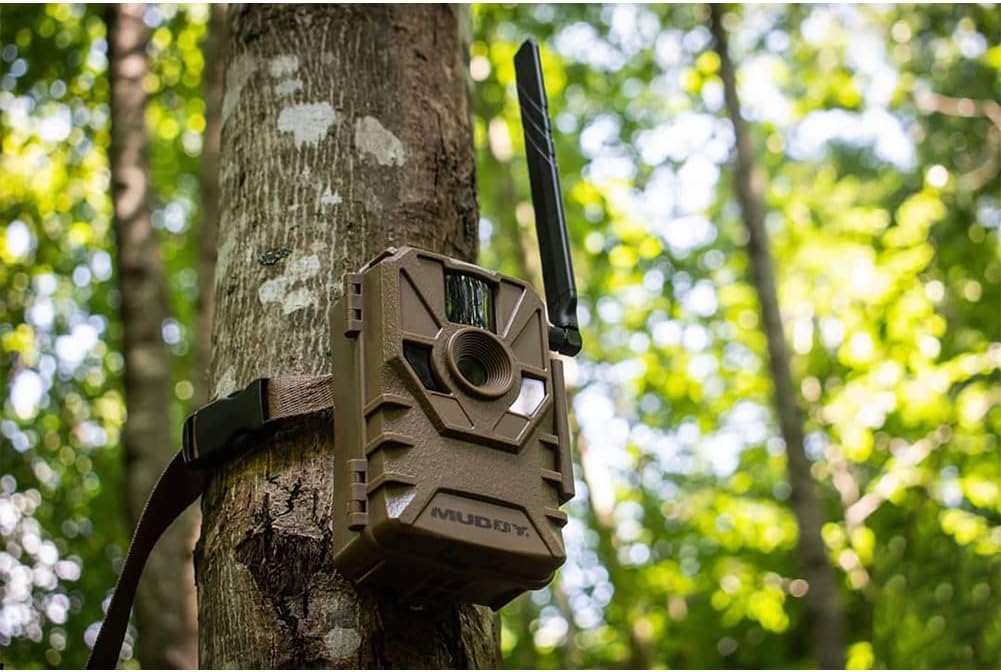
Image: A detailed front view of the Muddy Manifest 2.0 camera, highlighting its primary components.
Setup
1. Power Source
The Manifest 2.0 camera operates on 8 AA batteries. Ensure batteries are inserted with correct polarity. For extended use, an external power jack is available for connection to a SOLPAK solar battery pack (sold separately).
2. SD Card Installation
Insert an SD card into the designated slot. The camera supports SD cards up to 32GB. Important: Use standard SD cards; mini SD cards are not compatible. Using an SD card larger than 32GB or a mini SD card may result in operational issues or data loss.
3. Cellular Activation and App Setup
The Manifest 2.0 utilizes the Muddy COMMAND app for remote access and management. Download the COMMAND app, compatible with both Android and iOS devices. Follow the in-app instructions for quick scan QR code setup to activate your camera on the Verizon network and link it to your account.
4. Mounting the Camera
Use the included mounting strap to secure the camera to a vertical surface, such as a tree. Position the camera to achieve the desired field of view, ensuring it is stable and level. The camera features an 80-foot detection and IR range, so consider this when selecting a mounting location.
Video: An overview of the Muddy Manifest 2.0 Trail Camera, demonstrating its features and potential setup scenarios. This video is provided by GSM LLC, the manufacturer.
Operating Instructions
1. Image and Video Capture
The Manifest 2.0 captures high-resolution 16-megapixel images with an updated quick 0.8-second trigger speed. It supports various image resolutions (16MP/8MP/4MP) and upload resolutions (Low/High) which can be configured via the COMMAND app. The camera also features a burst mode, capturing 1-3 images per triggering event.
2. Recovery Time
The recovery time between triggers can be set from 2-59 seconds or 3-59 minutes, allowing you to customize how frequently the camera captures new events.
3. Data Overlay
Each captured image and video includes a data overlay displaying the time, date, moon phase, and camera name for detailed tracking.
4. Remote Access via COMMAND App
Access your camera from any location using the Muddy COMMAND app. The app allows you to view captured media, change settings, and monitor camera status remotely. It also features automatic photo tagging and tracking tools to help identify patterns in wildlife activity.

Image: The Muddy COMMAND app interface displaying a gallery of captured images.

Image: The photo tracker feature within the Muddy COMMAND app, providing activity statistics.
Maintenance
1. Weather Protection
The Manifest 2.0 features a watertight and sturdy housing design with an IP54 waterproof rating, protecting it from various weather conditions. While designed for outdoor use, avoid submerging the camera in water.
2. Battery Replacement
Regularly check the battery level via the COMMAND app. Replace all 8 AA batteries when low to ensure continuous operation and prevent interruption of monitoring.
3. SD Card Management
Periodically check the SD card capacity. Transfer important images and videos to another device and format the SD card in the camera to maintain optimal performance and storage space. Ensure the SD card is properly seated after removal or insertion.
Troubleshooting
- Camera Not Connecting: Ensure batteries are fresh and correctly installed. Verify the SD card is properly inserted and is a standard SD card (not mini) with a maximum capacity of 32GB. Check cellular signal strength in the camera's location via the COMMAND app.
- No Images/Videos Captured: Confirm the camera is powered on and the SD card has sufficient space. Check trigger settings and detection range in the app. Ensure the PIR sensor is not obstructed.
- Poor Image Quality: Clean the camera lens and PIR sensor with a soft, dry cloth. Ensure the camera is mounted securely to prevent movement.
- App Issues: Ensure your smartphone has a stable internet connection. Update the Muddy COMMAND app to the latest version. Restart the app or your phone if necessary.
If issues persist after following these steps, refer to the in-app support resources or contact Muddy customer service.
Specifications
| Feature | Specification |
|---|---|
| Image Resolution | 16MP / 8MP / 4MP |
| Effective Still Resolution | 6 MP |
| Trigger Speed | 0.8 seconds |
| Detection & IR Range | 80 feet |
| Burst Mode | 1-3 images per triggering |
| Recovery Time | 2-59 sec / 3-59 min |
| Power Source | 8 AA batteries (External power jack for SOLPAK solar battery pack) |
| SD Card Support | Up to 32GB (Standard SD card only) |
| Connectivity | Verizon Cellular, Bluetooth |
| Waterproof Rating | IP54 |
| Dimensions | 4 x 3 x 6 inches |
| Weight | 8.8 ounces |
| Model Number | MUD-VRZ |
Warranty Information
The Muddy Manifest 2.0 Cellular Trail Camera comes with a 1-year manufacturer's warranty. This warranty covers defects in materials and workmanship under normal use. Please retain your proof of purchase for warranty claims. For specific terms and conditions, refer to the official Muddy website or contact customer support.
Support
For assistance with your Muddy Manifest 2.0 camera, the primary resource is the Muddy COMMAND app. The app provides access to camera settings, captured media, and often includes troubleshooting guides and FAQs. If you encounter issues that cannot be resolved through the app or this manual, please visit the official Muddy website for further support options.


