
1. Product Overview
The VIJIM VL-81 is a compact and versatile LED video light designed for various photography and videography applications. It features 81 high-quality LED beads, offering adjustable color temperature and brightness, powered by a built-in 3000mAh battery.
- Soft Light Design: Equipped with 81 LED beads (41 white, 40 warm) and a softbox design to provide bright, wide-angle, and glare-free illumination.
- Adjustable Color Temperature: Seamlessly switch between warm (3200K) and cool (5600K) light to match different shooting environments.
- High Color Rendering: CRI95+ ensures accurate and natural color reproduction.
- Long Battery Life: Integrated 3000mAh lithium battery provides up to 150 minutes of continuous use at maximum brightness and up to 480 minutes at minimum brightness.
- Versatile Mounting: Features three cold shoe mounts for attaching microphones, additional lights, or other accessories. A universal hot shoe adapter and a 1/4-inch screw hole allow mounting on cameras, tripods, and light stands.
- Wide Compatibility: Suitable for use with various cameras and devices, including Sony, Canon, Nikon, DJI Osmo Pocket/Action/Mobile, and GoPro Hero series. Ideal for vlogging, live streaming, product photography, and more.

Image 1.1: The Ulanzi VL-81 LED Video Light, showcasing its compact design.
2. Package Contents
Please verify that all items are present in the package:
- Ulanzi VL-81 LED Video Light
- Type-C Charging Cable
- Universal Hot Shoe Adapter
- Instruction Manual (this document)
3. Setup Instructions
3.1 Charging the Device
Before initial use, fully charge the VL-81 LED video light. Use the provided Type-C cable to connect the light to a 5V power source (e.g., USB wall adapter, computer USB port).
- The charging time is approximately 3 hours.
- The battery indicator lights will show charging status.

Image 3.1: Connecting the Type-C charging cable to the VL-81 LED video light.
3.2 Mounting the Light
The VL-81 offers multiple mounting options:
- On-Camera Mounting: Attach the universal hot shoe adapter to the 1/4-inch screw hole at the bottom of the light. Slide the adapter into your camera's hot shoe mount.
- Tripod/Light Stand Mounting: Directly screw the 1/4-inch screw hole at the bottom of the light onto a compatible tripod or light stand.
- Accessory Mounting: Utilize the three cold shoe mounts located on the sides and top of the light to attach additional accessories such as microphones or other fill lights.

Image 3.2: The VL-81 LED video light mounted on a camera, demonstrating its compact size and hot shoe compatibility.
4. Operating Instructions
4.1 Power On/Off
- To power on, press and hold the power button (usually marked with a power symbol) for a few seconds.
- To power off, press and hold the power button again.
4.2 Adjusting Brightness
Rotate the brightness adjustment dial (often located on the side) to increase or decrease the light intensity. The VL-81 offers stepless dimming from 0% to 100%.
4.3 Adjusting Color Temperature
Rotate the color temperature adjustment dial (often marked 'CT' or with a color temperature symbol) to change the light's color from warm (3200K) to cool (5600K). This allows you to match ambient light or create specific moods.
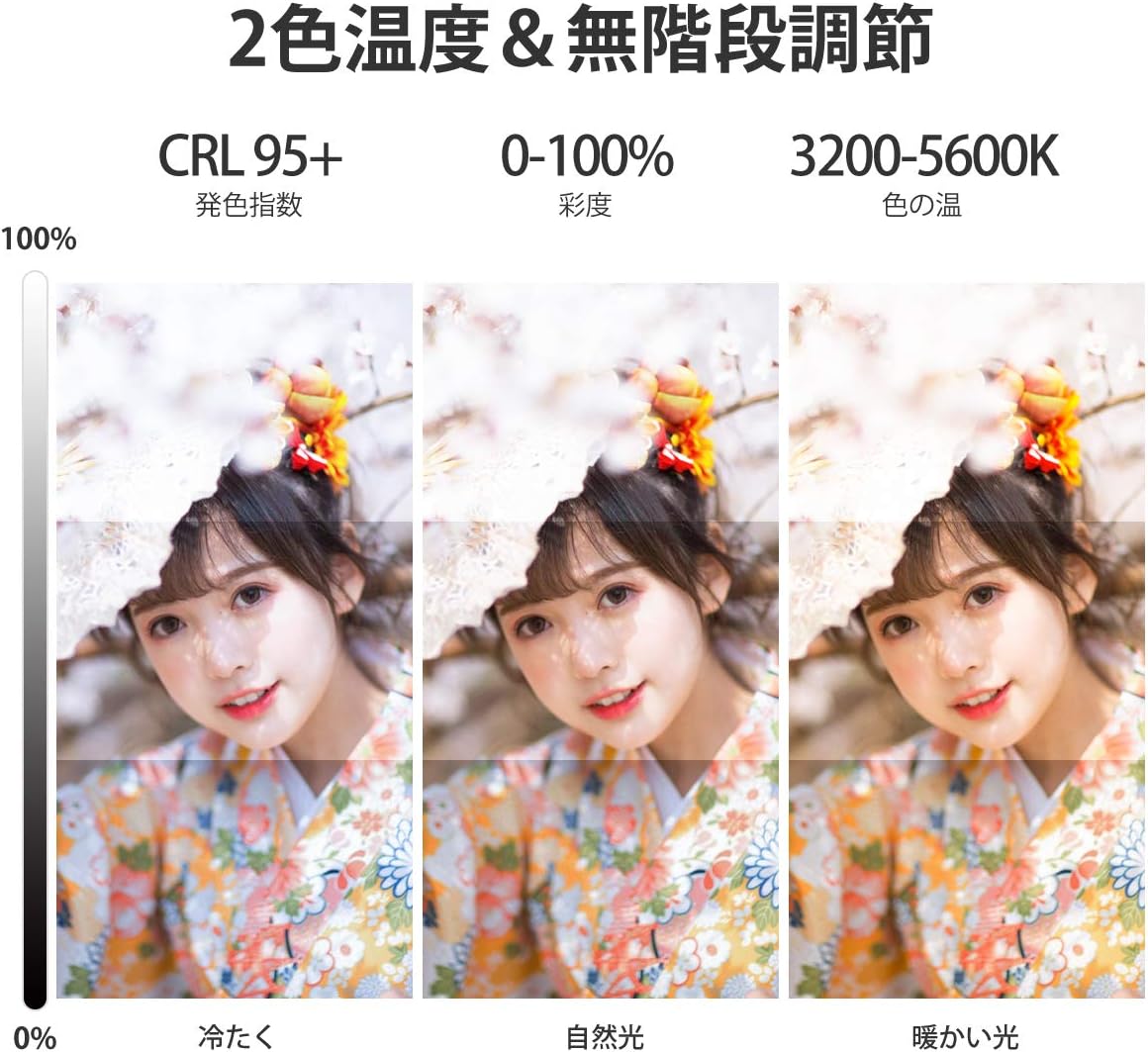
Image 4.1: Demonstrating the effect of different color temperatures (cool, natural, warm) provided by the VL-81 LED video light.

Image 4.2: Top-down view of the VL-81 LED video light, showing the power button, battery indicator, and adjustment dials for brightness and color temperature.
5. Maintenance
- Cleaning: Use a soft, dry cloth to clean the light. Do not use harsh chemicals or abrasive materials.
- Storage: Store the light in a cool, dry place away from direct sunlight and extreme temperatures.
- Battery Care: To prolong battery life, avoid fully discharging the battery frequently. Recharge the battery periodically if the light is not used for extended periods.
- Avoid Water: This device is not waterproof. Avoid exposure to water or high humidity.
6. Troubleshooting
| Problem | Possible Cause | Solution |
|---|---|---|
| Light does not turn on. | Battery is depleted. | Charge the device using the Type-C cable. |
| Light is dim or flickers. | Low battery or incorrect brightness setting. | Recharge the battery. Adjust the brightness dial. |
| Cannot adjust color temperature. | Color temperature dial not rotated correctly. | Ensure the color temperature dial is being rotated. |
| Device gets warm during use. | Normal operation for LED lights. | This is normal. If it becomes excessively hot, discontinue use and contact support. |
7. Specifications
| Feature | Detail |
|---|---|
| Model Number | VL81 |
| Brand | VIJIM |
| LED Beads | 81 (41 White, 40 Warm) |
| Color Temperature | 3200K - 5600K (Adjustable) |
| Color Rendering Index (CRI) | CRI95+ |
| Battery Capacity | 3000mAh Lithium Battery |
| Charging Port | Type-C |
| Charging Time | Approx. 3 hours |
| Max Brightness Run Time | Approx. 150 minutes |
| Min Brightness Run Time | Approx. 480 minutes |
| Mounting Options | 1/4-inch screw hole, Hot Shoe Adapter, 3 Cold Shoe Mounts |
| UPC/GTIN | 782902335205 |
8. Warranty and Support
VIJIM products are designed for reliability and performance. For warranty information and technical support, please refer to the official VIJIM website or contact your local distributor.
Please retain your proof of purchase for warranty claims.
Online Support: www.ulanzi.com (Ulanzi is the parent brand of VIJIM)


