
Outstanding 37
Professional Automatic Electric Manicure/Pedicure Nail File Set User Manual
Model: 37
Introduction
This user manual provides detailed instructions for the Professional Automatic Electric Manicure/Pedicure Nail File Set by Outstanding. This device is designed to provide a salon-quality manicure and pedicure experience at home, effortlessly maintaining the perfection of both toenails and fingernails.
The set includes 5 interchangeable attachments, each designed for specific nail care tasks such as polishing, shaping, sharpening, cuticle care, callus removal, and dead skin removal. It delivers high-quality care for both natural and acrylic nails.
Safety Information
WARNING:
- Do not soak the device in water.
- Always use with caution, as rotating bits can cause injury from flying debris or dust.
- Use appropriate protective measures, such as goggles, and keep the device away from children and pets.
- Always unplug or remove batteries when not in use.
- Do not use the device if the cord or battery compartment is damaged.
Package Contents
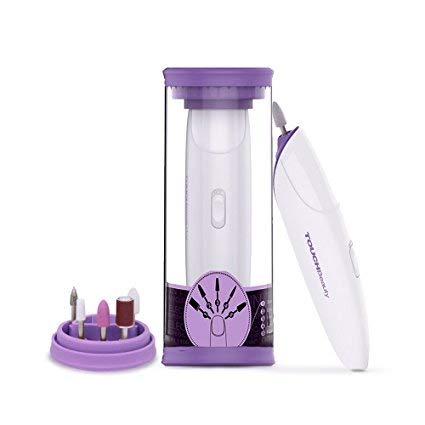
The complete Professional Automatic Electric Manicure/Pedicure Nail File Set, including the main device, storage case, and attachment holder with various bits.
- 1 x Automatic nail file drill device
- 1 x Travel Case
- 1 x User Manual
- 1 x Sandpaper grinder: quickly grinds the nail edge into your desired shape
- 1 x Chromium corundum grinder: grinds down the edge
- 1 x White corundum grinder: polishes the nail surface for a smoother and nicer look
- 1 x Carborundum grinder: removes the dead skin cells around the nail edge
- 1 x Felt grinder: Polishes the nail for a natural and shiny surface
Setup
Insert Batteries: The device requires two AAA batteries (not included). Locate the battery cover on the main device. Slide or gently pull the cover to open the battery compartment. Insert the batteries, ensuring correct polarity (+/-). Close the battery cover securely.

Illustration of the device highlighting the power switch and battery cover location.
Attach Desired Grinder Bit: Select the appropriate grinder bit for your desired nail care task from the included attachments. Gently insert the metal shaft of the chosen bit into the opening at the top of the nail file device until it is securely seated.
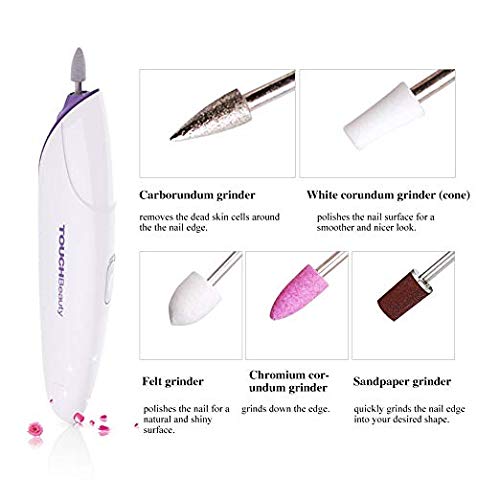
The five interchangeable grinder bits and their functions.
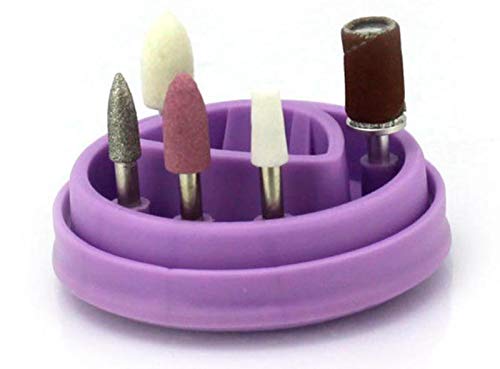
The convenient purple holder for organizing the grinder bits.
Operating Instructions
Power On: Slide the power switch (located on the side of the device) to the "ON" position. The integrated LED light will illuminate, indicating the device is active.
Select Attachment: Choose the appropriate attachment for your specific nail care need:
- Sandpaper grinder: For quickly grinding the nail edge into your desired shape.
- Chromium corundum grinder: For grinding down the edge of the nail.
- White corundum grinder: For polishing the nail surface to achieve a smoother and nicer look.
- Carborundum grinder: For removing dead skin cells around the nail edge.
- Felt grinder: For polishing the nail for a natural and shiny surface.

Visual guide to the multi-function grinder bits and their applications.
Perform Nail Care: Gently apply the rotating bit to the nail surface or edge, or to the surrounding skin as appropriate for the chosen attachment. Use light pressure and move the device smoothly. Avoid excessive pressure or prolonged contact in one area to prevent discomfort or damage.
Power Off: Once finished, slide the power switch to the "OFF" position. Remove the attachment by gently pulling it out.
Maintenance
- After each use, clean the grinder bits with a soft brush or cloth to remove any nail dust or debris.
- Wipe the main device with a dry or slightly damp cloth. Do not use harsh chemicals or abrasive cleaners.
- Important: Do not soak the device in water.
- Store the device and its attachments in the provided travel case to protect them from dust and damage.
- If the device will not be used for an extended period, remove the AAA batteries to prevent leakage.
Troubleshooting
If you encounter any issues with your Professional Automatic Electric Manicure/Pedicure Nail File Set, please refer to the following common solutions:
- Device not turning on or weak operation: Ensure that fresh AAA batteries are correctly installed with the proper polarity. The device may not work effectively if batteries are low or incorrectly inserted.
- Attachment not spinning or loose: Verify that the chosen grinder bit is fully and securely inserted into the device's opening.
- Unusual noise or vibration: Check if the attachment is properly seated. If the issue persists, discontinue use and contact customer support.
For further assistance, please contact Outstanding customer support.
Specifications
| Feature | Detail |
|---|---|
| Brand | Outstanding |
| Model Number | 37 |
| Power Source | Battery Operated (2 x AAA batteries, not included) |
| Maximum Rotational Speed | 12000 RPM |
| Voltage | 3.7 Volts |
| Package Dimensions | 7.72 x 3.94 x 1.89 inches |
| Item Weight | 9.59 ounces |
| UPC | 711668462405 |
Warranty and Support
For warranty information or technical support, please contact the manufacturer, Outstanding. Please retain your proof of purchase for any warranty claims.
Manufacturer: Outstanding
For customer service inquiries, please visit the Outstanding Brand Store on Amazon.
Related documents37

Ask a question about this manual
Ask about setup, troubleshooting, compatibility, parts, safety, or missing instructions. Manuals+ will review the question and use this page’s manual context to help answer it.