
KITCHEN MOVE BAT-1519BM
KITCHEN MOVE DALLAS PRO BAT-1519BM Multifunction Stand Mixer, Meat Grinder, and Blender Instruction Manual
Model: BAT-1519BM | Brand: KITCHEN MOVE
1. Important Safety Instructions
Please read all instructions carefully before using this appliance. Failure to follow these instructions may result in electric shock, fire, or serious injury.
- Always ensure the appliance is unplugged from the power outlet before assembling, disassembling, or cleaning.
- Do not immerse the motor unit in water or any other liquid. Clean with a damp cloth only.
- Keep hands and utensils away from moving parts during operation to prevent injury.
- Never operate the appliance with a damaged cord or plug, or if it has malfunctioned or been dropped. Contact customer support for assistance.
- This appliance is not intended for use by persons with reduced physical, sensory, or mental capabilities, or lack of experience and knowledge, unless they have been given supervision or instruction concerning use of the appliance by a person responsible for their safety.
- Close supervision is necessary when any appliance is used by or near children.
- Do not use attachments not recommended or sold by the manufacturer.
- Ensure the appliance is placed on a stable, flat, and dry surface during operation.
- Do not overload the appliance. Refer to the maximum capacities specified in this manual.
- Cleaning Note: While some product descriptions may indicate dishwasher compatibility for certain parts, it is strongly recommended to hand wash all attachments and accessories to prevent oxidation and damage, as noted by user experiences.
2. Product Overview
The KITCHEN MOVE DALLAS PRO is a versatile kitchen appliance designed for mixing, kneading, whipping, blending, and meat grinding. It features a powerful 1500W motor and a 5.5L stainless steel bowl.
Main Unit and Components

This image displays the complete KITCHEN MOVE DALLAS PRO unit in red, featuring the main stand mixer base, a 5.5L stainless steel mixing bowl with a splash guard, a glass blender jug mounted on top, and a meat grinder attachment on the front. The speed control dial is visible on the side of the main unit.
- Motor Unit: The main body housing the 1500W motor, speed control, and attachment ports.
- Mixing Bowl: 5.5L stainless steel bowl for mixing ingredients.
- Splash Guard: Transparent cover for the mixing bowl to prevent splatters.
- Speed Control Dial: Offers 6 speed settings plus a Pulse function.
- Head Release Lever: For tilting the motor head up to attach/remove accessories and the bowl.
- Anti-slip Feet: Suction cups on the base for stability during operation.
Accessories Included

This image displays the KITCHEN MOVE DALLAS PRO stand mixer alongside all its included accessories: the 5.5L stainless steel bowl, glass blender jug, meat grinder attachment with various grinding plates, a dough hook, a flat beater, a wire whisk, and a spatula.
- Dough Hook: For kneading heavy doughs like bread and pizza.
- Flat Beater: For mixing medium-heavy mixtures like cakes, cookies, and mashed potatoes.
- Wire Whisk: For whipping eggs, cream, and light batters.
- Glass Blender: For blending liquids, smoothies, and sauces.
- Meat Grinder Attachment: For grinding various types of meat. Includes different grinding plates.
- Spatula: For scraping down the sides of the bowl.
3. Setup and Assembly
Before first use, clean all parts that will come into contact with food as described in the 'Cleaning and Maintenance' section.
3.1 Stand Mixer Assembly
- Place the motor unit on a stable, flat, and dry surface. Ensure the suction cups on the base firmly grip the countertop.
- Press the head release lever and tilt the motor head upwards until it locks into place.
- Place the stainless steel mixing bowl into its base, turning it clockwise until it locks securely.
- Select the desired attachment (dough hook, flat beater, or wire whisk). Align the top of the attachment with the shaft and push upwards, then turn slightly counter-clockwise until it locks into place.
- Lower the motor head by pressing the head release lever again and gently pushing the head down until it clicks into its locked position.
- Attach the splash guard by aligning it over the bowl and twisting it into place.

This image shows the KITCHEN MOVE DALLAS PRO stand mixer with its head tilted upwards, revealing the attachment point for the mixing tools and the space for the stainless steel bowl. This position allows for easy assembly and disassembly of components.
3.2 Meat Grinder Assembly
- Ensure the stand mixer head is in the lowered and locked position.
- Remove the cover from the front attachment port of the motor unit.
- Insert the meat grinder attachment into the port, aligning the notch on the grinder with the groove on the motor unit. Turn clockwise until it is securely locked.
- Assemble the meat grinder components: insert the feeding screw, then the blade, followed by the desired grinding plate, and finally secure with the locking ring.
- Place the feeding tray on top of the grinder.
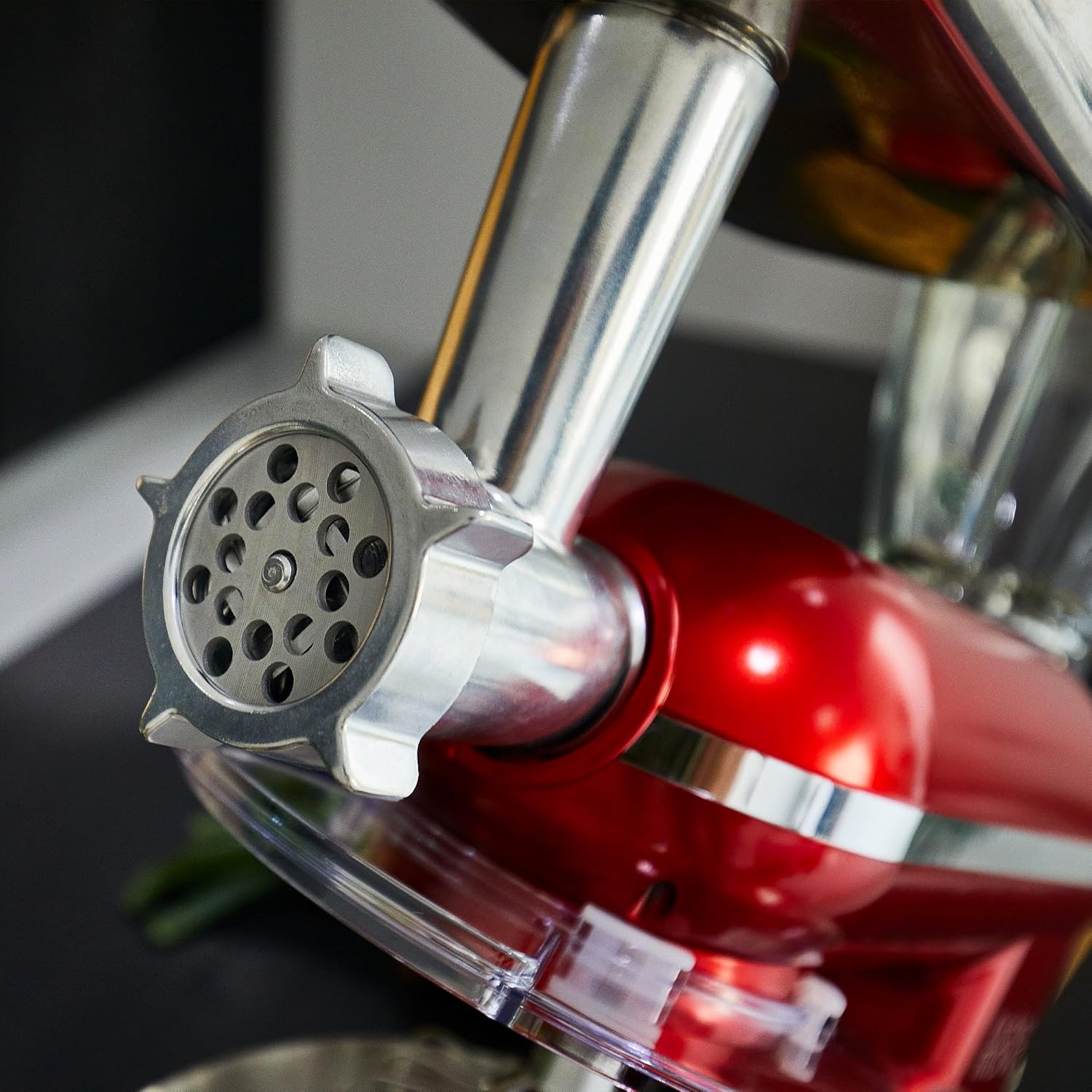
This image provides a detailed view of the meat grinder attachment connected to the front power hub of the KITCHEN MOVE DALLAS PRO stand mixer. The attachment is made of metal, indicating its robust construction for grinding tasks.
3.3 Blender Assembly
- Ensure the stand mixer head is in the lowered and locked position.
- Remove the cover from the top attachment port of the motor unit.
- Place the glass blender jug onto the top port, aligning the base with the drive shaft. Turn clockwise until it locks securely.
- Ensure the blender lid is properly secured before operation.
4. Operating Instructions
Always ensure the appliance is correctly assembled and plugged into a suitable power outlet (220-240V AC, 50/60Hz) before operation.
4.1 General Operation
- The speed control dial allows you to select speeds from 1 (lowest) to 6 (highest).
- The 'P' (Pulse) setting provides short bursts of maximum power, useful for quick mixing or breaking down ingredients.
- Start at a lower speed and gradually increase to avoid splashing or overloading.
- Do not operate continuously for more than 10 minutes. Allow the appliance to cool down for at least 20 minutes before resuming.
4.2 Using the Stand Mixer
- Ensure the desired attachment (dough hook, flat beater, or wire whisk) and mixing bowl are correctly installed.
- Add ingredients to the mixing bowl. Do not exceed the maximum capacity of 5.5L.
- Select the desired speed using the control dial.
- Recommended Speeds:
- Speeds 1-2 (Dough Hook): For kneading heavy doughs (bread, pizza).
- Speeds 2-4 (Flat Beater): For mixing medium-heavy mixtures (cakes, cookies, batters).
- Speeds 5-6 (Wire Whisk): For whipping light mixtures (eggs, cream, meringues).
- After mixing, turn the speed dial to '0' and unplug the appliance.
- Press the head release lever to tilt the head up and remove the attachment and bowl.

This image shows the KITCHEN MOVE DALLAS PRO stand mixer in action, with the whisk attachment actively mixing contents within the 5.5L stainless steel bowl. The transparent splash guard is in place, and the mixer head is in the lowered position.
4.3 Using the Blender
- Ensure the glass blender jug is correctly assembled and securely placed on the top attachment port.
- Add ingredients to the blender jug. Do not exceed the MAX fill line. For best results, add liquids first, then soft ingredients, and finally harder ingredients.
- Secure the blender lid firmly.
- Select a speed from 1 to 6, or use the 'P' (Pulse) function for short bursts.
- After blending, turn the speed dial to '0' and unplug the appliance.
- Carefully remove the blender jug.
This image shows the glass blender jug attached to the KITCHEN MOVE DALLAS PRO stand mixer, filled with strawberries and kiwi slices, indicating its use for blending fruits for smoothies or other preparations.
4.4 Using the Meat Grinder
- Ensure the meat grinder attachment is correctly assembled and securely placed on the front attachment port.
- Cut meat into small pieces that fit into the feeding tray. Remove any bones, gristle, or tough tendons.
- Place a bowl or plate under the grinder outlet to collect the ground meat.
- Turn the speed dial to a medium setting (e.g., speed 3-4).
- Feed the meat into the hopper using the food pusher. Never use your fingers or other utensils to push meat into the grinder.
- After grinding, turn the speed dial to '0' and unplug the appliance.
- Carefully disassemble the meat grinder for cleaning.

This image shows a hand feeding pieces of meat into the hopper of the meat grinder attachment, which is connected to the KITCHEN MOVE DALLAS PRO stand mixer. Ground meat is visible exiting the grinder, demonstrating its functionality.
5. Cleaning and Maintenance
Proper cleaning and maintenance will ensure the longevity and optimal performance of your KITCHEN MOVE DALLAS PRO.
- Always unplug the appliance before cleaning.
- Motor Unit: Wipe the exterior of the motor unit with a soft, damp cloth. Never immerse the motor unit in water or other liquids.
- Mixing Bowl: The stainless steel mixing bowl can be hand washed with warm, soapy water. Rinse thoroughly and dry immediately to prevent water spots.
- Attachments (Dough Hook, Flat Beater, Wire Whisk): Hand wash these attachments with warm, soapy water. Rinse thoroughly and dry completely. Do not wash in a dishwasher as this can cause oxidation and discoloration.
- Glass Blender Jug: Disassemble the blade assembly from the jug. Hand wash all parts with warm, soapy water. Use a brush for thorough cleaning of the blades. Rinse and dry completely.
- Meat Grinder Attachment: Disassemble all parts immediately after use. Hand wash all metal components with warm, soapy water. Use a brush to remove any food residue. Rinse thoroughly and dry completely to prevent rust.
- Splash Guard and Spatula: Hand wash with warm, soapy water.
- Store the appliance and its accessories in a clean, dry place.
6. Troubleshooting
If you encounter any issues with your appliance, please refer to the following common problems and solutions:
| Problem | Possible Cause | Solution |
|---|---|---|
| Appliance does not start | Not plugged in; Power outage; Head not locked; Overheat protection activated. | Check power connection; Check circuit breaker; Ensure motor head is fully lowered and locked; Unplug and let cool for 20-30 minutes. |
| Attachments not fitting correctly | Incorrect alignment; Residue in attachment port. | Ensure attachment is aligned with the shaft and twisted into place; Clean attachment port and attachment shaft. |
| Excessive noise or vibration | Overloaded; Appliance not stable; Loose parts. | Reduce ingredient quantity; Ensure suction cups are firmly gripping the surface; Check all attachments are securely fastened. |
| Meat grinder clogs | Meat not properly prepared (bones, gristle); Overfeeding. | Ensure meat is free of bones/gristle and cut into small pieces; Feed meat slowly and evenly. Turn off and clear blockage if necessary. |
| Blender leaks | Lid not secured; Blade assembly not tightened. | Ensure blender lid is firmly in place; Check that the blade assembly is securely tightened to the jug. |
If the problem persists after attempting these solutions, please contact customer support.
7. Specifications
| Brand | KITCHEN MOVE |
| Model Number | BAT-1519BM |
| Color | Red |
| Power | 1500 Watts |
| Voltage | 220-240V AC, 50/60Hz |
| Mixing Bowl Capacity | 5.5 Liters |
| Number of Speeds | 6 + Pulse function |
| Material | Alloy Steel |
| Product Dimensions (L x W x H) | 44.4 x 22.3 x 52.9 cm |
| Item Weight | 7.4 Kilograms |
| Special Features | Planetary mixing action, Anti-slip feet, Overheat protection, Locking system, Quiet operation (<80dB) |
8. Warranty and Support
This product comes with a 2-year warranty from the date of purchase.
For warranty claims, technical support, or inquiries regarding spare parts, please contact KITCHEN MOVE customer service. Please have your model number (BAT-1519BM) and proof of purchase ready when contacting support.
Contact information for customer support can typically be found on the manufacturer's official website or on your purchase receipt.
Ask a question about this manual
Ask about setup, troubleshooting, compatibility, parts, safety, or missing instructions. Manuals+ will review the question and use this page’s manual context to help answer it.