
1. Introduction
This manual provides detailed instructions for the TUREWELL replacement remote control, designed for use with various Android TV Box models including T9, T95, T95 MAX, T95 MAX+, and Q Plus. This remote offers a reliable and energy-efficient solution for controlling your compatible Android TV Box.
The remote control is ergonomically designed for comfortable handling and features a low power consumption, allowing standard AAA batteries to last for several months.

Image 1.1: TUREWELL Remote Control for Android TV Boxes.
2. Setup
2.1. Battery Installation
- Locate the battery compartment on the back of the remote control.
- Slide the battery compartment cover downwards or press the latch and lift to open.
- Insert two (2) AAA batteries, ensuring the positive (+) and negative (-) terminals align correctly with the markings inside the compartment.
- Replace the battery compartment cover, ensuring it clicks securely into place.
Note: Batteries are not included with the remote control. Please use new AAA batteries for optimal performance.

Image 2.1: Rear view of the remote control showing the battery compartment.
2.2. Compatibility
This remote control is specifically designed to work with the following Android TV Box models:
- TUREWELL T9
- TUREWELL T95
- TUREWELL T95 MAX
- TUREWELL T95 MAX+
- TUREWELL Q Plus (Q+)
Important: This remote control is not compatible with Android 8.1 operating systems or other TV Box models not listed above.
3. Operating Instructions
Familiarize yourself with the buttons and their functions for effective control of your Android TV Box.
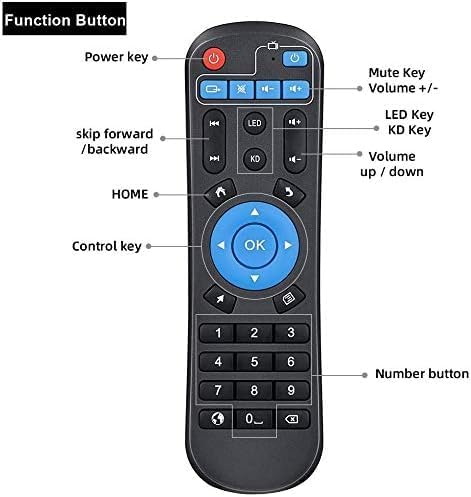
Image 3.1: Diagram illustrating the function of each button on the remote control.
- Power Key: Turns the Android TV Box on or off.
- Mute Key: Mutes or unmutes the audio output.
- Volume +/-: Adjusts the volume level up or down.
- LED Key: (Function may vary by TV Box model, often related to LED indicators).
- KD Key: (Function may vary by TV Box model, often related to specific applications or features).
- Skip Forward/Backward: Used for navigating media playback.
- HOME Key: Returns to the main home screen of the Android TV Box.
- Control Keys (Directional Pad & OK): Used for navigation within menus and selecting options. The OK button confirms selections.
- Number Buttons (0-9): For direct input of numbers, such as channel selection or password entry.
- Other Function Buttons: Additional buttons may include menu, back, or app-specific functions. Refer to your Android TV Box's manual for specific uses of these buttons.
Point the remote control directly at your Android TV Box for optimal signal transmission. Ensure there are no obstructions between the remote and the TV Box.
4. Maintenance
4.1. Battery Replacement
If the remote control's response becomes sluggish or stops working, it is likely that the batteries need to be replaced. Follow the battery installation steps in Section 2.1 to replace the old batteries with new AAA batteries.
4.2. Cleaning
To clean the remote control, gently wipe it with a soft, dry cloth. Do not use liquid cleaners, abrasive materials, or chemical solvents, as these can damage the remote's surface or internal components.
4.3. Storage
Store the remote control in a cool, dry place away from direct sunlight and extreme temperatures. If the remote will not be used for an extended period, it is recommended to remove the batteries to prevent leakage.
5. Troubleshooting
- Remote not responding:
- Check if the batteries are correctly inserted with the correct polarity.
- Replace the batteries with new ones.
- Ensure there are no obstructions between the remote control and the Android TV Box.
- Verify that the remote is compatible with your specific Android TV Box model (refer to Section 2.2).
- Buttons are sticky or unresponsive:
- Clean the remote control as described in Section 4.2.
- Avoid pressing buttons with excessive force.
- Short operating range:
- Replace the batteries.
- Ensure there are no strong light sources or electronic devices interfering with the infrared signal.
6. Specifications
| Brand | TUREWELL |
| Model Number | T95 MAX |
| Compatible Devices | TUREWELL T9, T95, T95 Max, MAX+, Q Plus Android TV Boxes |
| Dimensions (L x W x H) | 17 x 6 x 2 cm (approximately 6.69 x 2.36 x 0.79 inches) |
| Weight | 20 g (approximately 0.71 ounces) |
| Battery Type | 2 x AAA batteries (not included) |
| Maximum Range | 10 meters (approximately 33 feet) |
| Connectivity Technology | Infrared (IR) |

Image 6.1: Dimensions of the TUREWELL Remote Control.